
1. Uvod
This manual provides comprehensive instructions for the proper use and maintenance of your Zerone Replacement TV Remote Control, model BN59-01199G. This remote is designed as a direct replacement for compatible Samsung Smart TVs, ensuring seamless operation without complex setup.

Image 1.1: The Zerone Replacement TV Remote Control, showcasing its button layout and ergonomic design.
2. Vsebina paketa
- 1 x Zerone Replacement TV Remote Control (Model: BN59-01199G)
3. Specifikacije
| Funkcija | Podrobnost |
|---|---|
| Material lupine | ABS |
| Razdalja daljinskega upravljalnika | Greater than 8 meters (actual distance may vary based on TV model and environment) |
| Model baterije | 2 x AA baterije (niso vključene) |
| Dimenzije izdelka | Približno 175 x 45 x 20 mm (6.9 x 1.8 x 0.8 palca) |
| Teža predmeta | Pribl. 67 g (2.46 unče) |
| Združljive naprave | Samsung Smart TVs requiring BN59-01199G remote |

Image 3.1: Dimensions of the remote control: 175mm (6.9in) length, 45mm (1.8in) width, and 20mm (0.8in) thickness.
4. Nastavitev
4.1 Namestitev baterije
- Poiščite predal za baterije na zadnji strani daljinskega upravljalnika.
- Pokrov baterije potisnite navzdol, da ga odprete.
- Vstavite dve (2) bateriji AA in pazite, da se pozitivni (+) in negativni (-) pol pravilno poravnata z oznakami v predalu.
- Potisnite pokrov baterije nazaj na mesto, dokler se ne zaskoči.
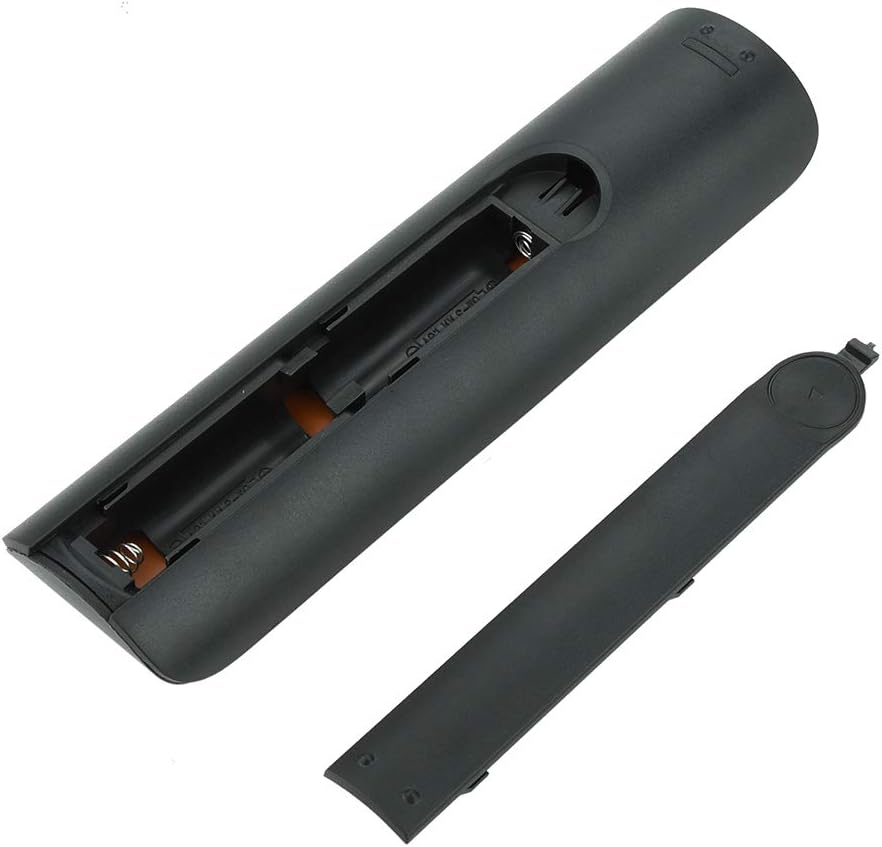
Slika 4.1: View of the remote control with the battery cover removed, showing the two AA battery slots.
4.2 Začetna uporaba
This remote control is designed to work directly with compatible Samsung Smart TVs that originally used the BN59-01199G model. No programming or pairing is typically required. Simply install the batteries and point the remote towards your television.

Image 4.2: The remote control positioned near a television, illustrating its intended use with compatible Samsung models.
5. Navodila za uporabo
The remote control features standard buttons for TV operation. Refer to the image below for a visual guide to the button layout.

Slika 5.1: Podroben view of the remote control's buttons, including power, number pad, volume, channel, and smart functions.
- Gumb za vklop (rdeč): Vklopi ali izklopi TV.
- Številska tipkovnica (0–9): Za neposredni vhod kanala.
- Povečanje/zmanjšanje glasnosti (+/-): Prilagodi glasnost televizorja.
- Kanal gor/dol (CH +/-): Menjava televizijskih kanalov.
- Mute: Utiša zvok televizorja.
- Smart Hub: Accesses the Smart Hub interface for apps and streaming services.
- meni: Odpre glavni meni televizorja.
- Orodja: Provides quick access to common TV functions.
- Informacije: Prikaže informacije o trenutnem programu ali vnosu.
- Navigacijska tipkovnica (gor, dol, levo, desno, Enter): Uporablja se za navigacijo po menijih in izbiranje možnosti.
- Vrnitev: Vrne se na prejšnji zaslon ali meni.
- Izhod: Closes the current menu or application.
- Barvni gumbi (A, B, C, D): Funkcionalnost se razlikuje glede na model televizorja in aplikacijo.
- Nadzor predvajanja: Predvajanje, premor, ustavitev, hitro previjanje naprej, previjanje nazaj za predvajanje medijev.
6. Vzdrževanje
6.1 Čiščenje
Daljinski upravljalnik očistite tako, da ga nežno obrišete z mehko, suho krpo. Za trdovratno umazanijo ga rahlo obrišite.ampKrpo obrišite z vodo ali blagim, neabrazivnim čistilom. Izogibajte se uporabi agresivnih kemikalij ali prekomerne vlage, saj lahko te poškodujejo elektroniko daljinskega upravljalnika.
6.2 Zamenjava baterije
Replace batteries when the remote control's response becomes sluggish or stops working. Always replace both AA batteries at the same time with new ones. Do not mix old and new batteries, or different types of batteries.
7. Odpravljanje težav
- Daljinec se ne odziva:
- Preverite, ali so baterije pravilno vstavljene s pravilno polarnostjo.
- Zamenjajte baterije s svežimi.
- Prepričajte se, da med daljinskim upravljalnikom in infrardečim sprejemnikom televizorja ni ovir.
- Preverite, ali je daljinski upravljalnik usmerjen neposredno proti televizorju.
- Short remote control distance:
- This can indicate low battery power; replace the batteries.
- Environmental factors or strong light sources can interfere with the infrared signal. Try using the remote in different lighting conditions.
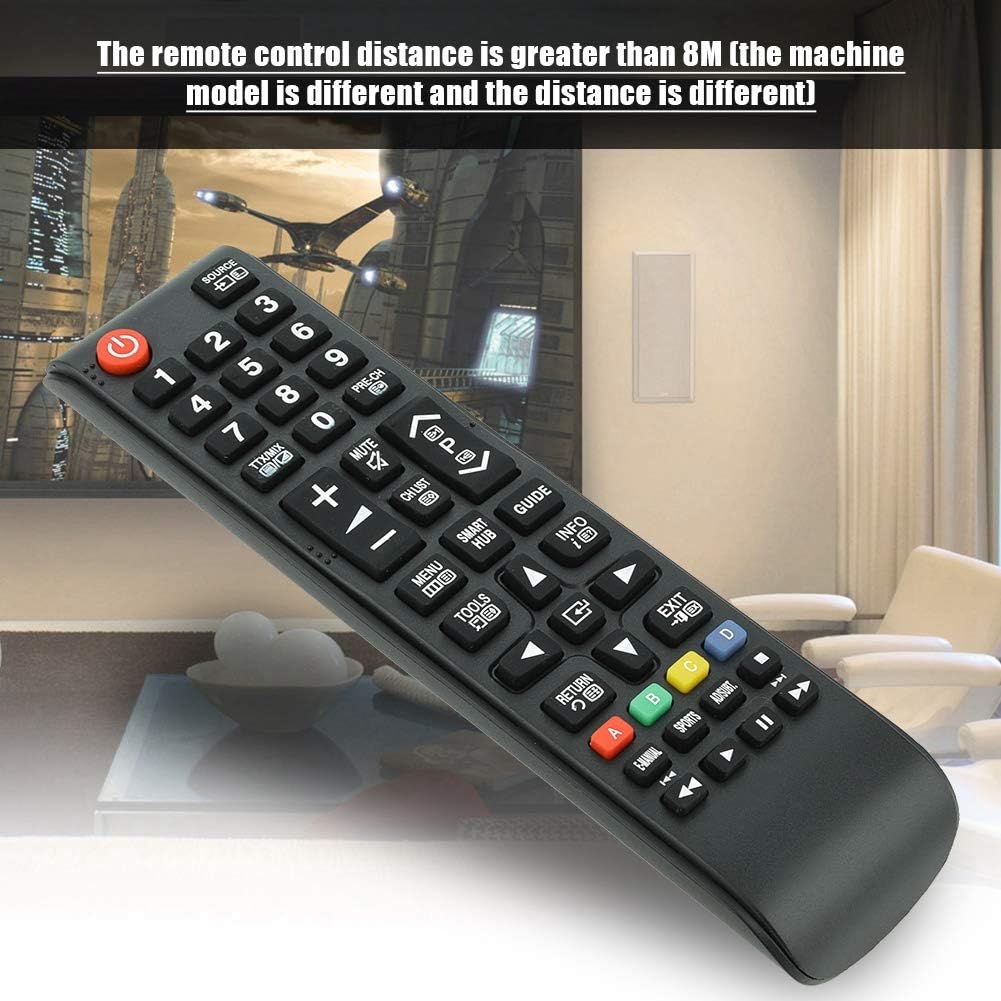
Image 7.1: The remote control in a typical home environment, demonstrating its effective range for TV operation.
8. Garancija in podpora
Zerone products are manufactured with quality in mind. If you encounter any issues or are not satisfied with your product, please contact the seller or manufacturer for support. Refer to your purchase documentation for specific warranty terms and contact information.