
1. Uvod
Thank you for choosing the SooPii 60W 6-Port Charging Station. This device is designed to efficiently charge multiple electronic devices simultaneously, helping to keep your space tidy and organized. This manual provides essential information for setting up, operating, and maintaining your charging station.

Image 1.1: The SooPii 60W 6-Port Charging Station with various devices connected.
2. Izdelek je končanview & Lastnosti
The SooPii 60W 6-Port Charging Station offers a centralized solution for charging and organizing your electronic devices. Key features include:
- 6 USB vhoda: Supports simultaneous charging of up to 6 devices.
- USB-C Power Delivery (PD) Charging: Features one 20W USB-C fast charging port compatible with devices supporting PD protocol (e.g., iPhone, iPad, Samsung). Charges phones to 50% in approximately 30 minutes.
- Smart USB-A Ports: Five additional USB-A ports (5V/2.4A) for standard charging.
- Odstranljive pregrade: Includes 7 sturdy, removable dividers to accommodate various device sizes and cases (up to 0.79 inches wide per slot).
- Upgraded 2-in-1 Holder: A dedicated holder for an Apple Watch and AirPods charger (Apple Watch charger not included).
- Napredne varnostne funkcije: Equipped with Activeshield safety system, including a Dynamic Temperature Sensor and Power Tuner Chip for enhanced protection against overload, over-voltage, over-charge, short-circuit, over-heating, and over-current.
- Vključeni kabli: Comes with 6 mixed charging cables: 1 USB-C to USB-C, 2 Type-C, 2 USB-A to Lightning, and 1 Micro USB cable.

Slika 2.1: Podrobno view of the charging ports on the station.

Image 2.2: Illustration of 20W Power Delivery fast charging capability.
3. Kaj je v škatli
Po razpakiranju bi morali najti naslednje predmete:
- 1x SooPii 60W 6-Port Charging Station (Model CS60)
- 1x napajalni kabel
- 7x Removable Dividers
- 1x 2-in-1 Holder for Apple Watch & AirPods
- 6x Mixed Charging Cables (1 USB-C to USB-C, 2 Type-C, 2 USB-A to Lightning, 1 Micro USB)
- 2x SooPii Cable Ties

Image 3.1: All components included with the charging station.
4. Navodila za nastavitev
- Namestite polnilno postajo: Choose a stable, flat surface for the charging station, ensuring adequate ventilation.
- Vstavi razdelilnike: Insert the clear plastic dividers into the slots on the charging station. You can adjust the spacing by removing or repositioning dividers to fit devices with different thicknesses or cases.
- Attach 2-in-1 Holder: If using, attach the 2-in-1 holder to one of the end slots. Follow the instructions below for proper Apple Watch charger installation.
- Priključite napajalni kabel: Plug the provided power cord into the charging station's power input port and then into a wall outlet.
- Priključite polnilne kable: Plug the short charging cables into the appropriate USB ports on the station. Use the included cable ties to manage excess cable length.
4.1. Installing Apple Watch Charger in 2-in-1 Holder
To properly install your Apple Watch charger (not included) into the 2-in-1 holder:
- Insert the holder onto the designated slot on the charging station.
- Pass your Apple Watch charger cable through the holder's opening.
- Press the Apple Watch charger into the slot until you hear a click. Ensure the concave surface of the charger is facing upwards.
- Place your Apple Watch on the holder to charge.

Image 4.1: Step-by-step guide for Apple Watch charger installation.

Image 4.2: The upgraded 2-in-1 holder in use with an iPhone, Apple Watch, and AirPods.
4.2. Video: How to Ensure Power Cord is Plugged in Tightly
Video 4.1: A short demonstration on how to securely plug in the power cord to the charging station.
5. Navodila za uporabo
- Vklop/izklop: Use the power switch located on the side of the charging station to turn the unit on or off.
- Naprave za polnjenje: Connect your devices to the appropriate charging cables plugged into the USB ports. Place your devices in the slots between the dividers.
- LED indikatorji: Blue LED lights will illuminate when a device is plugged in and charging. The dividers also feature blue LED light indicators when a product is plugged into the corresponding port for charging.
- Hitro polnjenje: For devices compatible with PD fast charging, use the 20W USB-C port. Other devices will charge at their optimal speed via the Smart USB-A ports.
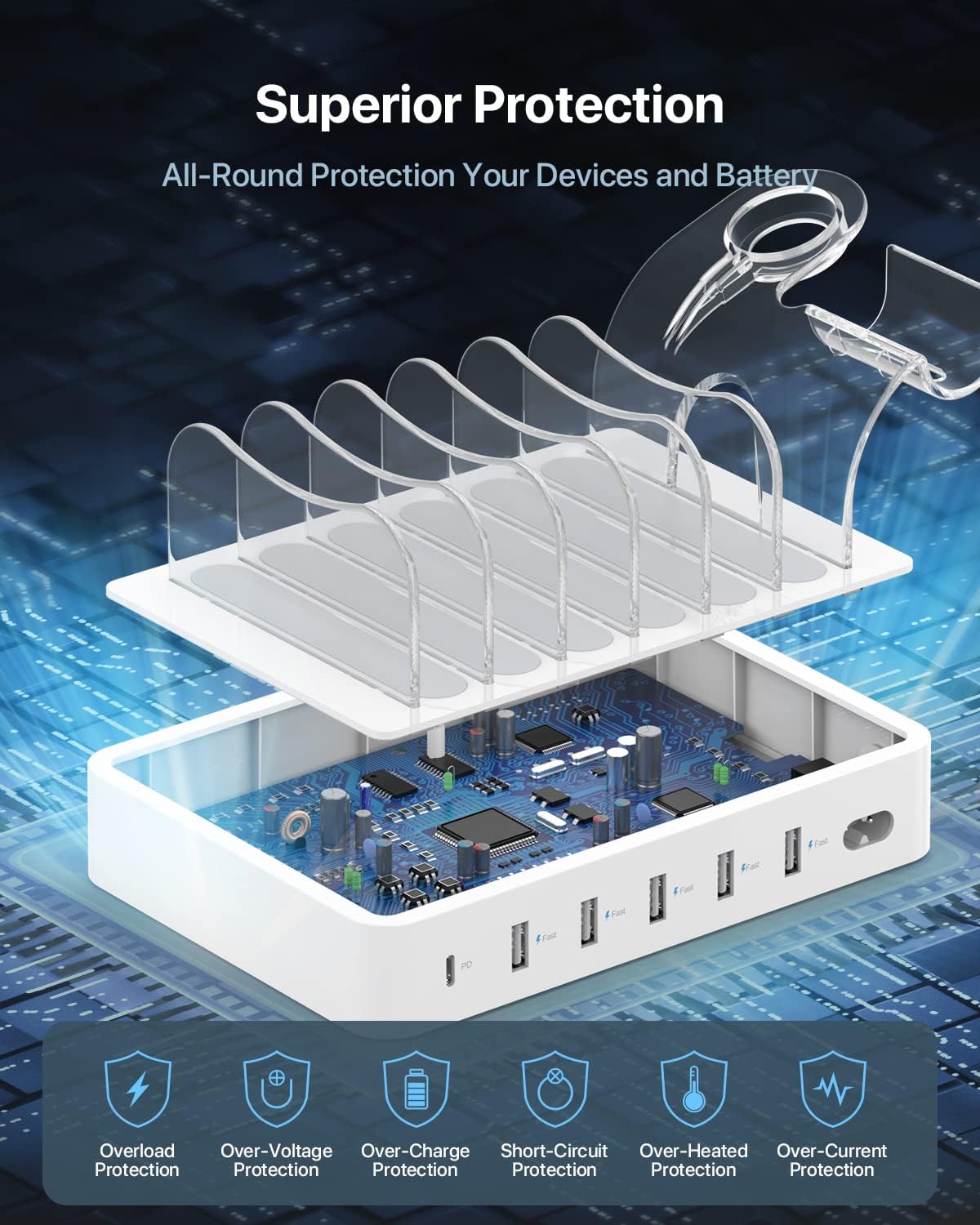
Slika 5.1: Notranje view razstavaasing the superior protection mechanisms.
6. Advanced Safety Features
The SooPii Charging Station is equipped with the Activeshield safety system to ensure the protection of your devices and battery. This system includes:
- Dinamični senzor temperature: Actively monitors the temperature of the charging station.
- Čip za uglaševanje moči: Adjusts power output to safeguard all connected devices.
- Več zaščit: Overload Protection, Over-Voltage Protection, Over-Charge Protection, Short-Circuit Protection, Over-Heated Protection, and Over-Current Protection.

Image 6.1: Visual representation of the advanced safety features.
7. Vzdrževanje
To ensure the longevity and optimal performance of your SooPii Charging Station, follow these maintenance guidelines:
- Čiščenje: Disconnect the power cord before cleaning. Use a soft, dry cloth to wipe the surface of the charging station. Avoid using liquid cleaners or abrasive materials.
- Shranjevanje: Ko polnilne postaje dalj časa ne uporabljate, jo shranite na hladnem in suhem mestu, stran od neposredne sončne svetlobe in ekstremnih temperatur.
- Upravljanje kablov: Regularly check charging cables for any signs of wear or damage. Replace damaged cables immediately to prevent potential hazards. Use the included cable ties to keep cables organized and prevent tangling.
8. Odpravljanje težav
If you encounter any issues with your charging station, refer to the following common troubleshooting steps:
- Naprava se ne polni:
- Ensure the power cord is securely plugged into both the charging station and the wall outlet.
- Verify that the power switch on the charging station is in the 'ON' position.
- Check if the charging cable is properly connected to both the device and the charging station.
- Try a different charging cable or a different port on the station to rule out a faulty cable or port.
- Ensure your device is compatible with the charging port (e.g., USB-C PD for fast charging).
- Počasno polnjenje:
- Confirm that your device supports fast charging if using the PD port.
- Prepričajte se, da uporabljate visokokakovosten kabel, ki podpira hitro polnjenje.
- Avoid charging too many high-power devices simultaneously, as this can distribute the total wattage.
- LED indikator ne sveti:
- Check if the charging station is powered on and connected to a working outlet.
- Ensure a device is properly connected to the corresponding port.
9. Specifikacije
| Funkcija | Podrobnost |
|---|---|
| Dimenzije izdelka | 7.24 x 5 x 1.26 palcev |
| Teža predmeta | 12.3 unč |
| Številka modela | CS60 |
| Vhodna voltage | 120 volta |
| Skupno število vrat USB | 6 |
| USB-C PD izhod | 20 W |
| Izhod USB-A | 5V/2.4A (per port) |
| Ampstarost | 12 Amps (Total) |
| barva | Bela |
10. Garancija in podpora
SooPii products are designed for reliability and user satisfaction. Your SooPii 60W 6-Port Charging Station comes with a 36-mesečna garancija brez težav and Lifetime Customer Care.
For any questions, concerns, setup guidance, or if you need spare parts (such as different types of cables), please contact us. We aim to provide solutions and guidance within 24 hours.
Kontaktni podatki:
E-pošta: support@soopii.com
Everything you buy from SooPii is safe and promised to be a working product.