
Uvod
This manual provides essential information for the safe and effective use of your Canon PowerShot SX740 HS Digital Camera. Please read it thoroughly before operating the camera to ensure proper handling and to maximize its features. The Canon PowerShot SX740 HS is a compact digital camera featuring a 20.3-megapixel CMOS sensor, 40x optical zoom, 4K video recording capabilities, and built-in Wi-Fi and Bluetooth connectivity.

Slika 1: Spredaj view of the Canon PowerShot SX740 HS Digital Camera with the lens retracted.
Kaj je v škatli
Preverite, ali so v vašem paketu priloženi vsi naslednji elementi:
- Digitalni fotoaparat Canon PowerShot SX740 HS
- NB-13L Lithium-Ion Battery Pack
- CB-2LH Battery Charger
- Zapestni trak
- HDMI kabel
- Stativ
- SanDisk 64GB SDHC Memory Card
- Premium Camera Case
- Visokohitrostni USB bralnik kartic
Nastavitev
1. Polnjenje in namestitev baterije
- Insert the NB-13L battery into the CB-2LH charger.
- Plug the charger into a power outlet. The charging indicator light will show the charging status.
- Ko je baterija popolnoma napolnjena, odstranite baterijo iz polnilnika.
- Odprite pokrov predalčka za baterije na spodnji strani fotoaparata.
- Insert the charged battery into the compartment, ensuring correct orientation. Close the cover securely.
2. Vstavljanje pomnilniške kartice
- Odprite pokrov reže za pomnilniško kartico, ki se običajno nahaja v bližini predala za baterijo.
- Insert the SDHC memory card with the label facing the front of the camera until it clicks into place.
- Zaprite pokrov reže za pomnilniško kartico.
3. Začetni vklop in osnovne nastavitve
- Pritisnite gumb za vklop, da vklopite fotoaparat.
- Sledite navodilom na zaslonu, da nastavite datum, čas in jezik.
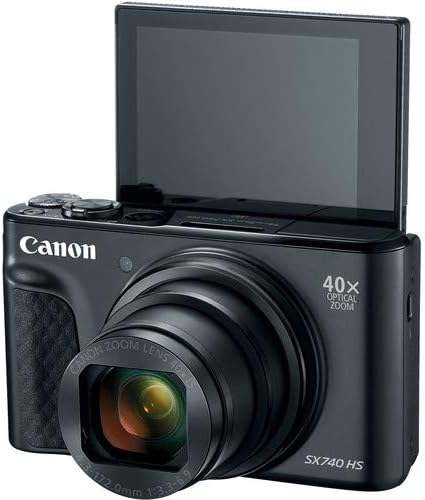
Slika 2: Spredaj view of the camera with the LCD screen tilted upwards, ready for use.
Upravljanje kamere
1. Vklop/izklop
Pritisnite MOČ gumb na vrhu kamere, da jo vklopite ali izklopite.
2. Načini fotografiranja
The camera offers various shooting modes. Use the mode dial or menu options to select:
- Samodejni način: For simple point-and-shoot operation, where the camera automatically adjusts settings.
- Programski (P) način: Omogoča večji nadzor nad nastavitvami, medtem ko fotoaparat nastavlja osvetlitev.
- Scenski načini: Optimized settings for specific scenarios like portraits, landscapes, or night scenes.
- Feature Assistant: Provides on-screen explanations to help you understand and use various camera features.
3. Delovanje povečave
The camera features a 40x optical zoom lens. Use the zoom lever around the shutter button to zoom in (telephoto) or out (wide-angle). Digital zoom can extend the range further, but may reduce image quality.

Slika 3: Spredaj view of the camera with the lens extended for zooming.
4. Osredotočanje
The camera primarily uses autofocus. Point the camera at your subject and half-press the shutter button to focus. The focus frame will appear on the LCD screen. For specific situations, manual focus options may be available in the menu.
5. Video snemanje
To record videos, switch to video mode (if available via a dedicated button or mode dial) or press the dedicated movie recording button. The camera supports 4K video capture. Press the button again to stop recording.
6. Using the Tilting LCD Screen
The 3.0-inch LCD screen can tilt 180 degrees, allowing for easy framing of selfies or shots from various angles. Adjust the screen to your desired position.

Slika 4: Zadaj view of the camera, displaying the LCD screen and control layout.
7. Povezljivost Wi-Fi in Bluetooth
The camera features built-in Wi-Fi and Bluetooth for connecting to compatible mobile devices. Download the Canon Camera Connect app to your smartphone or tablet to transfer images, remotely control the camera, and share photos.
- Enable Wi-Fi or Bluetooth in the camera's menu.
- Open the Canon Camera Connect app on your mobile device and follow the pairing instructions.
Vzdrževanje
1. Čiščenje fotoaparata
- Objektiv: Use a soft, lint-free cloth or a lens brush to gently remove dust. For smudges, use a specialized lens cleaning solution and cloth. Avoid touching the lens directly with your fingers.
- LCD zaslon: Wipe gently with a soft, dry cloth. Do not use harsh chemicals.
- Telo kamere: Use a soft, dry cloth to wipe away dust and dirt.
2. Skrb za baterijo
- Ko baterije ne uporabljate, jih hranite na hladnem in suhem mestu.
- Izogibajte se pogostemu popolnemu praznjenju baterije, da podaljšate njeno življenjsko dobo.
- Remove the battery from the camera if it will not be used for an extended period.
3. Shranjevanje
When storing the camera for long periods, ensure it is clean, dry, and stored in a protective case to prevent dust and damage. Remove the battery and memory card.
Odpravljanje težav
Če imate težave s fotoaparatom, si oglejte naslednje pogoste rešitve:
- Kamera se ne vklopi: Prepričajte se, da je baterija popolnoma napolnjena in pravilno vstavljena. Če je na voljo, poskusite z drugo napolnjeno baterijo.
- Napaka pomnilniške kartice: Check if the memory card is inserted correctly. Format the card (this will erase all data) if the error persists, or try a different compatible SDHC card.
- Slike so zamegljene: Ensure the lens is clean. Check your focus settings and make sure the camera has successfully focused on your subject before taking the shot. Use optical image stabilization for handheld shots.
- Wi-Fi/Bluetooth connection issues: Ensure Wi-Fi/Bluetooth is enabled on both the camera and your mobile device. Restart both devices and try pairing again. Confirm the Canon Camera Connect app is up to date.
- Bliskavica se ne sproži: Check the flash mode settings. Ensure the flash is popped up if it's a manual pop-up type.
For more complex issues or persistent problems, please consult the official Canon support webspletno mesto ali se obrnite na službo za stranke.
Specifikacije
| Funkcija | Specifikacija |
|---|---|
| Ime modela | PowerShot SX740 HS |
| Ločljivost foto senzorja | 20.3 milijonov slikovnih pik |
| Optični zoom | 40x |
| Format za zajem videa | 4K |
| Procesor slike | Canon DIGIC 8 |
| Povezljivost | Bluetooth, HDMI, USB, Wi-Fi |
| Vrsta zaslona | Tilting LCD |
| Stabilizacija slike | Optični |
| Vrsta baterije | Litij-ionska (NB-13L) |
| Združljiv pomnilnik | SDHC (up to 64 GB) |
| Neprekinjeno streljanje | 10 sličic na sekundo |
| Podprto File Oblika | JPEG, RAW |
Garancija in podpora
Your Canon PowerShot SX740 HS Digital Camera is covered by a manufacturer's warranty. Please refer to the warranty card included with your product for specific terms and conditions. For technical support, service, or additional information, please visit the official Canon website or contact Canon customer service directly. Keep your purchase receipt as proof of purchase for warranty claims.
Spletni viri: Uradnik Canon ZDA Webmesto