
1. Uvod
The nJoy Aten Pro 1000VA is an advanced Uninterruptible Power Supply (UPS) designed to provide reliable power protection for sensitive electronic equipment. This online double-conversion UPS ensures a continuous, clean power supply, safeguarding your devices against power outages, voltage fluctuations, and surges. It features a pure sine wave output, an LCD display for real-time status, and communication ports for comprehensive management.
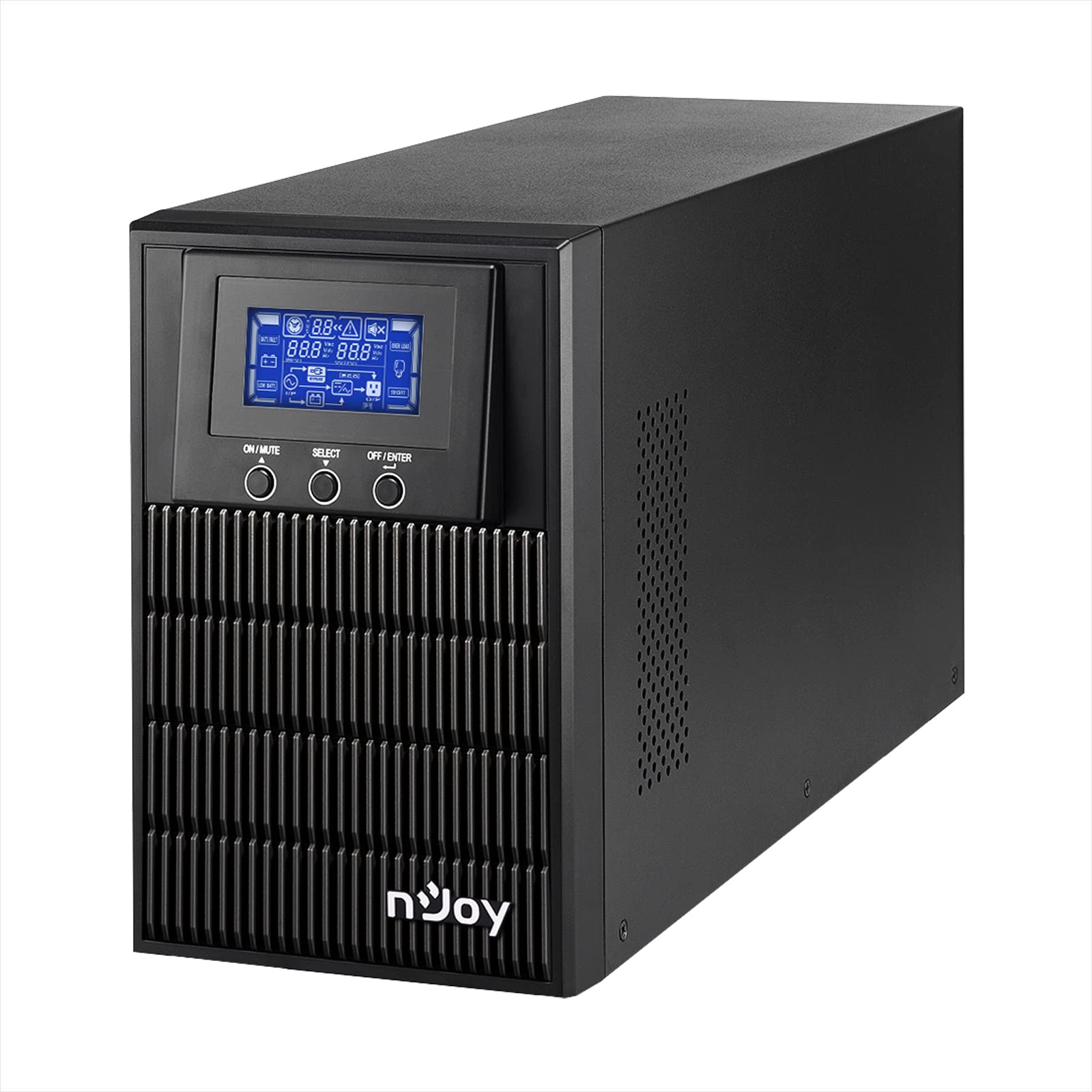
Figure 1: nJoy Aten Pro 1000VA UPS Front View
This image shows the front of the nJoy Aten Pro 1000VA UPS, highlighting its compact tower design and the integrated LCD display panel with control buttons.

Slika 2: Ključne značilnostiview
This image visually summarizes the main features of the nJoy Aten Pro 1000VA UPS, including its online double-conversion technology, 1000VA/900W capacity, dual 12V@9.0Ah batteries, USB interface, LCD display, pure sine wave output, and SNMP capability.
2. Varnostne informacije
Please read and follow all safety instructions carefully before installing, operating, or maintaining the UPS.
- Ta UPS je zasnovan samo za uporabo v zaprtih prostorih.
- Ne odpirajte UPS-aasing. V notranjosti ni delov, ki bi jih lahko uporabnik popravil. Vsa servisna dela prepustite usposobljenemu serviserju.
- Prepričajte se, da je UPS priključen na pravilno ozemljeno vtičnico z izmeničnim tokom.
- Do not block ventilation openings. Maintain adequate airflow around the UPS.
- Avoid placing the UPS in direct sunlight, near heat sources, or in environments with excessive dust, humidity, or corrosive substances.
- Pred kakršnim koli vzdrževanjem ali čiščenjem odklopite UPS iz vira napajanja.
- Batteries can present a risk of electrical shock and high short-circuit current. Observe the following precautions:
- Odstranite ure, prstane ali druge kovinske predmete.
- Uporabljajte orodja z izoliranimi ročaji.
- Nosite gumijaste rokavice in škornje.
3. Značilnosti in komponente izdelka
The nJoy Aten Pro 1000VA UPS is equipped with several features and ports for optimal performance and connectivity.
3.1 Sprednja plošča

Slika 3: Sprednja plošča zgorajview
This image displays the front panel of the UPS, showing the LCD screen that provides real-time status updates and the three control buttons: ON/MUTE, SELECT, and OFF/ENTER.
- LCD zaslon: Shows real-time status information such as AC mode, battery mode, charge level, battery level, input voltage, izhodna voltage, overload, fault, and low battery.
- ON/MUTE Button: Powers on the UPS or mutes the alarm.
- Gumb SELECT: Navigates through LCD display menus.
- OFF/ENTER Button: Powers off the UPS or confirms selections.
3.2 Zadnja plošča

Slika 4: Priključki na zadnji plošči
This image illustrates the rear panel of the UPS, detailing the various connection ports and components, including RS232, Schuko outputs, circuit breaker, intelligent slot, USB, and AC input.
- Vmesnik RS232: For serial communication with a computer.
- Schuko Outputs (3): Connect your critical devices here for battery backup and surge protection.
- Varovalka: Zagotavlja zaščito pred preobremenitvijo.
- Intelligent Slot (SNMP): For optional SNMP card for network management.
- USB vmesnik: For USB communication with a computer.
- AC vhod: Connect the UPS to the main AC power supply.
4. Navodila za nastavitev
4.1 Razpakiranje in pregled
- Previdno razpakirajte UPS in ga preglejte glede morebitnih poškodb med pošiljanjem. Če odkrijete kakršno koli poškodbo, enote ne nameščajte in se obrnite na prodajalca.
- Verify that all accessories are included: UPS unit, USB cable, RS232 cable, and user manual.
4.2 Namestitev
- Place the UPS in a clean, dry, and temperature-controlled environment.
- Ensure adequate clearance (at least 20 cm) around the UPS for proper ventilation.
- Avoid placing the UPS near water or excessive humidity.
4.3 Začetno polnjenje
- Before initial use, connect the UPS to a standard AC power outlet for at least 4 hours to ensure the batteries are fully charged. This will maximize battery runtime.
4.4 Priključna oprema
- Connect your computer, monitor, and other critical devices to the Schuko output receptacles on the rear panel of the UPS.
- Do not connect laser printers or strip heaters to the UPS outputs, as these devices can draw significant power and overload the UPS.
- Priključite UPS v stensko vtičnico s priloženim napajalnim kablom.
4.5 Namestitev programske opreme (neobvezno)
For advanced monitoring and management, install the UPS management software on your computer.

Figure 5: UPS Management Software
This image shows a graphical representation of the UPS management software interface, illustrating its capabilities for monitoring UPS status, scheduling operations, and configuring settings across various operating systems like Mac OS, Linux, and Windows.
- Connect the UPS to your computer using either the USB or RS232 cable.
- Install the provided management software (compatible with Mac OS, Linux, Windows).
- The software allows for:
- Real-time status visualization.
- Scheduling of power on/off and battery tests.
- Comprehensive UPS configuration.
5. Navodila za uporabo
5.1 Vklop/izklop UPS-a
- Prižgati: Pritisnite in držite VKLOP/IZKLOP button until you hear a beep. The UPS will perform a self-test and then enter AC mode.
- Izklopiti: Pritisnite in držite IZKLOP/VSTOP button until the UPS powers down.
5.2 Informacije na LCD-zaslonu
LCD-zaslon prikazuje ključne informacije o stanju UPS-a. Uporabite IZBERI gumb za preklapljanje med različnimi načini prikaza.
- AC način: Indicates the UPS is operating on utility power.
- Baterijski način: Indicates the UPS is operating on battery power (during an outagin).
- Raven polnjenja: Shows the current load percentage.
- Raven baterije: Prikazuje preostalo kapaciteto baterije.
- Vhodna voltage: Current incoming AC voltage.
- Izhodna voltage: Current outgoing AC voltage.
- Preobremenitev: Indicates connected equipment exceeds UPS capacity.
- Napaka: Indicates a system error.
- Nizka baterija: Warning that battery power is critically low.
5.3 Ekološki način
The Eco Mode feature helps reduce energy consumption. When the input voltage is within the acceptable range, the UPS will bypass the inverter and directly supply power from the utility, increasing energy efficiency. This mode can be configured via the management software.

Figure 6: Key Operational Features
This image highlights three core operational features of the UPS: Pure Sine Wave output for clean power, Zero Transfer Time for seamless power transition, and Eco Mode for energy efficiency.
6. Vzdrževanje
6.1 Nega in zamenjava baterije
- The UPS uses sealed lead-acid batteries (2 x 12V/9Ah). These batteries are designed for a specific lifespan.
- To maximize battery life, ensure the UPS is always connected to AC power to keep the batteries charged.
- Batteries are user-replaceable by qualified personnel only. Contact NJOY support or a certified technician for battery replacement.
- Stare baterije zavrzite v skladu z lokalnimi predpisi.
6.2 Čiščenje
- Ensure the UPS is turned off and disconnected from AC power before cleaning.
- Za brisanje zunanjosti UPS-a uporabite mehko, suho krpo.
- Ne uporabljajte tekočih ali aerosolnih čistil.
- Periodically clean the ventilation openings to prevent dust buildup.
7. Odpravljanje težav
If the UPS is not operating correctly, refer to the following table for common issues and solutions.
| Težava | Možen vzrok | rešitev |
|---|---|---|
| UPS se ne vklopi. | No AC input power; Low battery. | Ensure the power cord is securely connected. Allow the UPS to charge for at least 4 hours. |
| UPS is in battery mode frequently. | Unstable AC input power; High sensitivity setting. | Check the utility power quality. Adjust the UPS input voltage sensitivity via software if necessary. |
| Overload warning on LCD. | Too many devices connected; Connected devices draw too much power. | Disconnect non-essential equipment. Ensure total load does not exceed 900W. |
| Kratek čas delovanja baterije. | Batteries not fully charged; Batteries reaching end of life. | Allow the UPS to charge for 24 hours. Consider battery replacement if batteries are old. |
| UPS emits continuous alarm. | Overload; Battery fault; System fault. | Check LCD for specific error codes. Reduce load. If alarm persists, contact support. |
For issues not listed here, or if problems persist, please contact NJOY customer support.
8. Specifikacije
Detailed technical specifications for the nJoy Aten Pro 1000VA UPS.
| Funkcija | Specifikacija |
|---|---|
| Številka modela | PWUP-OL100AP-AZ01B |
| Zmogljivost | 1000 VA / 900 W |
| Tip UPS | On-line Double Conversion |
| Nominalni vhod Voltage | 110 – 300 Vac |
| Nominalna izhodna voltage | 230 Vac (± 1% in battery mode) |
| Frekvenčno območje | 40 Hz ~ 70 Hz |
| Izhodne vtičnice | 3 x šuko |
| Čas prenosa (AC v DC) | Nič |
| Čas preklopa (iz pretvornika v obvod) | 4 ms |
| Komunikacijska vrata | USB, RS232 (Optional: Smart SNMP card) |
| Delovna temperatura | 0 ~ 40 °C |
| Učinkovitost | do 90 % |
| Vrsta baterije | 2 x 12V/9Ah Sealed Lead-Acid |
| Dimenzije (D x Š x V) | 28.2 x 14.5 x 22 cm |
| Teža | 7 kilogramov |
8.1 Runtime Chart
The following chart illustrates the approximate battery runtime based on the connected load.
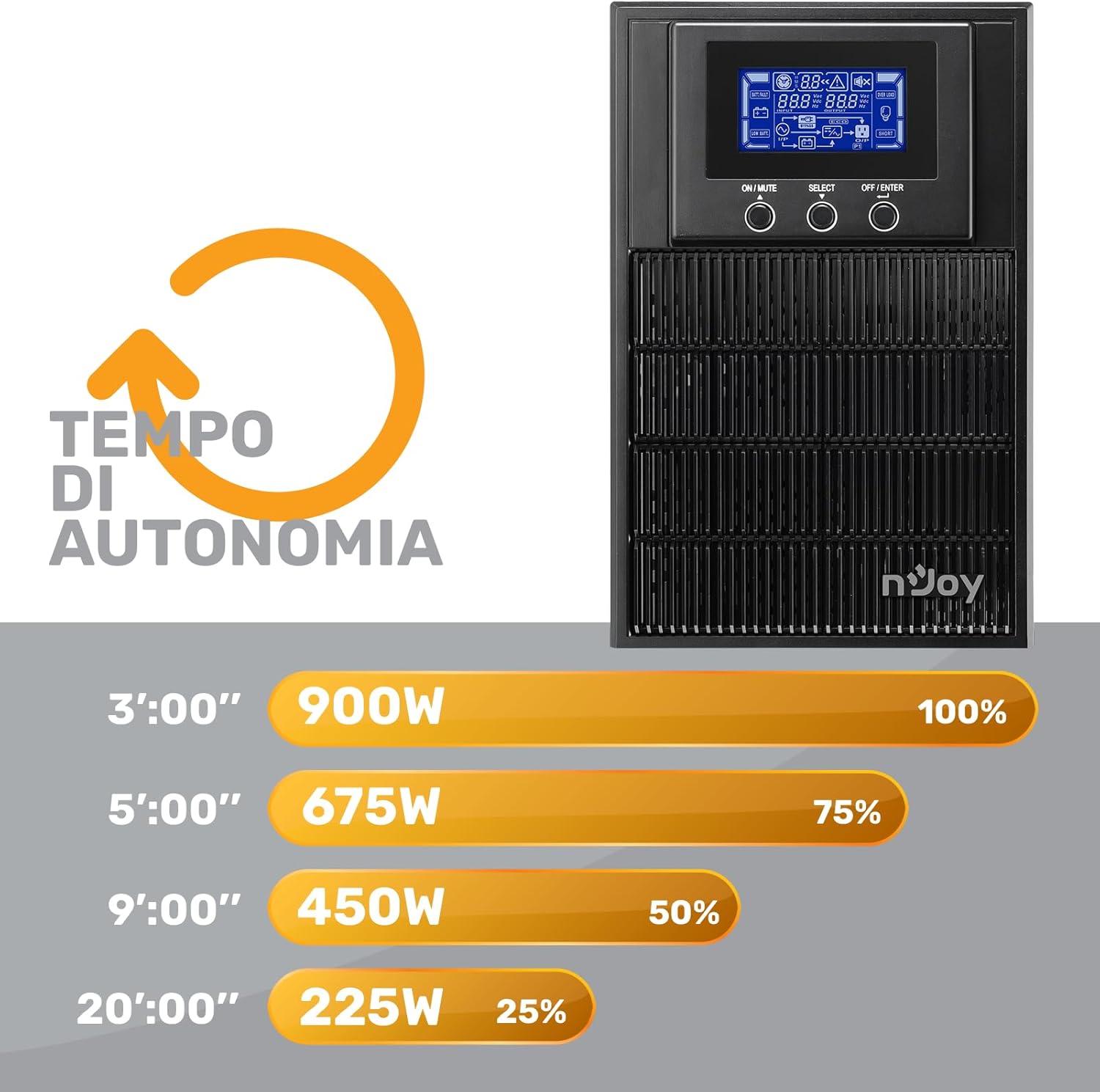
Figure 7: Battery Runtime vs. Load
This graph shows the estimated battery runtime in minutes for the nJoy Aten Pro 1000VA UPS at different load percentages. Za example, at 100% load (900W), the runtime is approximately 3 minutes, while at 25% load (225W), it can last up to 20 minutes.
- 100% Load (900W): Approximately 3 minutes
- 75% Load (675W): Approximately 5 minutes
- 50% Load (450W): Approximately 9 minutes
- 25% Load (225W): Approximately 20 minutes
9. Garancija in podpora
NJOY provides a comprehensive warranty and dedicated customer support for the Aten Pro series.
- Garancijska doba: The nJoy Aten Pro UPS comes with a 3-letna garancija. Batteries are covered by a 1-letna garancija.
- Podpora strankam: Our professional customer service team is available to provide prompt and quality assistance. If you require help or support before, during, or after your purchase, please do not hesitate to contact NJOY customer service. Refer to your product packaging or the NJOY official webspletno mesto za posebne kontaktne podatke.