
Uvod
Welcome to your new MIFA F6 Portable Bluetooth Speaker. This manual provides detailed instructions for the proper setup, operation, and maintenance of your device. Please read this manual thoroughly before using the product to ensure optimal performance and longevity.
Varnostne informacije
To ensure safe and proper use of your MIFA F6 speaker, please observe the following guidelines:
- Do not expose the speaker to extreme temperatures (hot or cold) or direct sunlight for extended periods.
- While the speaker is IP56 dust-proof and water-resistant, do not submerge it in water or expose it to strong jets of water.
- Do not attempt to disassemble, repair, or modify the speaker yourself. This may void the warranty and cause damage.
- Keep the speaker away from medical devices, as it contains magnets that may interfere with their operation.
- Za polnjenje uporabljajte samo priloženi kabel Micro USB.
- Hraniti izven dosega otrok.
Vsebina paketa
Označite polje za naslednje elemente:
- MIFA F6 Portable Bluetooth Speaker
- Micro USB polnilni kabel
- Uporabniški priročnik
Konec izdelkaview
Familiarize yourself with the components and controls of your MIFA F6 speaker.
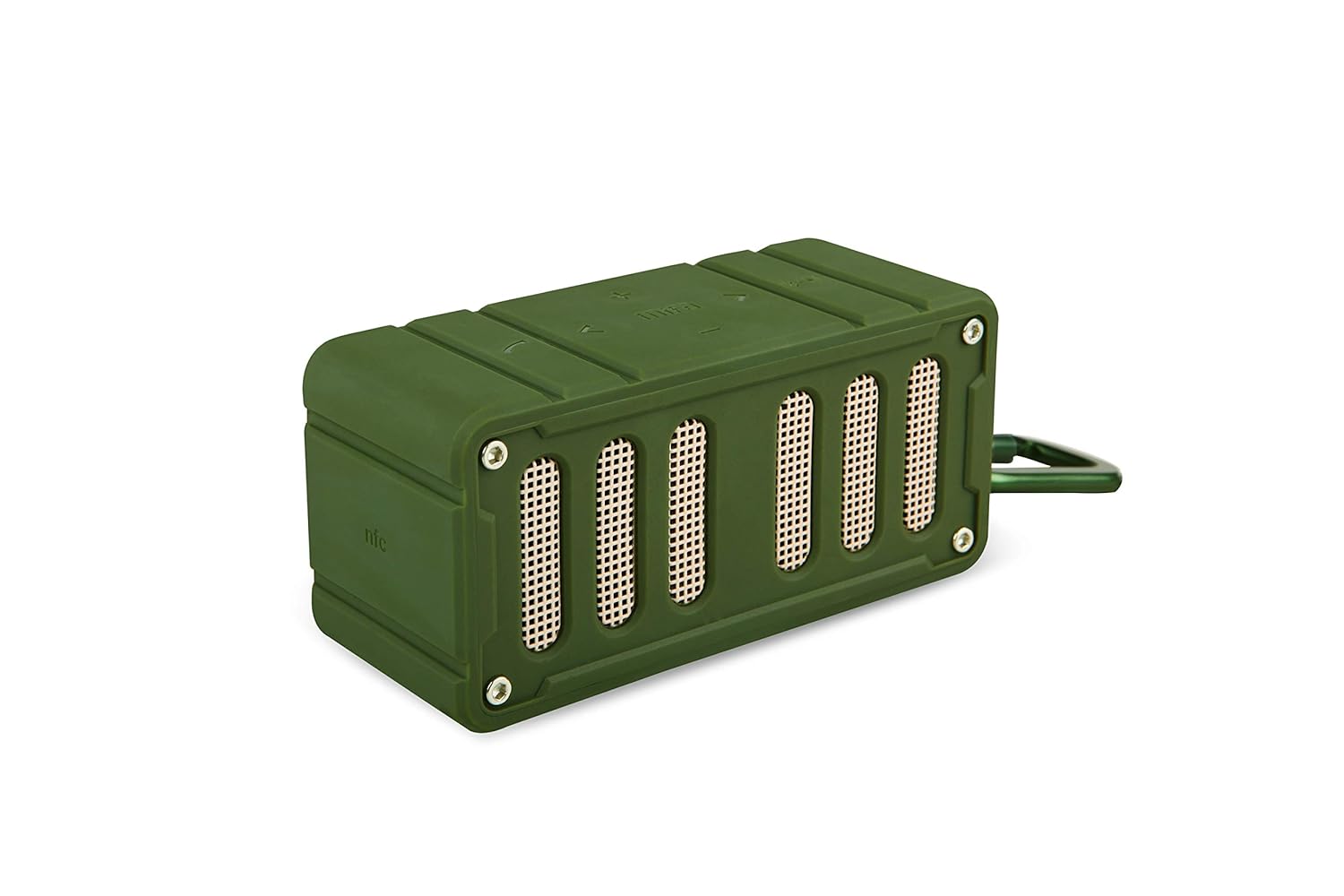
This image displays the MIFA F6 speaker in green, highlighting the front speaker grille and the control buttons located on the side panel.

This image shows the MIFA F6 speaker from a side angle, emphasizing its compact size and the detachable alloy metal loop hook (carabiner) for portability.
Kontrole in vrata
- Gumb za vklop: Pritisnite in držite za vklop/izklop.
- Gumb za povečanje glasnosti / naslednja skladba (+): Pritisnite za povečanje glasnosti. Pritisnite in držite za naslednjo skladbo.
- Gumb za zmanjšanje glasnosti / prejšnjo skladbo (-): Pritisnite za zmanjšanje glasnosti. Pritisnite in držite za prejšnjo skladbo.
- Play/Pause / Call Answer Button: Press to play/pause music. Press to answer/end calls.
- Mikrofon: Za prostoročno klicanje.
- Vrata za polnjenje mikro USB: Za polnjenje zvočnika.
- Reža za mikro SD kartico: Za predvajanje glasbe neposredno z Micro SD kartice (do 32 GB).
Nastavitev
Polnjenje zvočnika
Before first use, fully charge your MIFA F6 speaker.
- Priključite polnilni kabel Micro USB v polnilno vtičnico zvočnika.
- Drugi konec kabla priključite na vir napajanja USB (npr. vrata USB računalnika, stenski adapter USB).
- The LED indicator will illuminate to show charging status. It takes approximately 3 hours for a full charge.
Vklop/izklop
- Za vklop: Press and hold the Power button for a few seconds until you hear an audible prompt and the LED indicator lights up.
- Za izklop: Press and hold the Power button for a few seconds until you hear an audible prompt and the LED indicator turns off.
Navodila za uporabo
Bluetooth združitev
To connect your MIFA F6 speaker to a Bluetooth-enabled device:
- Ensure the speaker is powered on and within 33 feet (10 meters) of your device. The speaker will automatically enter Bluetooth pairing mode, indicated by a flashing LED.
- Na pametnem telefonu, tabličnem računalniku ali drugi napravi Bluetooth omogočite Bluetooth in poiščite razpoložljive naprave.
- Select "MIFA F6" from the list of devices.
- Once successfully paired, the speaker will provide an audible confirmation, and the LED indicator will stop flashing. The speaker will automatically reconnect to the last-used device when powered on, if available.
Predvajanje glasbe
- Preko Bluetooth: After successful pairing, play music from your connected device. Use the speaker's Play/Pause button or your device's controls.
- Prek kartice Micro SD: Insert a Micro SD card (up to 32GB) containing audio filev predvideno režo. Zvočnik bo samodejno zaznal kartico in začel predvajati glasbo.
Funkcija klica
The MIFA F6 speaker features a built-in microphone for hands-free calling.
- Sprejem klica: When an incoming call is received, press the Play/Pause button once to answer.
- Končanje klica: During a call, press the Play/Pause button once to end the call.
Nadzor glasnosti in skladbe
- Prilagoditev glasnosti: Pritisnite gumb "+" za povečanje glasnosti in gumb "-" za zmanjšanje glasnosti.
- Naslednja skladba: Press and hold the "+" button to skip to the next track.
- Prejšnja skladba: Press and hold the "-" button to go to the previous track.
Vzdrževanje
Čiščenje
To keep your speaker in good condition:
- Zunanjost zvočnika obrišite z mehko, rahlo suho krpoamp krpo.
- Do not use abrasive cleaners, alcohol, or harsh chemicals, as these can damage the surface.
- Pred polnjenjem ali priklopom drugih naprav se prepričajte, da so vsa priključka suha.
Shranjevanje
Ko se dlje časa ne uporablja:
- Zvočnik shranjujte na hladnem in suhem mestu, stran od neposredne sončne svetlobe in ekstremnih temperatur.
- Charge the battery periodically (e.g., every 3 months) to maintain battery health.
Odpravljanje težav
If you encounter issues with your MIFA F6 speaker, refer to the following common problems and solutions:
- Zvočnik se ne vklopi: Prepričajte se, da je baterija napolnjena. Zvočnik priključite na vir napajanja s kablom Micro USB.
- Seznanitev prek Bluetootha ni mogoča:
- Prepričajte se, da je zvočnik v načinu seznanjanja (utripajoča LED-lučka).
- Ensure Bluetooth is enabled on your device and it's within range (33 feet/10 meters).
- Forget "MIFA F6" from your device's Bluetooth settings and try pairing again.
- Znova zaženite zvočnik in napravo.
- Ni zvoka ali nizka glasnost:
- Preverite glasnost tako na zvočniku kot na priključeni napravi.
- Prepričajte se, da je zvočnik pravilno seznanjen in priključen.
- Če uporabljate kartico Micro SD, se prepričajte, da je zvok files are in a compatible format and the card is inserted correctly.
- Slaba kakovost zvoka:
- Za zmanjšanje motenj premaknite zvočnik bližje napravi Bluetooth.
- Prepričajte se, da med zvočnikom in napravo ni ovir.
- Preverite, ali je kakovost zvočnega vira visoka.
Specifikacije
Detailed technical specifications for the MIFA F6 Portable Bluetooth Speaker:
| Funkcija | Podrobnost |
|---|---|
| Ime modela | MIFA F6 |
| Vrsta zvočnika | 3D |
| Posebne lastnosti | Built-in Microphone, Portable, Micro SD Card Support, USB Port |
| Priporočene uporabe | Volume control, Music Playback |
| Združljive naprave | Pametni telefon, tablica |
| Brezžična komunikacijska tehnologija | Bluetooth 4.0 |
| Vir napajanja | Napajanje z baterijo (1200 mAh litij-polimerna) |
| Ocena vodotesnosti | IP56 (Dust-proof & Water-resistant) |
| Igralni čas | Do 10 ur (pri 75% glasnosti) |
| Čas polnjenja | Približno 3 ur |
| Dimenzije | 3.8 x 3.4 x 1.4 palcev |
| Teža | 5.9 oz |
| Material | Aluminij |
| Način avdio izhoda | Stereo |
| Nadzorna metoda | Dotik |
Garancija in podpora
Informacije o garanciji
This MIFA F6 Portable Bluetooth Speaker comes with a 30-day warranty from the date of purchase. Please retain your proof of purchase for any warranty claims. The warranty covers manufacturing defects under normal use. It does not cover damage caused by misuse, accidents, unauthorized modifications, or normal wear and tear.
Podpora uporabnikom
For further assistance, technical support, or warranty inquiries, please contact MIFA customer support through the retailer where you purchased the product or visit the official MIFA webspletno mesto za kontaktne podatke.