
MIFA A20
Uporabniški priročnik za Bluetooth zvočnik MIFA A20
Model: A20
1. Izdelek je končanview
The MIFA A20 is a portable Bluetooth speaker designed to deliver high-quality audio with powerful bass and True Wireless Stereo (TWS) capabilities. Its robust aluminum alloy housing ensures durability and a premium aesthetic. This manual will guide you through its features, setup, and operation.


2. Lastnosti
- Exceptional Wireless Stereo: Connect two A20 speakers via a single device for huge stereo sound and double the volume; two exposed radiators let you see the sound.
- Impressive Bass: Dual drivers, triple radiators and Class-D chips ensure distortion-free crystal loud sound and strong bass with 30W peak power output.
- Dolgo predvajanje: 4000 mAh rechargeable Li-ion battery offers 12 hours playtime at 70% volume; LED indicators to tell you the battery remaining; can play while charging.
- Endless Audio Options: Aux capability for non-Bluetooth devices; 32GB Micro SD card supported to save your phone's battery; built-in microphone for HD hands-free calls.
- Bluetooth 4.2: Instantly pairs with your Smartphone, Tablet, Laptop, iPhone, Samsung, etc.; auto-reconnects to the last used device within 66 feets away.
3. Vsebina paketa
Označite polje za naslednje elemente:
- MIFA A20 Bluetooth Speaker
- USB polnilni kabel
- 3.5 mm avdio kabel (AUX)
- Uporabniški priročnik
4. Diagram izdelka in krmilniki
Seznanite se z razporeditvijo in gumbi za upravljanje zvočnika.
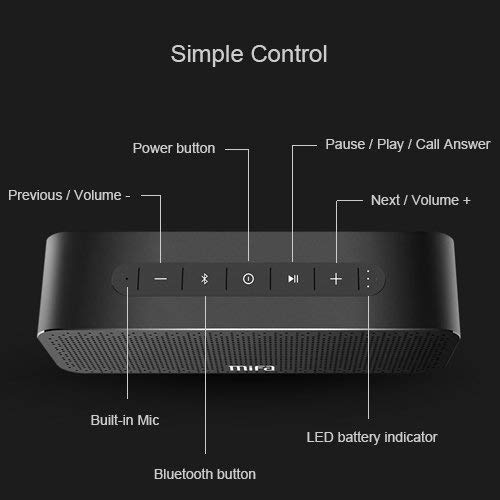
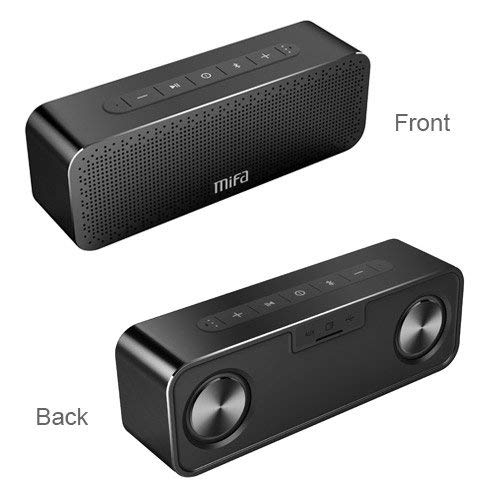
Gumbi za upravljanje:
- Gumb za vklop: Pritisnite in držite za vklop/izklop.
- Gumb Bluetooth: Pritisnite za vstop v način povezovanja Bluetooth.
- Play/Pause / Call Answer Button: Press to play/pause music; press to answer/end calls.
- Previous / Volume - Button: Press to go to previous track; press and hold to decrease volume.
- Next / Volume + Button: Press to go to next track; press and hold to increase volume.
Indicators and Ports:
- Vgrajeni mikrofon: Za prostoročno telefoniranje.
- LED indikator baterije: Prikazuje stanje baterije.
- Vrata za polnjenje: USB priključek za polnjenje.
- AUX vhod: 3.5 mm priključek za žično avdio povezavo.
- Reža za mikro SD kartico: Za predvajanje glasbe neposredno z Micro SD kartice (do 32 GB).
5. Nastavitev
5.1 Polnjenje zvočnika
Before first use, fully charge the speaker. Connect the provided USB charging cable to the speaker's charging port and the other end to a USB power adapter (not included) or a computer's USB port. The LED indicator will show charging status and turn off when fully charged.
5.2 Bluetooth seznanjanje
- Turn on the MIFA A20 speaker by pressing and holding the Power button.
- The speaker will automatically enter Bluetooth pairing mode, indicated by a flashing blue LED. If not, press the Bluetooth button.
- V napravi (pametnem telefonu, tablici, prenosniku) omogočite Bluetooth in poiščite razpoložljive naprave.
- Select "MIFA A20" from the list of devices.
- Once paired, the LED indicator will turn solid blue, and you will hear a confirmation sound.
- The speaker will automatically reconnect to the last paired device when turned on, if within range.
5.3 Združevanje s pravim brezžičnim stereo sistemom (TWS)
Za doseganje širšega stereo zvokatage, you can pair two MIFA A20 speakers together.
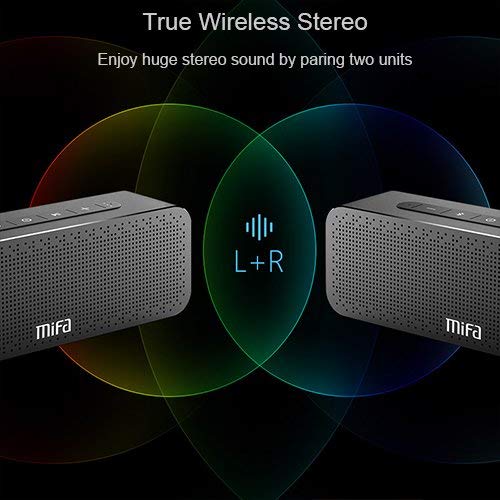
- Ensure both MIFA A20 speakers are turned on and not connected to any Bluetooth device.
- Na enem zvočniku (to bo glavni zvočnik) pritisnite in držite gumb Bluetooth, dokler ne zaslišite poziva, ki označuje način seznanjanja TWS.
- The two speakers will automatically search for and connect to each other. This may take a few seconds.
- Once connected, you will hear a confirmation sound, and the LED indicators on both speakers will change to reflect the TWS connection.
- Zdaj povežite napravo s primarnim zvočnikom prek povezave Bluetooth, kot je opisano v poglavju 5.2. Zvok se bo predvajal prek obeh zvočnikov v stereo načinu.
5.4 Using Micro SD Card
Insert a Micro SD card (up to 32GB, formatted to FAT32) with your music files into the Micro SD card slot. The speaker will automatically switch to Micro SD card mode and begin playing music.
5.5 Uporaba vhoda AUX
Connect one end of the 3.5mm audio cable to the AUX input port on the speaker and the other end to the audio output jack of your non-Bluetooth device. The speaker will automatically switch to AUX mode.
6. Upravljanje zvočnika
6.1 Predvajanje glasbe
- Predvajanje/pavza: Pritisnite gumb Predvajaj/Premor.
- Povečaj glasnost: Pritisnite in držite gumb za povečanje glasnosti.
- Znižaj glasnost: Pritisnite in držite gumb za glasnost -.
- Naslednja skladba: Short press the Next / Volume + button.
- Prejšnja skladba: Short press the Previous / Volume - button.
6.2 Prostoročno klicanje
Ko je zvočnik povezan prek Bluetootha, ga lahko uporabljate za prostoročne klice.
- Sprejmi klic: Press the Play/Pause / Call Answer button.
- Končaj klic: Press the Play/Pause / Call Answer button during a call.
- Zavrni klic: Press and hold the Play/Pause / Call Answer button when a call comes in.
7. Vzdrževanje
- Čiščenje: Za čiščenje zvočnika uporabite mehko, suho krpo. Ne uporabljajte abrazivnih čistil ali topil.
- Vzdrževanje baterije: Da podaljšate življenjsko dobo baterije, se izogibajte pogostemu popolnemu praznjenju zvočnika. Redno ga polnite, tudi če ga dalj časa ne uporabljate.
- Shranjevanje: Zvočnik shranjujte na hladnem in suhem mestu, stran od neposredne sončne svetlobe in ekstremnih temperatur.
- Vodoodpornost: The speaker is designed to be waterproof (as per specifications). However, avoid submerging it in water for extended periods or exposing it to high-pressure water jets. Ensure charging port cover is securely closed when near water.
8. Odpravljanje težav
| Težava | Možen vzrok | rešitev |
|---|---|---|
| Zvočnik se ne vklopi | Nizka baterija | Zvočnik popolnoma napolnite. |
| Brez zvoka | Glasnost je prenizka; Naprava ni povezana; Napačen način vnosa | Increase volume on speaker and device; Ensure successful Bluetooth pairing or AUX connection; Check if correct input mode (Bluetooth/AUX/SD card) is selected. |
| Seznanitev prek Bluetootha ni mogoča | Zvočnik ni v načinu seznanjanja; Bluetooth naprave izklopljen; Preveč daleč od zvočnika; Motnje | Ensure speaker is in pairing mode (flashing blue LED); Turn on Bluetooth on your device; Move device closer to speaker; Turn off other Bluetooth devices nearby. |
| Popačen zvok | Volume too high; Low battery; Device too far | Reduce volume; Charge speaker; Move device closer to speaker. |
| Seznanjanje TWS ne uspe | Speakers already connected to a device; Not in TWS pairing mode | Disconnect both speakers from any Bluetooth devices; Ensure both speakers are in TWS pairing mode. |
9. Specifikacije

| Funkcija | Podrobnost |
|---|---|
| Ime modela | A20 |
| Material | Aluminij |
| Vrsta zvočnika | Nizkotonec |
| Tehnologija povezljivosti | Bluetooth, Auxiliary, Wireless |
| Različica Bluetooth | 4.2 |
| Brezžično Domet | Do 66 čevljev (20 metrov) |
| Največja izhodna moč zvočnika | 30 vatov |
| Način avdio izhoda | Stereo |
| Konfiguracija kanala za prostorski zvok | 2.0 |
| Kapaciteta baterije | 4000 mAh |
| Življenjska doba baterije | Do 12 ur (pri 70 % glasnosti) |
| Podpora za kartico Micro SD | Do 32 GB |
| Vgrajen mikrofon | ja |
| Je vodoodporen | ja |
| barva | Črna |
10. Garancija in podpora
Informacije o garanciji
The MIFA A20 Bluetooth Speaker comes with a 30-dnevna garancija od datuma nakupa, ki krije proizvodne napake. Prosimo, shranite dokazilo o nakupu za uveljavljanje garancije.
Podpora uporabnikom
For any questions, technical assistance, or warranty inquiries, please contact MIFA customer support through the retailer's platform or the official MIFA webspletno mesto. Ko se obrnete na podporo, imejte pripravljen model izdelka in podatke o nakupu.
Ask a question about this manual
Ask about setup, troubleshooting, compatibility, parts, safety, or missing instructions. Manuals+ will review the question and use this page’s manual context to help answer it.