
1. Uvod
Hvala za nakupasing the MIFA A30 Bluetooth Speaker. This manual provides essential information for setting up, operating, and maintaining your device. Please read it thoroughly before use to ensure optimal performance and longevity of your speaker.
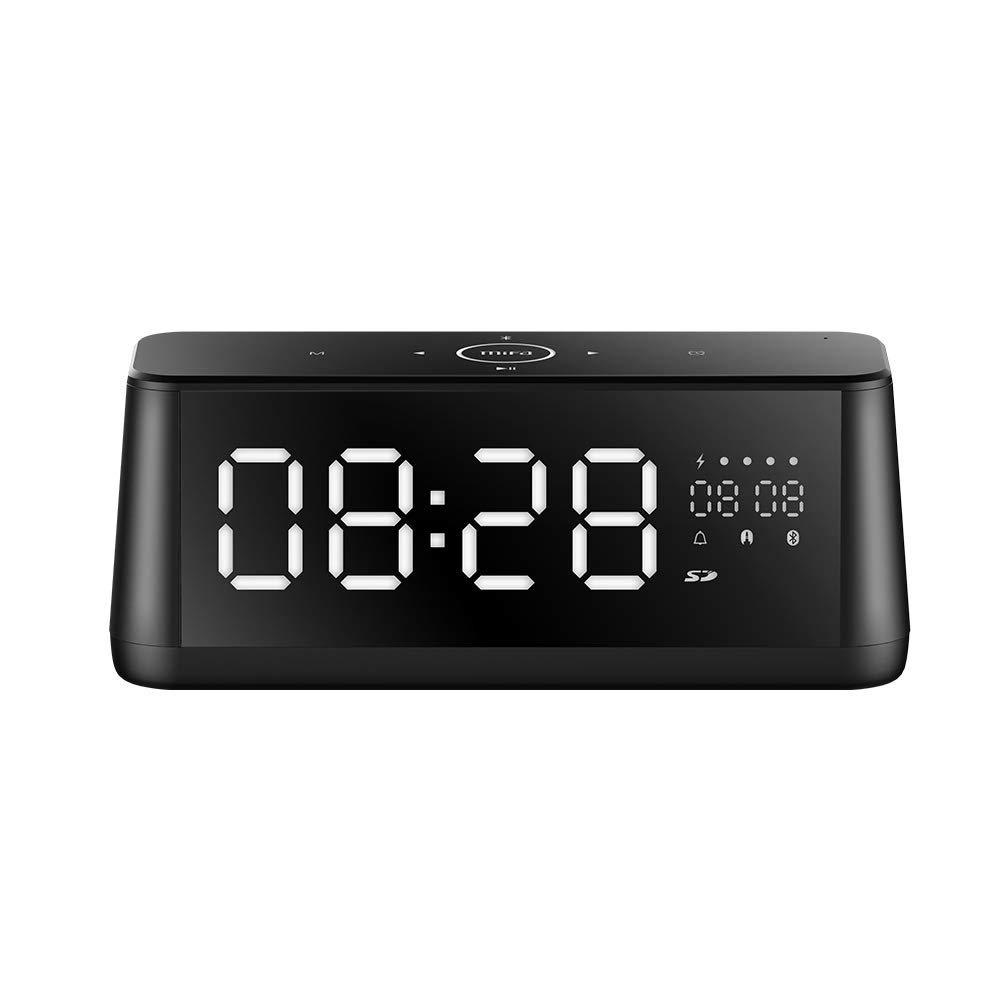
Slika 1.1: Spredaj view of the MIFA A30 Bluetooth Speaker, displaying the time on its large LED screen.
2. Varnostne informacije
- Zvočnika ne izpostavljajte ekstremnim temperaturam, neposredni sončni svetlobi ali visoki vlažnosti.
- Izogibajte se padcem ali izpostavljanju zvočnika močnim udarcem.
- Do not disassemble, repair, or modify the device yourself. Contact authorized service personnel for any repairs.
- Keep the speaker away from water and other liquids, despite its waterproof rating, to prevent damage to ports when open.
- Uporabljajte samo predpisani polnilni kabel in adapter.
- Zvočnik očistite z mehko, suho krpo. Ne uporabljajte abrazivnih čistil.
3. Vsebina paketa
Prosimo, preverite paket za naslednje artikle:
- MIFA A30 Bluetooth Speaker
- USB polnilni kabel
- 3.5 mm avdio kabel
- Uporabniški priročnik (ta dokument)
4. Izdelek je končanview
4.1. Komponente
The MIFA A30 speaker features a robust design with advanced audio components for high-quality sound reproduction.

Slika 4.1: Razstavljeno view illustrating the internal components of the MIFA A30, including two 15-watt drivers and two low-frequency passive radiators.
4.2. Nadzorna plošča in vrata
The speaker's top panel features capacitive touch controls, and the rear panel houses various connectivity ports.
Slika 4.2: Od zgoraj navzdol view of the MIFA A30 control panel, indicating the functions of each touch button for mode, playback, volume, and clock adjustment.
- Gumb M (način): Short press to switch between Bluetooth, TF Card, and AUX modes.
- Bluetooth nadzor: Long press to turn off Bluetooth, short press to turn on.
- Gumb za prejšnjo skladbo: Kratek pritisk za prehod na prejšnjo skladbo.
- Play/Pause/Hands-Free Button: Short press to play/pause music. Short press to answer/end calls. Long press to reject calls.
- Gumb za naslednjo skladbo: Kratek pritisk za prehod na naslednjo skladbo.
- Gumb ure: Long press for clock adjustment.
- Povečaj glasnost: Obrnite v smeri urinega kazalca, da povečate glasnost.
- Znižaj glasnost: Za zmanjšanje glasnosti zavrtite v nasprotni smeri urinega kazalca.
- Mikrofon: Vgrajen mikrofon za prostoročno telefoniranje.
- LED zaslon: Shows time, date, battery level, and current mode.
5. Nastavitev
5.1. Polnjenje zvočnika
Before first use, fully charge the speaker. Connect the provided USB charging cable to the speaker's charging port and the other end to a USB power adapter (not included) or a computer's USB port. The LED display will indicate charging status.
5.2. Vklop/izklop
- Za vklop: Press and hold the Play/Pause button until the LED display lights up.
- Za izklop: Press and hold the Play/Pause button until the LED display turns off. The speaker will automatically screen out and power off to save battery after a period of inactivity.
6. Navodila za uporabo
6.1. Bluetooth seznanjanje
- Ensure the speaker is powered on and in Bluetooth mode (indicated by the Bluetooth icon on the LED display). If not, short press the 'M' button to switch to Bluetooth mode.
- V pametnem telefonu ali tablici omogočite Bluetooth in poiščite razpoložljive naprave.
- Select "MIFA A30" from the list of devices.
- Ko je zvočnik seznanjen, bo oddal potrditveni zvok, ikona Bluetooth na zaslonu pa bo prenehala utripati.
- The speaker will automatically re-connect to the last paired device when powered on, if the device is within range.
6.2. Predvajanje zvoka
- Predvajanje/pavza: Kratek pritisk na gumb Predvajaj/Pavza.
- Naslednja skladba: Short press the Next Track button.
- Prejšnja skladba: Short press the Previous Track button.
- Prilagoditev glasnosti: Zavrtite regulator glasnosti v smeri urinega kazalca, da povečate glasnost, in v nasprotni smeri urinega kazalca, da zmanjšate glasnost.
6.3. Prostoročno telefoniranje
Ko je s pametnim telefonom povezan prek Bluetootha:
- Sprejmi klic: Kratek pritisk na gumb Predvajaj/Pavza.
- Končaj klic: Med klicem na kratko pritisnite gumb Predvajaj/Pavza.
- Zavrni klic: Ko prejmete klic, dolgo pritisnite gumb Predvajaj/Pavza.
6.4. Predvajanje s kartice TF
- Insert a Micro-SD (TF) card with supported audio files (FLAC/APE/MP3/WMA/WAV) into the TF card slot.
- Short press the 'M' button to switch to TF Card mode. The speaker will automatically begin playing music from the card.
6.5. AUX vhod
- Connect one end of the 3.5mm audio cable to the speaker's AUX input port and the other end to the audio output of your device (e.g., MP3 player, computer).
- Short press the 'M' button to switch to AUX mode.
- Zvok se bo zdaj predvajal prek zvočnika iz vaše povezane naprave.
6.6. Clock and Display Settings
- Nastavitev ure: Long press the Clock button to enter time setting mode. Use the Next/Previous buttons to adjust values and the Play/Pause button to confirm.
- Display Luminance: The LED display has 7 adjustable luminance levels. Refer to the full product documentation for specific adjustment steps, typically involving short presses of the Clock button or a combination with volume controls.
7. Vzdrževanje
- Čiščenje: Wipe the speaker's surface with a soft, dry, lint-free cloth. Do not use liquid or aerosol cleaners.
- Shranjevanje: Ko zvočnika dlje časa ne uporabljate, ga shranite na hladnem in suhem mestu, stran od neposredne sončne svetlobe in ekstremnih temperatur.
- Vzdrževanje baterije: Da podaljšate življenjsko dobo baterije, se izogibajte pogostemu popolnemu praznjenju baterije. Zvočnik redno polnite, tudi če ga ne uporabljate.
8. Odpravljanje težav
| Težava | Možen vzrok | rešitev |
|---|---|---|
| Zvočnik se ne vklopi. | Nizka baterija. | Zvočnik polnite vsaj 2 ure. |
| Brez zvoka. | Glasnost je prenizka; napačen način; naprava ni povezana. | Increase speaker and device volume. Ensure correct mode (Bluetooth/AUX/TF Card). Re-pair Bluetooth device or check AUX cable connection. |
| Bluetooth seznanjanje ne uspe. | Zvočnik ni v načinu seznanjanja; naprava je predaleč; motnje. | Ensure speaker is in Bluetooth mode. Move device closer to speaker. Turn off other Bluetooth devices. Try forgetting "MIFA A30" on your device and re-pairing. |
| TF Card not playing. | Napačen način; ni podprto file format; card error. | Switch to TF Card mode. Ensure files are FLAC/APE/MP3/WMA/WAV. Reinsert TF card or try a different card. |
9. Specifikacije
| Funkcija | Podrobnost |
|---|---|
| Ime modela | A30 |
| Vrsta zvočnika | Knjižna polica |
| Tehnologija povezljivosti | Bluetooth 4.2, Auxiliary (3.5mm), Micro-SD (TF Card) |
| Način avdio izhoda | Stereo |
| Največja izhodna moč zvočnika | 30 W (2 x 15 W gonilnika) |
| Izboljšanje nizkih tonov | Two low-frequency boosters |
| Kapaciteta baterije | 4000 mAh |
| Igralni čas | Do 10–12 ur (odvisno od količine in vsebine) |
| Nadzorna metoda | Kapacitivni zaslon na dotik |
| Zaslon | 7.2" x 2.8" Mirror LED Screen with 106 LEDs, 7-level adjustable luminance |
| Podprti zvočni formati | FLAC/APE/MP3/WMA/WAV |
| Vgrajen mikrofon | Da, za prostoročne klice |
| Vodotesen | Yes (Note: Ensure ports are covered for water resistance) |
| barva | Črna |
| Vrsta namestitve | Namizni nosilec |
10. Garancija in podpora
The MIFA A30 Bluetooth Speaker typically comes with a 30-day warranty from the date of purchase, covering manufacturing defects. Please retain your proof of purchase for warranty claims.
For technical support, troubleshooting assistance beyond this manual, or warranty inquiries, please contact MIFA customer service through their official website or the retailer where the product was purchased. Provide your product model (A30) and purchase details when seeking support.