
Uvod
Thank you for choosing the MIFA A3 Soundbox Bluetooth Portable Speaker. This manual provides essential information for the safe and efficient use of your device. Please read it thoroughly before operating the speaker and retain it for future reference.
Varnostne informacije
- Zvočnika ne izpostavljajte ekstremnim temperaturam, neposredni sončni svetlobi ali visoki vlažnosti.
- Izogibajte se padcem ali izpostavljanju zvočnika močnim udarcem.
- Do not disassemble or attempt to repair the speaker yourself. Contact qualified service personnel.
- Keep the speaker away from water and liquids, despite its waterproof rating, to prevent damage to charging ports or internal components.
- Uporabljajte samo predpisani polnilni kabel in adapter.
Vsebina paketa
Prosimo, preverite paket za naslednje artikle:
- MIFA A3 Bluetooth Portable Speaker
- USB polnilni kabel
- Avdio kabel AUX
- Uporabniški priročnik (ta dokument)
Konec izdelkaview
The MIFA A3 speaker features intuitive touch controls and multiple connectivity options. Familiarize yourself with the speaker's layout:
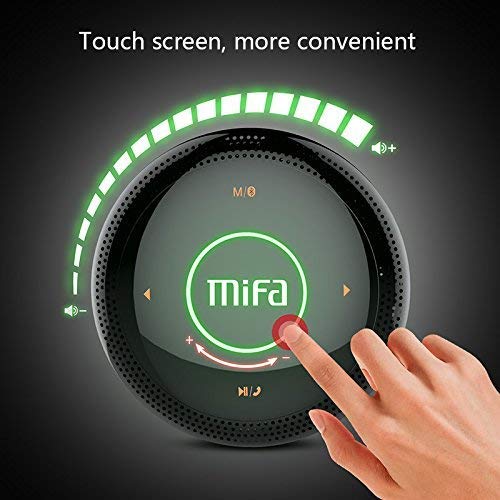
Slika 1: Vrh view of the MIFA A3 speaker, highlighting the touch-sensitive control panel. The panel displays volume indicators, play/pause, and track navigation buttons. A central 'Mifa' logo is also visible.
- Nadzorna plošča na dotik: Located on the top surface for volume adjustment, playback control, and mode selection.
- Mikrofon: Za prostoročno klicanje.
- Vrata za polnjenje: Mikro USB priključek za polnjenje.
- AUX vhod: 3.5 mm avdio priključek za žično povezavo.
- Reža za mikro SD kartico: Za predvajanje glasbe neposredno s pomnilniške kartice.
Nastavitev
1. Polnjenje zvočnika
Pred prvo uporabo zvočnik popolnoma napolnite. Priloženi polnilni kabel USB priključite na polnilno vtičnico zvočnika, drugi konec pa na napajalnik USB (ni priložen) ali vrata USB računalnika.
- Indikatorska lučka polnjenja bo med polnjenjem sveti.
- The indicator will turn off or change color once fully charged.
- A full charge provides approximately 8 hours of continuous playtime.
2. Vklop/izklop
- Za vklop: Press and hold the Power button (usually integrated into the touch panel or a dedicated button) for 2-3 seconds until you hear an audible prompt or see an indicator light.
- Za izklop: Press and hold the Power button again for 2-3 seconds.
Navodila za uporabo
1. Bluetooth seznanjanje
- Ensure the speaker is powered on and in Bluetooth pairing mode (indicated by a flashing blue light or audible prompt).
- V napravi (pametnem telefonu, tablici, računalniku) omogočite Bluetooth in poiščite razpoložljive naprave.
- Select "MIFA A3" from the list of devices.
- Once paired, the speaker will provide an audible confirmation, and the indicator light will become solid blue.
- The speaker will automatically connect to the last-paired device when powered on, if that device's Bluetooth is active and within range.
2. Priključek AUX
For devices without Bluetooth, use the provided 3.5mm AUX audio cable:
- En konec AUX kabla priključite na AUX vhod zvočnika.
- Drugi konec priključite v vhod za slušalke na zvočni napravi.
- Zvočnik se bo samodejno preklopil v način AUX.
3. Predvajanje s kartice Micro SD
Insert a Micro SD card (up to 32GB, FAT32 format) with music filev predvideno režo. Zvočnik bo samodejno zaznal kartico in začel predvajati.
4. Touch Control Operations
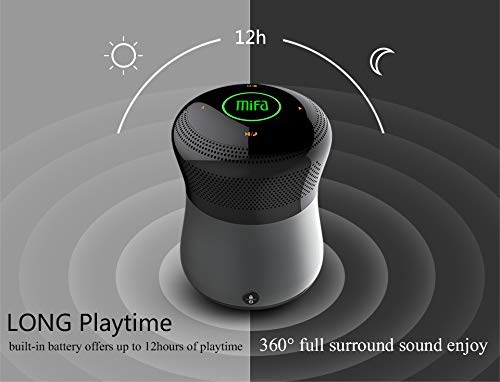
Slika 2: The MIFA A3 speaker shown with an overlay indicating "LONG Playtime" (up to 12 hours) and "360° full surround sound enjoy." This image emphasizes the speaker's battery life and audio dispersion.
- Nadzor glasnosti: Slide your finger clockwise on the touch panel to increase volume, counter-clockwise to decrease.
- Predvajanje/pavza: Tap the central Play/Pause icon.
- Naslednja skladba: Tap the "Next" arrow icon.
- Prejšnja skladba: Tap the "Previous" arrow icon.
- Stikalo načina: Tap the "M/O" icon to cycle between Bluetooth, AUX, and Micro SD card modes.
- Gumb za zaklepanje: Press the lock icon to prevent accidental touch inputs.
5. Call Handling (Bluetooth Mode)
- Sprejmi klic: Tap the Play/Pause icon when a call comes in.
- Končaj klic: Tap the Play/Pause icon again.
- Zavrni klic: Press and hold the Play/Pause icon for 2 seconds.
Vzdrževanje
- Zvočnik očistite z mehko, suho krpo. Ne uporabljajte abrazivnih čistil ali topil.
- Zvočnik shranite na hladnem in suhem mestu, ko ga dlje časa ne uporabljate.
- Charge the battery at least once every three months to maintain battery health.
Odpravljanje težav
| Težava | Možna rešitev |
|---|---|
| Zvočnik se ne vklopi. | Prepričajte se, da je baterija napolnjena. Priključite na vir napajanja in poskusite znova. |
| Seznanitev prek Bluetootha ni mogoča. |
|
| Brez zvoka. |
|
| Slaba kakovost zvoka. |
|
Specifikacije
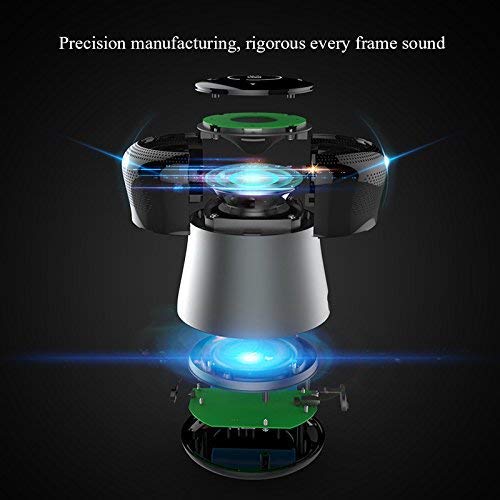
Slika 3: An exploded diagram of the MIFA A3 speaker, illustrating its internal components and structural design, emphasizing precision manufacturing.
| Model | MIFA A3 |
| Izhodna moč | 10 W |
| Povezljivost | Bluetooth 4.2, AUX, Micro SD Card |
| Baterija | 1800 mAh Li-ion |
| Igralni čas | Do 8 ur (pri 60% glasnosti) |
| Čas polnjenja | Približno 3-4 ur |
| Mikrofon | Vgrajen za prostoročno telefoniranje |
| Vodotesen | Yes (as per product specifications, but general caution advised for ports) |
| Nadzorna metoda | Dotik |
| Združljive naprave | Prenosnik, računalnik, pametni telefon, tablica |
Garancija in podpora
MIFA products are designed to provide reliable performance. For warranty information or technical support, please refer to the warranty card included with your purchase or visit the official MIFA webspletnega mesta. Shranite dokazilo o nakupu za uveljavljanje garancije.
For further assistance, you may contact MIFA customer support through their official channels.