
1. Uvod
This manual provides essential information for the safe and efficient operation of your NEC C861Q-AVT2 86-inch 4K UHD LED LCD Display. The C861Q-AVT2 is designed for commercial environments, offering clear, detailed imagery with a 4K UHD resolution, 350 cd/m² brightness, and an anti-glare surface for optimal readability in various lighting conditions. Its robust design includes a full metal chassis, real-time temperature sensors, and integrated cooling fans for reliable 24/7 operation.
Key features include multiple connectivity options such as HDMI 2.0 and DisplayPort 1.2, an integrated media player for USB or SD card playback, and a Raspberry Pi Compute Module slot for direct source integration.
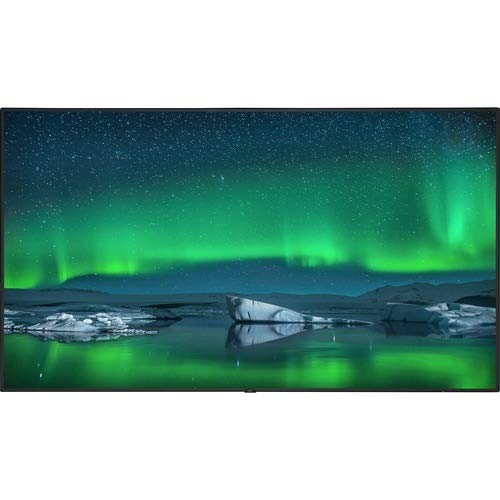
Spredaj view of the NEC C861Q-AVT2 86-inch 4K UHD LED LCD Display, showcasing its slim bezel and large screen.
2. Varnostne informacije
Please read all safety instructions carefully before using the display. Failure to follow these instructions may result in electric shock, fire, or damage to the product.
- vir energije: Connect the display only to the type of power source indicated on the label. Ensure the power cord is securely plugged into a grounded outlet.
- Prezračevanje: Do not block ventilation openings. Ensure adequate space around the display for proper airflow to prevent overheating.
- Izpostavljenost tekočini: Do not expose the display to rain, moisture, or spill liquids onto it. If liquid enters the display, disconnect power immediately and contact qualified service personnel.
- Čiščenje: Unplug the display from the power outlet before cleaning. Use a soft, dry cloth. Do not use liquid cleaners or aerosol cleaners.
- Montaža: Ensure the display is mounted securely to a stable surface or wall using appropriate mounting hardware. If wall-mounting, use a compatible mount such as the WMK-3255S to meet ADA compliance requirements.
- Servisiranje: Tega izdelka ne poskušajte servisirati sami. Vsa servisna dela prepustite usposobljenemu servisnemu osebju.
3. Kaj je v škatli
Previdno razpakirajte škatlo in se prepričajte, da so vsi predmeti prisotni:
- NEC C861Q-AVT2 86-inch 4K UHD LED LCD Display
- Stand (for table mounting)
- Napajalni kabel
- Remote Control (not explicitly listed but standard for displays)
- Uporabniški priročnik (ta dokument)
4. Nastavitev
4.1 Namestitev zaslona
The NEC C861Q-AVT2 can be used with the included stand for table mounting or with a compatible VESA wall mount (sold separately).
- Namizni nosilec: Attach the provided stand to the display following the instructions in the separate stand assembly guide. Place the display on a stable, level surface.
- Stenski nosilec: If wall-mounting, ensure the wall mount is rated for the display's weight (approximately 127.4 pounds or 57.8 kg). Follow the wall mount manufacturer's instructions carefully. For ADA compliance, consider using the WMK-3255S wall mount.
4.2 Priključitev zunanjih naprav
The display offers various input ports:
- HDMI: Connect up to three HDMI devices (e.g., media players, computers) to the HDMI 2.0 ports.
- DisplayPort: Connect DisplayPort devices to the DisplayPort 1.2 inputs. Daisy chain functionality is also supported.
- USB: Use the USB ports for connecting storage devices for the integrated media player or for service purposes.
- Raspberry Pi Compute Module Slot: Insert a compatible Raspberry Pi Compute Module for integrated source functionality.
4.3 Napajalni priključek
- Ensure all external devices are connected.
- Connect the power cord to the display's power input.
- Drugi konec napajalnega kabla priključite v ozemljeno električno vtičnico.
5. Navodila za uporabo
5.1 Vklop/izklop
Press the power button on the display or the remote control to turn the display on or off. The power indicator light will illuminate when the display is on.
5.2 Izbira vnosa
Use the 'Input' or 'Source' button on the remote control to cycle through available input sources (HDMI 1, HDMI 2, HDMI 3, DisplayPort 1, DisplayPort 2, Internal Media Player, Raspberry Pi Module).
5.3 Nastavitve slike
Access the on-screen display (OSD) menu using the remote control to adjust picture settings such as:
- Svetlost
- Kontrast
- Barvna temperatura
- Razmerje stranic
- Advanced settings via SpectraView Engine for color, intensity, gamma, or uniformity control.
5.4 Integrated Media Player
The display features an integrated media player. Insert a USB drive or SD card containing audio, video, or image files into the designated slot. Select the 'Internal Media Player' input source to access and play your content.
6. Vzdrževanje
6.1 Čiščenje zaslona
- zaslon: Zaslon nežno obrišite z mehko krpo, ki ne pušča vlaken. Za trdovratne madeže rahlo obrišiteampen the cloth with water or a non-abrasive, display-safe cleaning solution. Do not spray liquid directly onto the screen.
- Casing: Obrišite casinz mehko, suho krpo. Izogibajte se uporabi agresivnih kemikalij ali abrazivnih materialov.
6.2 Prezračevanje
Ensure that the ventilation openings on the display are not obstructed. Proper airflow is crucial for maintaining optimal operating temperature and extending the lifespan of the display, especially during 24/7 operation.
7. Odpravljanje težav
Če imate težave z zaslonom, si oglejte naslednje pogoste korake za odpravljanje težav:
- Brez napajanja:
- Check if the power cord is securely connected to both the display and the electrical outlet.
- Preverite, ali vtičnica deluje, tako da vanjo priključite drugo napravo.
- Brez signala:
- Prepričajte se, da je na zaslonu izbran pravilen vhodni vir.
- Check the connection cables (HDMI, DisplayPort) between the display and the source device. Try a different cable if possible.
- Preverite, ali je izvorna naprava vklopljena in oddaja signal.
- Slaba kakovost slike:
- Adjust picture settings (brightness, contrast, sharpness) via the OSD menu.
- Ensure the source device is outputting a resolution compatible with the display's native 4K UHD resolution.
- Check for any physical damage to the screen or cables.
- Display Overheating:
- Ensure adequate ventilation around the display. Clear any obstructions from the vents.
- Če težave ne odpravite, se obrnite na podporo strankam.
8. Specifikacije
| Funkcija | Specifikacija |
|---|---|
| Znamka | NEC |
| Številka modela | C861Q-AVT2 |
| Velikost zaslona | 86 palcev |
| Tehnologija zaslona | LED-LCD |
| Resolucija | 4K UHD (3840 x 2160) |
| Svetlost | 350 cd/m² |
| Posebne lastnosti | Anti-Glare Screen, Integrated ATSC Tuner, Flat Panel, Full Metal Chassis, Integrated Media Player, Raspberry Pi Compute Module Slot |
| Hitrost osveževanja | 60 Hz |
| Tehnologija povezljivosti | USB, DisplayPort 1.2 (x2, daisy chain), HDMI 2.0 (x3) |
| Dimenzije izdelka | 2.9 x 75.9 x 43.3 palcev (7.37 x 192.79 x 109.98 cm) |
| Teža predmeta | 127.4 funtov (57.8 kg) |
| Vrsta namestitve | Namizni nosilec (združljiv z VESA za stensko montažo) |
| Delovni čas | 24/7 operation capable |
9. Garancija in podpora
9.1 Informacije o garanciji
This NEC C861Q-AVT2 display comes with a full 3-year commercial warranty. Please retain your proof of purchase for warranty claims.
9.2 Podpora strankam
For technical assistance, troubleshooting beyond this manual, or warranty service, please contact NEC customer support. Refer to the contact information provided with your purchase documentation or visit the official NEC webstran za podrobnosti o podpori.