
Uvod
Thank you for choosing Groov-e Bluetooth DJ Style Wireless On-Ear Headphones. These headphones are designed for young users, offering wireless freedom, comfortable wear, and an audio-sharing feature. This manual provides essential information for setting up, operating, maintaining, and troubleshooting your new headphones to ensure a safe and enjoyable listening experience.
Vsebina paketa
Označite polje za naslednje elemente:
- 1 x Groov-e Bluetooth Kids Headphones with Audio Sharing Port
- 1 x 3.5 mm avdio kabel
- 1 x Micro USB kabel za polnjenje
- 1 x Uporabniški priročnik (ta dokument)
Konec izdelkaview
Familiarize yourself with the various parts and controls of your Groov-e headphones.
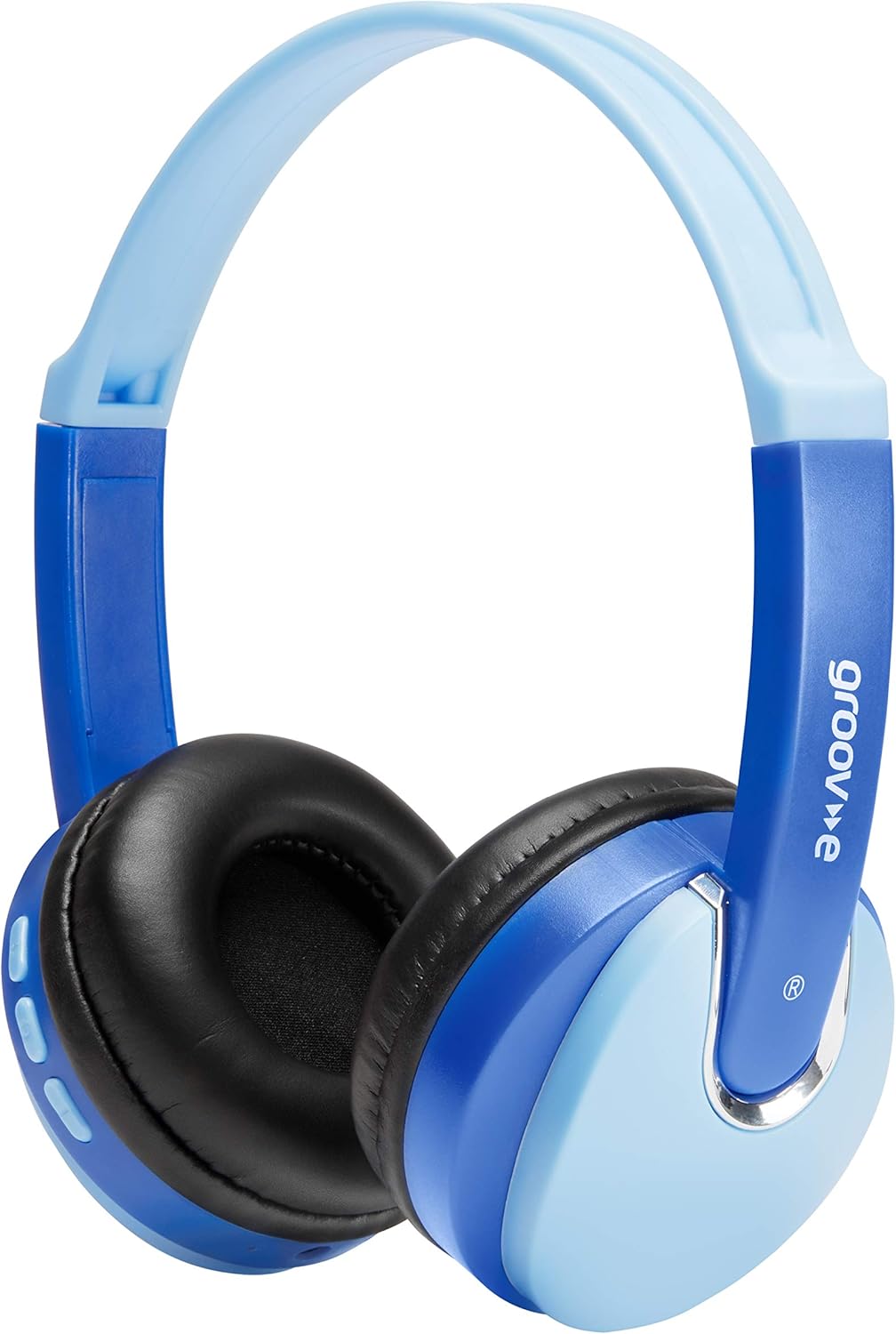
Spredaj view of the Groov-e Bluetooth DJ Style Wireless On-Ear Headphones in blue.

Stran view of the right earcup, displaying the volume and track control buttons.
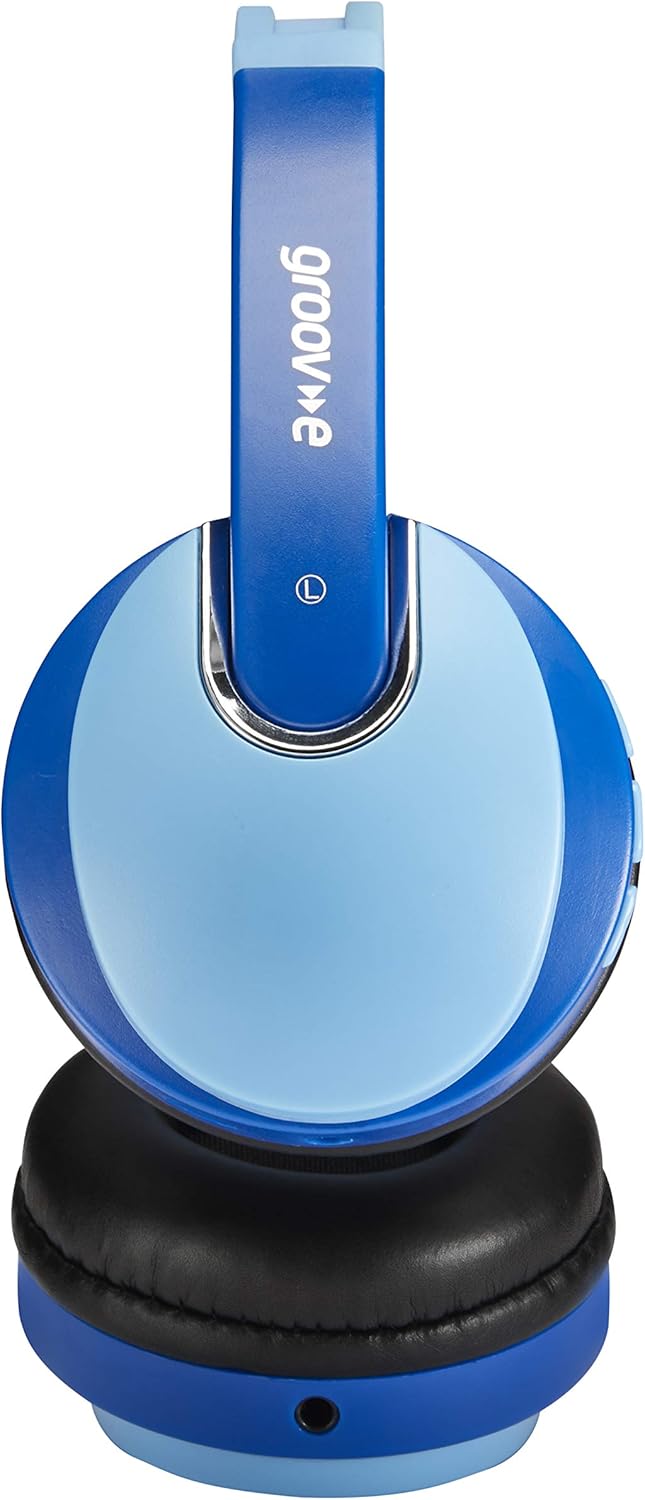
Stran view of the left earcup, showing the 3.5mm audio input and the audio sharing port.
- Nastavljiv naglavni trak: Za udobno in varno prileganje.
- Mehke ušesne blazinice: Zasnovano za dolgotrajno udobje nošenja.
- Gumbi za upravljanje: Located on the earcup for power, volume, and track control.
- Mikrofon: Vgrajeno za prostoročne klice.
- 3.5 mm avdio priključek: For wired connection to devices.
- Vrata za polnjenje mikro USB: Za polnjenje notranje baterije.
- Audio Sharing Port: Allows another pair of headphones to connect and share audio.
Nastavitev
Polnjenje slušalk
Before first use, fully charge the headphones. Connect the Micro USB charging cable to the charging port on the headphones and the other end to a USB power source (e.g., computer USB port, USB wall adapter). The LED indicator will show charging status (typically red while charging, turning off or blue when fully charged). A full charge provides up to 7.5 hours of wireless playback.
Bluetooth združitev
- Prepričajte se, da so slušalke izklopljene.
- Pritisnite in držite gumb za vklop, dokler LED indikator ne utripa izmenično modro in rdeče, kar označuje način seznanjanja.
- V napravi (pametnem telefonu, tablici, prenosniku) omogočite Bluetooth in poiščite nove naprave.
- Select "Groov-e Kidz DJ" (or similar name) from the list of available devices.
- Ko je povezava vzpostavljena, bo LED indikator običajno počasi utripal modro ali pa bo neprekinjeno svetil modro.
Žična povezava
If Bluetooth is not available or the battery is depleted, you can use the included 3.5mm audio cable. Simply plug one end into the 3.5mm audio jack on the headphones and the other end into the audio output of your device.
Navodila za uporabo
Vklop/izklop
- Vklop: Pritisnite in držite gumb za vklop približno 3 sekundi, dokler se ne prižge LED indikator.
- Ugasniti: Pritisnite in držite gumb za vklop približno 3 sekunde, dokler se LED indikator ne izklopi.
Predvajanje glasbe
- Predvajanje/pavza: Kratek pritisk na gumb Predvajaj/Pavza.
- Povečaj glasnost: Na kratko pritisnite gumb "+".
- Znižaj glasnost: Na kratko pritisnite gumb "-".
- Naslednja skladba: Dolgo pritisnite gumb "+".
- Prejšnja skladba: Dolgo pritisnite gumb "-".
Prostoročno telefoniranje
- Sprejmi/končaj klic: Kratek pritisk na gumb Predvajaj/Pavza.
- Zavrni klic: Dolgo pritisnite gumb Predvajaj/Premor.
- Ponovno klicanje zadnje številke: Dvakrat pritisnite gumb Predvajaj/Premor.
Audio Sharing (Daisy Chain)
The headphones feature a 'daisy chain' audio-sharing port. To share audio with another pair of headphones:
- Connect your Groov-e headphones to your audio source (via Bluetooth or 3.5mm cable).
- Plug a 3.5mm audio cable into the Audio Sharing Port on your Groov-e headphones.
- Connect the other end of the 3.5mm audio cable to the audio input of a second pair of headphones.
- Both pairs of headphones will now play the same audio.
Vzdrževanje
Čiščenje
Wipe the headphones with a soft, dry cloth. Do not use abrasive cleaners or solvents. Avoid getting moisture into any openings.
Shranjevanje
Slušalke shranjujte na hladnem in suhem mestu, stran od neposredne sončne svetlobe in ekstremnih temperatur. Nanje ne postavljajte težkih predmetov.
Skrb za baterijo
To prolong battery life, avoid fully discharging the battery frequently. If storing for a long period, charge the headphones at least once every three months.
Odpravljanje težav
| Težava | Možen vzrok | rešitev |
|---|---|---|
| Slušalke se ne vklopijo. | Baterija je skoraj prazna ali izpraznjena. | Slušalke povsem napolnite. |
| Seznanitev prek Bluetootha ni mogoča. | Slušalke niso v načinu seznanjanja; Bluetooth naprave izklopljen; preveč oddaljeno od naprave. | Prepričajte se, da so slušalke v načinu seznanjanja (utripa rdeče/modro). Vklopite Bluetooth naprave. Slušalke premaknite bližje napravi (v 10 metrih). |
| Brez zvoka. | Glasnost je prenizka; napačen vir zvoka; slušalke niso priključene. | Increase volume on headphones and device. Ensure headphones are properly connected (Bluetooth or wired). Check if the correct audio output is selected on your device. |
| Popačenje zvoka. | Too far from device; interference. | Premaknite se bližje napravi Bluetooth. Izogibajte se močnim elektromagnetnim motnjam. |
Specifikacije
| Funkcija | Podrobnost |
|---|---|
| Ime modela | GV590 KIDS DJ |
| Številka modela | GVBT590BE |
| Tehnologija povezljivosti | Bluetooth, Wired (3.5mm Jack), USB (Charging) |
| Brezžična komunikacija | Bluetooth |
| Čas predvajanja | Do 7.5 ur (brezžično) |
| Velikost gonilnika | 40 mm |
| Starostna skupina (opis) | Kid (Suitable for children aged 3+) |
| Material | Plastika |
| Združljive naprave | All Bluetooth devices, devices with 3.5mm jacks (MP3, smartphone, tablet, PC, laptop, portable DVD) |
| Teža predmeta | 298 gramov (0.3 kilograma) |
| Dimenzije izdelka | 7.7 x 18.2 x 24 cm |
| Vrsta baterije | 1 litij-ionska baterija (priložena) |
| barva | Bluetooth modra |
| Faktor oblike | Na uho |
Informacije o garanciji
Groov-e products are manufactured to high standards. For specific warranty details, please refer to the warranty card included with your purchase or visit the official Groov-e webspletnega mesta. Shranite dokazilo o nakupu za morebitne garancijske zahtevke.
Podpora uporabnikom
If you encounter any issues not covered in this manual or require further assistance, please contact Groov-e customer support. Contact details can typically be found on the product packaging, the official Groov-e webspletnem mestu ali prek vašega prodajalca.