
Protmex PT3374
Protmex Wireless Weather Station PT3374 User Manual
Model: PT3374 | Brand: Protmex
1. Uvod
Hvala za nakupasing the Protmex PT3374 Wireless Weather Station. This multifunctional device provides accurate indoor and outdoor temperature and humidity readings, barometric pressure, and a weather forecast. It also functions as an alarm clock with a colorful display, enhancing your daily life with essential environmental data. Please read this manual carefully before use to ensure proper operation and to fully utilize all features.
2. Izdelek je končanview
The Protmex PT3374 consists of a main display unit and a wireless outdoor sensor. Familiarize yourself with the components and their functions.
2.1 Značilnosti glavne enote
- Colorful LCD Display: Shows time, date, indoor/outdoor temperature and humidity, weather forecast, barometric pressure, and moon phase.
- Alarm Clock with Snooze: Set daily alarms with a convenient snooze function.
- Barometer: Displays atmospheric pressure and pressure tendency.
- Weather Forecast: Predicts weather conditions based on barometric pressure changes.
- Comfort Level Indicator: Provides a visual representation of indoor comfort.
- Temperature & Humidity Trend: Shows rising, falling, or steady trends for both indoor and outdoor conditions.
- Ice Alert: Notifies when outdoor temperature approaches freezing.
2.2 Brezžični zunanji senzor
The compact outdoor sensor wirelessly transmits temperature and humidity data to the main unit.
2.3 Identifikacija komponent

Figure 2.1: Main Unit and Wireless Sensor with Labeled Parts
This image shows the front and back of the main weather station unit and the wireless outdoor sensor, with key components labeled for easy identification. Labels include display areas for weather forecasting, barometric pressure, outdoor and indoor temperature/humidity, time/calendar, and moon phase on the front. The back of the main unit shows buttons (DOWN, UP, ALARM, SET, MEMORY, HPA/INHG, ALERT, SNOOZE/LIGHT), a hook hole, battery compartment, support frame, and power supply socket.

Figure 2.2: Protmex PT3374 Weather Station Overview
Jasno view of the Protmex PT3374 main display unit and its accompanying wireless outdoor sensor. The main unit features a large, colorful display showing various weather parameters and time, while the compact outdoor sensor is designed for remote placement.
3. Nastavitev
3.1 Razpakiranje
Carefully remove all components from the packaging. Ensure you have the main unit, wireless outdoor sensor, and power adapter.
3.2 Namestitev baterije
The main unit can be powered by the included AC adapter or by batteries (for backup). The outdoor sensor requires batteries.
- Glavna enota: Open the battery compartment on the back. Insert 3 x AAA batteries (not included) according to the polarity markings. For continuous backlight, connect the AC power adapter to the power supply socket on the back of the main unit and plug it into a wall outlet.
- Zunanji senzor: Open the battery compartment. Insert 2 x AA batteries (not included) according to the polarity markings.
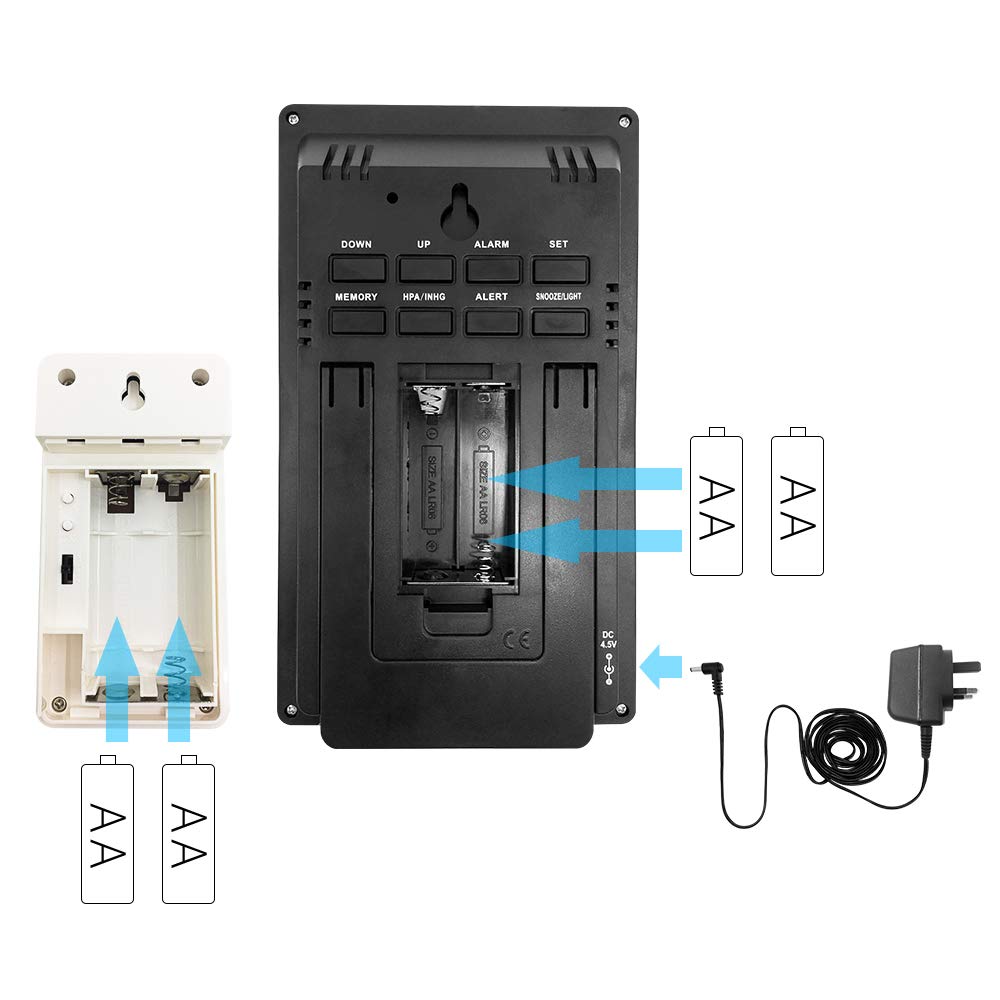
Slika 3.1: Namestitev baterije
This diagram illustrates the correct insertion of AAA batteries into the main unit and AA batteries into the wireless outdoor sensor, showing the battery compartments and polarity indicators.
3.3 Združevanje senzorjev
After installing batteries in both units, the main unit will automatically search for the outdoor sensor. Ensure both units are within range. If pairing fails, press and hold the "CHANNEL" button on the main unit to initiate a manual search.
3.4 Začetne nastavitve
Upon first power-up or after a reset, you may need to set the time, date, and measurement units.
- Press the "SET" button to enter time setting mode.
- Use the "UP" or "DOWN" buttons to adjust values.
- Press "SET" again to confirm and move to the next setting (e.g., 12/24 hour format, hour, minute, year, month, day, temperature unit (°C/°F), pressure unit (hPa/inHg)).
- Press "SET" repeatedly until all settings are confirmed or the unit exits setting mode automatically.
4. Navodila za uporabo
4.1 Time and Alarm Functions
- Nastavitev alarma: Pritisnite gumb "ALARM", da view alarm time. Press and hold "ALARM" to enter alarm setting mode. Use "UP" or "DOWN" to adjust, and "ALARM" to confirm.
- Vklop/izklop alarma: Press "ALARM" repeatedly to toggle the alarm on/off.
- Funkcija dremeža: When the alarm sounds, press the "SNOOZE/LIGHT" button to activate snooze. The alarm will sound again after approximately 5 minutes.
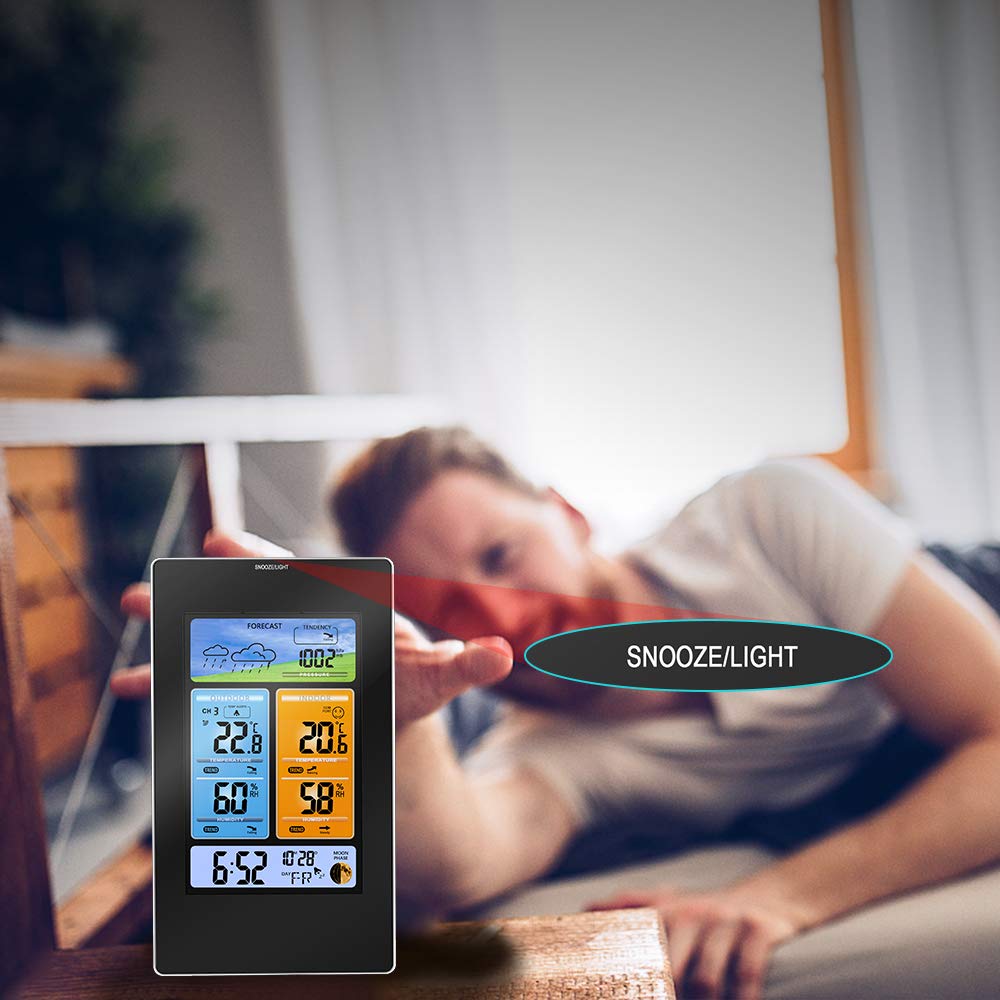
Figure 4.1: Snooze/Light Button Usage
This image demonstrates the use of the "SNOOZE/LIGHT" touch field, typically located at the top of the main unit, for activating the snooze function or temporarily illuminating the display backlight.
4.2 Weather Display and Forecast
The weather station provides a forecast for the next 12-24 hours based on barometric pressure changes.
- Ikone napovedi: The display shows icons for Sunny, Partly Cloudy, Cloudy, Rainy, and Snowy.
- Barometrični tlak: Displays current atmospheric pressure. Press "HPA/INHG" to switch between hPa and inHg units.
- Pressure Tendency: An arrow indicates if the pressure is rising, falling, or steady.

Slika 4.2: Ikone vremenske napovedi
This image illustrates the various weather forecast icons displayed on the main unit, including sunny, partly cloudy, cloudy, rainy, and snowy conditions, providing a visual prediction of upcoming weather.
4.3 Temperatura in vlažnost
- Indoor/Outdoor Readings: The display shows current indoor and outdoor temperature and humidity.
- Indikatorji trenda: Arrows next to temperature and humidity readings indicate if values are rising, falling, or stable.
- Opozorilo o ledu: An ice crystal icon appears when the outdoor temperature drops to a level indicating potential ice formation (typically below 3°C or 37.4°F).

Figure 4.3: Trend Indicators
This image highlights the trend indicators for temperature and humidity on the main display, showing arrows that signify whether the readings are rising, falling, or remaining steady.

Figure 4.4: Ice Alert Feature
An illustration of the ice alert icon appearing on the display when the outdoor temperature reaches a critical level, warning of potential freezing conditions.
4.4 Kazalnik ravni udobja
The comfort level indicator provides a quick visual reference for indoor environmental comfort based on temperature and humidity.

Figure 4.5: Comfort Level Indicator
This image shows the comfort level indicator, represented by various facial expressions, which changes based on the indoor temperature and humidity to indicate whether the environment is comfortable, too dry, or too humid.
4.5 Namestitev zunanjega senzorja
For accurate outdoor readings, place the wireless sensor in a sheltered location away from direct sunlight and precipitation. Ensure it is within the main unit's transmission range (typically up to 60 meters/200 feet in open air).

Figure 4.6: Optimal Outdoor Sensor Placement
This image illustrates the recommended placement of the main unit indoors and the wireless outdoor sensor in a sheltered outdoor location, ensuring optimal signal transmission and accurate readings.
5. Vzdrževanje
- Čiščenje: Glavno enoto in senzor obrišite z mehko krpoamp krpo. Ne uporabljajte abrazivnih čistil ali topil.
- Zamenjava baterije: Ko se na zaslonu prikaže indikator nizke napolnjenosti baterije, zamenjajte baterije v obeh enotah. Vedno zamenjajte vse baterije hkrati.
- Shranjevanje: Če napravo shranjujete dlje časa, odstranite vse baterije, da preprečite puščanje.
- Okoljski pogoji: Izogibajte se izpostavljanju enot ekstremnim temperaturam, neposredni sončni svetlobi ali prekomerni vlagi.
6. Odpravljanje težav
| Težava | Možen vzrok | rešitev |
|---|---|---|
| Ni odčitka zunanje temperature/vlažnosti. | Sensor out of range, low sensor batteries, interference. | Move sensor closer to main unit. Replace sensor batteries. Relocate units away from electronic devices. Press and hold "CHANNEL" button on main unit to re-pair. |
| Napačen čas/datum. | Time not set correctly, power interruption. | Manually set time and date (refer to Section 3.4). Ensure AC adapter is connected for continuous power. |
| Zaslon je zatemnjen ali prazen. | Low main unit batteries, AC adapter not connected. | Replace main unit batteries. Connect AC adapter for continuous backlight. |
| Inaccurate weather forecast. | Weather forecast is a prediction, not always 100% accurate. | The forecast is based on barometric pressure trends and may not always match official forecasts. It provides a general indication. |
7. Specifikacije
| Funkcija | Podrobnost |
|---|---|
| Številka modela | PT3374 (Part No: PPT-WS010) |
| Teža predmeta | 540 g |
| Dimenzije paketa | 25 x 22.5 x 6 cm |
| Vrsta napajanja (glavna enota) | Battery (3 x AAA, not included), Power Cord (AC Adapter) |
| Power Type (Outdoor Sensor) | Battery (2 x AA, not included) |
| Najvišja temperaturna ocena | 60°C |
| Znamka | Protmex |
8. Garancija in podpora
Protmex products are designed for reliability and performance. For specific warranty details, please refer to the warranty card included with your product or visit the official Protmex website. If you encounter any issues or have questions regarding your PT3374 Weather Station, please contact Protmex customer support for assistance. Contact information can typically be found on the product packaging or the official brand webmesto.
Za najnovejše informacije o podpori in pogosta vprašanja obiščite: www.protmex.com (Opomba: To je nadomestno besedilo URL as no specific support link was provided in the product data.)
Ask a question about this manual
Ask about setup, troubleshooting, compatibility, parts, safety, or missing instructions. Manuals+ will review the question and use this page’s manual context to help answer it.