
1. Uvod
This manual provides detailed instructions for the proper installation, operation, and maintenance of your Roadstar RD8410N and RD8200N TV Tuner and TV Antenna. Please read this manual thoroughly before using the product to ensure safe and efficient operation. Keep this manual for future reference.
2. Varnostne informacije
- Prepričajte se, da je napajalnik voltage ustreza zahtevam, navedenim na napravi.
- Naprave ne izpostavljajte dežju, vlagi ali ekstremnim temperaturam.
- Naprave ne postavljajte v bližino virov toplote ali na neposredno sončno svetlobo.
- Ne odpirajte casing of the TV tuner; refer all servicing to qualified personnel.
- Anteno hranite stran od visokonapetostnihtagdaljnovodi in druge električne nevarnosti.
- Med nevihtami ali če naprave dalj časa ne uporabljate, izključite napajalnik iz električnega omrežja.
3. Vsebina paketa
Po odprtju preverite vsebino paketa. Če kateri koli predmet manjka ali je poškodovan, se obrnite na prodajalca.
- Roadstar TV Tuner (RD8410N or RD8200N)
- TV antena
- Napajalni adapter
- Daljinski upravljalnik (če je priložen vašemu modelu)
- Uporabniški priročnik (ta dokument)
4. Izdelek je končanview
Familiarize yourself with the components of your Roadstar TV Tuner and Antenna.
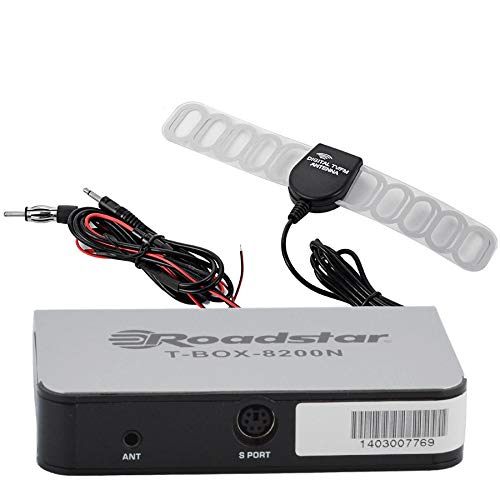
Figure 1: Roadstar T-BOX-8200N TV Tuner
This image displays the Roadstar T-BOX-8200N TV Tuner. It is a compact, silver-grey rectangular device with black side panels. The front face prominently features the "Roadstar" logo and the model name "T-BOX-8200N". On the right side, two ports are visible: one labeled "12V" for power input and another labeled "ANT" for antenna connection. This device is designed to receive and process television signals.
4.1. TV Tuner Ports and Indicators
- ANT Input: Connects to the TV antenna for receiving broadcast signals.
- 12V DC vhod: Priklopi se na priloženi napajalnik.
- (Other ports like HDMI Out, USB, AV Out may be present depending on specific model variant. Refer to your device for exact port configuration.)
4.2. TV Antenna
The included TV antenna is designed to capture terrestrial broadcast signals. Its performance may vary based on location, signal strength, and obstacles.
5. Nastavitev
5.1. Connecting the TV Tuner
- Povežite anteno: Plug the antenna cable into the "ANT" input port on the Roadstar TV Tuner.
- Povežite se s televizorjem: Use an appropriate cable (e.g., HDMI, AV) to connect the TV tuner's output port to an available input port on your television. Note the input port you use (e.g., HDMI 1, AV 2).
- Priključite napajanje: Insert the small end of the power adapter into the "12V DC" input port on the TV tuner. Plug the other end of the power adapter into a standard electrical outlet.
5.2. Positioning the TV Antenna
- Place the antenna in a location with minimal obstructions, ideally near a window or high up.
- Experiment with different antenna positions to find the best signal reception.
- Avoid placing the antenna near large metal objects or other electronic devices that may cause interference.
6. Navodila za uporabo
6.1. Začetni vklop in iskanje kanalov
- Turn on your television and select the correct input source (e.g., HDMI 1, AV 2) that the TV tuner is connected to.
- The TV tuner should power on automatically or can be turned on using its power button or remote control.
- Follow the on-screen prompts for initial setup. This typically includes selecting your language and country.
- Initiate an "Auto Scan" or "Channel Search" from the TV tuner's menu. This process will scan for available digital television channels. This may take several minutes.
- Once the scan is complete, the tuner will save the found channels, and you should be able to view njih.
6.2 Osnovna televizija Viewing
- Use the remote control's channel up/down buttons to navigate through channels.
- Use the volume buttons on your TV's remote control to adjust audio levels.
- Access the menu to adjust settings, view program guides (EPG), or manage channels.
7. Vzdrževanje
7.1. Čiščenje
- Pred čiščenjem se prepričajte, da je naprava izklopljena.
- Wipe the exterior of the TV tuner and antenna with a soft, dry cloth.
- Do not use liquid cleaners, aerosols, or abrasive chemicals.
7.2. Shranjevanje
- Če napravo shranjujete dalj časa, jo izključite iz električnega omrežja in jo shranite na hladnem in suhem mestu.
- Hranite ga stran od neposredne sončne svetlobe in ekstremnih temperatur.
8. Odpravljanje težav
| Težava | Možen vzrok | rešitev |
|---|---|---|
| Brez moči | Napajalnik ni priključen ali pa je vtičnica pokvarjena. | Ensure power adapter is securely connected to the tuner and a working electrical outlet. |
| No signal / "No Channel" message | Antenna not connected, poor antenna position, or no channels scanned. |
|
| Poor picture quality / pixelation | Weak signal, interference, or antenna position. |
|
| Brez zvoka | TV volume muted or too low, incorrect audio settings. |
|
9. Specifikacije
Opomba: Specifikacije se lahko spremenijo brez predhodnega obvestila.
- Model: Roadstar RD8410N, Roadstar RD8200N
- Vrsta izdelka: TV Tuner and Antenna Package
- Vrsta sprejemnika: Digital Terrestrial Television (DTT)
- Vhodna voltage: 12 V DC (prek priloženega napajalnika)
- Vrsta antene: Passive or Active (depending on specific antenna model)
- Povezljivost: ANT In, 12V DC In, (e.g., HDMI Out, USB, AV Out - specific to model)
- ASIN: B07GXJPR3R
- Znamka: Roadstar
10. Garancija in podpora
Za informacije o garanciji in tehnično podporo glejte dokumentacijo, ki ste jo prejeli ob nakupu, ali se obrnite na prodajalca. Potrdilo o nakupu shranite za uveljavljanje garancije.
