
FOINNEX H-DPF
Uporabniški priročnik za adapter HDMI v DisplayPort FOINNEX
Brand: FOINNEX | Model: H-DPF
1. Izdelek je končanview
The FOINNEX HDMI to DisplayPort Adapter (Model H-DPF) is designed to transmit high-definition video and audio signals from an HDMI source device to a DisplayPort display. This active adapter supports resolutions up to 4K@60Hz, making it suitable for various applications including video streaming, gaming, and extending/mirroring displays.
Ključne značilnosti:
- Unidirectional Signal Transfer: Converts signal from HDMI output to DisplayPort input only.
- 4K@60Hz Resolution Support: Supports UHD resolutions up to 3840x2160 at 60Hz.
- Plug and Play: Za namestitev niso potrebni gonilniki.
- Več načinov: Supports extended and mirror display modes.
- Široka združljivost: Compatible with various HDMI output devices (PCs, laptops, gaming consoles) and DisplayPort input devices (monitors, HDTVs, projectors).
- USB Power Option: Can be powered via USB for low-voltage devices like PS4 or Apple devices.
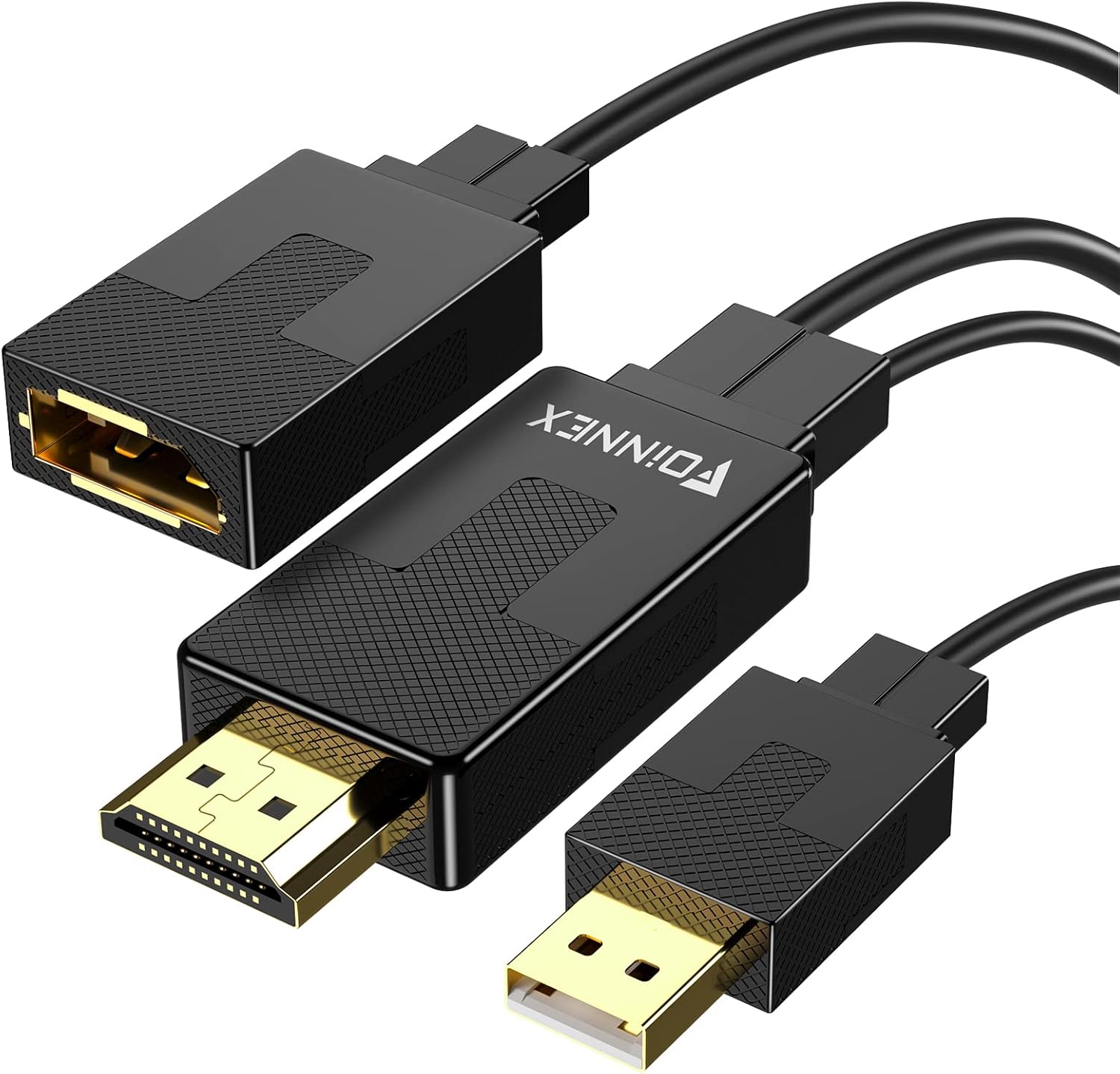
Figure 1: FOINNEX HDMI to DisplayPort Adapter. This image shows the adapter with its HDMI male connector, DisplayPort female port, and an attached USB-A male connector for optional power.
2. Navodila za nastavitev
Follow these steps to connect your FOINNEX HDMI to DisplayPort Adapter:
- Prepoznajte vrata: Ensure your source device has an HDMI output port and your display device has a DisplayPort input port. Remember, this adapter is unidirectional (HDMI source to DisplayPort display).
- Povežite HDMI: Plug the HDMI male connector of the FOINNEX adapter into the HDMI output port of your source device (e.g., computer, PS4, Nintendo Switch).

Figure 2: Connecting the HDMI output from your source device to the adapter.
- Connect DisplayPort: Connect a DisplayPort cable (not included) from the DisplayPort female port of the FOINNEX adapter to the DisplayPort input port on your monitor or display.

Figure 3: Connecting the DisplayPort cable from the adapter to your display.
- Dodatno napajanje prek USB-ja: For low-power HDMI source devices (such as SONY PS4, MacBook Pro with Retina Display, Mac mini, or Nintendo Switch), connect the USB-A male connector of the adapter to a USB port on your source device or a USB power adapter. This provides additional power to ensure stable signal transmission.

Figure 4: Optional USB power connection for low-voltage naprave.
- Select Input on Display: On your display, navigate to the input/source menu and select "DisplayPort" as the active input.

Figure 5: Selecting DisplayPort input on your monitor.
The adapter is plug-and-play, so no additional drivers are typically needed. Your display should automatically detect the signal.
3. Navodila za uporabo
Once connected, the FOINNEX HDMI to DisplayPort Adapter allows for seamless video and audio transmission. Here are common operating scenarios:
3.1. Načini prikaza
The adapter supports both mirror and extended display modes, configurable through your operating system's display settings.
- zrcalni način: Duplicates your primary display's content onto the connected DisplayPort monitor.
- Razširjeni način: Extends your desktop across both displays, providing more screen real estate for multitasking.

Figure 6: Using the adapter for dual monitors in extended mode for work.
3.2. Igre in multimedija
The adapter is suitable for connecting gaming consoles (PS3, Xbox One, Xbox 360, Nintendo Switch) or other multimedia devices to a DisplayPort monitor. It supports 4K@60Hz for compatible consoles and displays.
Opomba: This adapter cannot improve the native resolution of games. Game consoles supporting 4K@60Hz (e.g., Xbox One S) will display games at their native resolution on a compatible 4K@60Hz DisplayPort monitor.

Figure 7: Enhancing your gaming experience with 4K@60Hz support.
4. Vzdrževanje
The FOINNEX HDMI to DisplayPort Adapter requires minimal maintenance to ensure optimal performance and longevity.
- Čiščenje: Use a soft, dry cloth to gently wipe the adapter and its connectors. Avoid using liquid cleaners or abrasive materials.
- Shranjevanje: Ko adapterja ne uporabljate, ga shranite na hladnem in suhem mestu, stran od neposredne sončne svetlobe in ekstremnih temperatur.
- Ravnanje: Avoid bending or twisting the cables excessively, as this can damage internal wires. Always grasp the connector ends when plugging or unplugging the adapter.
- Okoljski pogoji: Adapterja ne izpostavljajte vodi, visoki vlažnosti ali prašnemu okolju.
5. Odpravljanje težav
If you encounter issues with your FOINNEX HDMI to DisplayPort Adapter, refer to the following common problems and solutions:
| Težava | Možen vzrok | rešitev |
|---|---|---|
| No display or flickering screen. | Incorrect connection, insufficient power, or incorrect display input selected. |
|
| Resolution is not 4K@60Hz. | Source device, display, or DisplayPort cable does not support 4K@60Hz. |
|
| Adapter does not work with my Rog Swift PG278Q or curved monitor. | Known incompatibility with specific gaming monitors. | This adapter is noted to be incompatible with certain gaming monitors like the Rog Swift PG278Q and some curved monitors when used with game consoles. No direct solution for these specific incompatibilities. |
| Ni avdio izhoda. | Audio settings on source device or display. |
|
| Adapter does not work from DisplayPort source to HDMI display. | Unidirectional design. | This adapter is strictly unidirectional, converting signals only from HDMI output to DisplayPort input. It will not work in the reverse direction (DisplayPort source to HDMI display). You would need a different type of adapter for that purpose. |
6. Specifikacije izdelka
| Funkcija | Podrobnost |
|---|---|
| Znamka | FOINNEX |
| Številka modela | H-DPF |
| Vrsta priključka | HDMI Male to DisplayPort Female |
| Smer signala | Unidirectional (HDMI Source to DisplayPort Display) |
| Podprta največja ločljivost | 3840x2160 @ 60Hz (4K@60Hz) |
| Podpora HDCP | HDCP 2.2 (Note: Does not support Dynamic HDR) |
| Zahteva po moči | Optional USB power for low-voltage naprave |
| barva | Črna |
| Teža predmeta | 0.247 unč |
| Dimenzije paketa | 6.02 x 5.35 x 0.75 palcev |
7. Garancija in podpora
FOINNEX stands behind the quality of its products. This adapter comes with a 24-mesečna garancija od datuma nakupa.
Poleg tega a 30-dnevno vračilo policy is available for eligible purchases.
For technical support, warranty claims, or any inquiries regarding your FOINNEX product, please contact FOINNEX customer service through the retailer where the product was purchased or visit the official FOINNEX webspletno mesto za kontaktne podatke.
FOINNEX is committed to providing high-quality products and customer experiences.
Ask a question about this manual
Ask about setup, troubleshooting, compatibility, parts, safety, or missing instructions. Manuals+ will review the question and use this page’s manual context to help answer it.