
Uvod
This manual provides instructions for the installation, operation, and maintenance of your Audiovox ELEAUDAX80EXT Wireless Extension. This device is designed to expand the functionality of compatible Audiovox phone models, specifically the AX8001, AX8001E, and AX8101AM, by providing an additional wireless handset.
Vsebina paketa
Preden nadaljujete z namestitvijo, preverite, ali so v paketu prisotni vsi elementi.
- Audiovox ELEAUDAX80EXT Wireless Extension Unit
- Napajalnik (če je na voljo)
- Polnilna baterija (predhodno nameščena ali ločena)
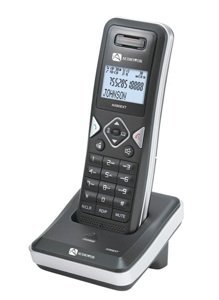
Image: The Audiovox ELEAUDAX80EXT Wireless Extension Unit. This image displays the compact design of the extension handset.
Nastavitev
- Napolnite baterijo: If the battery is not pre-installed, insert it into the extension unit according to the markings. Place the extension unit on its charging cradle (if included) or connect the power adapter directly to the unit and a power outlet. Allow the unit to charge for at least 12-16 hours before initial use.
- Register the Extension:
- Ensure your main Audiovox phone base (AX8001, AX8001E, or AX8101AM) is powered on.
- On the main phone base, locate and press the "Register" or "Page" button. Hold it until the indicator light on the base begins to flash (refer to your main phone's manual for exact instructions).
- While the base is in registration mode, on the ELEAUDAX80EXT extension unit, navigate to the "Menu" and select "Register Handset" or a similar option. Follow the on-screen prompts.
- Once registration is successful, the extension unit will display a confirmation message, and the indicator light on the base will stop flashing.
- Testna povezava: Make a test call from the extension unit to ensure proper functionality.
Navodila za uporabo
Klicanje
- Dvignite slušalko ali pritisnite POGOVORITE gumb.
- Pokličite želeno telefonsko številko.
- Pritisnite POGOVORITE ponovno pritisnite gumb ali postavite slušalko nazaj na odlagalno ploščo, da končate klic.
Sprejem klica
- Ko telefon zazvoni, dvignite slušalko ali pritisnite POGOVORITE gumb.
- Če želite končati klic, pritisnite KONEC gumb ali postavite slušalko nazaj na odlagalno ploščo.
Intercom Function (if supported by base unit)
- Pritisnite INTERKOM gumb.
- Dial the number of the extension you wish to call (e.g., "2" for the second handset).
- Pritisnite POGOVORITE to initiate the intercom call.
Vzdrževanje
- Čiščenje: Enoto obrišite z mehko, damp krpo. Ne uporabljajte močnih kemikalij ali abrazivnih čistil.
- Vzdrževanje baterije: For optimal battery life, avoid fully discharging the battery frequently. Keep the unit on its charger when not in use.
- Shranjevanje: Če napravo shranjujete dlje časa, odstranite baterijo in jo shranite na hladnem in suhem mestu.
Odpravljanje težav
| Težava | rešitev |
|---|---|
| Ni signala za klic / Ni mogoče klicati |
|
| Slušalka se ne polni |
|
| Slaba kakovost klica / Statični signali |
|
Specifikacije
- Številka modela: ELEAUDAX80EXT
- Compatible Base Units: Audiovox AX8001, AX8001E, AX8101AM
- Dimenzije (D x Š x V): 20 x 40 x 30 milimetrov
- Teža: 20 gramov
- UPC: 044476082719
Garancija in podpora
For specific warranty information and technical support, please refer to the documentation included with your original Audiovox phone system or visit the official Audiovox webspletnega mesta. Račun shranite kot dokazilo o nakupu za uveljavljanje garancije.
For further assistance, please contact Audiovox customer service.