
1. Izdelek je končanview
The Zerone Multi-Language Translator Bluetooth Earphone is a portable wireless device designed for real-time language translation and audio playback. It features Bluetooth 4.1 connectivity, high-fidelity audio output, and a compact in-ear design for comfortable use during various activities.

Slika 1.1: Glavna view of the Zerone Multi-Language Translator Bluetooth Earphone.
2. Vsebina paketa
Prosimo, preverite, ali so v vašem paketu priloženi vsi spodaj navedeni artikli:
- Zerone Multi-Language Translator Bluetooth Earphone
- USB polnilni kabel
- Dodatni ušesni nastavki (različne velikosti)
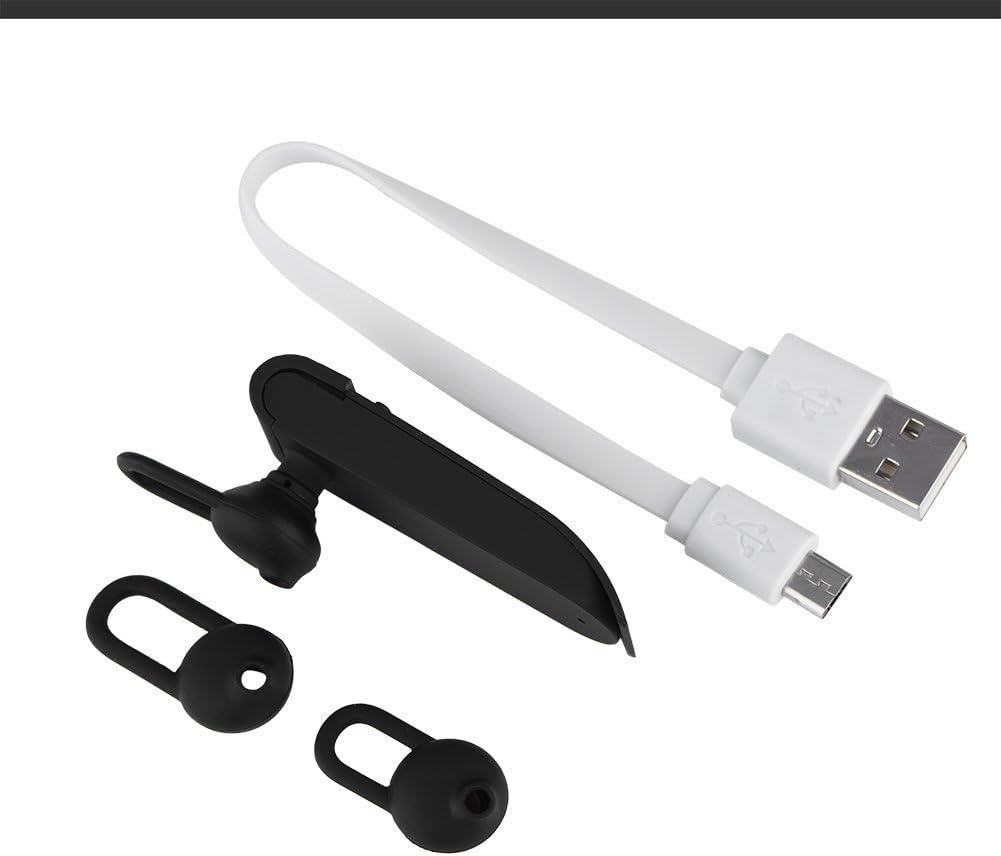
Image 2.1: The earphone with its charging cable and two additional ear tips.
3. Značilnosti izdelka
- Multi-Language Translation: Supports up to 16 languages for real-time translation. Speak into the earphone, and it will translate into the desired language.
- High Fidelity Audio Output: Equipped with an 8mm moving coil speaker for clear, smooth audio and enhanced bass.
- True Wireless In-Ear Design: Mini and compact, offering a stable and comfortable fit without tangled wires, suitable for various activities.
- Povezljivost Bluetooth 4.1: Optimized Bluetooth 4.1 version ensures a stable and fast wireless connection with a range of up to 10 meters.
- Podaljšana življenjska doba baterije: Built-in 90mAh rechargeable lithium battery provides approximately 5-8 hours of playback time and up to 13 hours of talk time.

Image 3.1: Visual representation of the 16 languages translation feature.

Image 3.2: Illustration of the high fidelity audio output with an 8mm moving coil speaker.

Image 3.3: Visual representation of the Bluetooth true wireless connection with a 10-meter transmission range.

Image 3.4: Details on the earphone's 90mAh rechargeable lithium battery and extended usage times.
4. Nastavitev
4.1 Polnjenje slušalk
Before initial use, fully charge the earphone. Connect the provided USB charging cable to the earphone's charging port and the other end to a USB power source (e.g., computer, wall adapter). The charging time is approximately 2 hours.
4.2 Bluetooth seznanjanje
- Ensure the earphone is fully charged and powered off.
- Press and hold the multi-function button on the earphone until the indicator light flashes red and blue alternately, indicating pairing mode.
- Na pametnem telefonu ali napravi, ki podpira Bluetooth, se pomaknite do nastavitev Bluetooth.
- Iskanje available devices and select "Zerone Translator Earphone" (or similar name) from the list.
- Ko je povezava vzpostavljena, indikatorska lučka običajno sveti modro ali počasi utripa modro.
4.3 Companion Application (for Translation)
To utilize the multi-language translation feature, you will need to download and install a compatible companion application on your smartphone. Refer to the packaging or product documentation for the specific app name and download instructions. Ensure your phone is connected to the internet for translation services.
5. Navodila za uporabo
5.1 Vklop/izklop
- Vklop: Press and hold the multi-function button for approximately 3 seconds until the indicator light turns blue.
- Ugasniti: Pritisnite in držite večfunkcijski gumb približno 5 sekund, dokler indikatorska lučka ne zasveti rdeče.
5.2 Predvajanje glasbe
- Predvajanje/pavza: Kratek pritisk na večfunkcijski gumb.
- Naslednja skladba: Dvakrat pritisnite večfunkcijski gumb.
- Prejšnja skladba: Trikrat pritisnite večfunkcijski gumb.
5.3 Upravljanje klicev
- Sprejmi/končaj klic: Kratek pritisk na večfunkcijski gumb.
- Zavrni klic: Pritisnite in 2 sekunde držite večnamenski gumb.
5.4 Using the Translation Function
After successfully pairing the earphone with your device and setting up the companion application:
- Open the translation application on your smartphone.
- Select the source and target languages within the app.
- Activate the translation mode as instructed by the application (this may involve pressing a button on the earphone or within the app).
- Speak clearly into the earphone's microphone. Your speech will be translated and played back through the earphone or your phone's speaker, depending on the app's settings.

Image 5.1: A conceptual image demonstrating the earphone's translation capability between two languages.
6. Vzdrževanje
- Čiščenje: Use a soft, dry cloth to clean the earphone. Do not use abrasive cleaners or immerse the device in water.
- Shranjevanje: Slušalke shranjujte na hladnem in suhem mestu, stran od neposredne sončne svetlobe in ekstremnih temperatur.
- Vzdrževanje baterije: To prolong battery life, avoid fully discharging the earphone frequently. Charge it regularly, even if not in use for extended periods.
7. Odpravljanje težav
| Težava | Možen vzrok | rešitev |
|---|---|---|
| Earphone does not power on | Nizka baterija | Charge the earphone for at least 30 minutes. |
| Seznanitev z napravo ni mogoča | Earphone not in pairing mode; Bluetooth off on device; device too far | Ensure earphone is in pairing mode (flashing red/blue). Turn on Bluetooth on your device. Move device closer to earphone (within 10m). |
| No sound during playback/calls | Volume too low; earphone not connected; media output not selected | Increase volume on both earphone and connected device. Re-pair the earphone. Check device's audio output settings. |
| Translation function not working | Companion app not open/configured; no internet connection; microphone blocked | Ensure the companion app is open and correctly configured. Verify internet connectivity. Check if the earphone's microphone is clear. |
8. Specifikacije
| Funkcija | Podrobnost |
|---|---|
| Številka modela | 4351510494 |
| Tehnologija povezljivosti | Brezžično (Bluetooth) |
| Različica Bluetooth | 4.1 |
| Bluetooth obseg | Do 10 metre |
| Kapaciteta baterije | 90 mAh litijeva baterija |
| Čas predvajanja | 5-8 ur |
| Čas za pogovor | Do 13 ur |
| Čas polnjenja | Približno 2 ur |
| Priključek za slušalke | USB (za polnjenje) |
| Material | Plastika |
| Namestitev ušesa | V ušesu |
| Faktor oblike | V ušesu |
| Vrsta nadzora | Upravljanje medijev, dotik |
| Nadzor hrupa | Aktivno odpravljanje hrupa |
| Teža predmeta | 2.39 unč |
9. Garancija in podpora
For warranty information and technical support, please refer to the documentation included with your purchase or visit the official Zerone webspletnega mesta. Shranite dokazilo o nakupu za uveljavljanje garancije.