
1. Uvod
Hvala za nakupasing the Nobsound NS-01G Pro Bluetooth 5.0 Power Amplifier. This compact yet powerful amplifier is designed to deliver high-fidelity audio for your speakers, offering versatile input options including Bluetooth 5.0, AUX, and USB. This manual provides detailed instructions for setup, operation, maintenance, and troubleshooting to ensure you get the best performance from your device.
2. Izdelek je končanview
2.1 Ključne lastnosti
- Dizajn 2 v 1: Functions as both a Bluetooth receiver and a power amplifier.
- Brezžična povezljivost: Seamlessly connect to smartphones and other devices via Bluetooth 5.0.
- Visoka izhodna moč: Despite its mini size, it delivers up to 100W output power.
- Več vhodov: Supports AUX, USB, and Bluetooth audio inputs.
- Kontrole tona: Features Bass, Middle, and Treble tone controls for sound customization.
2.2 Vsebina paketa
- 1 × Nobsound NS-01G Pro Amplifier
- 1 × napajalnik za enosmerni tok 19 V
- 1 × USB kabel
- 1 × RCA Cable
- 1 × 3.5 mm avdio kabel
- 1 × uporabniški priročnik

2.3 Razporeditev sprednje plošče

2.4 Postavitev zadnje plošče
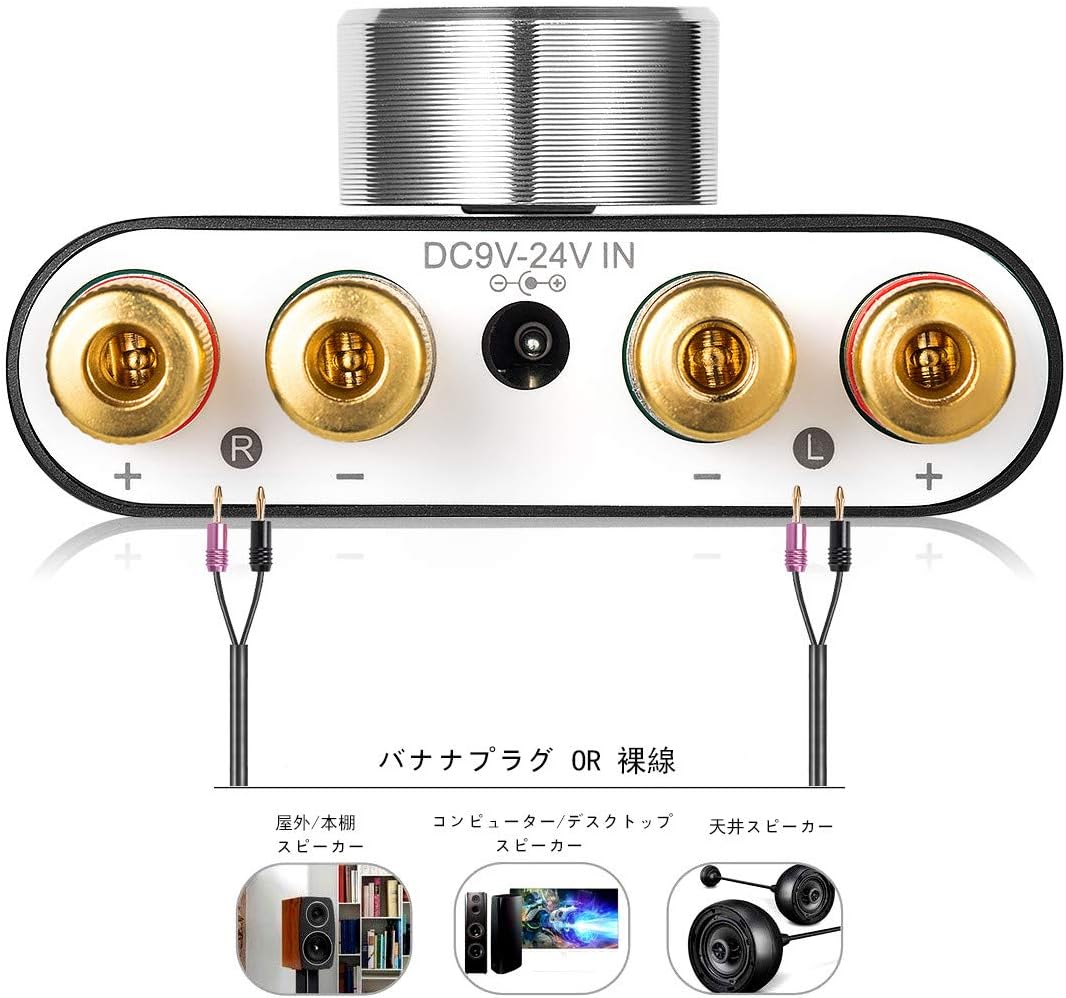
3. Navodila za nastavitev
3.1 Priključitev zvočnikov
- Zagotovite ampLifier je izklopljen.
- Connect your passive speakers to the speaker output terminals on the rear panel. Pay attention to polarity: connect the red (+) terminal on the amplifier to the red (+) terminal on the speaker, and the black (-) terminal on the amplifier to the black (-) terminal on the speaker.
3.2 Priključitev vhodnega vira
The NS-01G Pro supports three input methods: AUX, USB, and Bluetooth.

3.2.1 AUX vhod
- Connect your audio source (e.g., smartphone, CD player, TV) to the AUX input jack on the front panel using a 3.5mm audio cable.
3.2.2 USB vhod
- Connect your computer to the USB sound input port on the front panel using a USB cable. No drivers are typically required for this plug-and-play connection.

3.2.3 Bluetooth vhod
- Attach the Bluetooth antenna to the RF connector on the rear panel.
- Switch the input selector on the front panel to 'BT' mode.
- V mobilni napravi omogočite Bluetooth in poiščite
Ask a question about this manual
Ask about setup, troubleshooting, compatibility, parts, safety, or missing instructions. Manuals+ will review the question and use this page’s manual context to help answer it.