
Uvod
This manual provides essential information for the safe and efficient operation of your TechniSat Digitradio 1 BR Home Edition portable radio. This device offers high-quality digital radio reception via DAB+ and traditional FM radio, along with a powerful, interchangeable battery for portable use. Please read these instructions carefully before using the device.
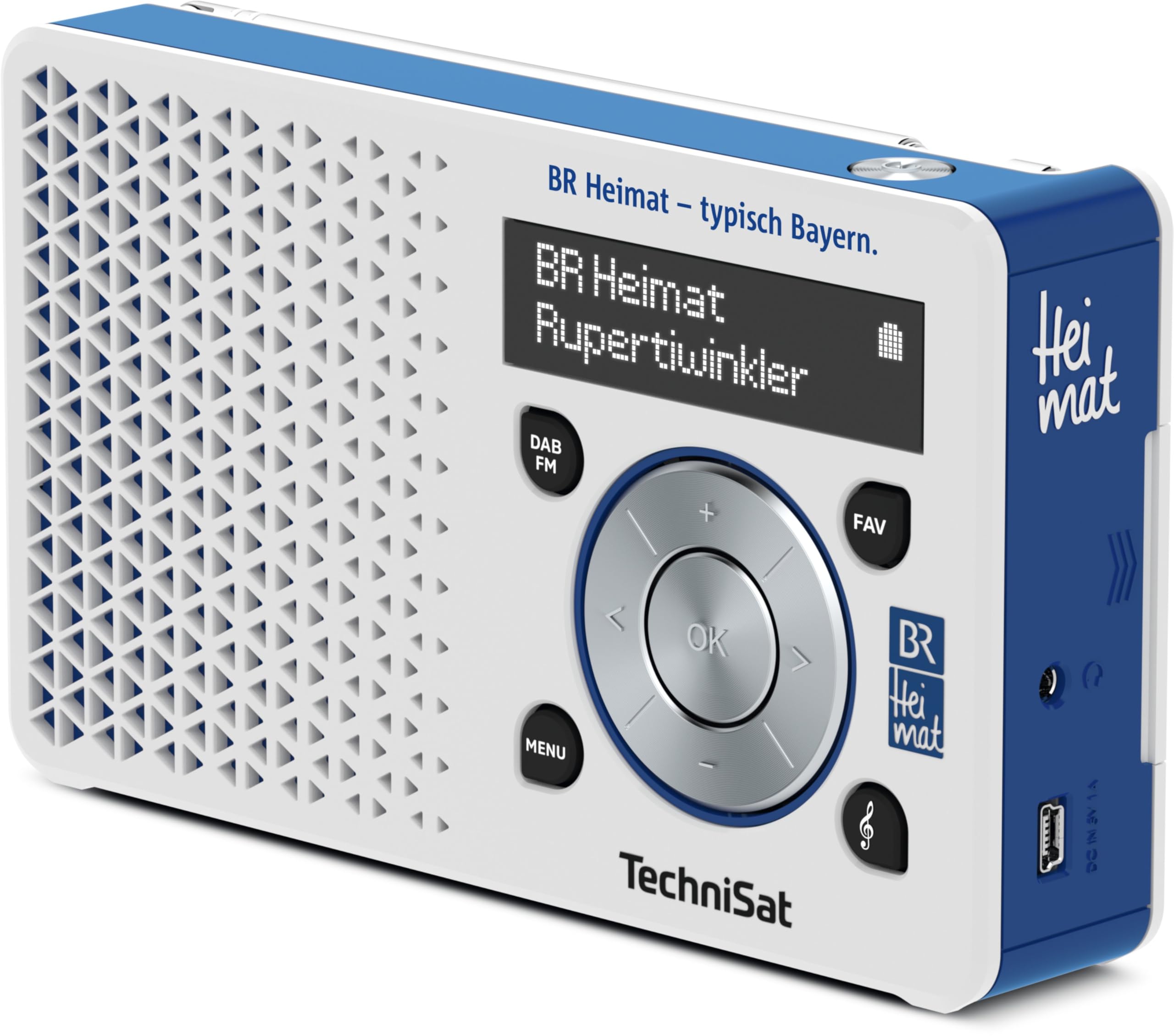
Slika 1: Spredaj view of the TechniSat Digitradio 1 BR Home Edition, showing the display, control knob, and speaker grille.
Nastavitev
1. Napajanje
- Namestitev/polnjenje baterije: The Digitradio 1 includes a powerful, interchangeable Lithium-ion battery. Before first use, fully charge the battery using the provided AC adapter and USB cable. Connect the USB cable to the radio's DC IN 5V port and the AC adapter to a power outlet. The charging indicator on the display will show the charging status.
- AC delovanje: The radio can also be operated directly from the mains power using the supplied AC adapter, even without the battery installed or while the battery is charging.
2. Antena
- For optimal reception, fully extend the telescopic antenna located on the top of the device. Adjust its position for the best signal quality.
3. Initial Scan
- Upon first power-on, the radio will automatically perform a scan for available DAB+ and FM stations. This process may take a few minutes. Once complete, the radio will tune to the first available station.

Slika 2: Zadaj view of the TechniSat Digitradio 1 BR Home Edition, highlighting the DC IN 5V port and headphone jack.
Navodila za uporabo

Slika 3: Pod kotom view of the TechniSat Digitradio 1 BR Home Edition, illustrating the control panel with menu, DAB/FM, favorite, and navigation buttons.
1. Vklop/izklop
- Pritisnite Moč button (usually integrated with the volume knob) to turn the radio on or off.
2. Mode Selection (DAB+/FM)
- Pritisnite DAB/FM button to switch between DAB+ digital radio and FM analog radio modes.
3. Station Tuning
- DAB+ Mode: Use the navigation buttons (left/right arrows on the control knob) to browse through available DAB+ stations. Press OK , da izberete postajo.
- FM način: Use the navigation buttons (left/right arrows) to manually tune to frequencies. A long press on the left/right arrows will initiate an automatic scan to the next available station.
4. Favorite Stations
- Saving Favorites: While listening to a station, press and hold the FAV button. Use the navigation buttons to select a preset number (1-20) and press OK shraniti.
- Recalling Favorites: Na kratko pritisnite FAV button. Use the navigation buttons to select your desired preset and press OK.
- BR Heimat Direct Selection: The BR Home Edition features a dedicated direct selection button for BR Heimat via DAB+. Press this button for instant access.
5. Nadzor glasnosti
- Rotate the main control knob to adjust the volume level.
6. Prikaz informacij
- The OLED display shows station name, program information, time, and battery status. Use the MENI button to access additional settings and display options.
Vzdrževanje
1. Čiščenje
- Wipe the radio with a soft, dry cloth. Do not use liquid cleaners, abrasive pads, or chemical solvents, as these can damage the surface.
2. Skrb za baterijo
- To prolong battery life, avoid fully discharging the battery frequently. Recharge the battery when the low battery indicator appears.
- If storing the radio for an extended period, ensure the battery is partially charged (around 50%) and store in a cool, dry place.
Odpravljanje težav
1. Brez moči
- Ensure the AC adapter is securely connected to both the radio and a working power outlet.
- If operating on battery, check if the battery is charged. Recharge if necessary.
2. No Signal/Poor Reception
- Teleskopsko anteno popolnoma izvlecite in nastavite.
- Move the radio to a different location, away from potential interference sources (e.g., other electronic devices, thick walls).
- Perform a full station scan in DAB+ mode to update the station list.
3. Ni zvoka
- Preverite glasnost in jo po potrebi povečajte.
- Ensure no headphones are connected to the headphone jack, or if they are, check their connection and functionality.
Specifikacije
Tehnični podatki
| Številka modela | 0025/4997 |
| Tehnologija uglaševanja | DAB+/FM (with RDS and PLL) |
| Vrsta zaslona | OLED |
| Vir napajanja | Napajalnik/baterija |
| Vrsta baterije | 1 litij-ionska (priložena) |
| Življenjska doba baterije | Up to 10 hours (mobile radio playback) |
| Max Product Power | 1 W (RMS) |
| Tehnologija povezljivosti | Pomožni (priključek za slušalke) |
| Mere izdelka (D x Š x V) | 15.5 D x 3.1 Š x 9.1 V centimetrov |
| Material | Plastika |
| Stopnja vodoodpornosti | Ni vodoodporen |

Figure 4: TechniSat Digitradio 1 BR Home Edition showing its dimensions: 15.5 cm length, 3.1 cm width, and 9.1 cm height.
Garancija in podpora
Informacije o garanciji
Specific warranty details for the TechniSat Digitradio 1 BR Home Edition are typically provided with the product packaging or can be found on the manufacturer's official webZa celovite garancijske pogoje glejte te vire.
Podpora uporabnikom
For further assistance, technical support, or service inquiries, please visit the official TechniSat website or contact their customer service department. Contact information can usually be found on the TechniSat webspletnem mestu ali v originalni dokumentaciji izdelka.