
WISE TIGER WT-RT8501
WISE TIGER AC1200 Wireless Router User Manual
Model: WT-RT8501
1. Izdelek je končanview
The WISE TIGER AC1200 Wireless Router is a high-speed dual-band router designed for robust wireless internet connectivity in homes, offices, and restaurants. It features 802.11AC/N/G/B/A Wi-Fi technology, beamforming for enhanced signal reliability, and four external 5dBi antennas to ensure long-range coverage, even in basements or attics.
This router supports up to 300Mbps at 2.4GHz and 866Mbps at 5GHz, providing smooth online gaming and video streaming experiences. It also includes a WAN port and four LAN Fast ports (10/100Mbps) for wired connections. Security features include WPA/WPA2-PSK encryption, firewall, parental controls, and guest network capabilities.

Slika 1: Spredaj view of the WISE TIGER AC1200 Wireless Router.
2. Vsebina paketa
Prosimo, preverite, ali so v vašem paketu vsi elementi:
- AC1200 brezžični dvosmerni usmerjevalnik
- Napajalna enota
- Navodila za hitro namestitev
- Omrežni kabel
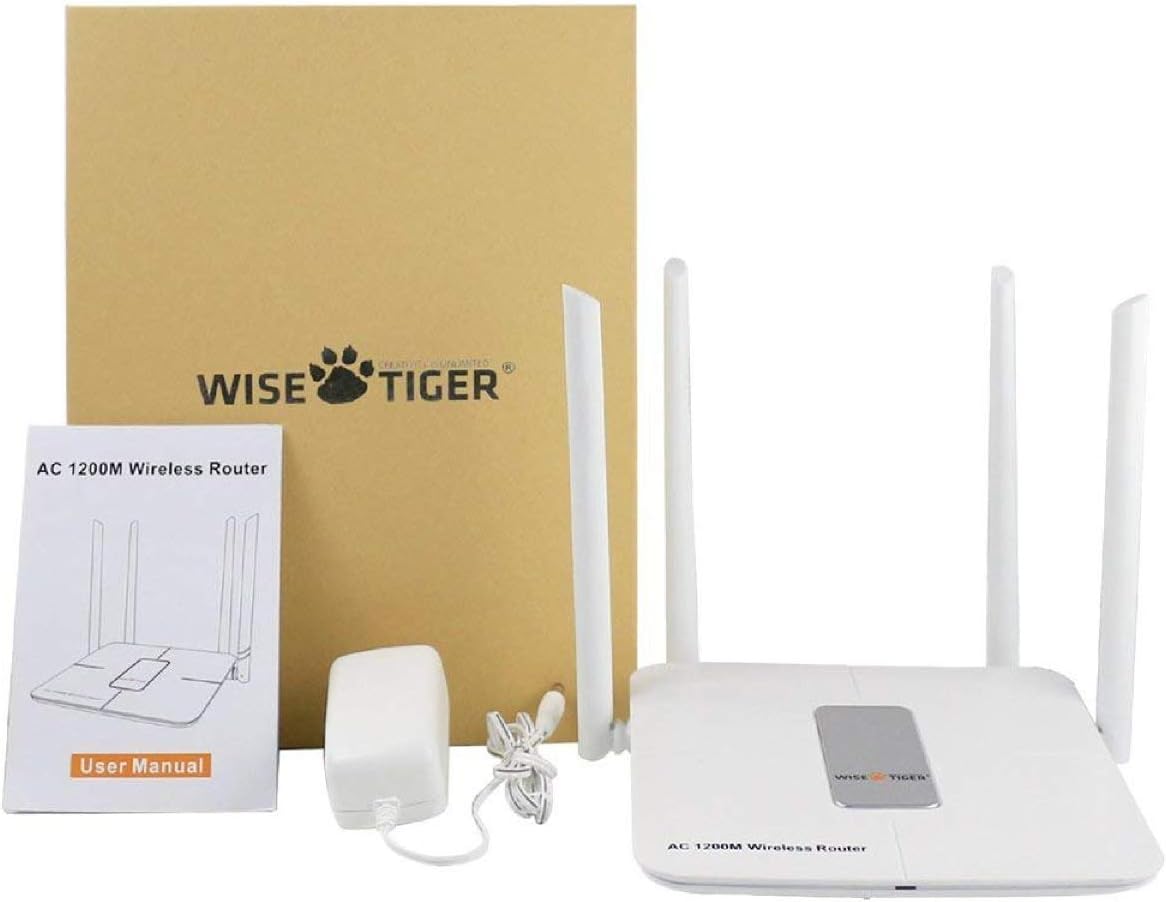
Figure 2: All components included in the WISE TIGER AC1200 Wireless Router package.
3. Product Diagram and Ports
Familiarize yourself with the router's physical layout and ports:

Slika 3: Zadaj view of the router with labeled ports.
- LAN vrata (x4): Connect your wired devices such as computers, gaming consoles, or smart TVs.
- Internetna vrata (WAN): Connect your modem's Ethernet cable to this port to receive internet access.
- Vhodna moč: Priloženi napajalnik priključite tukaj.
- Gumb za ponastavitev: Used to restore the router to factory default settings. Press and hold for several seconds while the router is powered on.
- Gumb WPS: Za hitro in varno vzpostavitev brezžične povezave z napravami, združljivimi s protokolom WPS.
4. Specifikacije
| Funkcija | Specifikacija |
|---|---|
| Znamka | MODRI TIGER |
| Ime modela | WT-RT8501 |
| Brezžična vrsta | 802.11a/b/g/n/ac |
| Razred frekvenčnega pasu | Dvopasovni (2.4 GHz in 5 GHz) |
| Hitrost prenosa podatkov | Do 300 Mbps (2.4 GHz), 866 Mbps (5 GHz) |
| Antena | 4 x 5dBi zunanje antene |
| Ethernet vrata | 1 x WAN, 4 x LAN (10/100Mbps) |
| Gumbi | WPS, ponastavitev |
| Varnost | WPA/WPA2-PSK, Firewall, Parental Controls, Guest Network |
| Združljivost operacijskega sistema | Windows XP/7/8/10/Vista, Mac, Android |
| Teža predmeta | 2.75 unč |
| Dimenzije izdelka | 1.48 x 6.6 x 5.58 palcev |

Figure 4: Router dimensions for placement planning.
5. Navodila za namestitev
Follow these steps to set up your WISE TIGER AC1200 Wireless Router:
5.1 Začetna povezava strojne opreme
- Povežite WAN kabel: Plug the broadband wire from your modem into the blue WAN port on the router.
- Connect LAN Cable (Optional): For wired devices, connect one end of the network patch cable to a yellow LAN port on the router and the other end to your PC's LAN network port.
- Vklop: Connect the power adapter to the router's power input and plug it into an electrical outlet.
5.2 Dostop do Web Vmesnik
- Join Wi-Fi: On your computer or mobile device, connect to the router's default Wi-Fi network. The default Wi-Fi name (SSID) and password can usually be found on a sticker on the bottom of the router.
- Odpri brskalnik: Odpri a web brskalnik (npr. Chrome, Firefox, Edge).
- Vnesite IP-naslov: V naslovno vrstico vnesite
192.168.0.1in pritisnite Enter. - Prijava: Enter the default username and password. Typically, both are
admin.
5.3 WAN Setup (Internet Connection Type)
Select the connection type provided by your Internet Service Provider (ISP):
- PPPoE: If your ISP provides a username and password for internet access, select PPPoE and enter the credentials.
- Statični IP: If your ISP provided a fixed IP address, subnet mask, default gateway, and DNS settings, select Static IP and input these details.
- Dinamični IP: If your ISP uses a DHCP server, select Dynamic IP. The router will automatically obtain network settings. No account or static IP info is needed.
- PPTP/L2TP: If your ISP provided PPTP/L2TP connection details including a server IP or domain, select this option and enter the required information.
- WISP (Wireless ISP): This mode allows the router to connect to another Wi-Fi network as its internet source, acting as a Wi-Fi repeater. Select a Wi-Fi network from the list and log in with its password.
5.4 Brezžične nastavitve
Configure your Wi-Fi networks for both 2.4GHz and 5GHz bands:
- Ime Wi-Fi (SSID): Change the default Wi-Fi name to a custom one for easy identification.
- Šifriranje: Select a strong encryption type, such as WPA2-PSK, for network security.
- Geslo za Wi-Fi: Nastavite močno in edinstveno geslo za svoje omrežje Wi-Fi.
- Širina traku: Adjust the channel width for optimal performance (e.g., 20/40MHz for 2.4GHz, 40/80MHz for 5GHz).
Video 1: Official product video demonstrating the unboxing, features, and installation process of the WISE TIGER AC1200 Wireless Router.
6. Upravljanje usmerjevalnika
6.1 Optimalna postavitev
For the best wireless performance, place your router in a central location, away from obstructions like thick walls, metal objects, and other electronic devices that may cause interference. The four high-gain external antennas are designed to provide extensive coverage.

Figure 5: Illustration of the router's high-power signal penetration.

Figure 6: Visual representation of 2.4GHz (longer distance) and 5GHz (faster transmission) band characteristics.
6.2 naprednih funkcij
- Starševski nadzor: Manage and restrict internet access for specific devices or users.
- Mreža gostov: Create separate Wi-Fi networks for guests, providing internet access without sharing your main network password or resources. The router supports up to 3 guest access points.
- Požarni zid: The built-in firewall helps protect your network from unauthorized access and malicious attacks.
- MAC Filtering (Restricted List): You can block or allow specific devices on your network based on their MAC addresses. This feature is found under the 'Restricted list' in the web vmesnik.
- Nadzor pasovne širine: Allocate specific download and upload limits to connected devices to manage network traffic effectively. This can be configured in the 'Bandwidth Control' section of the web vmesnik.
7. Vzdrževanje
Redno vzdrževanje zagotavlja optimalno delovanje in dolgo življenjsko dobo vašega usmerjevalnika:
- Posodobitve vdelane programske opreme: Periodically check the WISE TIGER official webspletno mesto za posodobitve vdelane programske opreme. Posodabljanje vdelane programske opreme lahko izboljša delovanje, doda nove funkcije in odpravi napake.
- Običajni ponovni zagon: Rebooting your router every few weeks can help clear its memory and resolve minor connectivity issues. Simply unplug the power adapter, wait 10 seconds, and plug it back in.
- Čiščenje: Keep the router clean and free from dust. Use a soft, dry cloth to wipe the exterior. Ensure ventilation openings are not blocked.
8. Odpravljanje težav
Če imate težave z usmerjevalnikom, poskusite naslednje rešitve:
- Brez dostopa do interneta:
- Check all cable connections (WAN, LAN, Power) to ensure they are secure.
- Verify your modem is working correctly. Try rebooting both the modem and the router.
- Potrdite nastavitve WAN v usmerjevalniku web interface match your ISP's requirements.
- Šibek signal Wi-Fi ali mrtva območja:
- Premaknite usmerjevalnik na bolj osrednje mesto v vašem domu/pisarni.
- Adjust the router's antennas for better signal direction.
- Zmanjšajte motnje zaradi drugih elektronskih naprav (brezžičnih telefonov, mikrovalovnih pečic).
- Consider using the WISP mode to extend coverage if you have another Wi-Fi network.
- Ni mogoče dostopati do usmerjevalnika Web Vmesnik:
- Prepričajte se, da je vaša naprava povezana z omrežjem Wi-Fi usmerjevalnika ali prek ethernetnega kabla z vrati LAN.
- Preverite, ali vnašate pravilen IP-naslov (
192.168.0.1). - Počistite predpomnilnik in piškotke brskalnika ali poskusite z drugim brskalnikom.
- Če ste pozabili svoje prijavne podatke, boste morda morali izvesti ponastavitev na tovarniške nastavitve.
- Tovarniška ponastavitev: If all else fails, use a paperclip or pin to press and hold the Reset button on the back of the router for about 10 seconds while it is powered on. This will restore all settings to their factory defaults, including Wi-Fi name and password. You will then need to reconfigure the router.
9. Garancija in podpora
WISE TIGER provides a 1-letna garancija for this product. In case the product does not meet your satisfaction or experiences issues within this period, a new replacement will be provided.
For technical support or warranty claims, please refer to the contact information provided in your product packaging or visit the official WISE TIGER webspletno mesto za najnovejše vire podpore.
Prosimo, shranite dokazilo o nakupu za namene garancije.
Ask a question about this manual
Ask about setup, troubleshooting, compatibility, parts, safety, or missing instructions. Manuals+ will review the question and use this page’s manual context to help answer it.