
1. Uvod
The Yealink RT30 is a DECT repeater designed to extend the radio coverage of compatible Yealink DECT IP Base Stations. It operates according to the Digital Enhanced Cordless Telecommunication (DECT) standard, offering easy installation and a clear LED display for status indication. This manual provides detailed instructions for the setup, operation, and maintenance of your RT30 DECT Repeater.
Vsebina paketa
- Yealink RT30 DECT repetitor
- USB kabel
- Napajalni adapter
- Uporabniški priročnik
2. Izdelek je končanview
The Yealink RT30 features a compact design with intuitive LED indicators. It is designed for desktop placement or wall mounting.

Slika 2.1: Spredaj view of the Yealink RT30 DECT Repeater, showing the Yealink logo, model number, and three LED indicators for Relay, DECT, and Power.
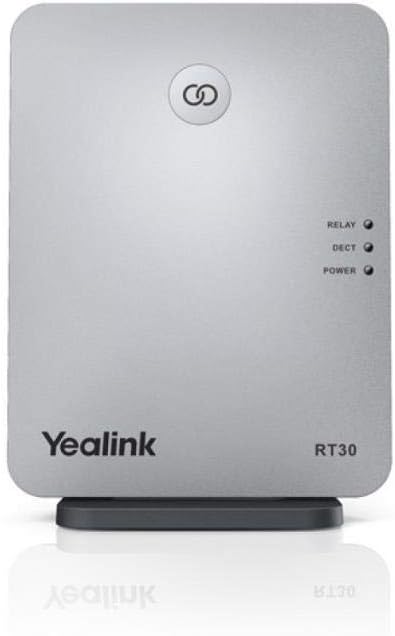
Slika 2.2: Pod kotom view of the Yealink RT30 DECT Repeater, highlighting its sleek design and the LED indicators.
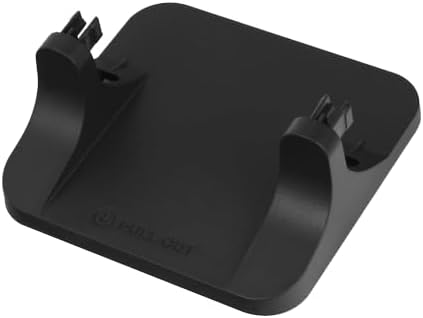
Figure 2.3: The stand component for the Yealink RT30 DECT Repeater, used for desktop placement.
3. Nastavitev in namestitev
The RT30 DECT Repeater is designed for plug-and-play setup with automatic association to compatible Yealink DECT IP Base Stations.
3.1 Združljivost
The RT30 is compatible with the following Yealink DECT IP Base Stations:
- Yealink W60B (version 77.81.0.35 or later)
- Yealink W70B (version 146.85.0.15 or later)
- Yealink W52 Base Station (version 25.81.0.10 or later)
Ensure your base station firmware is up to date for optimal performance and compatibility.
3.2 Namestitev
For optimal range extension, place the RT30 Repeater in an area where the signal from the base station is still strong, but close to the edge of the base station's coverage area. Avoid placing the repeater near large metal objects, concrete walls, or other electronic devices that may cause interference.
The RT30 can be placed on a desktop using its stand or mounted on a wall.
3.3 Napajalni priključek
- Connect the USB cable to the RT30 Repeater.
- Priključite napajalnik na kabel USB.
- Plug the power adapter into a standard AC power outlet (100-240V).
- The Power LED on the RT30 will illuminate, indicating it is receiving power.
3.4 Association with Base Station
The RT30 supports automatic association. Once powered on and within range of a compatible base station, it will attempt to establish a DECT link.
- Do 6 repetitorjev can be connected to a single base station in a star configuration.
- Do 2 repetitorjev can be arranged in a cascade (daisy-chain) configuration, but only when connected to Yealink W60B or W70B base stations.
Refer to your base station's manual for specific instructions on enabling repeater mode or confirming repeater association.
4. Operating the RT30 Repeater
Once successfully associated with a base station, the RT30 extends the DECT coverage, allowing compatible handsets to operate over a wider area.
4.1 LED indikatorji
The RT30 features three LED indicators to display its current status:
- LED za napajanje: Označuje stanje napajanja naprave.
- Na: Naprava je vklopljena.
- Izklop: Naprava je izklopljena.
- DECT LED: Indicates the DECT link status with the base station.
- Na: Successfully linked to the base station.
- utripa: Attempting to link or link lost.
- Izklop: No DECT link.
- Relay LED: Indicates active call relay status.
- Na: An active call is being relayed through the repeater.
- Izklop: No active call relay.
4.2 Upravljanje klicev
- The RT30 supports HD glas for clear audio quality.
- It supports automatic handover of calls between RT30 repeaters and the base station, allowing seamless movement within the extended coverage area.
- Each RT30 repeater can handle up to 4 simultaneous calls (requires W70B version 146.85.0.35 or later and RT30 version 83.0.0.22 or later).
5. Vzdrževanje
To ensure the longevity and optimal performance of your Yealink RT30 DECT Repeater, follow these general maintenance guidelines:
- Čiščenje: Use a soft, dry cloth to clean the device. Avoid using abrasive cleaners, waxes, or solvents.
- Okolje: Keep the repeater in a dry environment, away from direct sunlight, heat sources, and excessive dust.
- moč: Only use the provided power adapter. Disconnect power during electrical storms or when unused for extended periods.
6. Odpravljanje težav
If you encounter issues with your RT30 Repeater, refer to the following troubleshooting steps:
6.1 Brez napajanja
- Ensure the power adapter is securely connected to both the RT30 and a working power outlet.
- Preverite delovanje vtičnice tako, da vanjo priključite drugo napravo.
- Preverite, ali je kabel USB poškodovan.
6.2 No DECT Link (DECT LED Flashing or Off)
- Bližina: Ensure the RT30 is within range of the base station. Move it closer if necessary.
- Base Station Mode: Confirm that the base station is in repeater mode or has repeater functionality enabled. Refer to your base station's manual.
- Združljivost: Verify that your base station model and firmware version are compatible with the RT30 (see Section 3.1).
- Motnje: Relocate the RT30 away from potential sources of interference (e.g., Wi-Fi routers, microwaves, large metal objects).
- Base Link Reset: If issues persist, perform a "Base Link Reset" on the RT30. Consult the device's specific reset procedure if available, or power cycle the device and the base station.
6.3 Poor Range Extension or Call Quality
- Umestitev: Adjust the placement of the RT30. It should be positioned where the base station signal is still strong, but not too close to the base station itself.
- Ovire: Minimize physical obstructions between the RT30, the base station, and the handsets.
- Number of Repeaters: Ensure you are not exceeding the maximum number of repeaters supported by your base station (6 in star, 2 in cascade for W60B/W70B).
- Simultaneous Calls: If experiencing issues with multiple calls, ensure both the RT30 and the base station firmware meet the requirements for 4 simultaneous calls (W70B version 146.85.0.35 or later, RT30 version 83.0.0.22 or later).
7. Specifikacije
| Funkcija | Podrobnost |
|---|---|
| Model | RT30 |
| Dimenzije izdelka | 0.99 x 5.12 x 3.94 palcev |
| Teža predmeta | 0.01 unč |
| Standard brezžične komunikacije | DEC |
| Hitrost prenosa podatkov | 300 Megabits Per Second (Theoretical) |
| Razred frekvenčnega pasu | Enopasovni |
| Radio Frequency Range (EU) | 1880 MHz do 1900 MHz |
| Radiofrekvenčno območje (ZDA) | 1920 MHz do 1930 MHz |
| Moč prenosa | Average 10mW |
| RX občutljivost | tip. -91dBm |
| Notranji poligon | Up to 50m (in ideal conditions) |
| Zunanji domet | Up to 300m (in clear view in idealne pogoje) |
| Antene | 2 notranji QWL vsesmerni anteni |
| Napajalnik | AC 100-240V Input, DC 5V/600mA Output |
| Možnosti namestitve | Namizna ali stenska montaža |
| Posebna funkcija | LED indikator |
8. Garancija in podpora
For warranty information, please refer to the warranty card included with your product or visit the official Yealink website. If you require technical assistance or have questions not covered in this manual, please contact Yealink customer support.
Proizvajalec: Yealink
Prvič na voljo: 27. april 2018