
1. Uvod
Hvala za nakupasing the Sharp HT-SB140MT 2.0 150W Soundbar. This soundbar is designed to enhance your audio experience, providing clear and powerful sound for your television, music, and other media. With its sleek design and versatile connectivity options, including Bluetooth, HDMI ARC/CEC, Optical, and Auxiliary inputs, it integrates seamlessly into any home entertainment setup. This manual provides essential information for safe and effective use, including setup, operation, maintenance, and troubleshooting.
2. Varnostne informacije
- vir energije: Prepričajte se, da je napajalnik voltage matches the requirements specified on the soundbar. Use only the provided power cable.
- Prezračevanje: Do not block any ventilation openings. Maintain adequate space around the soundbar for proper airflow.
- Voda in vlaga: Do not expose the soundbar to dripping or splashing water. Do not place objects filled with liquids, such as vases, on the apparatus.
- Toplota: Do not place the soundbar near heat sources such as radiators, heat registers, stoves, or other apparatus (including amplifiers), ki proizvajajo toploto.
- Čiščenje: Unplug the soundbar from the power outlet before cleaning. Use a dry, soft cloth for cleaning. Do not use liquid cleaners or aerosol cleaners.
- Servisiranje: Tega izdelka ne poskušajte servisirati sami. Vsa servisna dela prepustite usposobljenemu servisnemu osebju.
- Baterije: The remote control uses a CR2 battery. Ensure correct polarity when inserting batteries. Do not mix old and new batteries.
3. Vsebina paketa
Prosimo, preverite, ali so v paketu vsi elementi:
- Sharp HT-SB140MT Soundbar
- Daljinski upravljalnik
- Napajalni kabel
- Uporabniški priročnik (ta dokument)
4. Izdelek je končanview

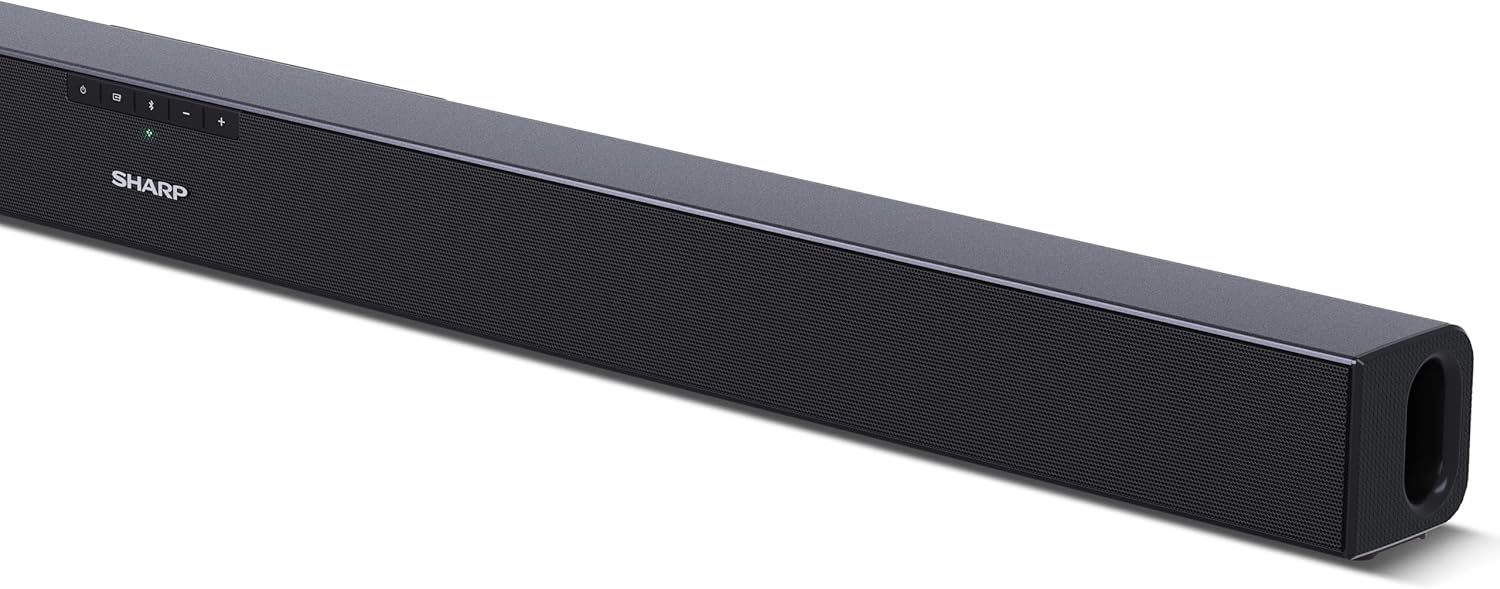
Slika 4.1: Spredaj View
The front of the soundbar features the Sharp logo and LED indicators for source selection and status. Control buttons for power, input, and volume are located on the top panel.
Slika 4.2: Zadaj View (Povezave)
The rear panel provides all necessary connection ports: HDMI ARC, Optical (S/PDIF), and Auxiliary (3.5mm) input, along with the power input.

Slika 4.3: Daljinski upravljalnik
The included remote control allows for convenient operation of the soundbar, including power, input selection, volume, bass, and treble adjustments.
5. Nastavitev
5.1 Namestitev
The Sharp HT-SB140MT Soundbar can be placed on a flat surface, such as a TV stand, or wall-mounted. Its slim profile of 6 cm allows it to fit easily under most TV screens without obstructing the view.

Figure 5.1: Soundbar Placement
The soundbar is ideally positioned directly in front of your television for optimal sound projection.
5.2 Priključitev na televizor
Izberite enega od naslednjih načinov povezave:
- HDMI ARC/CEC (priporočeno): Connect an HDMI cable (not included) from the HDMI ARC port on your TV to the HDMI ARC port on the soundbar. This allows your TV remote to control the soundbar's volume and power. Ensure HDMI ARC/CEC is enabled in your TV's settings.
- Digital Optical Audio (S/PDIF): Connect an optical cable (not included) from the Optical Out port on your TV to the OPTICAL IN port on the soundbar. Select the Optical input on the soundbar.
- Pomožni (AUX): Connect a 3.5mm audio cable (not included) from the headphone jack or AUX Out port on your TV to the AUX IN port on the soundbar. Select the AUX input on the soundbar.
5.3 Napajalni priključek
After connecting the audio cable, plug the power cable into the soundbar's power input and then into a wall outlet (220-240V / 50Hz).
6. Navodila za uporabo
6.1 Vklop/izklop
Pritisnite gumb za vklop na zvočniški letvi ali daljinskem upravljalniku, da vklopite ali izklopite enoto.
6.2 Izbira vira
Press the Input button on the soundbar or the remote control repeatedly to cycle through the available input sources: HDMI ARC, Optical, AUX, and Bluetooth. The LED indicator on the soundbar will change to reflect the selected source.
6.3 Prilagoditev glasnosti
Use the Volume Up (+) and Volume Down (-) buttons on the soundbar or the remote control to adjust the sound level.
6.4 Bluetooth seznanjanje
Če želite povezati napravo Bluetooth:
- Select Bluetooth input on the soundbar. The Bluetooth LED indicator will flash, indicating pairing mode.
- Na pametni napravi (pametnem telefonu, tabličnem računalniku itd.) omogočite Bluetooth in poiščite razpoložljive naprave.
- Select "SHARP HT-SB140MT" from the list of devices.
- Once connected, the Bluetooth LED indicator will stop flashing and remain solid. You can now stream audio wirelessly to the soundbar.
6.5 Zvočni načini (izenačevalnik)
The soundbar features an equalizer with different sound modes to optimize audio for various content types. Use the EQ button on the remote control to cycle through these modes (e.g., Movie, Music, News). You can also adjust Bass and Treble levels using dedicated buttons on the remote.
7. Vzdrževanje
7.1 Čiščenje
To clean the soundbar, unplug it from the power outlet. Use a soft, dry, lint-free cloth to wipe down the surfaces. Do not use abrasive cleaners, waxes, or solvents as they may damage the finish.
7.2 Shranjevanje
If you plan to store the soundbar for an extended period, disconnect it from the power supply and store it in a cool, dry place, away from direct sunlight and extreme temperatures.
8. Odpravljanje težav
Če imate težave z zvočno palico, si oglejte naslednje pogoste težave in rešitve:
| Težava | Možen vzrok | rešitev |
|---|---|---|
| Ni zvoka iz zvočne vrstice. | Zvočniški modul je izklopljen ali utišan. Izbran je napačen vhodni vir. Kabli niso pravilno priključeni. Nastavitve avdio izhoda televizorja so napačne. | Ensure the soundbar is powered on and not muted. Select the correct input source (HDMI ARC, Optical, AUX). Check all cable connections (HDMI, Optical, AUX). Verify your TV's audio output settings are set to external speakers or the correct digital output. |
| Naprava Bluetooth se ne more povezati. | Soundbar is not in pairing mode. Naprava je izven dosega. Motnje drugih naprav. | Ensure the soundbar is in Bluetooth input mode and the LED is flashing. Napravo Bluetooth premaknite bližje zvočniški vrstici (v 10 metrih). Turn off other Bluetooth devices nearby. Try unpairing and re-pairing. |
| Daljinski upravljalnik ne deluje. | Battery is low or inserted incorrectly. Ovira med daljinskim upravljalnikom in zvočniško palico. Remote control is faulty. | Zamenjajte baterijo CR2 in pazite na pravilno polarnost. Remove any obstructions between the remote and the soundbar's sensor. Če težave ne odpravite, se obrnite na podporo strankam. |
9. Specifikacije
| Ime modela | HT-SB140(MT) |
| Vrsta zvočnika | Soundbar |
| Konfiguracija kanala za prostorski zvok | 2.0 |
| Največja izhodna moč zvočnika | 150 vatov |
| Frekvenčni odziv | 60 Hz |
| Tehnologija povezljivosti | Bluetooth, HDMI ARC/CEC, Digital Optical Audio (S/PDIF), 3.5mm Auxiliary (AUX) |
| Brezžična komunikacijska tehnologija | Bluetooth |
| Največji doseg (Bluetooth) | 10 metrov |
| Nadzorna metoda | Daljinski upravljalnik |
| Vir napajanja | AC (Mains) |
| Vhodna voltage | 220-240 voltov |
| barva | Črna |
| Material | Plastika, Kovina |
| Vrsta namestitve | Stenski nosilec, namizni |
| Mere izdelka (D x Š x V) | 95 x 6 x 6 cm |
| Teža predmeta | 1.5 kilogramov |
| Vključene komponente | Daljinski upravljalnik |
| Zahtevana baterija | 1 baterija CR2 |
| Vodotesen | št |
| Razpoložljivost rezervnih delov | 5 leti |
| Posodobitve programske opreme zagotovljene do | Informacije niso na voljo |
10. Garancija in podpora
The Sharp HT-SB140MT Soundbar comes with a Limited Warranty. Please refer to the warranty card included in your package for specific terms and conditions. Spare parts are available for up to 5 years from the date of purchase.
For technical support, service, or warranty claims, please contact Sharp customer service through their official website or the contact information provided in your product documentation. When contacting support, please have your product model number (HT-SB140(MT)) and purchase details ready.


