
1. Uvod
Hvala za nakupasing the Capello Play it All Bluetooth Wireless Home Stereo Speaker CI302. This device offers versatile audio playback options including Bluetooth wireless streaming, CD player functionality, and FM digital radio. This manual provides detailed instructions for setup, operation, maintenance, and troubleshooting to ensure optimal performance and longevity of your speaker system.
2. Pomembne varnostne informacije
- Pred uporabo naprave preberite vsa navodila.
- Ta priročnik shranite za poznejšo uporabo.
- Enote ne izpostavljajte dežju ali vlagi, da preprečite nevarnost požara ali električnega udara.
- Zagotovite ustrezno prezračevanje; ne blokirajte prezračevalnih odprtin.
- Enoto postavite na stabilno, ravno površino.
- Uporabljajte samo priključke/dodatke, ki jih je določil proizvajalec.
- Izključite enoto med nevihtami ali ko je ne uporabljate dlje časa.
- Za vse servise se obrnite na usposobljeno servisno osebje.
3. Vsebina paketa
Prosimo, preverite, ali so vsi elementi prisotni:
- Capello Play it All Bluetooth Wireless Home Stereo Speaker CI302
- Daljinski upravljalnik
- AC napajalnik
- Uporabniški priročnik (ta dokument)
4. Izdelek je končanview
Familiarize yourself with the main components and controls of your Capello Play it All speaker.
Spredaj View

Slika 4.1: Spredaj view of the Capello Play it All speaker, showing the speaker grille, digital clock display, and subtle branding.
Nadzor na zgornji plošči

Slika 4.2: Top panel of the Capello Play it All speaker, illustrating the CD compartment, 'capello' logo, and various control buttons including PRESET, MODE, PAIRING, PROGRAM/CLOCK SET, SKIP, PLAY/PAUSE, STOP, REPEAT, and VOLUME.
- PREDNASTAVITEV +/-: Navigate through saved FM radio stations.
- NAVODILA: Switch between Bluetooth, CD, FM Radio, and Line-In modes.
- PAROVANJE: Zaženite način seznanjanja Bluetooth.
- PROGRAM/CLOCK SET: Program CD tracks or set the clock.
- SKIP ◀◀ / ▶▶: Skip tracks on CD or adjust FM frequency.
- PLAY/PAUSE ▶▶: Play or pause CD playback.
- STOP ■: Stop CD playback.
- PONOVI: Repeat current track or all tracks on CD.
- GLASNOST +/-: Prilagodite raven glasnosti.
- ODPRTI/ZAPRTI: Odprite ali zaprite predal za CD-je.
- OSTANI V PRIPRAVLJENOSTI: Power on/off the unit.
Rear Panel (Typical)
The rear panel typically includes the AC power input, FM antenna connection, and Line-In jack.
5. Nastavitev
5.1 Napajalni priključek
- Connect the AC power adapter to the DC IN jack on the rear of the speaker.
- Drugi konec adapterja priključite v standardno stensko vtičnico.
- The unit will enter standby mode, and the digital clock display will illuminate.
5.2 Nastavitev FM antene
For optimal FM radio reception, extend the FM wire antenna fully and position it for the best signal. Avoid placing it near other electronic devices that may cause interference.
5.3 Nastavitev ure
- V stanju pripravljenosti pritisnite in držite PROGRAM/CLOCK SET gumb.
- The hour digits will begin to flash. Use the SKIP ◀◀ / ▶▶ gumbi za nastavitev ure.
- Pritisnite PROGRAM/CLOCK SET ponovno, da potrdite uro.
- Številke minut bodo utripale. Uporabite SKIP ◀◀ / ▶▶ gumbe za nastavitev minut.
- Pritisnite PROGRAM/CLOCK SET one last time to save the setting.
6. Navodila za uporabo
6.1 Vklop/izklop in izbira načina
- Pritisnite OSTANI V PRIPRAVLJENOSTI button on the unit or the remote control to turn the speaker on or off.
- Pritisnite NAČIN button repeatedly to cycle through available modes: Bluetooth, CD, FM Radio, and Line-In.
6.2 Bluetooth Wireless Streaming
- Vklopite zvočnik in izberite način Bluetooth z NAČIN button. The display will show 'BT' and flash, indicating it's in pairing mode.
- V napravi, ki podpira Bluetooth (pametni telefon, tablični računalnik, računalnik), omogočite Bluetooth in poiščite razpoložljive naprave.
- Select 'Capello CI302' (or similar) from the list of devices.
- Once paired, the speaker will emit a confirmation tone, and 'BT' on the display will stop flashing.
- You can now play audio from your device through the speaker. Use your device or the speaker's controls for volume and track navigation.
6.3 Predvajanje CD-ja
- Pritisnite ODPRTO/ZAPRI gumb za odpiranje predala za CD.
- Carefully place an audio CD (CD, CD-R/-RW) with the label side facing up into the compartment.
- Close the CD compartment. The unit will read the disc.
- If not already in CD mode, press the NAČIN gumb za izbiro načina CD -ja.
- Pritisnite PREDVAJAJ/PAVZA gumb za začetek predvajanja.
- Uporaba SKIP ◀◀ / ▶▶ to skip tracks, STOP ■ to stop, and PONOVI to cycle through repeat options.
6.4 FM Digital Radio
- Pritisnite NAČIN button to select FM radio mode. The current frequency will be displayed.
- Samodejno skeniranje: Pritisnite in držite PREDVAJAJ/PAVZA button to automatically scan and save available FM stations as presets.
- Ročna nastavitev: Pritisnite SKIP ◀◀ / ▶▶ briefly to fine-tune the frequency. Press and hold to scan for the next strong station.
- Accessing Presets: Uporabite PREDNASTAVITEV +/- gumbi za preklapljanje med shranjenimi postajami.
6.5 Line-In Operation
- Connect an audio cable (not included) from the headphone jack or line-out of an external audio device to the PRILOGA jack on the speaker.
- Pritisnite NAČIN button to select Line-In mode.
- Play audio from your connected device. Volume can be controlled via the speaker or the external device.
6.6 Polnjenje prek USB
The speaker features a USB port for charging compatible devices (e.g., smartphones, tablets). Connect your device's USB charging cable (not included) to the USB port on the speaker. The speaker does not need to be in a specific mode for USB charging to function.
6.7 Uporaba daljinskega upravljalnika
The included remote control provides convenient access to all functions. Ensure the remote has working batteries and is pointed towards the front of the speaker.
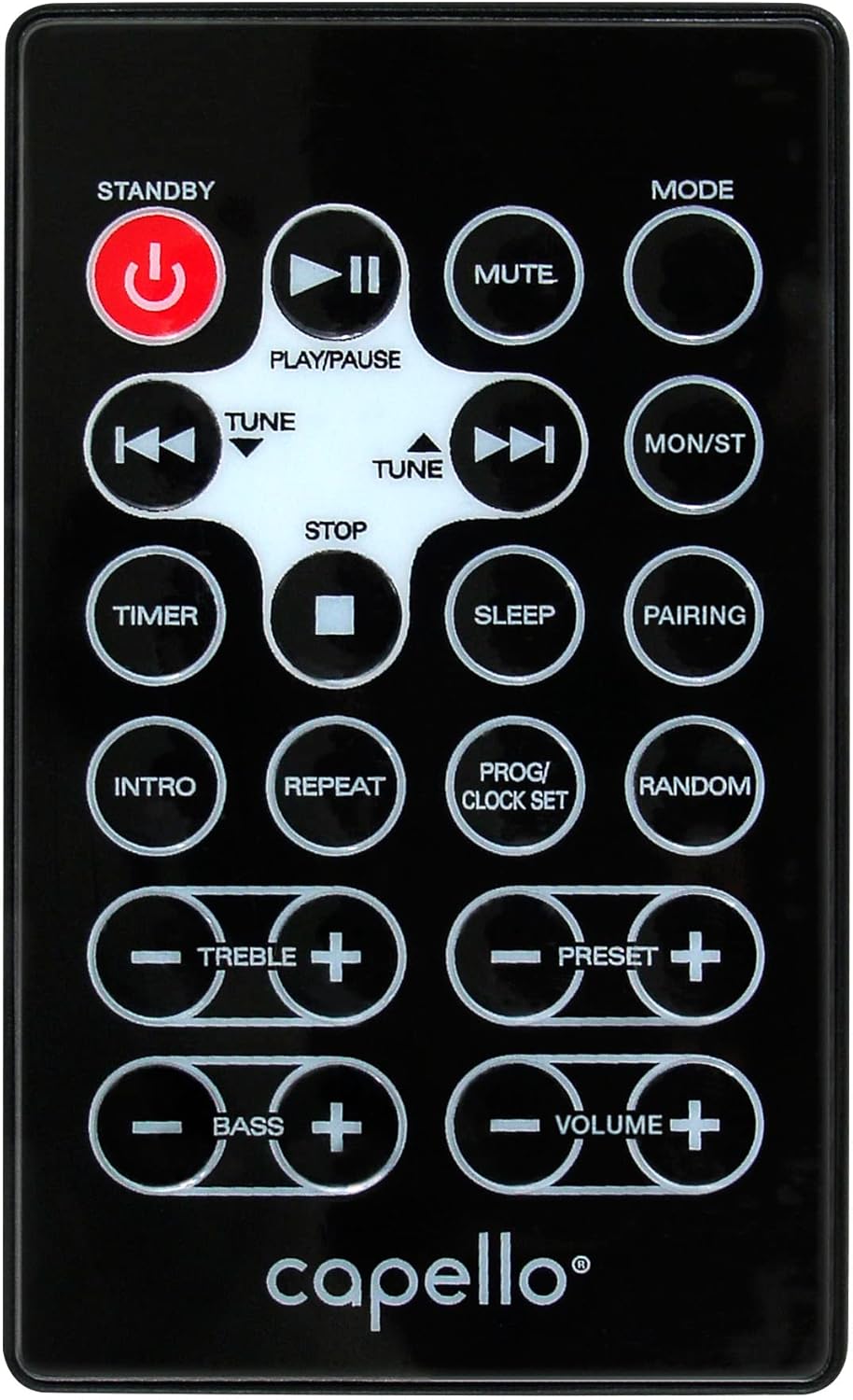
Slika 6.1: Layout of the remote control for the Capello Play it All speaker, showing buttons for Standby, Play/Pause, Mute, Mode, Skip/Tune, Stop, Timer, Sleep, Pairing, Intro, Repeat, Program/Clock Set, Random, Treble, Bass, and Volume controls.
- OSTANI V PRIPRAVLJENOSTI: Vklop/izklop vklopa.
- PREDVAJAJ/PAVZA: Predvajaj ali začasno zaustavi zvok.
- MUTE: Izklopite ali vklopite zvok.
- NAVODILA: Cycle through input modes.
- SKIP/TUNE ◀◀ / ▶▶: Skip tracks or tune radio frequency.
- STOP: Ustavite predvajanje.
- ČASOVNIK: Nastavite časovnik za spanje.
- SPANJE: Activate sleep function.
- PAROVANJE: Začnite seznanjanje prek Bluetootha.
- INTRO: Play the first few seconds of each CD track.
- PONOVI: Repeat current track or all tracks.
- PROG/CLOCK SET: Program CD tracks or set clock.
- NAKLJUČEN: Play CD tracks in random order.
- VISOKI +/-: Prilagodite raven visokih tonov.
- BASS +/-: Prilagodite raven nizkih tonov.
- GLASNOST +/-: Prilagodite splošno glasnost.
7. Vzdrževanje
7.1 Čiščenje
- Pred čiščenjem enoto vedno izključite iz električne vtičnice.
- Za brisanje zunanjih površin uporabite mehko, suho krpo.
- Ne uporabljajte abrazivnih čistil, voskov ali topil, saj lahko poškodujejo premaz.
- Za lečo CD-jev uporabite specializiran čistilni disk za leče CD-jev.
7.2 Shranjevanje
If storing the unit for an extended period, unplug it from the power source and store it in a cool, dry place away from direct sunlight and extreme temperatures.
8. Odpravljanje težav
| Težava | Možen vzrok | rešitev |
|---|---|---|
| Brez moči | Napajalni kabel ni priključen; vtičnica ni aktivna. | Prepričajte se, da je napajalni kabel varno priključen; poskusite z drugo vtičnico. |
| Brez zvoka | Volume too low; incorrect mode selected; external device muted. | Increase volume; select correct input mode; check external device volume/mute. |
| CD preskakuje ali se ne predvaja | Dirty or scratched CD; CD inserted incorrectly; dirty CD lens. | Clean or replace CD; insert CD label-side up; use a CD lens cleaner. |
| Bluetooth povezovanje ne uspe | Device too far; Bluetooth not enabled on device; speaker not in pairing mode. | Move device closer; enable Bluetooth; ensure speaker is in BT pairing mode. |
| Slab FM sprejem | Antena ni iztegnjena; motnje. | Fully extend and reposition FM antenna; move away from other electronics. |
| Daljinski upravljalnik ne deluje | Batteries depleted; obstruction; not pointed at sensor. | Replace batteries; remove obstructions; point remote directly at the unit. |
9. Specifikacije
| Funkcija | Specifikacija |
|---|---|
| Znamka | Capello |
| Številka modela | CI302 |
| Tehnologija povezljivosti | Bluetooth |
| Vrsta zvočnika | Stereo |
| Način avdio izhoda | Stereo |
| Podprti zvočni formati | CD, MP3 |
| Nazivna izhodna moč zvočnikov | 10 vatov |
| Največja izhodna moč zvočnikov | 10 vatov |
| Konfiguracija kanalov prostorskega zvoka zvočnika | 2.0 |
| Vrsta vira napajanja | Električni na kabel |
| Združljive naprave | Prenosnik, pametni telefon, tablica |
| Posebne lastnosti | Digital Display, Portable, USB Port |
| Vrsta materiala | Plastika |
| Vrsta namestitve | Namizna plošča |
| Teža predmeta | 2.57 kilogramov |
| Dimenzije paketa | 38.3 x 24.2 x 18.5 cm |
| Baterije priložene | št |
| Potrebne baterije | št |
10. Garancija in podpora
This product is covered by a limited warranty. Please refer to the warranty card included in your package for specific terms and conditions. For technical support or customer service inquiries, please contact Capello customer support through their official webspletnega mesta ali kontaktnih podatkov, navedenih v dokumentaciji o nakupu.