
Uvod
Thank you for choosing the Capello Extra Large Display Digital Alarm Clock. This manual provides detailed instructions to help you set up, operate, and maintain your new alarm clock. Designed for clarity and ease of use, this clock features a large digital display and a stylish wood-grain finish, making it a perfect addition to any bedroom or living space.
Konec izdelkaview
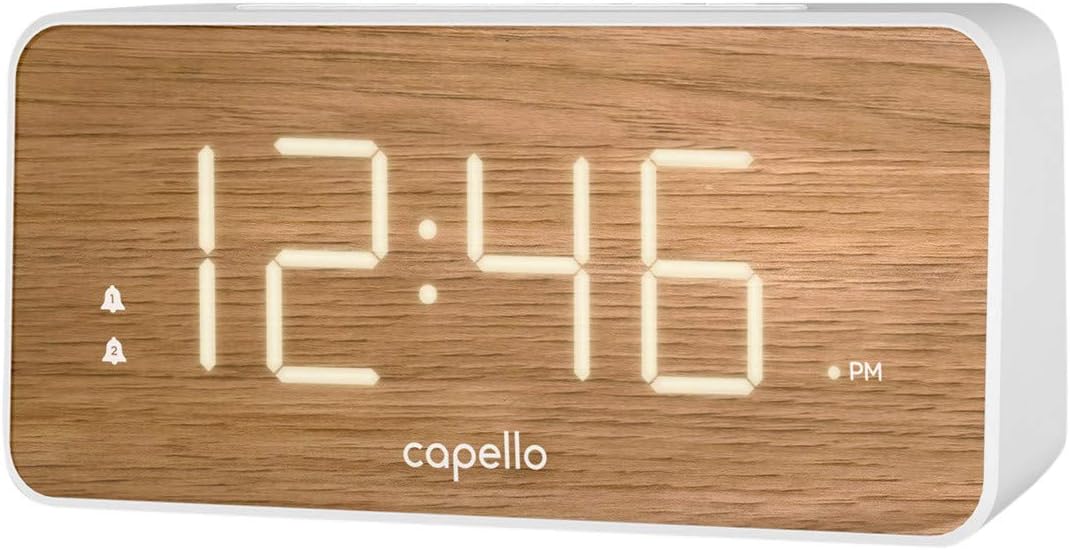
The Capello Digital Alarm Clock (Model: 43213-14795) features an extra-large digital display for easy readability from across the room. Its elegant white and pine D-frame design with a wood-grain finish complements various interior styles. The clock is equipped with intuitive controls for setting time and alarms, ensuring a user-friendly experience.
Nastavitev
Napajalni priključek
The alarm clock requires a continuous power supply via its included AC adapter for full functionality. Insert the adapter into a standard wall outlet and connect it to the clock's power input port. For backup during power outages, install 2 AAA batteries (not included) into the battery compartment located on the underside of the unit. These batteries will preserve time and alarm settings but will not power the display or alarm functions during an outage.
Nastavitev časa
- Pritisnite in držite ČAS NAST button (or similar button, refer to specific button labels on your unit) until the hour digits begin to flash.
- Uporabite URA gumb za nastavitev ure. Bodite pozorni na indikator AM/PM.
- Pritisnite ČAS NAST ponovno pritisnite gumb, da se premaknete na minutne številke.
- Uporabite MIN gumb za prilagoditev minut.
- Pritisnite ČAS NAST še enkrat za potrditev in izhod iz načina nastavitve časa.
Nastavitev alarma
This clock supports dual alarms.
- Pritisnite in držite ALARM 1 gumb, dokler ne utripajo številke ure budilke.
- Uporabite URA in MIN gumba za nastavitev želenega časa alarma za alarm 1.
- Pritisnite ALARM 1 again to confirm. The alarm indicator for Alarm 1 will illuminate.
- Ponovite korake 1–3 za ALARM 2 if a second alarm is desired.
- To activate/deactivate an alarm, simply press the corresponding ALARM 1 or ALARM 2 button. The alarm indicator will show its status.
Navodila za uporabo
Funkcija dremeža
Ko se oglasi alarm, pritisnite veliko DREMEŽ button located on the top of the clock. This will temporarily silence the alarm for approximately 9 minutes, allowing for extra rest. The alarm will sound again after the snooze period ends.
Ustavitev alarma
Če želite alarm po tem, ko se oglasi, popolnoma izklopiti, pritisnite ustrezno tipko ALARM 1 or ALARM 2 button. The alarm indicator will turn off, signifying that the alarm is deactivated for the next day.
Svetlost zaslona
The display brightness can be adjusted to suit your preference. Locate the SVETLOBA or DIMMER button (often represented by a sun icon) on the top panel. Press this button repeatedly to cycle through different brightness levels (e.g., High, Medium, Low, Off).
Vzdrževanje
To ensure the longevity and optimal performance of your Capello Digital Alarm Clock, follow these simple maintenance guidelines:
- Čiščenje: Wipe the clock's surface with a soft, dry cloth. Do not use abrasive cleaners, waxes, or solvents as they may damage the finish.
- Umestitev: Uro postavite na stabilno, ravno površino, stran od neposredne sončne svetlobe, virov toplote in prekomerne vlage.
- Zamenjava baterije: Rezervne baterije zamenjajte letno ali ko zaslon med izpadom električne energije kaže znake zatemnitve.tage. Pri vstavljanju novih baterij pazite na pravilno polarnost.
Odpravljanje težav
Če imate kakršne koli težave z budilko, si oglejte naslednje pogoste težave in rešitve:
| Težava | Možna rešitev |
|---|---|
| Zaslon je prazen ali temen. | Ensure the AC adapter is securely plugged into both the clock and a working wall outlet. Check the display brightness setting using the LIGHT/DIMMER button. |
| Alarm se ne oglasi. | Verify that the alarm is activated (alarm indicator is lit). Ensure the alarm time is set correctly (AM/PM). Check if the volume is set to an audible level. |
| Čas je napačen. | Reset the time following the 'Setting the Time' instructions. If using backup batteries, ensure they are fresh and correctly installed. |
| Gumbi se ne odzivajo. | Unplug the AC adapter, remove backup batteries, wait for 1 minute, then reconnect power. This performs a soft reset. |
Specifikacije
- Znamka: Capello
- Številka modela: 43213-14795
- barva: Bela
- Vrsta zaslona: Digitalno
- slog: Moderno
- Posebna lastnost: Large Display, Alarm
- Dimenzije izdelka: 8.74 cm Š x 5.83 cm V
- vir energije: AC Powered (with battery backup for settings)
- Material: Plastika
- Teža artikla: 1.01 funta
Uradni videoposnetki izdelkov
Trenutno za ta izdelek ni na voljo uradnih videoposnetkov izdelka prodajalca.
Garancija in podpora
For warranty information and customer support, please refer to the manufacturer's official documentation included with your product or visit the Capello webmesto. Shranite račun za garancijske zahtevke.