
1. Uvod
This manual provides essential information for the safe and efficient operation of your Rigol DS1104Z-S Plus 100 MHz Digital Oscilloscope. Please read this manual thoroughly before using the instrument to ensure proper functionality and to prevent damage. The Rigol DS1104Z-S Plus is a 4-channel digital storage oscilloscope designed for precise signal analysis with a 100 MHz bandwidth and a 1 GSa/s real-time sample obrestna mera.
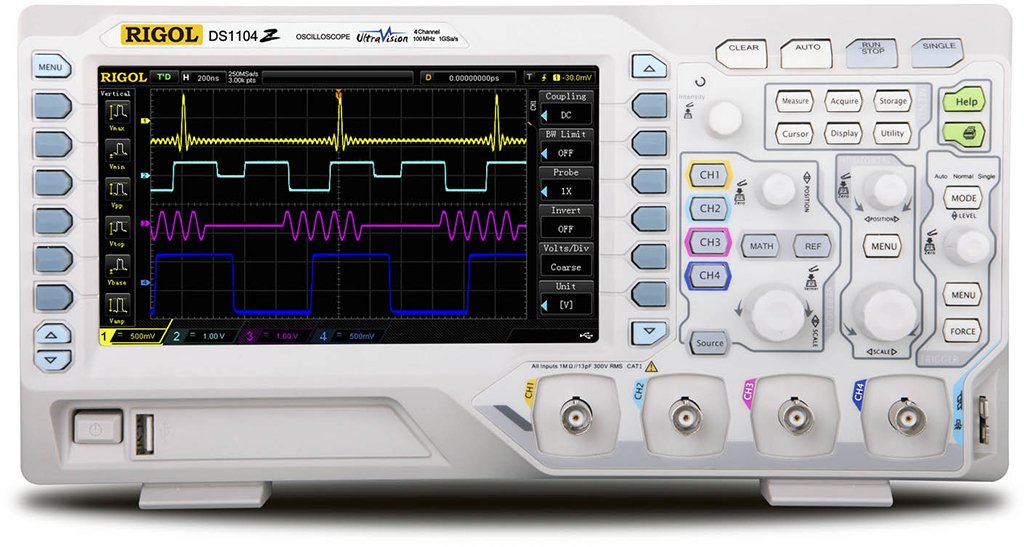
Figure 1: Rigol DS1104Z-S Plus Digital Oscilloscope. This image shows the front panel of the oscilloscope with its display, control knobs, and input channels.
2. Varnostne informacije
Vedno upoštevajte naslednje varnostne ukrepe, da preprečite poškodbe in škodo na instrumentu:
- vir energije: Connect the instrument only to a power source with the specified voltage in frekvenca.
- Ozemljitev: Ensure the instrument is properly grounded to prevent electric shock.
- Prezračevanje: Ne blokirajte prezračevalnih odprtin. Zagotovite zadosten pretok zraka okoli instrumenta.
- Okolje: Osciloskop uporabljajte v suhem, dobro prezračevanem prostoru, stran od neposredne sončne svetlobe, visokih temperatur in prekomernega prahu.
- Sonde: Use only probes designed for the specified voltage in frekvenčne ocene.
- Servisiranje: Refer all servicing to qualified service personnel. Do not attempt to repair the instrument yourself.
- Čiščenje: Pred čiščenjem izključite napajanje. Uporabite mehko,amp krpo. Ne uporabljajte abrazivnih čistil ali topil.
3. Vsebina paketa
Preverite, ali vaš paket vsebuje naslednje elemente:
- Rigol DS1104Z-S Plus Digital Oscilloscope
- Napajalni kabel
- Passive Probes (4 units)
- USB kabel
- Kratek vodnik
- Resource CD (User Manual, Programming Manual, Software)
4. Izdelek je končanview
The Rigol DS1104Z-S Plus features a user-friendly interface and robust design for various measurement applications.
4.1 Sprednja plošča
The front panel includes the display, control knobs, function buttons, and input connectors for channels 1-4.
- Zaslon: Shows waveforms, measurement results, and menu options.
- Vertikalni nadzor: Prilagodite glasnosttage per division and position for each channel.
- Horizontalne kontrole: Adjust time per division and horizontal position.
- Kontrole sprožilca: Set trigger level, mode, and type.
- Funkcijski gumbi: Access various menus such as Acquire, Measure, Storage, Utility, etc.
- Vhodi kanalov (CH1-CH4): BNC connectors for probe connection.
4.2 Zadnja plošča
The rear panel provides power input, USB host/device ports, and LAN port for connectivity.
- Vhod za izmenični tok: Za priključitev napajalnega kabla.
- Gostiteljska vrata USB: Za priklop USB-naprav za shranjevanje podatkov.
- Vrata USB za naprave: For connecting to a PC.
- Vrata LAN: Za omrežno povezljivost in daljinsko upravljanje.
5. Nastavitev
5.1 Napajalni priključek
- Prepričajte se, da je stikalo za vklop na zadnji plošči v položaju IZKLOP.
- Priloženi napajalni kabel priključite na vhod za izmenični tok na zadnji plošči osciloskopa.
- Drugi konec napajalnega kabla priključite v ozemljeno vtičnico za izmenični tok.
5.2 Priključitev sonde
- Connect the BNC connector of a passive probe to one of the input channels (CH1, CH2, CH3, or CH4) on the front panel.
- Connect the probe's ground clip to the circuit's ground reference.
- Set the attenuation ratio on the probe to match the setting on the oscilloscope (e.g., 1X or 10X).
5.3 Začetni vklop
- Press the power switch on the rear panel to the ON position.
- The oscilloscope will perform a self-test and display the Rigol logo.
- After startup, the default waveform display will appear.
6. Navodila za uporabo
This section covers basic operations for acquiring and analyzing waveforms.
6.1 Osnovni prikaz valovne oblike
- Vertical Scale (VOLTS/DIV): Use the vertical scale knob for the active channel to adjust the voltage občutljivost.
- Navpični položaj: Use the vertical position knob to move the waveform up or down on the screen.
- Horizontal Scale (SEC/DIV): Use the horizontal scale knob to adjust the time base.
- Vodoravni položaj: Use the horizontal position knob to shift the waveform left or right.
6.2 Sprožitev
Sproženje stabilizira ponavljajoče se valovne oblike in zajame posamezne dogodke.
- Raven sprožitve: Adjust the trigger level knob to set the voltage point at which the trigger occurs.
- Sprožilni meni: Pritisnite Sprožilni meni button to configure trigger type (Edge, Pulse, Video, etc.), source, and slope.
- Način sprožilca: Select between Auto, Normal, and Single modes.
6.3 Merilne funkcije
The oscilloscope offers various automatic measurement functions.
- Pritisnite Izmeri button to display the measurement menu.
- Select desired measurements such as Vpp, Vmax, Vmin, Freq, Period, Rise Time, etc.
- The results will be displayed on the screen.
6.4 Saving Data
Waveforms and settings can be saved to internal memory or a USB storage device.
- Pritisnite Shranjevanje gumb.
- Select the storage type (Waveform, Setup, Image) and destination (Internal, USB).
- Follow the on-screen prompts to save the data.
7. Vzdrževanje
7.1 Čiščenje
To maintain the instrument's appearance and performance:
- Pred čiščenjem odklopite napajalni kabel.
- Uporabite mehko krpo dampened with mild detergent and water to clean the exterior.
- Ne uporabljajte abrazivnih čistil, topil ali agresivnih kemikalij.
- Pazite, da v instrument ne pride nobena tekočina.
7.2 Kalibracija
The oscilloscope is factory calibrated. For optimal performance, periodic calibration by qualified service personnel is recommended, typically every 1-2 years, depending on usage.
7.3 Shranjevanje
When not in use for extended periods, store the oscilloscope in a dry, dust-free environment within the specified operating temperature range.
8. Odpravljanje težav
This section lists common problems and their solutions. If the problem persists, contact Rigol customer support.
| Težava | Možen vzrok | rešitev |
|---|---|---|
| Po vklopu ni prikaza | Napajalni kabel ni priključen; Stikalo za napajanje izklopljeno; Okvarjena vtičnica | Preverite priključek napajalnega kabla; Prepričajte se, da je stikalo za vklop vklopljeno; Preizkusite vtičnico z drugo napravo |
| Valovna oblika ni prikazana | Probe not connected; Incorrect channel settings; Trigger level incorrect; Input signal too small/large | Connect probe to active channel; Adjust vertical scale and position; Adjust trigger level; Check input signal source |
| Nestabilna valovna oblika | Nepravilne nastavitve sprožilca; Šumni signal | Adjust trigger level and mode; Check signal source for noise; Use averaging acquisition mode |
| Cannot save data to USB | USB drive not formatted correctly; USB drive full; USB drive faulty | Format USB drive to FAT32; Delete unnecessary files; Try a different USB drive |
9. Specifikacije
Key technical specifications for the Rigol DS1104Z-S Plus Digital Oscilloscope:
- Pasovna širina: 100 MHz
- Kanali: 4 analognih kanalov
- S. v realnem časuample Stopnja: Up to 1 GSa/s
- Globina pomnilnika: 12 Mpts (Standard), 24 Mpts (Optional)
- Waveform Capture Rate: Up to 30,000 wfms/s
- Zaslon: 7-inch TFT LCD (800x480 resolution)
- Navpična občutljivost: 1 mV/div do 10 V/div
- Časovni razpon baze: 2 ns/div to 50 s/div
- Vrste sprožilcev: Edge, Pulse, Video, Slope, Alternate, Runt, Window, Delay, Setup/Hold, Nth Edge
- Vmesnik: USB Host, USB Device, LAN, Pass/Fail, Trigger Out
- vir energije: Električni na kabel
- Teža artikla: 1 kilogramov
- Skladnost: CE
10. Garancija in podpora
Rigol Technologies provides a standard warranty for its products. For detailed warranty terms and conditions, please refer to the warranty card included with your product or visit the official Rigol website. For technical support, service, or inquiries, please contact your local Rigol distributor or Rigol customer service. Contact information can typically be found on the Rigol website or in the documentation provided with your oscilloscope.
Uradno Webspletno mesto: www.rigol.com