
1. Uvod
This manual provides essential information for the safe and efficient operation of your Lenco L-30BK Belt Drive Turntable. Please read these instructions thoroughly before using the device and retain them for future reference. The Lenco L-30BK is designed for playing vinyl records at 33 and 45 RPM, featuring a built-in preamplifier and USB connectivity for digitizing your vinyl collection.
2. Varnostne informacije
- vir energije: Prepričajte se, da je napajalnik voltage ustreza zahtevam, navedenim na enoti. Uporabljajte samo priloženi napajalnik.
- Voda in vlaga: Enote ne izpostavljajte dežju, vlagi ali kapljajočim/brizgajočim tekočinam. Na enoto ne postavljajte predmetov, napolnjenih s tekočinami, kot so vaze.
- Prezračevanje: Zagotovite zadostno prezračevanje. Ne blokirajte prezračevalnih odprtin.
- Toplota: Napravo hranite stran od virov toplote, kot so radiatorji, grelniki, štedilniki ali druge naprave (vključno z amplifiers), ki proizvajajo toploto.
- Čiščenje: Pred čiščenjem izključite enoto iz stenske vtičnice. Uporabite mehko, suho krpo. Ne uporabljajte tekočih čistil ali aerosolnih čistil.
- Servisiranje: Tega izdelka ne poskušajte servisirati sami. Vsa servisna dela prepustite usposobljenemu servisnemu osebju.
- Umestitev: Place the turntable on a stable, level surface to prevent vibrations and ensure proper playback.
3. Vsebina paketa
Prosimo, preverite, ali so v paketu priloženi vsi spodaj navedeni artikli:
- Lenco L-30BK Turntable Unit
- Pokrov proti prahu
- Plošča
- Varnostni pas
- Slipmat
- AC napajalnik
- USB kabel
- RCA avdio kabel
- Navodila za uporabo
- Pick-up Needle (pre-installed on cartridge)
4. Izdelek je končanview
Familiarize yourself with the components of your Lenco L-30BK turntable.

Slika 4.1: Spredaj view of the Lenco L-30BK Turntable with the dust cover open, revealing the main components including the platter, tonearm, and control buttons.

Slika 4.2: Rear panel connections of the Lenco L-30BK, including RCA audio outputs (L/R), USB port, DC12V power input, and the main power switch.
Ključne komponente:
- Krožnik: Krožna ploščad, kjer so postavljene plošče.
- Tonar: Drži kartušo in pisalo, ki bere utore plošče.
- Cartridge and Stylus: Converts physical vibrations into electrical signals. The L-30BK features a Movable Magnet Sensor (MMC) with an individually replaceable stylus.
- Izbirnik hitrosti: Switch to select between 33 and 45 RPM playback speeds.
- Samodejni izklop: Samodejno ustavi vrtenje plošče na koncu plošče.
- Pokrov proti prahu: Ščiti gramofon pred prahom, ko ga ne uporabljate.
- RCA Audio Outputs (L/R): Za povezavo z zunanjim amplifier ali aktivni zvočniki.
- Vrata USB: For connecting to a computer to digitize vinyl records.
- Vhodna moč DC12V: Za priključitev napajalnika.
5. Nastavitev
5.1 Razpakiranje in namestitev
- Previdno vzemite gramofon iz embalaže.
- Place the unit on a stable, level surface, away from direct sunlight, heat sources, and excessive dust or vibrations.
- Install the dust cover by aligning its hinges with the slots on the back of the turntable.

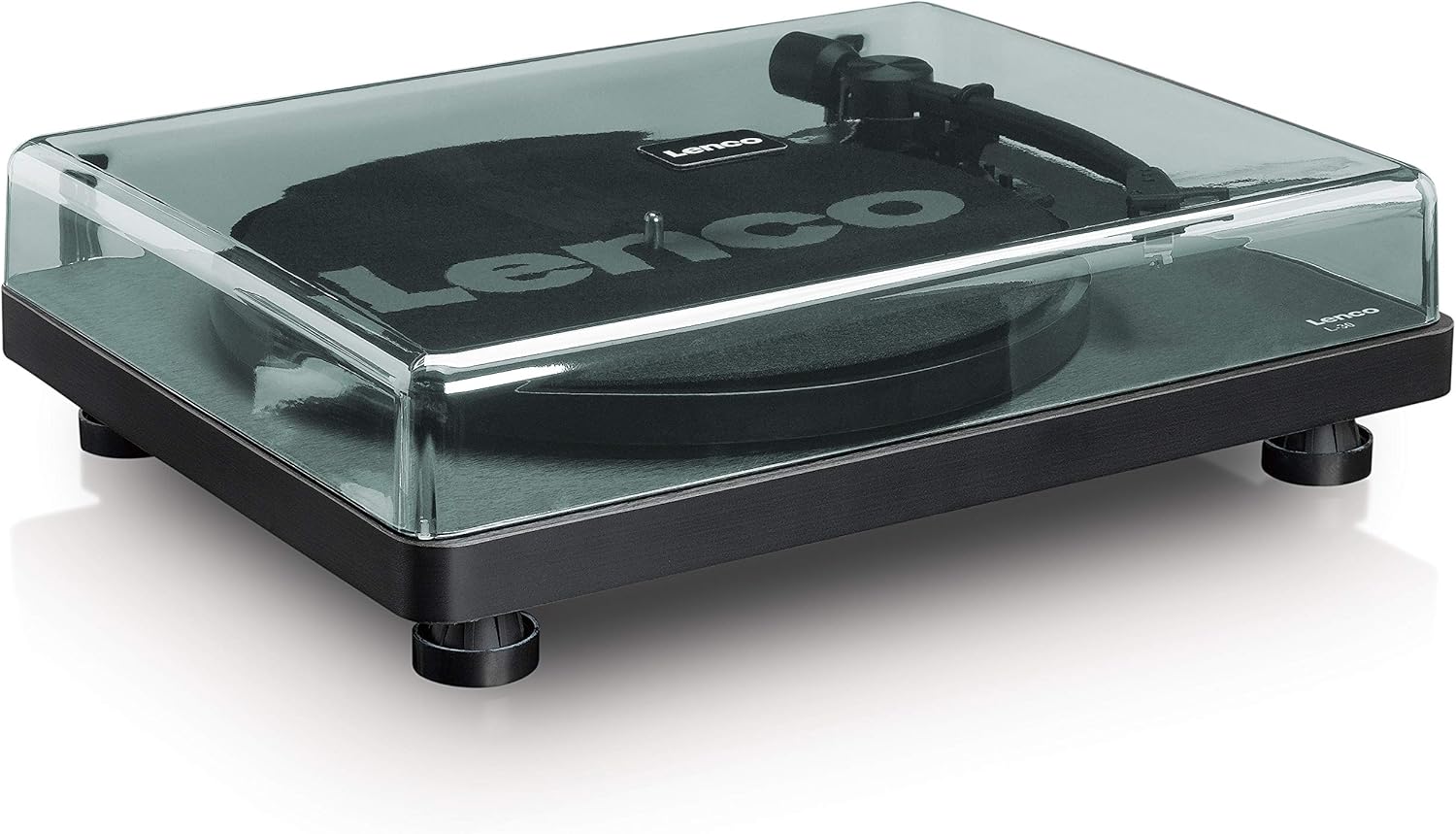
Slika 5.1: The Lenco L-30BK Turntable with its protective dust cover closed, ready for placement.
5.2 Namestitev plošče in traku
- Place the platter onto the turntable spindle.
- Poiščite pogonski jermen, ki ga običajno najdete pod ploščo ali pa je ločeno pakiran.
- Carefully stretch the drive belt around the motor pulley and the inner rim of the platter. Ensure the belt is not twisted.
- Na pladenj postavite podlogo za hranjenje.
5.3 Avdio povezava
The L-30BK has a built-in preamplifier, allowing direct connection to most audio systems.
- Connect the RCA audio cable (red for right channel, white for left channel) from the AUDIO OUT jacks on the rear of the turntable to the LINE IN or AUX IN jacks on your amplifier ali aktivni zvočniki.
5.4 Napajalni priključek
- Connect the DC12V power adapter to the DC12V POWER input on the rear of the turntable.
- Priključite napajalnik v ustrezno stensko vtičnico.
5.5 USB Connection (for Digitization)
- To digitize your vinyl records, connect the USB cable from the USB port on the rear of the turntable to an available USB port on your computer (PC or Mac).
6. Navodila za uporabo
6.1 Vklop/izklop
- Flip the ON/OFF switch on the rear panel to the 'ON' position to power on the turntable.
- Flip the switch to 'OFF' when not in use.
6.2 Predvajanje plošče
- Ploščo postavite na pladenj in pazite, da je na sredini.
- Select the appropriate speed (33 or 45 RPM) using the speed selector switch. For 45 RPM singles, place the included adapter on the spindle if needed.
- Dvignite ročico tona z uporabo ročice za nastavitev tona.
- Ročno namestite ročico gramofona nad želeni začetni utor plošče.
- Gently lower the tonearm using the cueing lever. The stylus will descend onto the record, and playback will begin.
- At the end of the record, the auto shut-off function will stop the platter rotation. Lift the tonearm and return it to its rest.

Slika 6.1: Proper technique for lowering the tonearm onto a record for playback.
Slika 6.2: Podrobno view of the Movable Magnet Sensor (MMC) cartridge and stylus assembly.
6.3 Digitizing Records via USB
The L-30BK allows you to convert your vinyl records into digital audio fileuporablja računalnik.
- Gramofon priključite na računalnik s priloženim kablom USB.
- Download and install audio recording software such as Audacity (available online for free) on your computer.
- Open the recording software and select the USB Audio Device as the input source.
- Start recording in the software, then begin playing your record on the turntable as described in section 6.2.
- Once the record finishes, stop the recording in the software and save your digitized audio file.
7. Vzdrževanje
7.1 Čiščenje gramofona
- Always unplug the turntable from the power outlet before cleaning.
- Use a soft, dry, lint-free cloth to wipe the cabinet and dust cover.
- Ne uporabljajte abrazivnih čistil, voskov ali topil, saj lahko poškodujejo premaz.
7.2 Stylus Care and Replacement
- The stylus is a delicate component. Avoid touching it with your fingers.
- Clean the stylus regularly using a soft brush, gently brushing from back to front.
- The stylus should be replaced after approximately 300-500 hours of playback, or if you notice a degradation in sound quality.
- To replace the stylus, carefully pull the old stylus assembly forward and down from the cartridge. Insert the new stylus assembly by pushing it upwards and backwards into the cartridge until it clicks into place.
8. Odpravljanje težav
If you encounter problems with your turntable, refer to the following common issues and solutions:
| Težava | Možen vzrok | rešitev |
|---|---|---|
| Brez moči | Power adapter not connected; Power switch off; Wall outlet faulty. | Ensure power adapter is securely connected; Turn power switch to 'ON'; Test wall outlet with another device. |
| Brez zvoka ali nizke glasnosti | RCA kabli niso pravilno priključeni; Amplifier/speakers off or volume low; Input selected incorrectly on amplifier. | Check RCA cable connections; Turn on amplifier/speakers and adjust volume; Select correct input source on your audio system. |
| Popačen zvok | Dirty stylus; Damaged stylus; Dirty record; Turntable not on a stable surface. | Clean the stylus; Replace the stylus if damaged; Clean the record; Ensure turntable is on a stable, level surface. |
| Preskakovanje zapisa | Dirty or scratched record; Stylus worn or damaged; Turntable not level; External vibrations. | Clean the record; Replace the stylus; Ensure turntable is level; Place turntable away from sources of vibration. |
| Težave s snemanjem na USB | USB cable not connected; Incorrect input selected in software; Software not installed. | Check USB cable connection; Select 'USB Audio Device' as input in recording software; Install Audacity or similar software. |
9. Specifikacije
| Ime modela | L-30BK |
| Znamka | Lenco |
| Vrsta pogona | Pogon na jermen |
| Hitrosti | 33 1/3, 45 vrt./min |
| Prejamplifier | Vgradna |
| Vrsta kartuše | Movable Magnet Sensor (MMC) |
| Povezljivost | USB, RCA Audio Out |
| Samodejni izklop | ja |
| Premer krožnika | 300 mm |
| Material | Wood (Enclosure) |
| barva | Črna |
| Teža predmeta | 3.28 kilogramov |
| Dimenzije (D x Š x V) | 41 D x 32 Š x 12 V centimetrov |
| Razmerje med signalom in hrupom | 60 dB |
| voltage | 240 volta |
| Vir napajanja | Električni na kabel |
10. Garancija in podpora
Lenco products are manufactured to high quality standards. In the event of a defect, your product is covered by the terms of the warranty in your country of purchase. For detailed warranty information, please refer to the warranty card included with your product or visit the official Lenco website. For technical support or service inquiries, please contact Lenco customer service through their official channels.