
DIGOO DIGOOWolifui253
Digoo DG-HOSA Smart Home Security Alarm System User Manual
Model: DIGOOWolifui253 | Brand: DIGOO
1. Izdelek je končanview
The Digoo DG-HOSA Smart Home Security Alarm System is a comprehensive security solution designed to protect your home. This system supports Wi-Fi, GSM, 2G, and 3G networks, offering flexible connectivity options. It features an intuitive control panel with a keypad and display, along with various wireless sensors for motion detection and door/window monitoring. The system can be controlled remotely via the "Easy security" mobile application, providing real-time alerts and management capabilities.
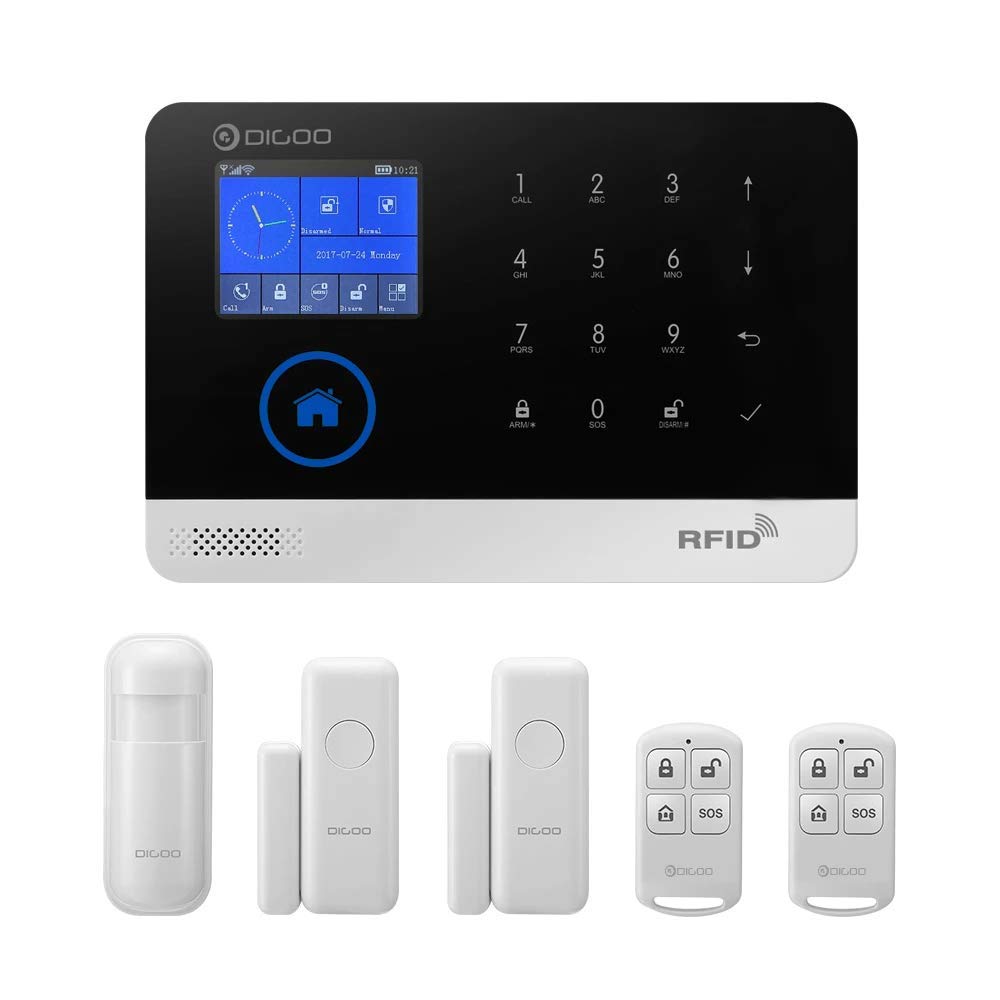
Figure 1.1: Complete Digoo DG-HOSA Smart Home Security Alarm System kit, including the main control panel, PIR motion detector, door/window sensors, and remote controllers.
2. Kaj je v škatli
Po odprtju paketa preverite, ali so priložene vse naslednje komponente:
- 1 x Digoo DG-HOSA Home Security Alarm Host (Main Control Panel)
- 1 x Wireless PIR Detector (Passive Infrared Motion Sensor)
- 2 x daljinski upravljalnik
- 2 x senzorji za vrata/okna
- 4 x Assist Installation Screws
- 4 x Wall-in Fixed Rubber Blocks
- 1 x 1M USB Power Cable (for 5V power supply)

Figure 2.1: Main control panel shown with a PIR motion detector, a door/window sensor, and a remote controller, representing key components of the system.
3. Navodila za namestitev
3.1 Začetni vklop in omrežna povezava
- Priključite napajanje: Use the provided USB power cable to connect the alarm host to a 5V power source.
- Namestitev SIM kartice (neobvezno): If using GSM/3G network, insert a compatible SIM card into the designated slot on the side of the control panel.
- Konfiguracija Wi-Fi:
- Download the "Easy security" app from your smartphone's app store.
- Ensure your smartphone and the alarm host are connected to the same Wi-Fi network during the initial setup.
- Follow the in-app instructions to pair the alarm host with your Wi-Fi network.

Slika 3.1: stran view of the Digoo DG-HOSA control panel, highlighting the USB power port, SIM card slot, and reset button for initial setup and connectivity.
3.2 Namestitev in povezovanje senzorjev
The system supports up to 99 sensors. Each sensor needs to be installed and paired with the main control panel.
- PIR detektor gibanja:
- Install the PIR detector in a corner or on a wall where it can cover the desired area, avoiding direct sunlight or heat sources.
- Ensure the detector is at an appropriate height (typically 2-2.2 meters) for optimal coverage.
- Pair the detector with the alarm host via the "Easy security" app or directly through the control panel's menu.
- Senzorji za vrata/okna:
- Mount the two parts of the door/window sensor (magnet and main unit) on the door/window frame and the moving part, ensuring they are aligned and within 1 cm of each other when closed.
- Pair the sensors with the alarm host using the same method as the PIR detector.
- Daljinski upravljalniki:
- The remote controllers are typically pre-paired. If not, follow the pairing instructions in the app or manual.


Figure 3.2: Individual components: Wireless PIR Motion Detector (left) and Wireless Door/Window Sensor (right), essential for comprehensive home security coverage.
4. Navodila za uporabo
4.1 Uporaba nadzorne plošče
The main control panel features a touchscreen display and a numeric keypad for direct interaction.
- Oborožitev: Press the "ARM" button or enter your passcode followed by "ARM" to activate the alarm system.
- Razorožitev: Press the "DISARM" button or enter your passcode followed by "DISARM" to deactivate the alarm system.
- SOS funkcija: In an emergency, press the "SOS" button on the panel or remote controller to trigger an immediate alarm and send alerts to pre-programmed contacts.
- nastavitve: Navigate through the menu using the touchscreen to adjust system settings, add/remove sensors, set up alarm zones, and configure network preferences.

Slika 4.1: Spredaj view of the Digoo DG-HOSA control panel, displaying the touchscreen interface, numeric keypad, and function buttons for system control.
4.2 Mobile App Control ("Easy security")
The "Easy security" app provides full remote control and monitoring capabilities for your alarm system.
- Daljinsko vklop/izklop: Activate or deactivate the system from anywhere with an internet connection.
- Obvestila v realnem času: Receive instant push notifications for alarm events, low battery alerts, and system status changes.
- Upravljanje senzorjev: Add, remove, or configure individual sensors and their respective defense zones.
- Call and Message Settings: Set up emergency contacts to receive calls and SMS alerts during an alarm.
- Stanje sistema: View trenutno stanje vašega alarmnega sistema in priključenih senzorjev.
5. Vzdrževanje
- Zamenjava baterije: Replace batteries in wireless sensors and remote controllers as indicated by low battery alerts on the control panel or app.
- Čiščenje: Nadzorno ploščo in senzorje nežno obrišite z mehko, suho krpo. Izogibajte se uporabi abrazivnih čistil ali topil.
- Posodobitve vdelane programske opreme: Periodically check for firmware updates via the "Easy security" app to ensure optimal performance and security.
- Stabilnost omrežja: Ensure a stable Wi-Fi and cellular network connection for reliable operation and remote access.
6. Odpravljanje težav
| Težava | Možen vzrok | rešitev |
|---|---|---|
| Sistem se ne povezuje z omrežjem Wi-Fi | Incorrect Wi-Fi password; Host and phone not on same network during setup; Weak Wi-Fi signal. | Verify password; Ensure both devices are on the same 2.4GHz Wi-Fi network; Move host closer to router. |
| Senzorji ne sprožijo alarma | Sensor not paired; Low sensor battery; Sensor placed incorrectly. | Re-pair sensor; Replace sensor battery; Adjust sensor position according to installation guidelines. |
| Brez potisnih obvestil | App notification settings disabled; Network issues; App not running in background. | Enable notifications in app and phone settings; Check internet connection; Ensure app is allowed to run in background. |
| SOS function not calling contacts | No SIM card; Invalid SIM card; Emergency contacts not programmed correctly. | Install active SIM card; Verify SIM card balance/plan; Program emergency contacts via app or control panel. |
7. Specifikacije
| Funkcija | Podrobnost |
|---|---|
| Znamka | DIGOO |
| Model | DIGOOWolifui253 (DG-HOSA) |
| Tehnologija povezljivosti | Wireless (Wi-Fi, GSM, 2G, 3G) |
| Vir napajanja | Battery Powered (5V USB Power Cable included) |
| Nadzorna metoda | App ("Easy security"), Control Panel, Remote Control |
| Združljive naprave | Pametni telefon |
| Vrsta opozorila | Audio Only, Motion Only (configurable) |
| Največ podprtih senzorjev | 99 |
| Mere izdelka (D x Š x V) | 15 x 7 x 21 centimetrov |
| Teža predmeta | 408 g (0.9 funta) |
| Potrebne baterije | 1 Lithium Polymer battery (for host, typically internal/rechargeable) |
| Vrsta namestitve | Screw-In (for mounting) |
8. Garancija in podpora
For warranty information and technical support, please refer to the official DIGOO webspletno mesto ali se obrnite na njihovo službo za stranke. Račun shranite kot dokazilo o nakupu za uveljavljanje garancije.
Spletni viri:
- Official DIGOO Webspletno mesto: www.digoo.cc (Opomba: To je nadomestno besedilo URL, please refer to actual product documentation for correct support links.)
- "Easy security" App Support: Check the app's 'Help' or 'About' section for in-app support options.
Ask a question about this manual
Ask about setup, troubleshooting, compatibility, parts, safety, or missing instructions. Manuals+ will review the question and use this page’s manual context to help answer it.