
Radenso XP
Radenso XP Radar & Laser Detector User Manual
This manual provides detailed instructions for the setup, operation, and maintenance of your Radenso XP Radar & Laser Detector. The Radenso XP offers top-flight sensitivity for radar alerts and excellent filtering for blind spot monitor/traffic monitor false alerts, along with GPS Lockout capability to remember common false alerts.
1. Uvod
1.1 izdelkov konecview
The Radenso XP is a high-performance radar and laser detector designed to provide advanced warning of radar and laser signals. It features an OLED display, voice alerts, and advanced filtering technologies to minimize false alarms, ensuring a quiet and reliable driving experience.
1.2 Ključne lastnosti
- Long Range & False Alert Filtering: Detects radar alerts from several miles away while filtering out blind spot monitor and traffic monitor false alerts.
- GPS Lockout Technology: Remembers and mutes common false alerts along frequently driven routes.
- Low Speed Muting: Automatically mutes alerts below a user-selectable speed.
- USA Support / Warranty: In-house telephone and e-mail support with a 1-year manufacturer warranty.
- Ready Out of the Box: Simple plug-and-play operation with pre-configured settings.
- Windows & Mac OS Compatible: Supports firmware updates via both Windows and Apple computers.
- OLED zaslon: Clear and bright display for easy readability.
- Glasovna opozorila: Provides 260 different voice messages for various alerts.
2. Nastavitev
2.1 Kaj je vključeno
Your Radenso XP package includes the following items:
- Radenso XP Radar & Laser Detector
- Potovalni kovček
- Sesalni nosilec
- Power Cord (RJ11 connection)
- Kabel USB (za posodobitve)

Figure 2.1: Radenso XP Radar Detector with its travel case, suction cup mount, power cord, and USB cable.
2.2 Namestitev
To install your Radenso XP, simply mount it to your windshield using the provided suction cup mount and plug in the power cord. The device is designed for immediate use with optimal factory settings.
2.3 Upravljalni elementi in prikazovalnik
Familiarize yourself with the controls and OLED display of your Radenso XP:
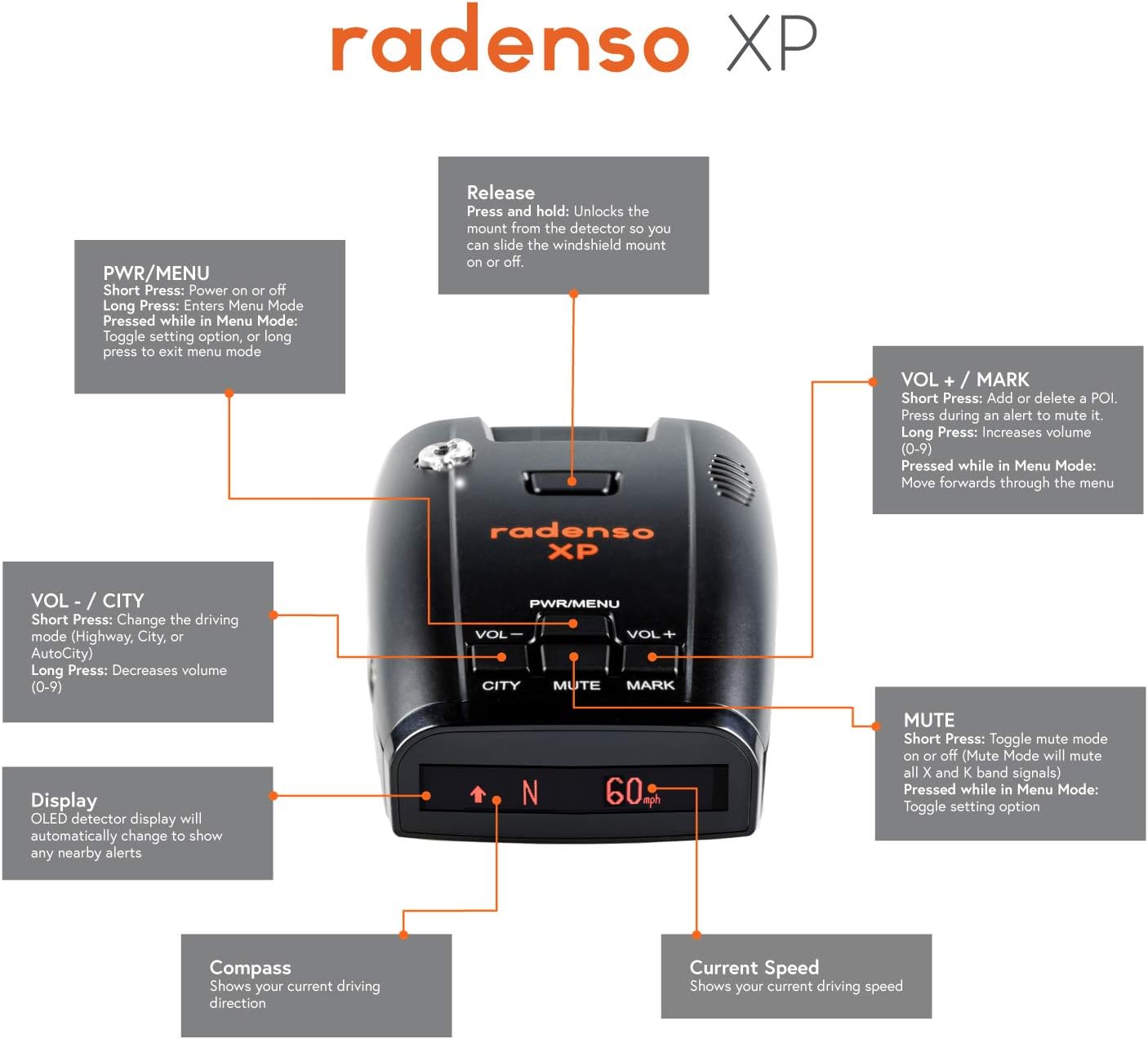
Slika 2.2: Konecview of Radenso XP controls and display elements.
- PWR/MENU Button: Short press to power on or off. Long press to enter/exit Menu Mode. Pressed while in Menu Mode: Toggle setting option, or long press to exit menu mode.
- VOL - / CITY Button: Short press to change driving mode (Highway, City, or AutoCity). Long press to decrease volume (0-9).
- Gumb MUTE: Short press to toggle mute mode on or off. In mute mode, it will mute all X and K band signals. Pressed while in Menu Mode: Toggle setting option.
- VOL + / MARK Button: Short press to add or delete a Point of Interest (POI). Press during an alert to mute it. Long press to increase volume (0-9). Pressed while in Menu Mode: Move forwards through the menu.
- Gumb za sprostitev: Unlocks the mount from the detector to slide the windshield mount on or off.
- Zaslon: OLED detector display will automatically change to show any nearby alerts.
- Kompas: Shows your current driving direction.
- Trenutna hitrost: Shows your current driving speed.
3. Upravljanje naprave
3.1 Vklop/izklop
Pritisnite PWR/MENU button briefly to turn the device on or off. The device will perform a self-test upon startup.
3.2 Načini vožnje
The Radenso XP offers three driving modes to optimize performance based on your driving environment:
- Avtocestni način: Provides maximum sensitivity for long-range detection, suitable for open road driving.
- Mestni način: Reduces sensitivity to X and K bands to minimize false alerts from automatic doors and other urban sources.
- AutoCity Mode: Automatically adjusts sensitivity based on your speed, offering a balance between detection range and false alert filtering.
Toggle between these modes using the VOL - / CITY gumb.
3.3 GPS Lockouts
The GPS Lockout feature allows the detector to remember and automatically mute common false alerts at specific locations. To set a GPS lockout, simply press and hold the VOL + / MARK button when a consistent false alert is detected. The device will then learn to ignore this signal at that location in the future.
3.4 Low Speed Muting
Configure the Radenso XP to automatically mute audio alerts when your vehicle's speed drops below a user-selectable threshold. This feature is particularly useful in heavy traffic or urban areas where constant alerts might be distracting.
3.5 Radar and Laser Detection
The Radenso XP detects X, K, Ka, and Laser frequency bands. When a signal is detected, the OLED display will show the band and signal strength, accompanied by a voice alert. The device's advanced filtering helps distinguish between legitimate threats and common false sources like Blind Spot Monitors (BSM) and Traffic Sensor Rejection (TSR).
4. Vzdrževanje
4.1 Čiščenje
To maintain optimal performance and appearance, regularly clean your Radenso XP. Use a soft, dry cloth to wipe the exterior. Avoid using abrasive cleaners or solvents, as they may damage the device's finish or internal components.
4.2 Posodobitve programske opreme
Radenso regularly releases firmware updates to improve performance, add new features, and update the red light/speed camera database. You can update your Radenso XP using a Windows or Mac OS computer. Visit the official Radenso webspletno mesto za najnovejšo vdelano programsko opremo in navodila za posodobitev.
5. Odpravljanje težav
If you encounter issues with your Radenso XP, refer to the following common troubleshooting tips:
- Brez napajanja: Ensure the power cord is securely connected to both the detector and the vehicle's power outlet. Check the vehicle's fuse for the power outlet.
- Pogosta lažna opozorila: Adjust the driving mode to City or AutoCity. Utilize the GPS Lockout feature for recurring false alert locations. Ensure the Blind Spot Monitor filter is enabled in settings.
- No Radar/Laser Detection: Verify the device is powered on and not in mute mode. Ensure the detector has a clear line of sight to the road.
- Težave s prikazom: Check for any physical damage. If the display is dim, adjust brightness settings in the menu.
For persistent issues or advanced troubleshooting, please contact Radenso customer support.
6. Specifikacije
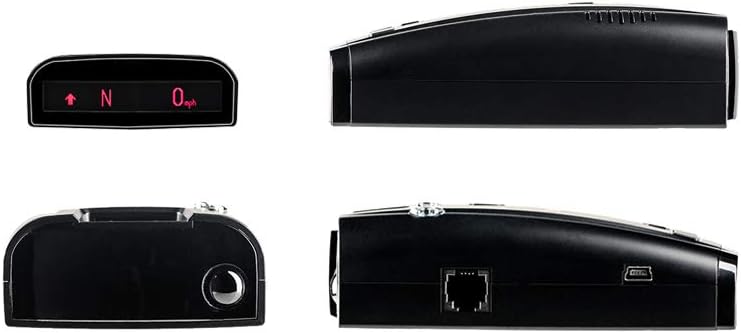
Slika 6.1: Različne views of the Radenso XP Radar Detector.
| Funkcija | Podrobnost |
|---|---|
| Številka modela | XP |
| Teža predmeta | 1.21 funtov |
| Dimenzije izdelka | 4.5 x 2.75 x 1.5 palcev (11.43 x 6.98 x 3.81 cm) |
| Vrsta zaslona | OLED |
| Podprti frekvenčni pasovi | X, K, Ka, Laser |
| Vir napajanja | Enosmerni tok (12 voltov) |
| Združljive naprave | Avtomobili in vozila |

Figure 6.2: FCC ID and Patent Information.
Pravna izjava o omejitvi odgovornosti: This device complies with part 15 of FCC rules. (FCC ID: 2AEE3XP)
7. Garancija in podpora
7.1 Informacije o garanciji
The Radenso XP comes with a 1-letna garancija proizvajalca. Additionally, Radenso offers a 1-year radar speeding ticket guarantee, providing peace of mind for users.
7.2 Podpora strankam
For any questions, technical assistance, or warranty claims, please contact Radenso's in-house USA Technical Support staff via telephone or e-mail. Detailed contact information can be found on the official Radenso webmesto.
Na voljo je tudi uradni uporabniški priročnik (PDF) za prenos: Prenesi uporabniški priročnik (PDF)
Sorodni dokumentiXP


Ask a question about this manual
Ask about setup, troubleshooting, compatibility, parts, safety, or missing instructions. Manuals+ will review the question and use this page’s manual context to help answer it.