
Propel Zipp Nano 2.0
Propel Zipp Nano 2.0 Drone User Manual
Model: Zipp Nano 2.0
Znamka: Propel
1. Uvod
This manual provides essential information for the safe and effective operation of your Propel Zipp Nano 2.0 Drone. Please read this manual thoroughly before operating the drone to ensure proper usage and to prevent damage or injury.
The Propel Zipp Nano 2.0 is a high-performance 2.4 GHz indoor/outdoor drone designed for stable flight and exciting aerial maneuvers. It features a built-in 6-axis gyroscopic chip for stability, multiple speed settings, and the ability to perform 360-degree stunt rolls.
2. Varnostni ukrepi
Always prioritize safety when operating the drone. Failure to follow these guidelines may result in injury or damage to the drone or property.
- Do not operate the drone near people, animals, or obstacles.
- Keep hands, hair, and loose clothing away from rotating propellers.
- Ensure the drone is fully charged before each flight.
- Ne letite v močnem vetru ali slabih vremenskih razmerah.
- Supervise children during operation. This product contains small parts and is not suitable for children under 3 years due to choking hazard.
- Do not attempt to modify or repair the drone yourself. Contact customer support for assistance.

Image: Back of the product packaging, highlighting features and a warning about small parts.
3. Vsebina paketa
Preverite, ali so v paketu vsi elementi:
- Propel Zipp Nano 2.0 Drone (Red)
- 2.4 GHz Digital Remote Control
- USB polnilni kabel
- Spare Replacement Parts (Propellers)

Image: The Propel Zipp Nano 2.0 Drone and its remote control visible within the clear retail packaging.
4. Nastavitev
4.1 Polnjenje baterije drona
The drone is powered by an internal rechargeable battery. Use the provided USB charging cable to charge the drone.
- Connect the small end of the USB charging cable to the drone's charging port.
- Večji konec polnilnega kabla USB priključite na vir napajanja USB (npr. vrata USB računalnika, stenski adapter USB).
- Indikatorska lučka polnjenja na USB-kablu med polnjenjem sveti in ugasne, ko je naprava popolnoma napolnjena.
- Polnjenje običajno traja približno 30–45 minut. Ne polnite premočno.
4.2 Vstavljanje baterij v daljinski upravljalnik
The remote control requires 2 "AAA" batteries (not included).
- Poiščite predal za baterije na zadnji strani daljinskega upravljalnika.
- Odprite pokrov prostora za baterije.
- Insert 2 "AAA" batteries, ensuring correct polarity (+/-).
- Trdno zaprite pokrov prostora za baterije.

Image: The remote control for the Propel Zipp Nano 2.0 Drone, showing its various buttons and joysticks.
4.3 Združevanje drona in daljinskega upravljalnika
To establish a connection between the drone and the remote control:
- Postavite dron na ravno, ravno površino.
- Turn on the drone by sliding the power switch. The drone's LED lights will flash.
- Vklopite daljinski upravljalnik.
- Potisnite levo igralno palico (ročico za plin) do konca navzgor in jo nato povlecite do konca navzdol.
- The drone's LED lights will turn solid, indicating successful pairing.
5. Upravljanje drona
5.1 Krmilniki leta
Seznanite se z razporeditvijo in funkcijami daljinskega upravljalnika:
- Leva igralna palica (plin/zasuk):
- Push up to increase altitude (throttle).
- Push down to decrease altitude.
- Push left/right to rotate the drone (yaw).
- Desna igralna palica (nagib/nagib):
- Push up/down to move forward/backward (pitch).
- Push left/right to move left/right (roll).
- Gumb za hitrost: Cycles through 3 different speed settings (slow, medium, high).
- Gumb za kaskaderje: Press to initiate 360-degree stunt rolls (see 5.4).
- T-Mode Button: Activates T-Mode for beginner pilots, providing more stable and controlled flight.
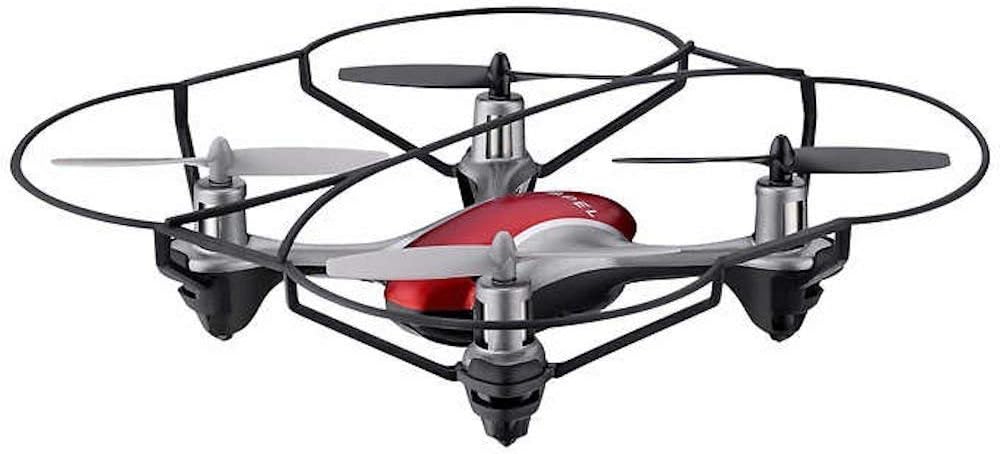
Image: The Propel Zipp Nano 2.0 Drone, showcasing its compact design and propeller guards.
5.2 Vzlet in pristanek
- Vzlet: After pairing, slowly push the left joystick (throttle) up to lift off.
- Pristanek: Slowly pull the left joystick (throttle) down until the drone lands gently.
5.3 Zadrževanje nadmorske višine
The Zipp Nano 2.0 features an air pressure sensor that helps lock altitude in mid-air, making it easier to control and hover stably.
5.4 360-Degree Stunt Rolls
To perform a stunt roll:
- Ensure the drone is flying at a sufficient height (at least 6-8 feet).
- Press the dedicated Stunt Button on the remote control.
- Immediately push the right joystick in the desired direction (forward, backward, left, or right) to execute the roll.

Slika: Poševna view of the Propel Zipp Nano 2.0 Drone, highlighting its sleek design and protective frame.
6. Vzdrževanje
- Čiščenje: Use a soft, dry cloth to clean the drone and remote control. Do not use harsh chemicals or water.
- Zamenjava propelerja: If propellers become damaged, replace them with the provided spare parts. Carefully remove the damaged propeller and snap the new one into place, ensuring correct orientation.
- Shranjevanje: When not in use, store the drone and remote control in a cool, dry place away from direct sunlight.
7. Odpravljanje težav
| Težava | Možen vzrok | rešitev |
|---|---|---|
| Dron se ne odziva na daljinski upravljalnik. | Not paired, low drone battery, low remote control batteries. | Ponovno seznanite dron in daljinski upravljalnik. Napolnite baterijo drona. Zamenjajte baterije daljinskega upravljalnika. |
| Dron leti neenakomerno ali pa se nese. | Not calibrated on a level surface, damaged propeller, strong wind. | Ensure drone is placed on a flat surface for pairing. Check for damaged propellers and replace if necessary. Fly in calm conditions. |
| Drone does not lift off. | Low drone battery, propellers not spinning correctly. | Charge drone battery fully. Check for obstructions around propellers. |
8. Specifikacije
| Funkcija | Podrobnost |
|---|---|
| Znamka | Poganjanje |
| Ime modela | Propel 2.4 ghz (Zipp Nano 2.0) |
| Tehnologija povezljivosti | Radio Frequency (2.4 GHz) |
| Operativno območje | Do 200 čevljev |
| Žiroskop | Built-in 6-axis gyroscopic chip |
| Nastavitve hitrosti | 3 (Slow, Medium, High) |
| Posebne lastnosti | 360-degree stunt rolls, Altitude Hold, T-Mode for beginners |
| Vrste materiala | Plastic, Carbon Fibre |
| Dimenzije izdelka | 13.97 x 3.81 x 13.97 cm |
| Teža predmeta | 453.59 g (1 funt) |
| barva | Rdeča |
| Stopnja spretnosti | Začetnik |
9. Garancija in podpora
Propel offers unlimited replacement parts for one year from the date of purchase. For warranty claims, technical support, or to order replacement parts, please refer to the contact information provided on the product packaging or the official Propel webmesto.
Za namene garancije shranite račun kot dokazilo o nakupu.
Ask a question about this manual
Ask about setup, troubleshooting, compatibility, parts, safety, or missing instructions. Manuals+ will review the question and use this page’s manual context to help answer it.