
1. Uvod
Hvala za nakupasing the BYINTEK BT140 WiFi Projector. This manual provides essential information for setting up, operating, and maintaining your projector. Please read it thoroughly before use to ensure proper functionality and to extend the lifespan of your device.
2. Varnostne informacije
Da preprečite požar, električni udar ali poškodbe, upoštevajte naslednje varnostne ukrepe:
- Ne glejte neposredno v lečo projektorja, ko jeamp je vklopljena. Močna svetloba lahko povzroči poškodbe oči.
- Ensure proper ventilation. Do not block ventilation openings. Overheating can damage the projector.
- Projektor postavite na stabilno, ravno površino, da preprečite njegov padec.
- Projektor hranite stran od vode, vlage in vnetljivih materialov.
- Uporabljajte samo napajalnik, ki je priložen projektorju.
- Projektorja ne poskušajte popravljati sami. Vsa servisna dela prepustite usposobljenemu osebju.
- Med nevihtami ali če projektorja dalj časa ne uporabljate, ga izključite iz električne vtičnice.
3. Vsebina paketa
Prosimo, preverite, ali so vsi elementi prisotni:
- BYINTEK BT140 Projector
- Napajalni kabel
- Daljinski upravljalnik
- AV Cable
- Uporabniški priročnik (ta dokument)
Note: Specific accessories may vary slightly depending on the region or retailer.
4. Izdelek je končanview
Seznanite se s komponentami in vmesniki projektorja.
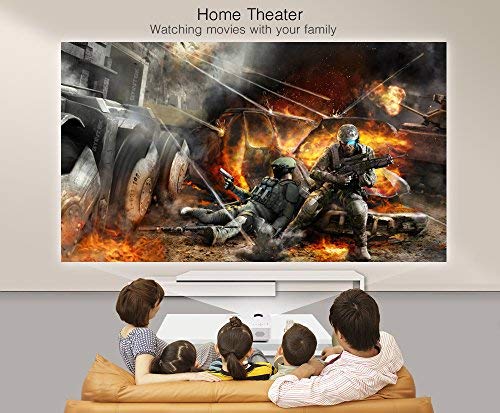
Slika: spredaj view of the BYINTEK BT140 Projector, showing the lens and ventilation grilles.
Vmesniki:
- HDMI: Connect to devices like laptops, Blu-ray players, gaming consoles.
- USB: Za predvajanje medijev priključite USB-pogone.
- Reža za kartico SD: Vstavite SD kartice za predvajanje medijev.
- OD: Connect to older devices using the included AV cable.
- VGA: Connect to computers with a VGA output.
- Zvočni izhod: Priključite zunanje zvočnike ali slušalke.
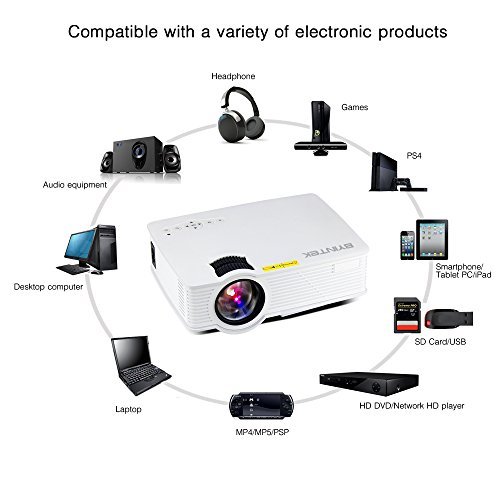
Image: Diagram illustrating various devices compatible with the BYINTEK BT140 Projector, including laptops, smartphones, tablets, gaming consoles (PS4, PSP), desktop computers, headphones, audio equipment, and HD media players, connected via HDMI, USB, SD, AV, and VGA ports.
5. Nastavitev
5.1 Namestitev
Place the projector on a stable surface. The recommended projection distance is 1.5 to 2.5 meters for an optimal screen size of 50 to 80 inches. The projector supports image sizes from 34 to 100 inches.
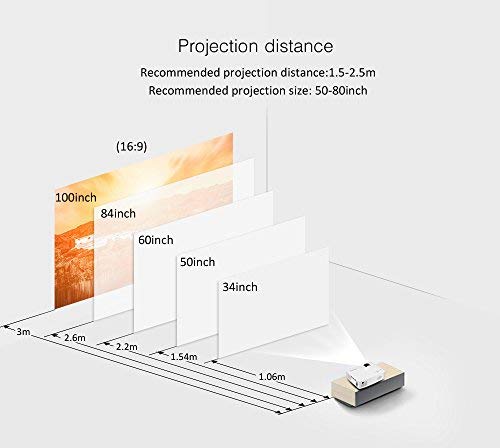
Image: Diagram showing recommended projection distances and corresponding screen sizes for the BYINTEK BT140 Projector, ranging from 34 inches at 1.06m to 100 inches at 3m.
5.2 Napajalni priključek
- Priključite napajalni kabel na vhod za napajanje projektorja.
- Drugi konec napajalnega kabla priključite v stensko vtičnico.
5.3 Povezovanje naprav
- HDMI: Connect an HDMI cable from your source device (e.g., laptop, game console) to the projector's HDMI port.
- USB/SD: Insert a USB drive or SD card into the respective port for direct media playback.
- AV/VGA: Use the appropriate cable to connect older devices.
5.4 Prilagoditev ostrenja
Vrtite obroč za ostrenje na objektivu projektorja, dokler projicirana slika ni jasna in ostra.
5.5 Trapezni popravek
If the projected image appears trapezoidal, adjust the keystone correction dial (usually located near the lens) to square the image. The projector supports vertical keystone correction of ±15 degrees.
5.6 Wireless Connection (Airplay/Miracast)
The BT140plus model includes a built-in wireless push module supporting Airplay and Miracast functionality for wireless connection to smartphones, tablets, and iPads. Refer to the on-screen instructions for pairing your device.
6. Navodila za uporabo
6.1 Vklop/izklop
- Vklop: Pritisnite gumb za vklop na projektorju ali daljinskem upravljalniku.
- Ugasniti: Ponovno pritisnite gumb za vklop. Po potrebi potrdite izklop.
6.2 Izbira vhodnega vira
Use the "Source" button on the remote control or the projector's control panel to cycle through available input sources (HDMI, USB, SD, AV, VGA, Wireless).
6.3 Predvajanje medijev (USB/SD)
When a USB drive or SD card is inserted, the projector's multimedia interface will typically appear. Navigate through folders and select your desired media file (videos, photos, music) using the remote control.
- Podprti video formati: RMVB/RM (Realvideo2.0/3.0/4.0), AVI (Xvid/H264), FLV (Sorenson H.263), MOV (H264), MP4 (MPEG4, AVC), MPG (MPG1)
- Podprti zvočni formati: MP3, WMA, AAC, AC3
7. Vzdrževanje
7.1 Čiščenje leče
Use a soft, lint-free cloth or lens cleaning paper to gently wipe the projector lens. Avoid using abrasive cleaners or excessive force, which can scratch the lens.
7.2 Čiščenje ohišja projektorja in prezračevalnih odprtin
Wipe the projector's exterior with a soft, dry cloth. Use a small brush or compressed air to clear dust from the ventilation openings to ensure proper airflow and prevent overheating.
7.3 Lamp življenje
The BYINTEK BT140 uses an LED lamp with an estimated lifespan of 20,000 hours, significantly reducing the need for lamp replacement compared to conventional lamps.
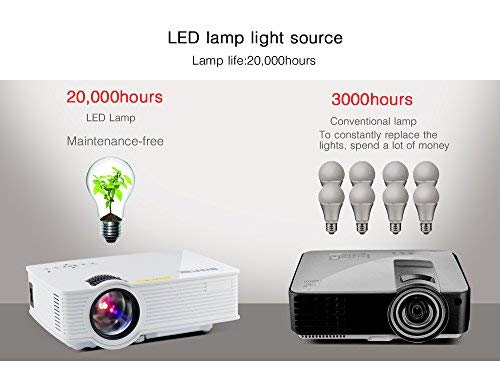
Image: Comparison showing the BYINTEK BT140's LED lamp with 20,000 hours lifespan versus conventional lamps with 3,000 hours lifespan, highlighting the maintenance-free aspect of LED technology.
8. Odpravljanje težav
Če imate težave s projektorjem, si oglejte naslednje pogoste težave in rešitve:
| Težava | Možen vzrok/rešitev |
|---|---|
| Na zaslonu ni slike |
|
| Slika je zamegljena |
|
| Slika je trapezoidna |
|
| Brez zvoka |
|
| Daljinski upravljalnik ne deluje |
|
9. Specifikacije
Below are the technical specifications for the BYINTEK BT140 Projector:
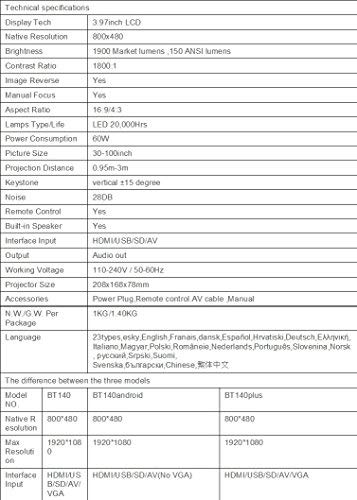
Image: Table detailing the technical specifications of the BYINTEK BT140 Projector, including display tech, resolution, brightness, contrast, aspect ratio, lamp life, power consumption, and interface inputs.
| Funkcija | Podrobnost |
|---|---|
| Tehnologija zaslona | 3.97-palčni LCD-zaslon |
| Izvorna ločljivost | 800 x 480 |
| Največja ločljivost zaslona | 1920 x 1080 (Support 1080P) |
| Svetlost | 1900 Lumens (150 ANSI lumens) |
| Kontrastno razmerje | 1800:1 |
| Slika Reverse | ja |
| Ročno ostrenje | ja |
| Razmerje stranic | 16:9/4:3 |
| Lamp Type / Life | LED, 20,000 ur |
| Poraba energije | 70 W |
| Velikost slike | 34-100 palcev |
| Projekcijska razdalja | 0.95m - 3m |
| Popravek Keystone | Navpično ±15 stopinj |
| Nivo hrupa | 28 dB |
| Daljinski upravljalnik | ja |
| Vgrajen zvočnik | ja |
| Vhodni vmesnik | HDMI / USB / SD / AV / VGA |
| Avdio izhod | Vrata za izhod zvoka |
| Delovni letniktage | 110-240V / 50-60Hz |
| Velikost projektorja | 208 x 168 x 78 mm |
| Neto teža | 950 Grams (1KG N.W./G.W. Per Package) |
| Tehnologija povezljivosti | Wi-Fi (for Airplay/Miracast) |
| Združljive naprave | Prenosnik, pametni telefon, tablica |
10. Garancija in podpora
BYINTEK products are designed for reliability and performance. For warranty information or technical support, please refer to the warranty card included with your product or contact BYINTEK customer service through their official webspletno mesto ali vaš prodajalec.
Za dodatno pomoč lahko obiščete BYINTEK Store on Amazon.