
1. Uvod
The Zoom LiveTrak L-12 is a versatile 12-channel digital mixer and 14-track multitrack recorder, engineered for a wide range of audio applications including live performances, studio recording, band rehearsals, and podcast production. This compact unit integrates a digital mixer with a robust multitrack recorder and a USB audio interface, providing comprehensive control over your audio environment.
Key features include 8 mono channels with high-gain, low-noise microphone preamps, +48V phantom power, and a compression knob, alongside two stereo input channels. Channels 1 and 2 are equipped with Hi-Z inputs for direct instrument connection. Each channel offers a low-cut filter, a 3-band equalizer, pan control, and a dedicated send for the 16 built-in high-quality effects.
2. Vsebina paketa
Preverite, ali so v paketu vsi spodaj navedeni predmeti. Če kateri koli predmet manjka ali je poškodovan, se obrnite na prodajalca.
- Zoom LiveTrak L-12 Digital Mixer & Multitrack Recorder
- Napajalni kabel
- USB kabel
- XLR-XLR Cable (2 units)
- XLR-TRS Cable (2 units)
- Polsen HPC-A30 Closed-Back Studio Monitor Headphones
- Gator Cases G-MIXERBAG-1815 Padded Nylon Mixer/Equipment Bag
3. Nastavitev
3.1 Razpakiranje in namestitev
Carefully remove the LiveTrak L-12 from its packaging. Place the unit on a stable, flat surface, ensuring adequate ventilation around the device. Avoid placing it near heat sources or in direct sunlight.

Figure 3.1: Zoom LiveTrak L-12 Digital Mixer and Multitrack Recorder. This image shows the top-down view of the L-12 unit, highlighting its various faders, knobs, and input/output ports.
3.2 Napajalni priključek
- Connect the supplied power cable to the DC IN port on the rear panel of the L-12.
- Drugi konec napajalnega kabla priključite v ustrezno vtičnico za izmenični tok.
- Press the POWER switch to turn on the unit. The display will illuminate.
3.3 Priključki avdio vhoda
The L-12 offers various input options:
- Mono Channels (1-8): Use XLR or 1/4" TRS/TS cables for microphones, line-level instruments, or other audio sources. Channels 1 and 2 feature Hi-Z inputs for direct connection of guitars and basses.
- Stereo Channels (9/10, 11/12): Use dual 1/4" TS/TRS or RCA cables for stereo line-level sources.

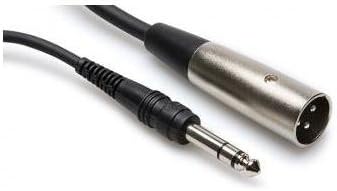
Slika 3.2: Npramples of XLR-XLR (left) and XLR-TRS (right) cables used for connecting microphones and other audio equipment to the L-12.
3.4 Izhodne povezave
- Master Out: Connect to your main PA system or studio monitors using XLR cables.
- Monitor Out: Use for connecting stagelektronski monitorji ali osebni nadzorni sistemi.
- Izhodi za slušalke: Five independent headphone outputs are available for individual monitoring.

Figure 3.3: Polsen HPC-A30 Closed-Back Studio Monitor Headphones, suitable for monitoring audio from the L-12.
3.5 Povezava USB
Connect the L-12 to a computer via the USB cable to use it as a 14-in/4-out USB audio interface. This allows for multi-track recording directly to a DAW or playback from a computer. The L-12 is also compatible with iOS devices.
4. Navodila za uporabo
4.1 Kontrolniki kanalnega traku
- Gumb GAIN: Adjusts the input level for each channel.
- COMP (Compression) Knob: Applies compression to mono channels (1-8) to control dynamics.
- Gumb LOW CUT: Activates a high-pass filter to reduce unwanted low-frequency noise.
- 3-pasovni EQ: Adjusts High, Mid, and Low frequencies for tone shaping.
- Gumb PAN: Positions the channel's sound in the stereo field.
- Gumb SEND EFX: Nadzira količino signala, poslanega notranjemu procesorju efektov.
- Gumb za snemanje/predvajanje: Engages recording or playback for individual tracks on the SD card.
- Gumb MUTE: Silences the channel output.
- FADER: Adjusts the overall volume level of the channel.
4.2 Recording to SD Card
The L-12 features a built-in 14-track SD recorder. Insert an SD card (Class 10 or higher recommended) into the SD card slot. Use the dedicated REC/PLAY buttons on each channel and the master recorder controls (REC, PLAY, STOP) to manage your recording sessions. Recordings are saved as WAV files.
4.3 Uporaba učinkov
The L-12 includes 16 editable effects. Use the SEND EFX knobs on individual channels to route signal to the effects processor. The EFX RETURN fader controls the overall level of the effects in the mix. Adjust effect parameters using the dedicated controls in the master section.
4.4 Scene Memory
The L-12 allows you to save and recall up to nine mix scenes. This feature is useful for quickly switching between different setups for various songs or performance segments. Use the SCENE buttons to store and recall your preferred settings.
5. Vzdrževanje
- Čiščenje: Za čiščenje zunanjosti enote uporabite mehko, suho krpo. Izogibajte se abrazivnim čistilom ali topilom.
- Shranjevanje: When not in use, store the L-12 in a cool, dry place, away from direct sunlight and extreme temperatures. The included Gator Cases G-MIXERBAG-1815 is ideal for protection during storage and transport.
- Posodobitve vdelane programske opreme: Periodically check the Zoom webspletno mesto za posodobitve vdelane programske opreme, da se zagotovi optimalno delovanje in dostop do novih funkcij.

Figure 5.1: Gator Cases G-MIXERBAG-1815 Padded Nylon Mixer/Equipment Bag, designed for protecting and transporting the L-12.
6. Odpravljanje težav
- Ni zvoka:
- Ensure the L-12 is powered on and connected correctly to your speakers or headphones.
- Check all faders (channel, master, EFX return) are raised and not muted.
- Verify input sources are connected properly and their gain levels are set appropriately.
- Confirm that the correct output (Master Out, Monitor Out, Headphone) is selected and its level is up.
- Popačen zvok:
- Zmanjšajte vhodne nivoje GAIN, da preprečite spotikanje (kar prikazuje LED PEAK).
- Check that output levels are not too high, causing distortion in connected devices.
- Ensure cables are in good condition and correctly connected.
- Težave s snemanjem:
- Prepričajte se, da je SD-kartica vstavljena in da ima dovolj prostega prostora.
- Verify the SD card is Class 10 or higher for reliable recording.
- Check that the REC/PLAY button for the desired track is engaged (red).
- Confirm that the master recorder's REC button is pressed to start recording.
- USB Audio Interface Not Recognized:
- Prepričajte se, da je kabel USB varno priključen tako na L-12 kot na računalnik.
- Check your computer's audio settings to select the L-12 as the input/output device.
- Install any necessary drivers from the Zoom website if prompted by your operating system.
7. Specifikacije
| Funkcija | Specifikacija |
|---|---|
| Število kanalov | 12 (8 mono, 2 stereo) |
| Vgrajeni snemalnik | 14-track SD Recorder |
| Vmesnik USB Audio | 14-in/4-out (iOS Compatible) |
| Vložki | 8x Combo XLR-1/4" (Channels 1-8), 2x Dual 1/4" (Channels 9/10, 11/12), 2x RCA (Channels 9/10, 11/12) |
| Hi-Z Inputs | Kanali 1-2 |
| Fantomska moč | +48 V |
| Prejamps | Visoko ojačanje, nizek šum |
| Stiskanje | Single knob (Channels 1-8) |
| EQ | 3-band (High, Mid, Low) per channel |
| Učinki | 16 built-in, editable |
| Izhodi | Master Out (XLR), Monitor Out, 5x Headphone Outputs |
| Vir napajanja | Električni na kabel |
| Nivo hrupa | 26 decibelov |
8. Garancija in podpora
8.1 Garancija izdelka
The Zoom LiveTrak L-12 comes with a Limited 1-Year Warranty from the date of purchase. This warranty covers defects in materials and workmanship under normal use. Please retain your proof of purchase for warranty claims. For specific terms and conditions, refer to the warranty card included with your product or visit the official Zoom webmesto.
The Polsen HPC-A30 Closed-Back Studio Monitor Headphones and Gator Cases G-MIXERBAG-1815 Padded Nylon Mixer/Equipment Bag included in this bundle may have separate warranties. Please refer to their respective documentation for details.
8.2 Podpora strankam
For technical assistance, troubleshooting, or service inquiries, please visit the official Zoom support website or contact their customer service department. You can typically find contact information and FAQs on the manufacturer's webspletno mesto: