
1. Uvod
The Focal Shape 50 is a versatile monitoring loudspeaker designed for professional audio environments. It offers extended low-frequency response and precise control, making it suitable for rooms up to 130 sq ft (12 sq m). This manual provides essential information for the proper setup, operation, and maintenance of your Shape 50 studio monitor.

Slika 1.1: Sprednja stran view of the Focal Shape 50 Studio Monitor, showcasing its dark walnut finish and speaker components.
2. Vsebina paketa
Before proceeding with installation, please verify that all components are present in the packaging:
- Focal Shape 50 Studio Monitor (1 unit)
- Napajalni kabel
- Uporabniški priročnik (ta dokument)
3. Nastavitev
3.1 Namestitev
The Shape 50 monitor is designed to be placed near a wall due to its port-less design. For optimal listening, position the monitor at a distance of approximately 30 inches (80 cm) from your listening position. Ensure the monitors are placed symmetrically in your room to achieve a balanced stereo image.
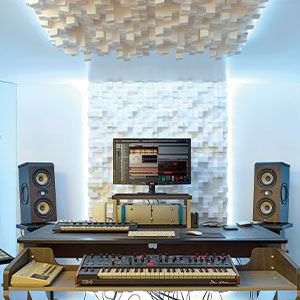
Slika 3.1: Nprample of a studio setup with two Focal Shape 50 monitors positioned for optimal sound monitoring.
3.2 Povezave
Connect your audio source to the Shape 50 monitor using an RCA cable. Ensure all connections are secure before powering on the unit.
- Avdio vhod: Use the RCA input for connecting your audio interface or mixer.
- moč: Connect the provided power cord to the monitor's power inlet and then to a suitable electrical outlet.

Figure 3.2: Rear panel of the Focal Shape 50, showing the RCA input, power connection, and various adjustment controls.
3.3 Montaža
The Shape 50 includes threads for ceiling and wall mount fastening. Mounting accessories are not supplied and must be purchased separately. Consult a professional for proper installation of wall or ceiling mounts.
4. Navodila za uporabo
4.1 Vklop/izklop
To power on the monitor, ensure all audio connections are made, then connect the power cord and flip the power switch located on the rear panel. To power off, reverse this process.
4.2 Prilagajanje nastavitev
The Shape 50 features numerous settings on its rear panel for optimal integration into various acoustic environments and for accurate control of sound reproduction. These include adjustments for high-frequency, mid-frequency, and low-frequency response, allowing you to tailor the sound to your specific room and preferences.
4.3 Flexible Listening Position
The monitor's low directivity tweeter design allows for a flexible listening position, providing consistent sound quality even when slightly off-axis from the monitor.
5. Vzdrževanje
To ensure the longevity and optimal performance of your Focal Shape 50 monitors, follow these maintenance guidelines:
- Čiščenje: Use a soft, dry cloth to clean the exterior surfaces of the monitor. Avoid abrasive cleaners or solvents.
- Prezračevanje: Ensure adequate airflow around the monitor to prevent overheating. Do not block the ventilation openings.
- Okolje: Monitor uporabljajte v stabilnem okolju, stran od ekstremnih temperatur, vlage in neposredne sončne svetlobe.
6. Odpravljanje težav
If you encounter issues with your Focal Shape 50 monitor, refer to the following common troubleshooting steps:
- Ni zvoka:
- Check if the monitor is powered on and the power cord is securely connected.
- Verify that the audio source is active and connected correctly to the monitor's input.
- Ensure the volume levels on both the monitor and the audio source are appropriately set.
- Popačen zvok:
- Zmanjšajte vhodno raven zvoka iz avdio vira, da preprečite prekinitev zvoka.
- Preverite vse kable glede poškodb ali ohlapnih priključkov.
- Ensure the monitor's rear panel settings are not causing excessive boosting of certain frequencies.
- Brenčanje ali brenčanje:
- Ensure all audio cables are properly shielded.
- Try connecting the monitor to a different power outlet, preferably on a different circuit.
- Check for nearby electronic devices that might be causing interference.
If the issue persists after attempting these steps, please contact Focal customer support.
7. Specifikacije
| Funkcija | Specifikacija |
|---|---|
| Znamka | Fokalno |
| Ime modela | Oblika 50 |
| Številka modela | 3544059801524DW001 |
| Vrsta zvočnika | Monitor |
| Največja izhodna moč zvočnika | 1000 vatov |
| Frekvenčni odziv | 35000 Hz |
| Tehnologija povezljivosti | RCA |
| Način avdio izhoda | Stereo, prostorski zvok |
| Vrsta namestitve | Wall Mount (accessories not supplied) |
| Material ohišja | Oreh |
| Premer nizkotonca | 5 palcev |
| Premer nizkotonca | 5 palcev |
| barva | Temni oreh |
| Mere predmeta (D x Š x V) | 9.5"D x 12.3"Š x 7.5"V |
| Teža predmeta | 14.33 funta |
| Vir napajanja | Električni na kabel |
| Število avdio kanalov | 2.0 |
| Združljive naprave | Pametni telefon, tablični računalnik, predvajalnik MP3, namizni računalnik, televizor, projektor, prenosni računalnik |
8. Informacije o garanciji
The Focal Shape 50 Studio Monitor is covered by a 2-letna garancija proizvajalca od datuma nakupa. Ta garancija krije napake v materialu in izdelavi pri normalni uporabi. Ne krije škode, ki jo povzroči napačna uporaba, nesreče, nepooblaščene spremembe ali nepravilna namestitev.
Please retain your proof of purchase for warranty claims. For detailed warranty terms and conditions, refer to the official Focal webspletno mesto ali se obrnite na podporo strankam.
9. Podpora
For technical assistance, troubleshooting beyond this manual, or warranty inquiries, please contact Focal customer support through their official webspletnega mesta ali kontaktnih podatkov, ki so navedeni v dokumentaciji izdelka.
Spletni viri: Visit the official Focal webspletno mesto za registracijo izdelkov, pogosta vprašanja in dodatna podporna gradiva.