
Uvod
The American Lifetime 8-inch Digital Day Clock is designed to provide clear and easy-to-read time, day, and date information. Its large display and customizable features make it a valuable tool for maintaining daily routines and orientation. This manual will guide you through the setup, operation, and maintenance of your new clock.
Ključne značilnosti:
- Vzdržljiva konstrukcija: Built with robust materials for long-lasting use.
- Lahko berljiv zaslon: Features a large, clear, high-contrast 8-inch display for optimal visibility, even in low light.
- Enostavna nastavitev: User-friendly interface with an easy-to-follow manual for quick operation.
- Prilagodljivi alarmi: Set up to 5 daily alarms for reminders such as medication times or appointments.
- Samodejno zatemnitev: Adjusts display brightness automatically based on ambient room light.
- Večjezična podpora: Offers various language and time format options.
- Varnostno kopiranje baterije: Internal battery ensures time and date are maintained during power outages, automatically resetting when power returns.
- Jasen zaslon: Spells out the time, period of the day, full day of the week, month, and date without confusing abbreviations.
Nastavitev
Setting up your American Lifetime Digital Day Clock is straightforward. Follow these steps to get started:
- Razpakirajte uro: Previdno vzemite uro in vso dodatno opremo iz embalaže.
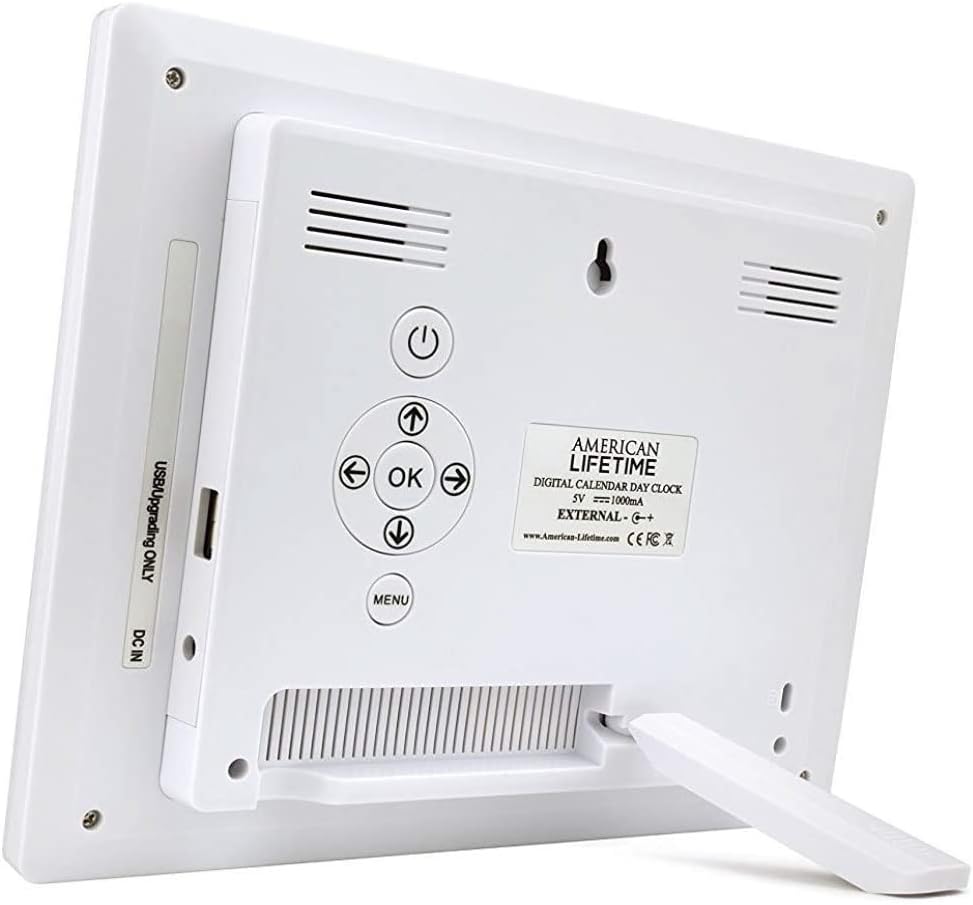
- Pritrdite stojalo: The clock includes a removable stand that can be inserted into the back for tabletop display. It supports both horizontal and vertical orientations.
- Priključite napajanje: Plug the provided power adapter into the DC IN port on the back of the clock and then into a standard electrical outlet. The clock will automatically power on and display the current time and date.
- Začetne nastavitve: Use the control buttons on the back of the clock to navigate the menu and set the correct time, date, time mode (12/24 hour), date mode (Month-Day-Year, Day-Month-Year), and language.

Navodila za uporabo
Your Digital Day Clock offers several customizable settings to enhance its utility. All adjustments are made using the buttons located on the back of the unit.
Gumbi za upravljanje:
- Gumb za vklop: Vklopi ali izklopi zaslon.
- Gumb V redu: Potrdi izbire v meniju.
- Puščične tipke (gor/dol/levo/desno): Pomikajte se po možnostih menija in prilagajajte vrednosti.
- Gumb menija: Dostopi do glavnega menija z nastavitvami.
Nastavitev časa in datuma:
- Pritisnite meni gumb za vstop v nastavitve.
- Uporabite Gor/Dol arrows to select "Set Time" or "Set Date".
- Pritisnite OK to enter the setting. Use Levo/desno arrows to move between digits/fields and Gor/Dol arrows to change values.
- Pritisnite OK to confirm each change.
Customizing Alarms:
The clock supports up to 5 customizable alarms with messages.
- From the main menu, navigate to "Alarm Time 1" through "Alarm Time 5".
- Pritisnite OK da izberete alarm.
- Set the alarm time and frequency (e.g., daily, weekdays).
- Choose a pre-set message (e.g., "Time to take medication", "Appointment Reminder") or set a custom message if available.
- Ensure the alarm is set to "On" and press OK shraniti.
Druge nastavitve:
- Časovni način: Preklapljanje med 12-urnim in 24-urnim formatom časa.
- Datumski način: Select your preferred date display format (e.g., Month-Day-Year).
- jezik: Choose from multiple language options.
- Show Period Of The Day: Enable or disable the display of "Morning," "Afternoon," "Evening," or "Night."
- Samodejno zatemnitev: Turn this feature on to allow the clock to automatically adjust its brightness.
Vzdrževanje
To ensure the longevity and optimal performance of your Digital Day Clock, follow these simple maintenance guidelines:
- Čiščenje: Use a soft, dry cloth to gently wipe the screen and frame. Avoid abrasive cleaners or sprays that could damage the display or finish.
- Umestitev: Place the clock on a stable, flat surface or mount it securely on a wall. Avoid direct sunlight or extreme temperatures, which can affect performance and display life.
- moč: Always use the original power adapter provided with the clock.
Odpravljanje težav
If you encounter any issues with your American Lifetime Digital Day Clock, refer to the following common problems and solutions:
| Težava | rešitev |
|---|---|
| Ura se ne vklopi. | Ensure the power adapter is securely plugged into both the clock and a working electrical outlet. Try a different outlet. |
| Zaslon je pretemno ali presvetlo. | Check the "Auto Dimming" setting in the menu. You can turn it off to manually adjust brightness if needed. |
| Ura ali datum ni pravilen. | Access the "Set Time" and "Set Date" options in the menu to manually correct the settings. |
| Alarms are not sounding. | Verify that the alarm time is correctly set, the alarm is enabled ("On"), and the volume is not muted. |
Specifikacije
- Znamka: American Lifetime
- Številka modela: H1-HO1A--JB6HDWLAO4
- barva: Rjava
- Vrsta zaslona: Digitalno
- Dimenzije izdelka: 8.5 cm Š x 6.75 cm V
- vir energije: Električni na kabel
- Material: Plastika
- Vrsta pritrditve: Stenski nosilec, namizni
- Posebne lastnosti: Alarm, Calendar Display, Auto-Dimming, Multi-Language Support, Battery Backup
- Teža artikla: 15.8 unč
- UPC: 728044490976
Garancija in podpora
American Lifetime stands behind its products. Your Digital Day Clock comes with a 1-letna omejena garancija proizvajalca. Additionally, you can return the product for free within the first 30 days of purchase, no questions asked.
For any questions, troubleshooting assistance, or warranty claims, please contact American Lifetime customer service. Our team is dedicated to providing support and ensuring your satisfaction.
Obiščite American Lifetime Store za več informacij in vire podpore.