
Uvod
This manual provides instructions for the Sentry BT900 On-Neck Bluetooth Headphones. It covers setup, operation, maintenance, and troubleshooting to ensure proper use of your wireless audio device.
Vsebina paketa
Verify that the following items are included in your product package:
- Sentry BT900 On-Neck Bluetooth Headphones
- USB polnilni kabel
- Assorted Ear Tips
- Uporabniški priročnik
Konec izdelkaview
Familiarize yourself with the components of your Sentry BT900 headphones.
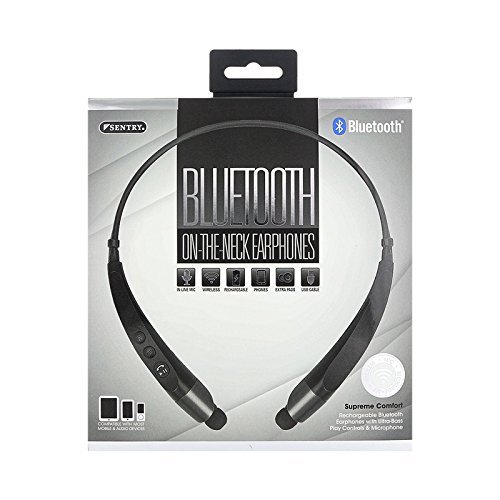
The image displays the Sentry BT900 headphones, featuring a flexible neckband designed for comfortable wear. The earbuds are connected to the neckband, and control buttons are typically located on one side of the neckband for easy access.
Ključne komponente:
- Gumb za vklop/večfunkcijski gumb: Uporablja se za vklop/izklop, predvajanje/pavzo, sprejemanje/končanje klicev.
- Gumb za povečanje glasnosti/naslednja skladba: Poveča glasnost, preskoči na naslednjo skladbo.
- Gumb za zmanjšanje glasnosti/prejšnja skladba: Zmanjša glasnost, preskoči na prejšnjo skladbo.
- Vrata za polnjenje Micro-USB: Za priklop polnilnega kabla.
- LED indikator: Prikazuje stanje napajanja, polnjenja in seznanjanja.
- Mikrofon: Za prostoročno klicanje.
Polnjenje slušalk
Before initial use, fully charge the headphones.
- Manjši konec polnilnega kabla USB priključite v vrata Micro-USB na slušalkah.
- Večji konec polnilnega kabla USB priključite na vir napajanja USB (npr. vrata USB računalnika, stenski adapter USB).
- The LED indicator will illuminate during charging and change color or turn off when charging is complete.
- Polno polnjenje običajno traja približno 2-3 ure.
Seznanjanje z napravo Bluetooth
Follow these steps to connect your headphones to a Bluetooth-enabled device:
- Prepričajte se, da so slušalke izklopljene in popolnoma napolnjene.
- Pritisnite in držite Gumb za vklop/večfunkcijo for approximately 5-7 seconds until the LED indicator flashes red and blue alternately, indicating pairing mode.
- V napravi, ki podpira Bluetooth (pametni telefon, tablični računalnik itd.), se pomaknite do nastavitev Bluetooth.
- Omogočite Bluetooth in poiščite razpoložljive naprave.
- Select 'Sentry BT900' from the list of found devices.
- Ko so slušalke seznanjene, bo LED indikator na slušalkah običajno počasi utripal modro ali pa bo svetil modro.
- If a passcode is requested, enter '0000'.
Upravljanje slušalk
Vklop/izklop:
- Vklop: Pritisnite in držite Gumb za vklop/večfunkcijo for 3 seconds. The LED indicator will flash blue.
- Ugasniti: Pritisnite in držite Gumb za vklop/večfunkcijo for 3 seconds. The LED indicator will flash red and then turn off.
Predvajanje glasbe:
- Predvajanje/pavza: Pritisnite Gumb za vklop/večfunkcijo enkrat.
- Naslednja skladba: Pritisnite in držite Gumb za povečanje glasnosti.
- Prejšnja skladba: Pritisnite in držite Gumb za zmanjšanje glasnosti.
Upravljanje klicev:
- Sprejmi/končaj klic: Pritisnite Gumb za vklop/večfunkcijo enkrat.
- Zavrni klic: Pritisnite in držite Gumb za vklop/večfunkcijo za 2 sekund.
- Ponovno klicanje zadnje številke: Dvakrat pritisnite Gumb za vklop/večfunkcijo.
Nadzor glasnosti:
- Povečajte glasnost: Pritisnite Gumb za povečanje glasnosti večkrat.
- Zmanjšaj glasnost: Pritisnite Gumb za zmanjšanje glasnosti večkrat.
Vzdrževanje
Čiščenje:
Gently wipe the headphones and earbuds with a soft, dry cloth. For ear tips, remove them and clean with a mild soap solution if necessary, then rinse and dry completely before reattaching.
Shranjevanje:
Slušalke shranjujte na hladnem in suhem mestu, stran od neposredne sončne svetlobe in ekstremnih temperatur. Nanje ne postavljajte težkih predmetov.
Vzdrževanje baterije:
Da podaljšate življenjsko dobo baterije, se izogibajte pogostemu popolnemu praznjenju baterije. Slušalke redno polnite, tudi če jih dalj časa ne uporabljate.
Odpravljanje težav
Slušalke se ne vklopijo:
Ensure the headphones are fully charged. Connect to a power source and attempt to power on after a few minutes.
Seznanitev z napravo ni mogoča:
Ensure the headphones are in pairing mode (flashing red and blue LED). Make sure Bluetooth is enabled on your device and it is within range (typically 10 meters). Turn off and on both the headphones and the device, then try pairing again.
Ni zvoka ali nizka glasnost:
Check the volume levels on both the headphones and your connected device. Ensure the headphones are properly paired and connected. Try re-pairing the headphones.
Slaba kakovost zvoka:
Ensure there are no obstructions between the headphones and your device. Move closer to your device. Check for interference from other wireless devices.
Težave s polnjenjem:
Verify the USB cable is securely connected to both the headphones and the power source. Try a different USB cable or power source.
Specifikacije
- Model: BT900
- Brezžična komunikacijska tehnologija: Bluetooth
- Vrsta baterije: 1 litij-ion (priložen)
- Teža artikla: 2.39 unč
- Dimenzije izdelka: 8.25 x 1.5 x 6.75 palcev
- Posebne lastnosti: Microphone Included, Wireless
- UPC: 080068549000
Garancija in podpora
For warranty information, please refer to the documentation included with your purchase or contact Sentry customer support.
Shranite dokazilo o nakupu za garancijske zahtevke.