
Uvod
Hvala za nakupasing the Ezonetronics 1DIN Car Stereo, Model RM-CW9601. This unit features a 7-inch retractable touchscreen, Bluetooth connectivity, FM radio, and multimedia playback capabilities. This manual provides essential information for installation, operation, and maintenance to ensure optimal performance and user satisfaction. Please read this manual thoroughly before using the product.
Varnostne informacije
- Naprave ne upravljajte na način, ki bi vas motil od vožnje. Vedno dajte prednost varnosti v cestnem prometu.
- Zagotovite pravilno namestitev s strani usposobljenega strokovnjaka, da preprečite poškodbe enote ali vozila.
- Naprave ne izpostavljajte ekstremnim temperaturam, neposredni sončni svetlobi dlje časa ali vlagi.
- Do not attempt to disassemble or modify the unit. This may void the warranty and pose safety risks.
- Glasnost naj bo nastavljena tako, da boste slišali zunanje prometne zvoke.
Vsebina paketa
Preverite, ali so v paketu prisotni vsi elementi:
- Ezonetronics 1DIN Car Stereo Unit (RM-CW9601)
- Kabelski snop za napajanje in zvočnik
- Daljinski upravljalnik
- Uporabniški priročnik (ta dokument)
- Pribor za montažo (nosilci, vijaki)
- Neobvezno: Zadajview Camera (if included in your specific package)
Konec izdelkaview
The Ezonetronics RM-CW9601 features a single DIN chassis with a motorized retractable 7-inch touchscreen display. The front panel includes essential controls and ports for easy access.

Slika 1: Spredaj view of the Ezonetronics RM-CW9601 car stereo, illustrating the 7-inch screen in both retracted and extended positions, along with front panel controls and ports.
Krmilniki in vrata na sprednji plošči:
- Gumb za vklop / način: Press to turn on/off, short press to change mode.
- Gumb za glasnost: Zavrtite za nastavitev glasnosti. Pritisnite za utišanje/vklop zvoka.
- Vrata USB: Za predvajanje medijev z USB-ključkov.
- Reža za kartico SD: For media playback from SD cards.
- AUX vhod: 3.5 mm priključek za zunanje avdio naprave.
- Gumb za ponastavitev: Small button to reset the unit (requires a pointed object).
- Screen Retract/Extend Button: Controls the motorized screen movement.
Nastavitev
1. Namestitev
The RM-CW9601 is designed for a standard 1DIN car stereo opening. Professional installation is highly recommended. Ensure the vehicle's battery is disconnected before starting installation.
- Odstranite obstoječi avtomobilski stereo z armaturne plošče.
- Connect the wiring harness to the vehicle's wiring.
- Secure the unit into the dashboard using the provided mounting brackets and screws.
- Ponovno priklopite akumulator vozila in preizkusite enoto.
2. Električna shema (splošno)
Refer to the detailed wiring diagram included with your product packaging for specific connections. Below are common connections:
- rumena žica: Konstantno 12V (baterija)
- Rdeča žica: Switched 12V (Accessory/Ignition)
- Črna žica: Tla
- Oranžna žica: Illumination (Optional)
- Modra žica: Napajalna antena / AmpDaljinski vklop Lifier
- Zvočniške žice: Connect to vehicle speakers (e.g., White/White-Black for Front Left, Grey/Grey-Black for Front Right, Green/Green-Black for Rear Left, Purple/Purple-Black for Rear Right).
- Vhod za vzvratno kamero: Connect to the rearview camera video output and reverse trigger wire.
- Vhod za upravljanje volana: Connect to vehicle's steering wheel control wires (if applicable).

Slika 2: Illustration of USB connection points, relevant for media input and smartphone integration.
Navodila za uporabo
1. Osnovno delovanje
- Vklop/izklop: Pritisnite gumb za vklop na sprednji plošči ali daljinskem upravljalniku.
- Prilagoditev glasnosti: Rotate the volume knob or use the remote control.
- Izbira načina: Short press the power/mode button to cycle through available modes (Radio, USB, SD, Bluetooth, AUX, CarPlay/Android Auto).
- Nadzor zaslona: Use the dedicated button to retract or extend the 7-inch display.
2. Funkcija Bluetooth
The unit supports Bluetooth for hands-free calling and wireless audio streaming.
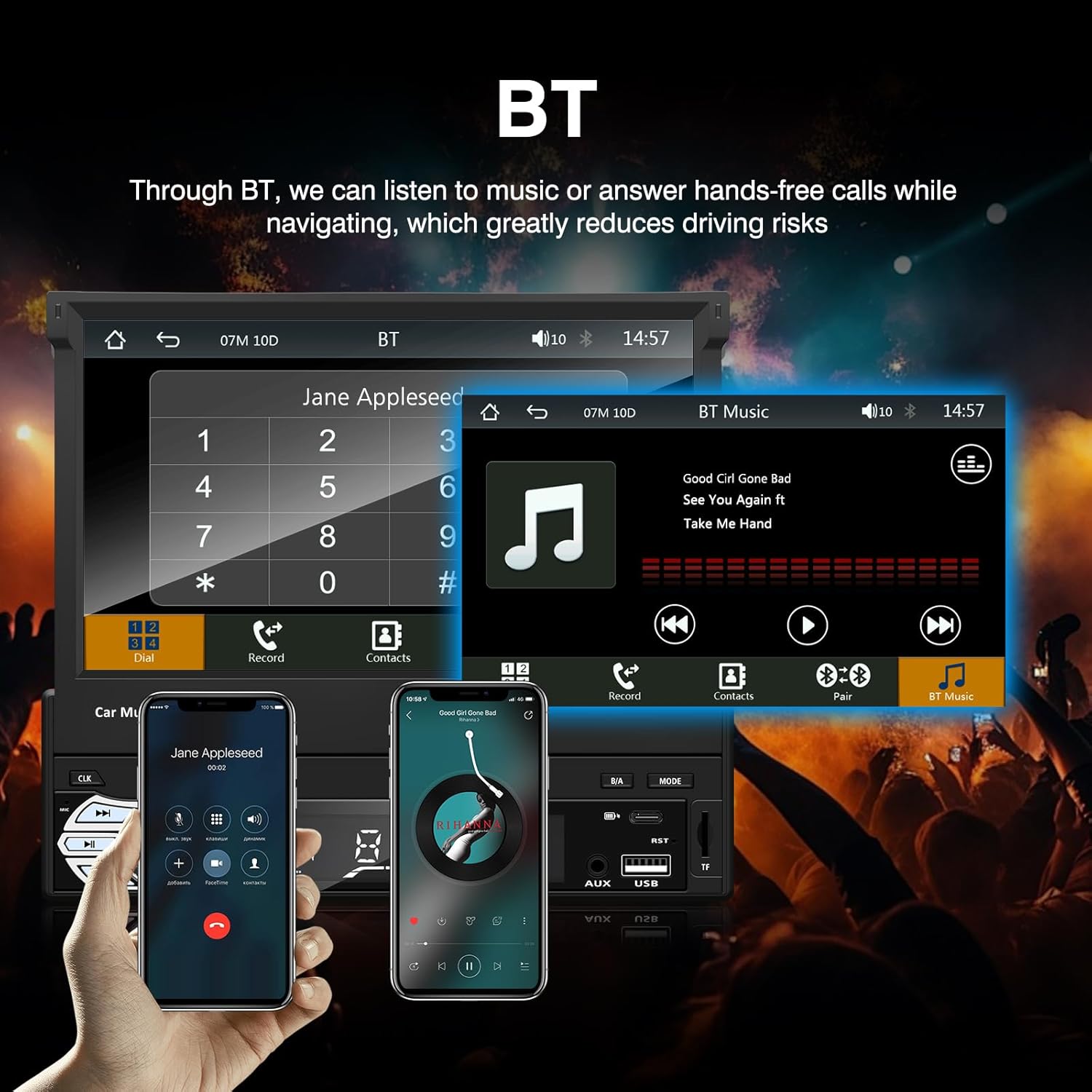
Slika 3: Bluetooth interface for hands-free calls and music streaming, showing a dial pad and music controls.
- Seznanjanje: Omogočite Bluetooth na mobilni napravi. Iskanje available devices and select "Ezonetronics" or similar. Enter PIN "0000" if prompted.
- Prostoročno telefoniranje: Once paired, you can make and receive calls directly through the car stereo. Use the touchscreen or remote to dial, answer, or end calls.
- Pretakanje zvoka (A2DP): Play music from your paired device wirelessly. Control playback (play/pause, skip) from the car stereo or your device.
3. USB/SD Media Playback
Insert a USB drive or SD card into the respective slot. The unit will automatically switch to USB/SD mode and begin playing compatible media files.

Slika 4: Icons indicating support for Bluetooth, Auxiliary input, TF (SD) Card, and USB connections for media playback.
- Supported formats include RM, RMVB, ASF, MKV, DIVX, MPEG4, AVI, VOB for video, and MP3/MP4 for audio.
- Navigacija po mapah in filez uporabo vmesnika na dotik.
4. FM radio
Access the FM radio mode to listen to local broadcasts.

Slika 5: FM Radio interface with frequency display and equalizer settings for audio customization.
- Samodejno skeniranje: Automatically search and save strong stations.
- Ročna nastavitev: Fine-tune frequencies using the touchscreen.
- Prednastavitve: Save your favorite stations for quick access (up to 18 preset stations).
5. Apple CarPlay / Android Auto
Connect your compatible smartphone via USB to access Apple CarPlay or Android Auto features directly on the stereo's display.

Slika 6: Wired Apple CarPlay interface, displaying phone applications like navigation, music, and messages on the car stereo screen.

Slika 7: Wired Android Auto interface, displaying Android applications like Google Maps, Spotify, and phone calls on the car stereo screen.
- Ensure your phone has CarPlay or Android Auto enabled.
- Use a high-quality USB cable for a stable connection.
- Access navigation, music, messages, and other compatible apps safely while driving.
6. Zrcalna povezava
Mirror Link allows you to display your smartphone's screen content directly onto the car stereo's display via a USB data cable.

Slika 8: Mirror Link function demonstrating a smartphone screen being projected onto the car stereo display.
- Connect your smartphone to the USB port using a data cable.
- Sledite navodilom na zaslonu stereo sistema in telefona, da vzpostavite povezavo.
- Note: Functionality may vary depending on your smartphone model and operating system.
7. Zadajview Vnos kamere
Ko zadajview camera is connected and the vehicle is shifted into reverse, the stereo automatically displays the camera feed.

Slika 9: Reversing display showing the view from a rearview camera with parking assistance lines, providing an intuitive aid for parking.
- Zagotovite zadnjicoview camera is properly installed and connected to the dedicated input.
- Zaslon se bo samodejno preklopil na kamero view when the reverse gear is engaged.
8. Upravljanje na volanu
The unit supports connection to your vehicle's existing steering wheel controls for convenient operation. Refer to your vehicle's manual and the stereo's wiring diagram for proper connection and configuration.
Vzdrževanje
- Čiščenje zaslona: Zaslon na dotik nežno obrišite z mehko krpo, ki ne pušča vlaken. Ne uporabljajte abrazivnih čistil ali topil.
- Generalno čiščenje: Zunanjost enote obrišite s suho, mehko krpo.
- Izogibajte se tekočinam: Tekočin ne pršite neposredno na enoto.
- Temperatura: Avoid prolonged exposure to extreme heat or cold, which can affect the unit's lifespan.
Odpravljanje težav
| Težava | Možen vzrok | rešitev |
|---|---|---|
| Enota se ne vklopi. | Nepravilno ožičenje; Pregorela varovalka; Težava z akumulatorjem vozila. | Preverite napajalne priključke (rumena, rdeča, črna žica). Preverite varovalke vozila. Prepričajte se, da je akumulator napolnjen. |
| Brez zvoka. | Glasnost je prenizka; Vklopljen je bil izklop zvoka; Nepravilna ožičenje zvočnikov. | Povečaj glasnost. Preverite, ali je vklopljen izklop zvoka. Preverite povezave zvočnikov. |
| Povezava Bluetooth se ne vzpostavi. | Bluetooth not enabled on phone; Incorrect pairing process. | Ensure phone's Bluetooth is on and discoverable. Re-attempt pairing. |
| USB/SD media not playing. | Nepodprto file format; Corrupted media; Drive/card not inserted correctly. | Preverite file formats. Try a different USB drive/SD card. Ensure proper insertion. |
| Zadajview kamera ne prikazuje. | Camera not connected; Reverse trigger wire not connected. | Verify camera video input and reverse trigger wire connection. |
Če težave ne prenehajo, se posvetujte s kvalificiranim tehnikom ali se obrnite na podporo strankam.
Specifikacije
- Znamka: EZoneTronics
- Številka modela: RM-CW9601
- barva: Črna
- zaslon: 7-inch Capacitive Touchscreen, Retractable
- Tehnologija povezljivosti: Bluetooth, USB, SD, AUX, RCA
- Bluetooth: Integrated Bluetooth 2.0 with A2DP/Hands-free
- Združljive naprave: Pametni telefon
- Način avdio izhoda: Stereo
- Podpora za video kodiranje: RM, RMVB, ASF, MKV, DIVX, MPEG4, AVI, VOB
- Podpora USB/SD: Up to 32GB max.
- Posebne lastnosti: Touchscreen, Steering Wheel Control Support, Rear Camera Input, Apple CarPlay, Android Auto, Mirror Link
- Proizvajalec: Rhythm Electronics Limited
Garancija in podpora
This product comes with a limited manufacturer's warranty.
- Garancija glavne enote: 12 months for defective items (excluding damaged or misused items after receipt).
- Garancija za dodatke: 3 months for accessories.
For warranty claims or technical support, please contact your retailer or the manufacturer directly. Keep your purchase receipt as proof of purchase.