
1. Uvod
This manual provides detailed instructions for setting up, operating, and maintaining your Epson L485 Wi-Fi Inktank Printer. Please read this manual thoroughly to ensure proper use and to maximize the performance and longevity of your device.
Konec izdelkaview
The Epson L485 is a versatile all-in-one printer offering print, scan, and copy functionalities with the added convenience of Wi-Fi Direct. It features an innovative ink tank system designed for high-volume printing with impressive page yields and a high print resolution for quality output.

Slika 1: Spredaj view of the Epson L485 Wi-Fi Inktank Printer.
Kaj je v škatli
- Tiskalnik Epson L485
- CD s programsko opremo
- Napajalni kabel
- Garancijska kartica
- Set of Original Epson Ink Bottles (Black, Cyan, Magenta, Yellow)
Video 1: Overview of the Epson L485 Wi-Fi Inktank Printer's features and design.
2. Navodila za namestitev
Follow these steps to set up your Epson L485 printer for the first time.
Video 2: Step-by-step guide on how to set up your Epson InkTank Printer.
2.1 Initial Printer Preparation
- Razpakirajte tiskalnik: Previdno vzemite tiskalnik iz embalaže. Odstranite vse zaščitne trakove in materiale.
- Check Valve Position: Locate the ink tank valve on the side of the printer. Ensure it is in the upright (printing) position.
- Open Ink Tank Unit: Gently unhook the ink tank unit from the side of the printer and open its lid to access the ink tanks.
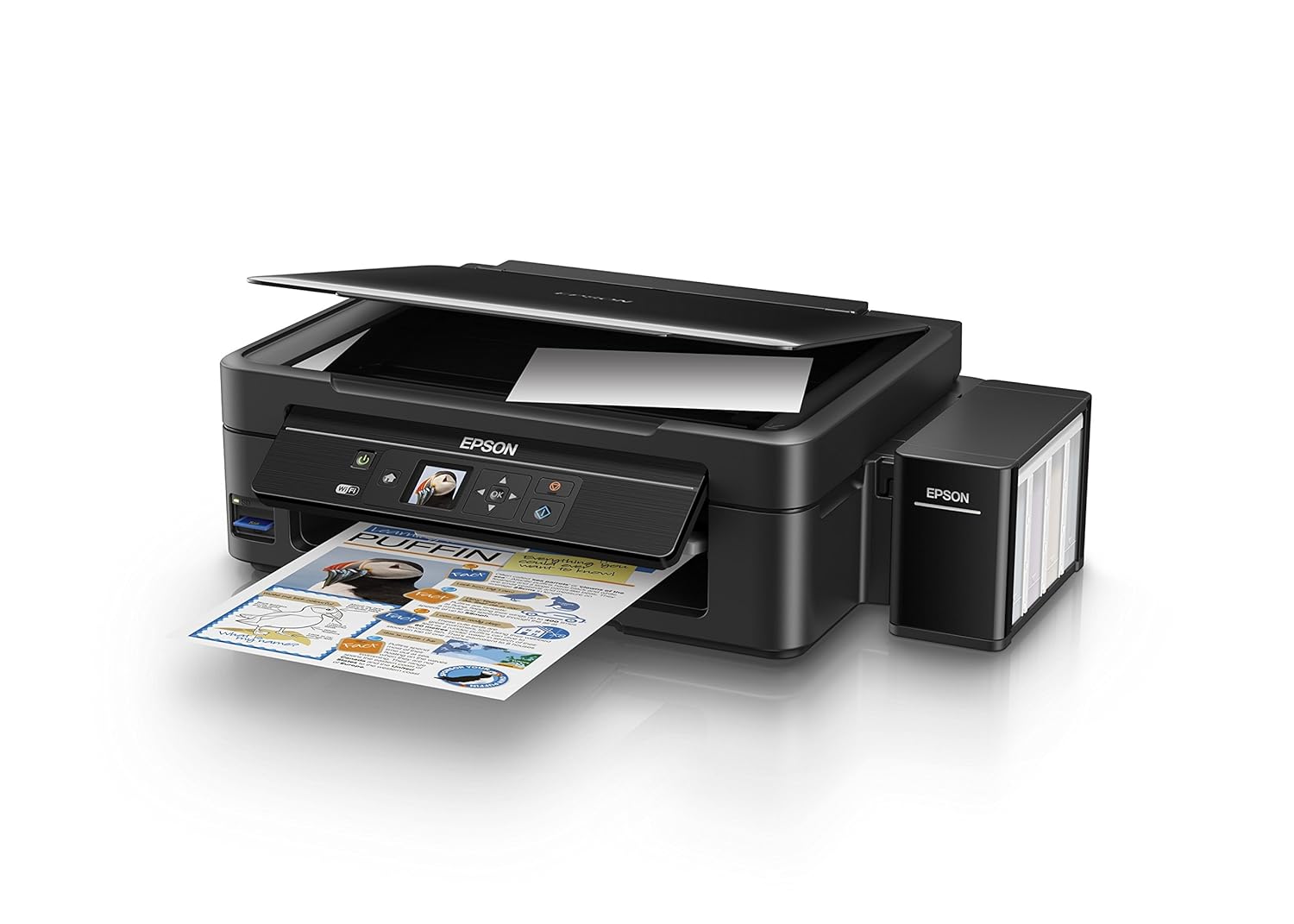
Figure 2: The ink tank unit unhooked and open, showing the ink reservoirs.
2.2 Polnjenje črnilnih posod
- Prepare Ink Bottles: Snap off the tip of each ink bottle and remove the cap.
- Napolnite kartuše s črnilom: Match the color of the ink bottle with the corresponding ink tank. Carefully pour the entire contents of each ink bottle into its respective tank. Do not overfill.
- Secure Caps: Once all tanks are filled, replace the caps securely on the ink tanks.
- Close Ink Tank Unit: Close the lid of the ink tank unit and re-hook it to the printer.

Figure 3: Demonstrating the process of filling an ink tank with a yellow ink bottle.

Figure 4: The four color ink bottles used for the Epson L485 printer.
2.3 Power On and Ink Charging
- Priključite napajanje: Napajalni kabel priključite v tiskalnik in nato v stensko vtičnico.
- Turn On Printer: Pritisnite gumb za vklop, da vklopite tiskalnik.
- Initiate Ink Charge: Press and hold the 'Ink Charge' button (usually indicated by a droplet icon) for 3 seconds until the lights start blinking. The initial ink charging process takes approximately 20 minutes. Do not turn off or unplug the printer during this process.
- Dokončanje: The lights will stop blinking when ink charging is complete.
2.4 Namestitev gonilnika
- Insert Software CD: Insert the provided Software CD into your computer's CD/DVD drive. If your computer does not have a CD drive, download the latest drivers from the official Epson support webmesto.
- Sledite navodilom na zaslonu: Follow the prompts on your computer screen to install the printer drivers and utilities. Agree to the license agreement and select 'Start & Connection' for setup.
- Connect USB Cable (if prompted): If setting up via USB, connect the USB cable between the printer and your computer when prompted by the installation software.
2.5 Connectivity Setup
The Epson L485 supports both USB and Wi-Fi connectivity.
USB povezava
Connect the USB cable from the printer to an available USB port on your computer. The printer should be recognized automatically after driver installation.
Nastavitev Wi-Fi
The printer features an LCD screen for easy Wi-Fi setup without needing a PC.
- Access Wi-Fi Setup: On the printer's control panel, navigate to the 'Wi-Fi Setup' option using the arrow keys and press 'OK'.
- Izberite omrežje: Choose your desired wireless network from the list and enter the password if required.
- Potrdite povezavo: Once connected, the Wi-Fi indicator light will be solid, and the LCD screen will confirm the setup is complete.

Figure 5: Demonstrating wireless printing from a smartphone to the Epson L485 printer.
3. Upravljanje tiskalnika
3.1 Tiskanje
The Epson L485 delivers high-quality prints with a resolution of 5760 dpi. It offers print speeds of up to 33 ppm for black and 15 ppm for color documents.
- Naložite papir: Load paper into the rear paper feeder. Adjust the paper guides to fit the paper size.
- Izberite tiskalniško opravilo: From your computer or mobile device, select the document or image you wish to print.
- Prilagodite nastavitve: Choose your print settings (e.g., paper size, print quality, color/black & white) in the print dialog box.
- Natisni: Kliknite »Natisni«, da pošljete opravilo tiskalniku.

Figure 6: The Epson L485 printer in action, producing a vibrant print.
3.2 Skeniranje
The printer features a sheetfed scanner with an optical resolution of 1200 dpi x 2400 dpi for clear and detailed scans.
- Kraj dokumenta: Lift the scanner lid and place your document face-down on the scanner glass, aligning it with the corner mark.
- Začni skeniranje: From your computer, open the Epson Scan software or use the scan function on the printer's control panel.
- Prilagodite nastavitve: Izberite nastavitve skeniranja, kot so ločljivost, barvni način in ciljna mapa.
- Začetek skeniranja: Begin the scanning process.

Figure 7: The scanner bed of the Epson L485 printer with the lid open.
3.3 Kopiranje
Kopirajte neposredno z nadzorne plošče tiskalnika.
- Kraj dokumenta: Place the document you wish to copy on the scanner glass.
- Select Copy Function: On the printer's LCD screen, navigate to the 'Copy' option.
- Prilagodite nastavitve: Select the number of copies, color or black & white, and other copy settings.
- Začni kopiranje: Za začetek kopiranja pritisnite gumb »Start«.
3.4 Neposredno omrežje Wi-Fi
Wi-Fi Direct allows you to connect your mobile devices directly to the printer without a router, enabling convenient wireless printing.
- Enable Wi-Fi Direct: On the printer's control panel, go to 'Wi-Fi Setup' and select 'Wi-Fi Direct'. Follow the on-screen instructions to enable it and view omrežno ime in geslo.
- Povežite mobilno napravo: On your mobile device, go to Wi-Fi settings, find the printer's Wi-Fi Direct network, and connect using the provided password.
- Natisni: Use an Epson printing app (e.g., Epson iPrint) or your device's native print function to print directly to the printer.
4. Vzdrževanje
4.1 Polnjenje črnila
When ink levels are low, refill the tanks using genuine Epson ink bottles. Refer to section 2.2 for detailed ink filling instructions. Always use the correct color ink for each tank.
4.2 Čiščenje
Redno čiščenje pomaga ohranjati kakovost tiskanja in podaljšuje življenjsko dobo tiskalnika.
- Čiščenje zunanjosti: Zunanjost tiskalnika obrišite z mehko,amp krpo. Izogibajte se uporabi abrazivnih čistil.
- Čiščenje tiskalne glave: If print quality declines (e.g., missing lines, incorrect colors), perform a print head cleaning using the printer's utility software on your computer or through the printer's control panel menu.
- Preverjanje šob: Run a nozzle check pattern to diagnose print quality issues before performing a head cleaning.
5. Odpravljanje težav
Ta razdelek obravnava pogoste težave, na katere lahko naletite s tiskalnikom Epson L485.
5.1 Tiskalnik se ne odziva
- Prepričajte se, da je tiskalnik vklopljen in varno priključen v električno vtičnico.
- Check the USB cable connection to both the printer and computer, or verify the Wi-Fi connection status.
- Znova zaženite tiskalnik in računalnik/mobilno napravo.
5.2 Slaba kakovost tiska
- Perform a nozzle check to identify clogged nozzles. If necessary, run a print head cleaning cycle.
- Preverite raven črnila in dolijte morebitne prazne rezervoarje.
- Ensure you are using genuine Epson ink and appropriate paper types for your print job.
5.3 Zastoji papirja
- Turn off the printer and carefully remove any jammed paper from the paper tray, output tray, or inside the printer.
- Prepričajte se, da je papir pravilno vložen in da ni zmečkan aliurlizd.
6. Specifikacije
| Znamka | Epson |
| Ime modela | L485 |
| Tehnologija povezljivosti | Wi-Fi |
| Tehnologija tiskanja | Inkjet |
| Posebna funkcija | Reža za pomnilniško kartico |
| barva | Črna |
| Izhod tiskalnika | barva |
| Največja hitrost tiskanja (barvno) | 15 ppm |
| Največja hitrost tiskanja (enobarvno) | 33 ppm |
| Teža predmeta | 6001 gramov |
| Vrsta tiskalnika | Inkjet |
| Vrsta optičnega bralnika | List |
| Maximum Copy Speed (Black and White) | 33 ppm |
| Vrsta zaslona | LCD |
| Združljive naprave | Pametni telefoni |
| Barva črnila | Črna, cijan, magenta, rumena |
| Resolucija | 5760 x 5760 DPI |
| Dodatne funkcije tiskalnika | All In One (Print, Scan, Copy) |
| Največja velikost medija | A4 |
| Velikost papirja | A4 |
| Obojestranski tisk | št |
7. Garancija in podpora
Your Epson L485 Wi-Fi Inktank Printer comes with a free installation service and an onsite warranty.
7.1 Free Installation and Onsite Warranty
To avail free installation for your printer, please contact Epson support after receiving your product. The onsite warranty covers manufacturing defects and ensures professional assistance at your location.
7.2 Kontaktirajte podporo
For installation, support, or any technical assistance, please contact Epson customer service:
- telefon: 1860 3000 1600 (Timings: 9 am - 6 pm)