
1. Uvod
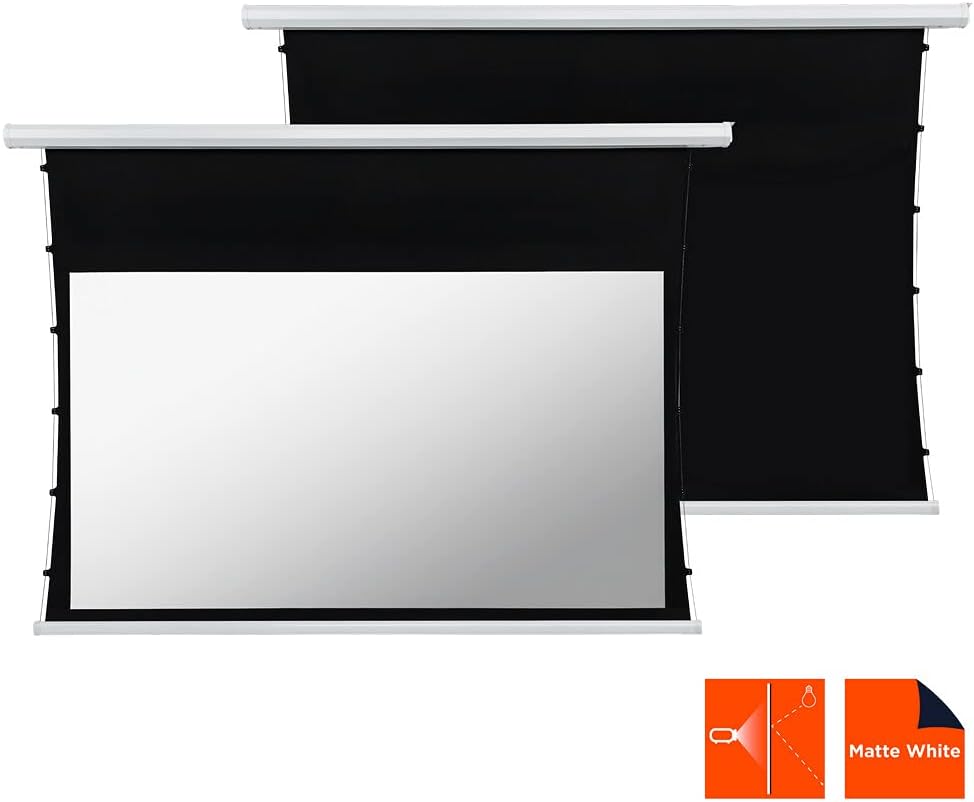
This manual provides comprehensive instructions for the installation, operation, and maintenance of your celexon Basic Motorized and Tensioned Projection Screen. Designed for optimal visual performance, this screen features a unique cord tension system that ensures a consistently flat and smooth projection surface, even after extended use. It is compatible with both 3D and 4K content, offering a superior viewing experience for home cinema, presentations, and more. The screen's black backing and black drop enhance contrast, delivering vibrant and sharp images.
2. Varnostne informacije
- Pred namestitvijo in uporabo natančno preberite vsa navodila.
- Prepričajte se, da napajalnik ustreza voltagZahteve, navedene na etiketi izdelka.
- Do not attempt to disassemble or repair the screen yourself. Refer all servicing to qualified personnel.
- Keep the screen away from direct sunlight, heat sources, and moisture.
- Ensure the mounting surface is strong enough to support the weight of the screen.
- Keep children and pets away from the screen during operation to prevent accidents.
- Avoid touching the screen surface with sharp objects or abrasive materials.
3. Vsebina paketa
Prosimo, preverite paket za naslednje artikle:
- celexon Basic Motorized and Tensioned Projection Screen
- Daljinski upravljalnik
- Pritrdilni material (vijaki, sidra, nosilci)
- Napajalni kabel
- Uporabniški priročnik (ta dokument)
If any items are missing or damaged, please contact celexon customer support.
4. Nastavitev in namestitev
The celexon Basic Motorized and Tensioned Projection Screen is designed for both wall and ceiling mounting. Follow these steps for a secure installation.
4.1 Screen Dimensions
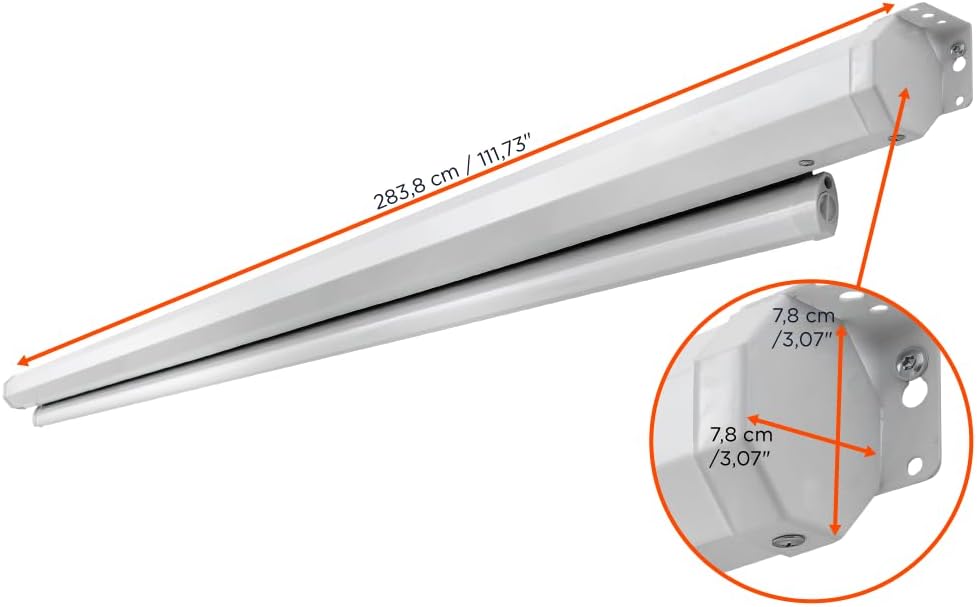
The screen features a usable surface area of 240 x 135 cm (108 inches diagonal) with a 16:9 aspect ratio. The overall casing dimensions are approximately 275.9 cm (length) x 8 cm (height) x 11 cm (depth).


4.2 Navodila za montažo
- Izberite lokacijo: Select a suitable location on a wall or ceiling that can safely support the screen's weight (approximately 12.8 kg / 28.21 lbs). Ensure there are no electrical wires or pipes behind the drilling points.
- Označite vrtalne točke: Using the provided mounting brackets as a template, mark the drilling points on the wall or ceiling. Ensure the points are level and correctly spaced.
- Vrtanje lukenj: Drill holes at the marked points using an appropriate drill bit for your wall/ceiling material. Insert wall anchors if necessary.
- Pritrdite oklepaje: Securely fasten the mounting brackets to the wall or ceiling using the provided screws.
- Mount Screen: Carefully lift the screen and attach it to the installed mounting brackets. Ensure it clicks securely into place.
- Priključite napajanje: Plug the power cable into the screen's power input and then into a suitable power outlet.
5. Navodila za uporabo
Your celexon motorized screen is operated via the included remote control.

- Extend Screen: Pritisnite DOL button on the remote control to lower the screen. The screen will automatically stop when fully extended.
- Retract Screen: Pritisnite UP button on the remote control to raise the screen. The screen will automatically stop when fully retracted.
- Stop Screen: Pritisnite STOP button on the remote control to halt the screen at any desired position.
The integrated cord tension system ensures that the screen surface remains optimally flat and balanced during extension and retraction, providing a consistently smooth projection area.
6. Vzdrževanje
- Čiščenje površine zaslona: Uporabite mehko, damp cloth with mild soap and water to gently clean the screen surface. Do not use abrasive cleaners, solvents, or harsh chemicals, as these can damage the screen material. Allow the screen to air dry completely before retracting.
- Čiščenje C-jaasing: Wipe the screen casing s suhim ali rahlo damp krpo za odstranjevanje prahu.
- Nega motorja: The motor is maintenance-free. Avoid obstructing the screen's movement or forcing it manually.
- Shranjevanje: When not in use for extended periods, ensure the screen is fully retracted and stored in a dry, dust-free environment.
7. Odpravljanje težav
| Težava | Možen vzrok | rešitev |
|---|---|---|
| Screen does not respond to remote control. |
|
|
| Screen stops midway or moves erratically. |
|
|
| Screen surface appears wrinkled or uneven. |
|
|
8. Specifikacije
| Funkcija | Podrobnost |
|---|---|
| Znamka | celekson |
| Model | Basic Motorized and Tensioned Screen |
| Screen Dimensions (W x H) | 240 x 135 cm |
| Diagonalna velikost | 108 palcev |
| Razmerje stranic | 16:9 |
| Dimenzije izdelka (D x V) | 2.76m x 0.08m (casing) |
| Material | Polyester (screen surface) |
| Opis površine zaslona | Mat bela |
| Dobiček | 0.9 |
| Viewkota | 150° |
| Vrsta namestitve | Stenski ali stropni nosilec |
| Združljivost | 3D and 4K UHD |

9. Garancija in podpora
celexon products are manufactured to high quality standards. For information regarding warranty coverage and terms, please refer to the warranty card included with your product or visit the official celexon website. If you encounter any issues or require technical assistance, please contact celexon customer support through their official channels. Please have your product model and purchase details ready when contacting support.