
MIDAS DM16
Uporabniški priročnik za MIDAS DM16
16 vhodnih analognih živih in studijskih mešalnikov
1. Uvod
This manual provides comprehensive instructions for the operation and maintenance of your MIDAS DM16 16 Input Analogue Live and Studio Mixer. The DM16 is designed for both live performance and studio recording environments, featuring award-winning MIDAS microphone preamplifiers and robust construction.
Please read this manual thoroughly before operating the device to ensure proper usage and to maximize its lifespan.
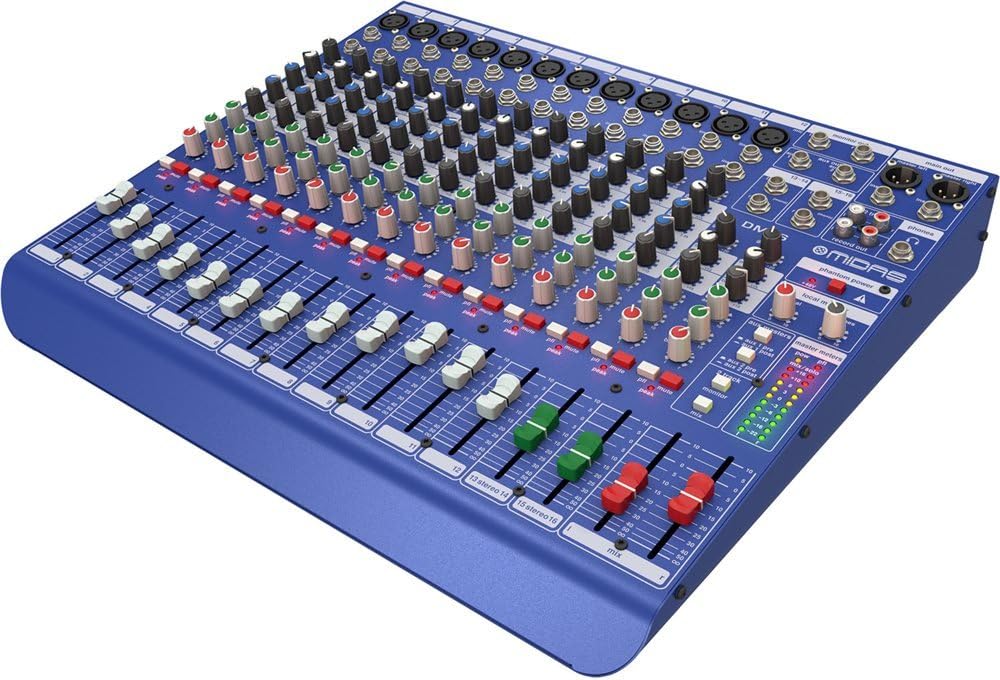
Slika 1.1: Sprednji kot view of the MIDAS DM16 mixer.
2. Nastavitev
2.1 Razpakiranje in pregled
Upon receiving your MIDAS DM16, carefully unpack the unit and inspect it for any signs of damage that may have occurred during transit. Retain the original packaging materials for future transport or storage.
Vključeno v škatli:
- MIDAS DM16 16-vhodni analogni živi in studijski mešalnik
- Napajalni kabel
- Uporabniški priročnik (ta dokument)
2.2 Napajalni priključek
The DM16 operates on a standard AC power supply. Connect the provided power cord to the AC inlet on the rear panel of the mixer and then to a suitable power outlet. Ensure the power switch is in the 'Off' position before connecting to power.
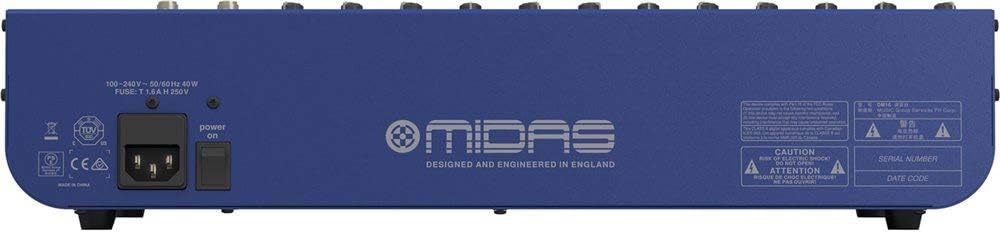
Figure 2.1: Rear panel of the MIDAS DM16 showing power input and warnings.
2.3 Vhodne in izhodne povezave
The DM16 features a variety of input and output options for connecting microphones, instruments, and other audio devices.
- Vhodi za mikrofon: 12 mono input channels with XLR connectors for microphones. These channels feature MIDAS microphone preamposvežilci.
- Linijski vhodi: 2 electronically-balanced stereo line input channels on 1/4" TRS connectors for instruments or line-level devices.
- Glavni izhodi: Connect to your main PA system or recording interface.
- Pomožni signali: For monitor mixes or effects sends.
- Izhod za slušalke: Za spremljanje zvoka.
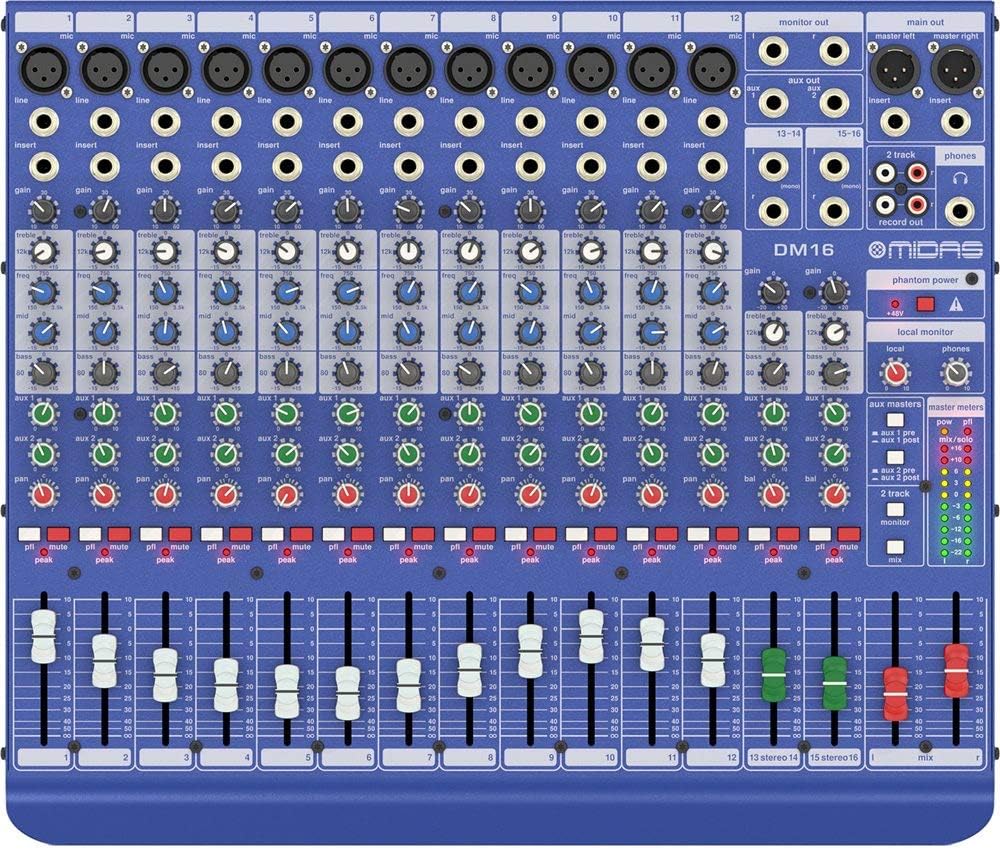
Slika 2.2: Zgornji del view of the MIDAS DM16 showing all input/output connections and controls.
3. Navodila za uporabo
3.1 Nadzor kanala
Each mono input channel on the DM16 features the following controls:
- DOBITE: Adjusts the input sensitivity for the microphone preamplifier.
- EQ: A 3-band equalizer with a swept mid-band for precise tone shaping.

Slika 3.1: Podrobno view of the 3-band EQ section on a mono channel.
- AUX 1/2: Controls the level sent to the auxiliary outputs. These can be switched pre/post fader.

Figure 3.2: Aux masters section with pre/post fader switching.
- PAN: Prilagodi stereo položaj kanala.
- MUTE: Utiša kanal.
- PEAK LED: Indicates when the input signal is clipping.
- FADER: Controls the output level of the channel to the main mix.

Figure 3.3: Channel faders for precise level control.
3.2 Fantomsko napajanje
The DM16 provides +48V phantom power for condenser microphones. This is a global switch, meaning it applies to all microphone inputs simultaneously. Ensure all connections are made before activating phantom power to prevent damage to non-phantom powered devices.

Figure 3.4: Phantom power switch.
3.3 Spremljanje
Use the headphone output and monitor controls to listen to the main mix or specific auxiliary sends. The monitor section includes controls for local monitor and phones output levels.

Figure 3.5: Monitor and headphone controls.
4. Vzdrževanje
Proper maintenance ensures the longevity and optimal performance of your MIDAS DM16 mixer.
- Čiščenje: Use a soft, dry cloth to clean the exterior of the mixer. Avoid abrasive cleaners or solvents that could damage the finish or controls.
- Zaščita pred prahom: Mešalnik pokrijte, ko ga ne uporabljate, da preprečite nabiranje prahu, zlasti okoli drsnikov in gumbov.
- Prezračevanje: Zagotovite zadosten pretok zraka okoli enote, da preprečite pregrevanje. Ne blokirajte prezračevalnih odprtin.
- Shranjevanje: Mešalnik shranjujte na hladnem in suhem mestu, stran od neposredne sončne svetlobe in ekstremnih temperatur.
5. Odpravljanje težav
This section addresses common issues you might encounter with your DM16 mixer.
- Brez napajanja:
- Check if the power cord is securely connected to both the mixer and the power outlet.
- Preverite, ali vtičnica deluje.
- Ensure the power switch on the rear panel is in the 'On' position.
- Ni zvoka:
- Check all input and output cable connections.
- Ensure channel faders and the main mix fader are raised.
- Verify that the MUTE buttons on active channels are not engaged.
- Check the gain settings for each channel.
- Confirm that your connected speakers or monitoring system are powered on and functioning correctly.
- Popačen zvok:
- Reduce the GAIN setting on the input channel if the PEAK LED is frequently illuminating.
- Lower the output level of the connected source device.
- Preverite morebitne okvarjene kable.
- Brenčanje ali šum:
- Prepričajte se, da so vsi kabli pravilno zaščiteni in v dobrem stanju.
- Preverite ozemljitvene zanke; poskusite priključiti vso avdio opremo na isti podaljšek.
- Zvočne kable hranite ločeno od napajalnih kablov.
Če naletite na težave, ki niso obravnavane tukaj, si oglejte razdelek za podporo.
6. Specifikacije
| Funkcija | Podrobnost |
|---|---|
| Vrsta izdelka | Analogni mikser v živo in studijski mikser |
| Vhodni kanali | 16 (12 mono, 2 stereo) |
| Pred mikrofonomamposvežilci | Award-winning MIDAS preamposvežilci |
| EQ on Mono Channels | 3-band with swept mid band |
| Aux pošlje | 2 (with pre/post fader switching) |
| Vir napajanja | Električni na kabel |
| Teža predmeta | 11.02 funtov (5.0 kg) |
| Mere izdelka (D x Š x V) | 17.24 x 14.57 x 3.74 palca (438 x 370 x 95 mm) |
| Država izvora | Kitajska |
| Številka modela | DM16 |
| Tehnologija povezljivosti | Pomožni |
7. Garancija in podpora
7.1 Informacije o garanciji
Your MIDAS DM16 mixer is covered by a limited warranty against defects in materials and workmanship. Please refer to the warranty card included with your product or visit the official MIDAS webza podrobne garancijske pogoje.
Opomba: The warranty may not cover damage caused by improper use, unauthorized modifications, or natural disasters.
7.2 Podpora strankam
For technical assistance, troubleshooting, or service inquiries, please contact MIDAS customer support through their official webspletnega mesta ali kontaktnih podatkov, navedenih v dokumentaciji izdelka.
Spletni viri:
- Official MIDAS Webspletno mesto: www.midasconsoles.com
- Product Support Page: (Specific link if available, otherwise general webspletno mesto)
When contacting support, please have your product model number (DM16) and serial number ready.
Ask a question about this manual
Ask about setup, troubleshooting, compatibility, parts, safety, or missing instructions. Manuals+ will review the question and use this page’s manual context to help answer it.