
1. Uvod
The Amkette Trubeats S50 is a versatile smart wireless Bluetooth speaker designed to enhance your audio experience. It features multiple connectivity options including Bluetooth, USB, Micro SD card, and AUX input, along with an integrated FM radio. The speaker also includes a digital clock with alarm functions and can be controlled via a dedicated smartphone application. Additionally, it can function as a power bank to charge your mobile devices.
2. Vsebina paketa
Označite polje za naslednje elemente:
- Amkette Trubeats S50 Smart Wireless Bluetooth Speaker
- USB polnilni kabel
- AUX kabel
- Uporabniški priročnik (ta dokument)
3. Izdelek je končanview
Familiarize yourself with the various parts and controls of your Amkette Trubeats S50 speaker.
3.1 Spredaj View

Slika 1: Spredaj view of the Amkette Trubeats S50 speaker, showing the speaker grille and LED display.
3.2 Zgornja nadzorna plošča

Figure 2: Labeled diagram of the Amkette Trubeats S50 speaker's top control buttons: Mode, Volume Down/Previous, Play/Pause/Answer Call, Volume Up/Next, Clock, and Microphone.
- Gumb MODE: Press to switch between Bluetooth, FM, AUX, USB, and Micro SD modes.
- K-/ Button: Press to decrease volume; long press for previous track/station.
- Play/Pause/Answer Call Button: Press to play/pause audio; press to answer/end calls.
- +/N Button: Press to increase volume; long press for next track/station.
- Gumb URA: Press to set time and alarms.
- Mikrofon: Za prostoročno klicanje.
3.3 Rear Ports and Switch

Figure 3: Labeled diagram of the Amkette Trubeats S50 speaker's rear ports: AUX, Micro SD, USB Host, USB DC, and On/Off switch.
- AUX vhod: Zunanje avdio naprave priključite s 3.5 mm AUX kablom.
- Reža za mikro SD kartico: Za predvajanje zvoka vstavite kartico Micro SD.
- Gostiteljska vrata USB: Insert a USB drive for audio playback or use as a power bank.
- USB DC Input: Connect the USB charging cable to power the speaker.
- Stikalo za vklop/izklop: Vklopite ali izklopite zvočnik.
4. Nastavitev
4.1 Polnjenje zvočnika
- Priključite manjši konec polnilnega kabla USB v USB DC Input vrata na zadnji strani zvočnika.
- Večji konec polnilnega kabla USB priključite na napajalnik USB (ni priložen) ali na vrata USB računalnika.
- LED indikator bo prikazoval stanje polnjenja. Popolno polnjenje običajno traja približno 4 uri.
Opomba: The speaker does not have a visible battery level indicator. It is recommended to charge fully before first use and when the battery is low.
4.2 Vklop/izklop
- Za vklop potisnite Stikalo za VKLOP/IZKLOP on the rear of the speaker to the 'ON' position.
- Za izklop potisnite Stikalo za VKLOP/IZKLOP to the 'OFF' position.
5. Navodila za uporabo
5.1 Bluetooth seznanjanje

Figure 4: Speaker in Bluetooth pairing mode, indicated by 'BT' on the display.
- Power on the speaker. It will automatically enter Bluetooth pairing mode, indicated by 'BT' flashing on the LED display.
- Omogočite Bluetooth na pametnem telefonu ali drugi napravi.
- Iskanje available devices and select "Amkette S50" from the list.
- Once paired, the speaker will emit a confirmation tone, and 'BT' will stop flashing.
- Zdaj lahko predvajate zvok iz naprave prek zvočnika.
5.2 Uporaba vhoda AUX

Figure 5: Speaker connected to a smartphone via AUX cable for wired audio playback.
- Connect one end of the 3.5mm AUX cable to the AUX vhod vrata na zadnji strani zvočnika.
- Connect the other end of the AUX cable to the audio output jack of your external device (e.g., smartphone, MP3 player, laptop).
- Pritisnite Gumb MODE repeatedly until the speaker enters AUX mode.
- Predvajajte zvok iz povezane naprave.
5.3 Using USB/Micro SD Card
- Vstavite USB-pogon v Gostiteljska vrata USB ali kartico Micro SD v Reža za kartico Micro SD na zadnji strani zvočnika.
- Zagotovite svoj zvok files (MP3 format recommended) are stored on the drive/card.
- Pritisnite Gumb MODE repeatedly until the speaker enters USB or Micro SD mode. Playback will begin automatically.
- Uporabite K-/ in +/N buttons for track navigation and volume control.
5.4 Delovanje FM-radia

Figure 6: Speaker displaying FM frequency, with app control for station selection.
- Pritisnite Gumb MODE repeatedly until the speaker enters FM radio mode.
- Samodejno skeniranje: V načinu FM dolgo pritisnite Predvajaj/Premor button to initiate an automatic scan for available FM stations. The speaker will save detected stations.
- Ročna nastavitev: Uporabite K-/ in +/N gumbe za navigacijo med shranjenimi postajami.
- For precise tuning and station management, use the Amkette Trubeats Smart Speaker App (see section 5.7).
5.5 Digital Clock and Alarm Setup

Figure 7: Speaker displaying the current time on its LED screen.
- Čas nastavitve: Pritisnite in držite Gumb URA. The hour display will flash. Use the K-/ in +/N gumbe za nastavitev ure. Pritisnite Gumb URA again to set minutes, and adjust with K-/ in +/N. Pritisnite Gumb URA še enkrat za potrditev.
- Nastavitev alarmov: Na kratko pritisnite Gumb URA to cycle through Alarm 1 and Alarm 2 settings. When an alarm time is displayed, long press the Gumb URA to enter alarm setting mode. Adjust hour and minute using K-/ in +/N, confirming each with a short press of the Gumb URA. You can also set the alarm source (FM/SD Card/USB) via the app.
5.6 Uporaba kot prenosna polnilna naprava
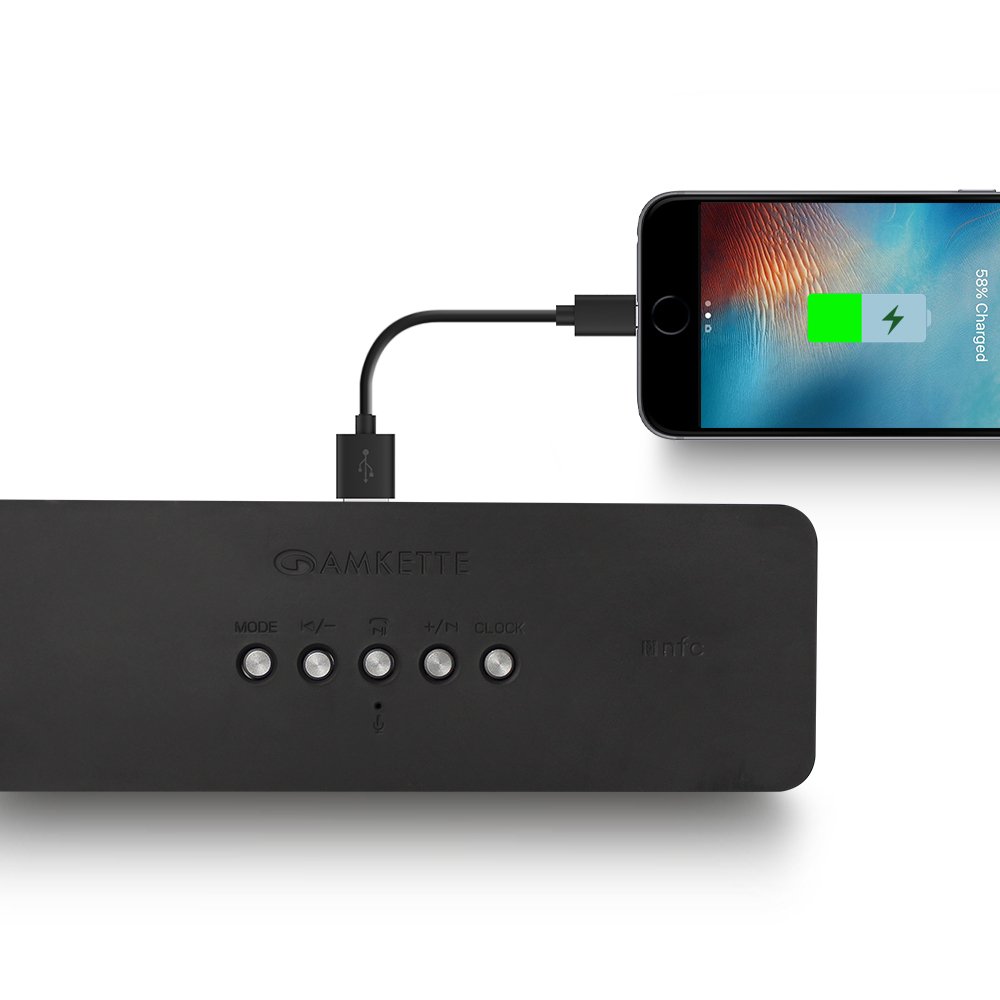
Figure 8: Speaker providing power to a smartphone through its USB Host port.
The Amkette Trubeats S50 can charge your smartphone or other USB-powered devices. Connect your device's charging cable to the Gostiteljska vrata USB on the rear of the speaker. The speaker's internal battery will then supply power to your device.
5.7 App Control (Android Only)

Figure 9: Smartphone displaying the Amkette Trubeats Smart Speaker App interface.
For enhanced control, download the Amkette Trubeats Smart Speaker App from the Google Play Store (for Android phones). The app allows you to:
- Preklapljajte med različnimi zvočnimi načini.
- Control volume and track playback.
- Manage FM radio stations and perform precise tuning.
- Set and customize alarms, including alarm source.
Ensure your speaker is connected via Bluetooth to your smartphone for app functionality.
5.8 Upravljanje klicev
When connected via Bluetooth to a smartphone, the speaker can be used for hands-free calling:
- Sprejmi klic: Pritisnite Play/Pause/Answer Call Button enkrat.
- Končaj klic: Pritisnite Play/Pause/Answer Call Button enkrat med klicem.
- Zavrni klic: Dolgo pritisnite Play/Pause/Answer Call Button.
6. Vzdrževanje
- Zvočnika ne izpostavljajte ekstremnim temperaturam, neposredni sončni svetlobi in vlagi.
- Zvočnik očistite z mehko, suho krpo. Ne uporabljajte abrazivnih čistil ali topil.
- Pazite, da vam zvočnik ne pade ali da ga ne izpostavljate močnim udarcem.
- Ko zvočnika dlje časa ne uporabljate, ga shranite na hladnem in suhem mestu ter ga redno polnite, da ohranite zdravje baterije.
7. Odpravljanje težav
| Težava | Možen vzrok | rešitev |
|---|---|---|
| Zvočnik se ne vklopi. | Baterija je prazna. | Zvočnik popolnoma napolnite. |
| Iz zvočnika ni zvoka. | Glasnost je prenizka; izbran je napačen način; naprava ni pravilno priključena. | Increase speaker and source device volume. Ensure correct mode (Bluetooth, AUX, etc.) is selected. Reconnect the device. |
| Bluetooth seznanjanje ne uspe. | Zvočnik ni v načinu seznanjanja; naprava je predaleč; motnje. | Ensure speaker is in pairing mode ('BT' flashing). Move device closer to speaker. Turn off other Bluetooth devices. |
| Slab sprejem FM radia. | Šibek signal; motnje iz okolja. | Relocate the speaker to an area with better reception. Perform an auto-scan again. |
| Aplikacija se ne poveže z zvočnikom. | Bluetooth not connected; app issue. | Ensure speaker is paired via Bluetooth to your phone. Restart the app and try again. |
8. Specifikacije
- Model: S50
- Znamka: Amkette
- Vrsta zvočnika: Portable Bluetooth Speaker (Outdoor)
- Povezljivost: Bluetooth, USB, Micro SD, AUX, FM Radio
- Brezžična komunikacijska tehnologija: Bluetooth
- Nadzorna metoda: Buttons, App (Android)
- Način avdio izhoda: Stereo
- Avdio Wattage: 10 vatov
- vir energije: Napajanje na baterije
- Življenjska doba baterije: Do 12 ur (povprečno)
- Čas polnjenja: Približno 4 ur
- Združljive naprave: Laptop, Mobile, Tablet
- Dimenzije (DxŠxV): 26.7 x 10.9 x 7.9 cm
- Teža artikla: 703 gramov
- Vodoodporen: ja
- Vrsta pritrditve: Namizni nosilec
9. Garancija in podpora
The Amkette Trubeats S50 Smart Wireless Bluetooth Speaker comes with a 1-letna garancija od datuma nakupa. Ta garancija krije proizvodne napake pri normalni uporabi.
For warranty claims, technical assistance, or any other support inquiries, please contact Amkette customer support through their official webspletnega mesta ali kontaktnih podatkov, navedenih v dokumentaciji o nakupu.
Prosimo, shranite račun kot dokazilo o nakupu za namene garancije.