
Uvod
This manual provides comprehensive instructions for the setup, operation, and maintenance of your GPX Digital AM/FM Clock Radio, model C224B. Please read this manual thoroughly before using the device to ensure proper functionality and to maximize your user experience. Keep this manual for future reference.
Konec izdelkaview
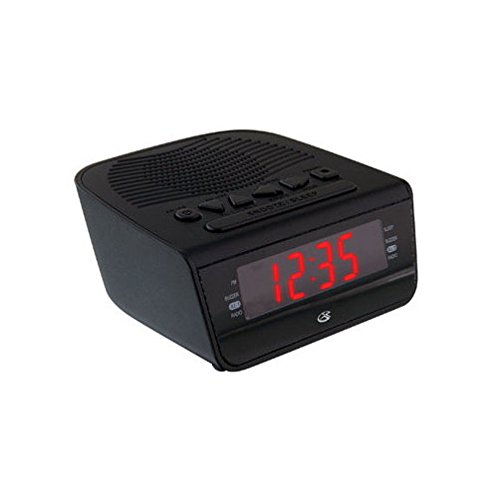
Slika 1: Spredaj view of the GPX Digital AM/FM Clock Radio. This image shows the compact black unit with its digital display and control buttons.
The GPX Digital AM/FM Clock Radio (C224B) is designed for reliable timekeeping and audio entertainment. Key features include a clear multi-display clock, AM/FM radio tuner, dual alarm functionality, and a battery backup option to ensure continuous operation during power interruptions. Its compact and modern design makes it suitable for various indoor settings.
Nastavitev
1. Razpakiranje
Carefully remove the clock radio from its packaging. Ensure all components are present: the clock radio unit and the power adapter.
2. Napajalni priključek
- Plug the power adapter into the DC input jack located on the back of the clock radio.
- Plug the other end of the power adapter into a standard wall outlet (AC 120V, 60Hz).
- The display will illuminate, indicating the unit is receiving power.
3. Battery Backup Installation (Optional)
Za rezervno napajanje med izpadomtages, install batteries (not included).
- Poiščite predal za baterije na spodnji strani enote.
- Odprite pokrov prostora za baterije.
- Insert the required batteries (e.g., 2 x AAA, check unit for specific type) according to the polarity markings (+ and -).
- Trdno zaprite pokrov prostora za baterije.
Opomba: Batteries are for backup only and will not power the display or radio functions continuously. They preserve time and alarm settings during a power interruption.
Navodila za uporabo
1. Nastavitev časa
- Pritisnite in držite ČAS NAST gumb, dokler zaslon ne utripa.
- Uporabite URA in MINUTA gumbe za nastavitev časa.
- Pritisnite ČAS NAST ponovno za potrditev in izhod iz načina nastavitve časa.
2. Nastavitev alarmov (Alarm 1 in Alarm 2)
This unit features dual alarms, allowing you to set two independent wake-up times.
- Pritisnite in držite ALARM 1 NAST (oz ALARM 2 NAST) button until the alarm time flashes.
- Uporabite URA in MINUTA buttons to adjust the desired alarm time.
- Pritisnite ALARM 1 NAST (oz ALARM 2 NAST) again to confirm the time.
- Immediately after confirming the time, use the NAČIN ALARMA button to select the alarm source: BRENEČ or RADIO.
- The alarm icon (e.g., AL1 or AL2) will appear on the display, indicating the alarm is active.
To turn off an alarm, press the corresponding ALARM 1 VKLOP/IZKLOP (oz ALARM 2 VKLOP/IZKLOP) button. The alarm icon will disappear.
3. Delovanje AM/FM radia
- Pritisnite RADIO VKLOP/IZKLOP gumb za vklop radia.
- Pritisnite BAND gumb za preklapljanje med pasovi AM in FM.
- Uporabite TUNE + or UGLAŠEVANJE - gumbe za ročno uglaševanje želene postaje.
- To automatically scan for the next available station, press and hold TUNE + or UGLAŠEVANJE - za nekaj sekund.
- Glasnost prilagodite s tipko GLASNOST + or GLASNOST - gumbi.
- Če želite izklopiti radio, pritisnite RADIO VKLOP/IZKLOP gumb znova.
4. Funkcija dremeža
Ko se oglasi alarm, pritisnite DREMEŽ gumb za začasno utišanje alarma za približno 9 minut. Alarm se bo po obdobju dremeža znova oglasil.
5. Funkcija spanja
Funkcija spanja omogoča, da radio predvaja določen čas, preden se samodejno izklopi.
- Medtem ko se predvaja radio, pritisnite SPANJE Večkrat pritisnite gumb , da se pomikate med razpoložljivimi časi spanja (npr. 90, 60, 30, 15 minut, IZKLOP).
- Radio se bo po izbranem času samodejno izklopil.
Vzdrževanje
1. Čiščenje
To clean the unit, wipe the exterior with a soft, slightly damp cloth. Do not use abrasive cleaners or solvents, as these may damage the finish. Ensure the unit is unplugged before cleaning.
2. Zamenjava baterije
If the battery backup function is not working, or if the unit loses time during a power outage, the backup batteries may need replacement. Follow the "Battery Backup Installation" steps in the Setup section to replace them.
Odpravljanje težav
| Težava | Možen vzrok | rešitev |
|---|---|---|
| Enota se ne vklopi. | Napajalnik ni priključen ali pa je vtičnica pokvarjena. | Prepričajte se, da je napajalnik varno priključen v enoto in delujočo stensko vtičnico. Poskusite z drugo vtičnico. |
| Alarm se ne oglasi. | Alarm not set, alarm volume too low, or alarm turned off. | Verify alarm time and source (buzzer/radio) are set correctly. Ensure alarm is activated (icon visible). Increase radio volume if alarm source is radio. |
| Slab radijski sprejem. | Šibek signal ali motnje. | Adjust the position of the unit or the antenna (if external). Move away from other electronic devices that may cause interference. |
| Izguba časa/nastavitev po izpadu električne energijetage. | Rezervne baterije so prazne ali niso nameščene. | Install fresh backup batteries or replace existing ones. |
Specifikacije
- Model: C224B
- vir energije: AC 120V, 60Hz (main); Battery Powered (backup)
- Vrsta zaslona: LED digitalni zaslon
- Radijski pasovi: AM/FM
- Dimenzije (pribl.): 5.12 cm Š x 5.12 cm V
- Teža (pribl.): 3 funta
- barva: Črna
- Material: Plastika
Garancija in podpora
Za informacije o garanciji ali tehnično podporo glejte garancijski list, ki je priložen izdelku, ali obiščite uradno spletno stran GPX. website. Do not attempt to repair this unit yourself, as this may void your warranty.
GPX Official Webspletno mesto: www.gpx.com