
1. Izdelek je končanview
The ADATA HM900 (model AHM900-6TU3-CEUBK) is a 6TB external hard disk drive designed for high-capacity data storage and transfer. This mechanical hard disk drive offers ample space for extensive data needs and supports simultaneous operations without compromising performance. It connects via USB, making it compatible with various devices, including personal computers and televisions.

Slika 1: Sprednja stran view of the ADATA HM900 External Hard Drive.
2. Navodila za nastavitev
2.1 Vsebina paketa
Preden nadaljujete, se prepričajte, da so v paketu vsi elementi:
- ADATA HM900 External Hard Disk Drive
- USB podatkovni kabel
- Napajalni adapter
- Vodnik za hitri začetek (če je priložen)
2.2 Connecting the Hard Drive
- Priključite napajalnik: Plug the power adapter into the DC IN port on the back of the ADATA HM900. Connect the other end of the power adapter to a wall outlet. The device requires 12 Watts of power.
- Priključite USB kabel: Insert one end of the provided USB data cable into the USB port (marked 'SS' for SuperSpeed USB) on the back of the hard drive.
- Povežite se z vašo napravo: Plug the other end of the USB cable into an available USB port on your computer, television, or other compatible device.
- Vklop: The drive should power on automatically. A status indicator light will typically illuminate to show it is active.
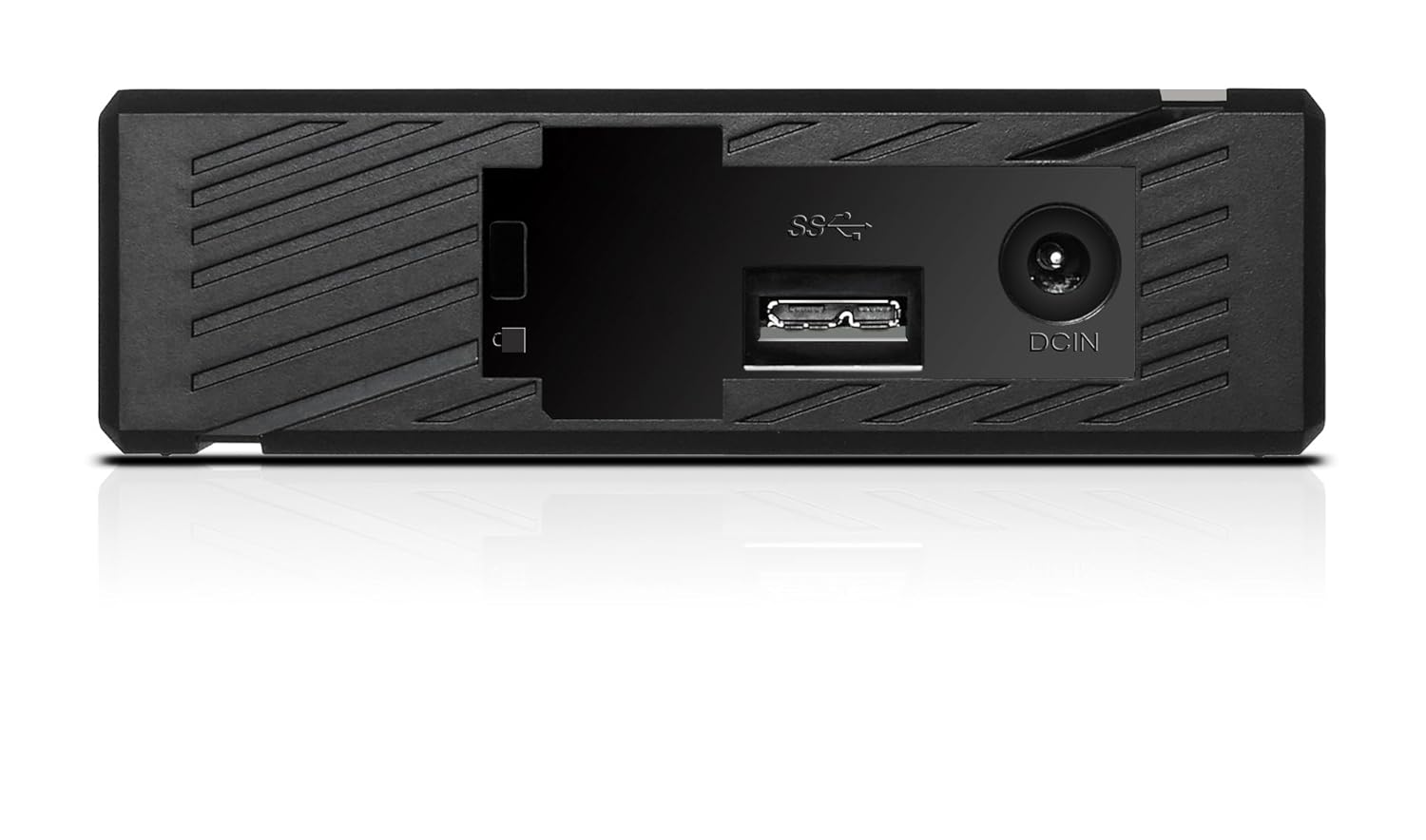
Slika 2: Zadaj view of the ADATA HM900, highlighting the USB and DC IN ports for connection.
3. Upravljanje trdega diska
3.1 Začetno pripoznavanje
Upon first connection, your operating system (Windows, macOS, Linux) or compatible device (e.g., smart TV) should automatically detect the ADATA HM900. For computers, it may appear as a new drive letter or volume in 'My Computer'/'This PC' or 'Finder'.
3.2 Prenos podatkov
Za prenos files, simply drag and drop them to and from the HM900 drive icon. For larger transfers, it is recommended to use your operating system's copy/paste functions or dedicated backup software.
3.3 Using with a Television
The ADATA HM900 is compatible with televisions that support external storage devices. Connect the drive as described in Section 2.2. Refer to your television's user manual for specific instructions on how to access and play media files from an external USB drive.
4. Vzdrževanje in nega
Proper care ensures the longevity and reliability of your ADATA HM900 external hard drive:
- Varen odklop: Always safely eject or unmount the hard drive from your operating system before physically disconnecting the USB cable or power. This prevents data corruption.
- Fizično varovanje: Avoid dropping or subjecting the drive to strong impacts, as it contains a mechanical hard disk that can be damaged.
- Okoljski pogoji: Store and operate the drive in a cool, dry environment, away from direct sunlight, extreme temperatures, and high humidity.
- Čiščenje: Za čiščenje zunanjosti pogona uporabite mehko, suho krpo. Ne uporabljajte tekočih čistil ali topil.
5. Odpravljanje težav
5.1 Pogon ni bil zaznan
- Preverite povezave: Ensure both the power adapter and USB cable are securely connected to the drive and your device.
- Poskusite z drugimi vrati USB: Connect the drive to a different USB port on your computer or device.
- Preverite moč: Confirm the power adapter is plugged into a working electrical outlet and the drive's indicator light is on.
- Znova zaženite napravo: Restart your computer or television and try connecting the drive again.
- Preverite Upravljanje diskov (Windows) / Disk Utility (macOS): For computers, check if the drive appears in disk management tools, even if it doesn't have a drive letter assigned.
5.2 Počasne hitrosti prenosa podatkov
- Uporabite vrata USB 3.0: Ensure the drive is connected to a USB 3.0 (or higher) port on your device for optimal speeds. USB 2.0 ports will result in slower transfers.
- Izogibajte se drugim napravam USB: Med velikimi prenosi odklopite druge visokopasovne USB naprave.
- Preverite stanje pogona: Run a disk check utility on your computer to ensure the drive is healthy.
6. Specifikacije
| Funkcija | Specifikacija |
|---|---|
| Znamka | ADATA |
| Številka modela | AHM900-6TU3-CEUBK |
| Zmogljivost digitalnega shranjevanja | 6 TB |
| Opis trdega diska | Mehanski trdi disk |
| Faktor oblike trdega diska | 2.5 palcev |
| Tehnologija povezljivosti | USB |
| Dimenzije artikla (DxŠxV) | 19 x 12.1 x 3.65 centimetrov |
| Teža predmeta | 998 g |
| Wattage | 12 vatov |
| Združljive naprave | Television, Personal Computers |
| Prvi razpoložljivi datum | 11. november 2016 |
7. Garancija in podpora
For detailed warranty information, please refer to the warranty card included with your product or visit the official ADATA website. Support resources, including drivers and firmware updates, may also be available on the ADATA support portal.