
1. Uvod
The KELUSHI XQ-350 Wire Tracker is a versatile tool designed for telecommunication network line engineering, routine servicing, and computer network line maintenance. It assists in tracing wires, verifying LAN cable conditions, and performing continuity tests on various metal wire lines.
Vsebina paketa
Po odprtju paketa preverite, ali so prisotni vsi naslednji elementi:
- 1x Emitter Unit
- 1x sprejemna enota
- 1x Slušalke
- 1x adapterski kabel RJ11
- 1x Alligator Clip Adapter Cable
- 1x adapterski kabel RJ45
- 1x Uporabniški priročnik (ta dokument)
- 1x Toolkit/Carrying Case

Figure 1.1: KELUSHI XQ-350 Wire Tracker and included accessories.

Figure 1.2: The carrying case and a list of its contents, ensuring all components are accounted for.
2. Značilnosti in funkcije izdelka
The XQ-350 Wire Tracker offers a range of functionalities to assist in network and telephone cable management:
- Sledenje žice: Locate telephone wires and LAN cables within electrical systems.
- LAN Cable Verification: Assess the condition of LAN cables, identifying open circuits, short circuits, and cross-connections.
- Test kontinuitete: Perform basic continuity checks on cables.
- Indikacija prazne baterije: Opozori uporabnika, ko je baterija skoraj prazna.
- Vgrajena LED svetilka: Zagotavlja osvetlitev v temnih delovnih okoljih.
- Cable Assignment Test: Specifically tests 2-wire (RJ11) and 4-wire (RJ45) telephone cables for open, short, and cross faults.
- Cable State Testing (2-wire): Detects DC line voltage, determines anode/cathode polarity, and identifies ringing signals.
- Target Wire Identification: Quickly find specific wires among bundles of telephone or network cables by comparing sound volume and signal indicator brightness.
- Ethernet Switch/Router Compatibility: Capable of finding wires connected to operating Ethernet switches, routers, or PC terminals.
3. Identifikacija komponent
3.1 Emitter Unit

Slika 3.1: Spredaj view of the Emitter unit with key components labeled.
The Emitter unit features:
- Pristanišče RJ11: Za priključitev telefonskih kablov.
- Pristanišče RJ45: Za priključitev omrežnih kablov.
- Wire Finding Indicator (STATUS): LEDs indicating the status during wire tracing.
- Gumb za preklapljanje funkcij: Cycles through different test modes.
- Stikalo za izbiro funkcij: Toggles between SCAN, OFF, and TEST modes.
- Wire Sequence Indicator (1-8, G): LEDs that light up to show cable continuity and wiring sequence.
- Testing Indicator (VERIFY): Indicates the result of cable verification.
3.2 Sprejemna enota

Slika 3.2: Spredaj view of the Receiver unit with key components labeled.
The Receiver unit features:
- Sonda: Used to detect the signal emitted by the Emitter.
- Indikator signala: Visual indication of signal strength.
- Inching Button (PUSH TO TEST): Activates the signal detection.
- PWR-VOL Switch: Power and volume control for the receiver.
- Vtičnica za slušalke: For connecting the included earphone for clearer audio detection.
- Volume Adjuster: Nadzira raven zvočnega izhoda.
- Spotlight Switch: Aktivira vgrajeno LED svetilko.
- Wire Sequence Indicator (1-8, G): LEDs mirroring the Emitter's indicators during cable testing.
- Pristanišče RJ45: For connecting network cables during testing.
Slika 3.3: Podrobno views of the RJ45/RJ11 ports, probe, power switch, and speaker on the XQ-350 units.
4. Nastavitev
4.1 Namestitev baterije
Both the Emitter and Receiver units require a 9V DC battery (not included) for operation.
- Locate the battery compartment cover on the back of each unit.
- Potisnite ali odpnite pokrov, da odprete predal.
- Priključite 9V baterijo na sponko za baterijo in pazite na pravilno polarnost.
- Baterijo vstavite v predal in pokrovček varno zaprite.

Figure 4.1: Open battery compartments of the Emitter and Receiver, showing where to insert the 9V laminated battery.
4.2 Povezovalni kabli
Use the appropriate adapter cables (RJ45, RJ11, or alligator clips) to connect the Emitter to the cable you wish to test or trace. The Receiver is used to detect the signal or verify the cable status.
5. Navodila za uporabo
5.1 Wire Tracing (SCAN Mode)
This mode is used to locate a specific wire among a bundle of cables.
- Connect the Emitter to one end of the target cable using the appropriate adapter (RJ45, RJ11, or alligator clips).
- Set the Function Selector Switch on the Emitter to 'SCAN'. The 'STATUS' indicator will light up.
- Turn on the Receiver by adjusting the PWR-VOL switch. Adjust the volume to a comfortable level.
- Use the Receiver's probe to scan the cables at the other end or along the cable path.
- When the probe is near the target wire, the Receiver will emit an audible tone. The signal indicator LEDs will also light up.
- The target wire is identified by the loudest tone and brightest signal indicator.
- For clearer audio, connect the earphone to the Receiver's headset jack.
5.2 LAN Cable Testing (TEST Mode - RJ45)
This mode verifies the wiring sequence and identifies faults in RJ45 network cables.
- Connect one end of the RJ45 cable to the Emitter's RJ45 port and the other end to the Receiver's RJ45 port.
- Set the Function Selector Switch on the Emitter to 'TEST'.
- Observe the Wire Sequence Indicator LEDs (1-8, G) on both the Emitter and Receiver.
- Normal Connection: LEDs on both units will light up sequentially from 1 to 8, then G (ground), indicating a correct wiring sequence.
- Odprto vezje: If a specific LED (e.g., '3') does not light up on either unit, it indicates an open circuit on that wire.
- Kratek stik: If two or more LEDs light up simultaneously or out of sequence, it indicates a short circuit between those wires.
- Cross-Connection: If the sequence of LEDs on the Receiver differs from the Emitter, it indicates a cross-connection.
5.3 Telephone Cable Testing (TEST Mode - RJ11)
This mode is used for 2-wire telephone cables to check continuity and state.
- Connect one end of the RJ11 cable to the Emitter's RJ11 port using the RJ11 adapter.
- For cable state testing, connect the other end of the RJ11 cable to the line you wish to test.
- Set the Function Selector Switch on the Emitter to 'TEST'.
- Line DC Detecting and Anode/Cathode Determination: The Emitter will indicate the presence of DC voltage in njegova polarnost.
- Ringing Signal Detecting: The Emitter can detect if a ringing signal is present on the line.
- Open, Short, and Cross Testing: Similar to LAN cable testing, the LEDs will indicate faults.
5.4 Uporaba LED svetilke
The Receiver unit includes a built-in LED flashlight for working in dimly lit areas.
- Locate the Spotlight Switch on the side of the Receiver unit.
- Slide the switch to the 'ON' position to activate the flashlight.
- Slide the switch to the 'OFF' position when not in use to conserve battery life.
6. Vzdrževanje
6.1 Zamenjava baterije
When the low battery indicator illuminates or the unit's performance degrades, replace the 9V battery in both the Emitter and Receiver units as described in Section 4.1.
6.2 Čiščenje in skladiščenje
- Clean the units with a soft, dry cloth. Do not use abrasive cleaners or solvents.
- Napravo shranjujte na hladnem in suhem mestu, stran od neposredne sončne svetlobe in ekstremnih temperatur.
- Če napravo shranjujete dlje časa, odstranite baterije, da preprečite puščanje in poškodbe.
7. Odpravljanje težav
7.1 Brez napajanja
- Ensure the 9V battery is correctly installed with proper polarity.
- Zamenjajte baterijo s svežo.
- Check that the power switch (PWR-VOL on Receiver, Function Selector on Emitter) is in the 'ON' or 'SCAN'/'TEST' position.
7.2 No Signal During Wire Tracing
- Verify the Emitter is set to 'SCAN' mode.
- Ensure the Emitter is properly connected to the cable.
- Adjust the Receiver's volume to maximum.
- Confirm the Receiver's probe is in close proximity to the target cable.
- Check for excessive electromagnetic interference in the environment.
7.3 Incorrect Cable Test Results
- Ensure both ends of the cable are securely connected to the Emitter and Receiver.
- Verify the Emitter is set to 'TEST' mode.
- Preverite kabel in priključke za vidne poškodbe.
- Test with a known good cable to confirm the device is functioning correctly.
8. Specifikacije
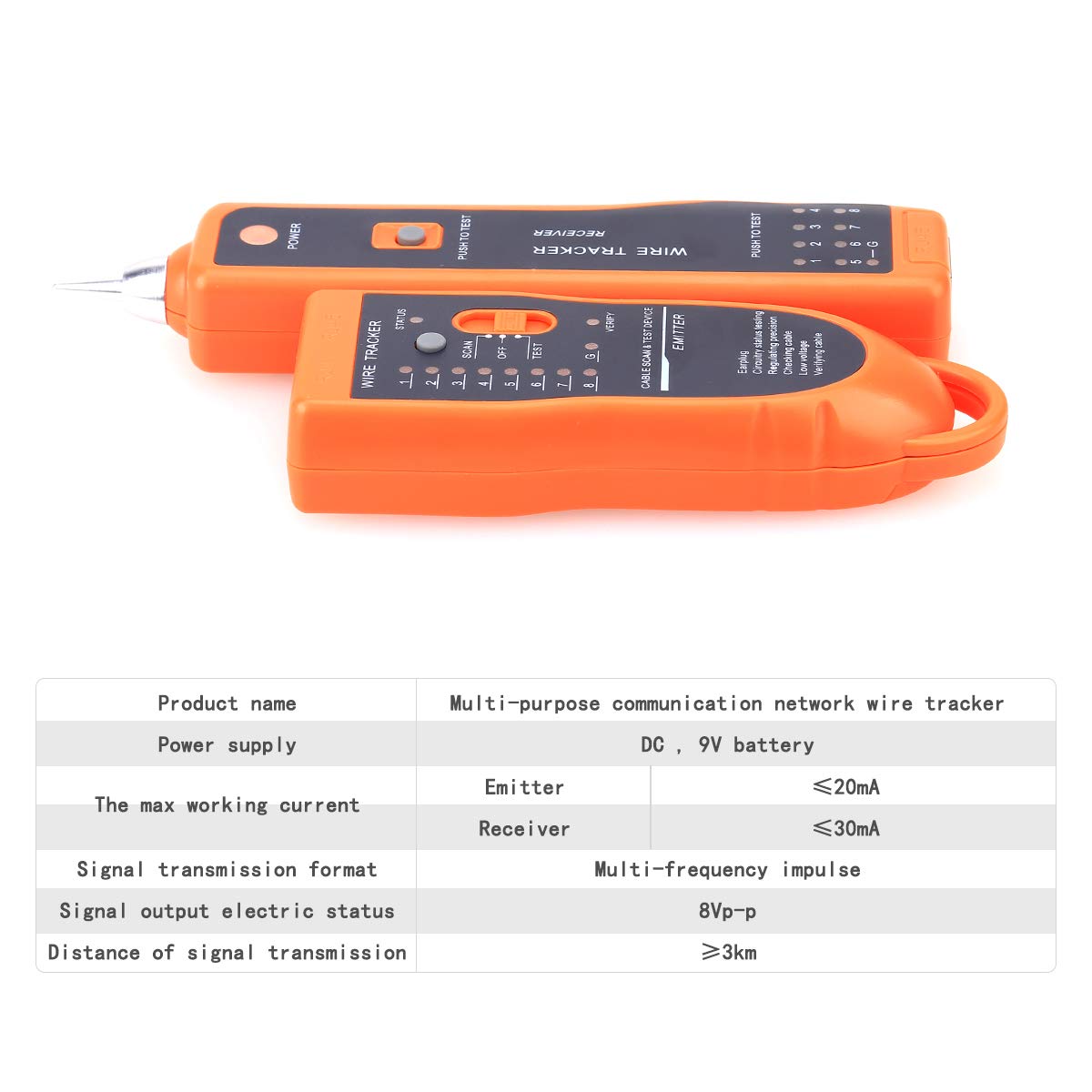
The following table outlines the technical specifications for the KELUSHI XQ-350 Wire Tracker:

Figure 8.1: Visual representation of the KELUSHI XQ-350 Wire Tracker's key specifications.
| Parameter | Vrednost |
|---|---|
| Model | XQ-350 |
| Napajalnik | DC 9V baterija (ni vključena) |
| Working Current (Emitter) | ≤10mA (Test mode) |
| Working Current (Receiver) | ≤30 mA |
| Signal Transmission Format | Multiple frequency pulse |
| Signal Output Electric Status | 8VP-P |
| Distance of Signal Transmission | ≥3 km |
| barva | Oranžna |
| Material | ABS plastika |
| Dimenzija oddajnika | Pribl. 12.8 × 4.5 × 2.5 cm |
| Dimenzija sprejemnika | Pribl. 17.5 × 4 × 2.2 cm |
| Teža predmeta | 250 gramov |
9. Podpora
For any questions or assistance regarding the KELUSHI XQ-350 Wire Tracker, please contact the manufacturer or seller. Refer to your purchase documentation for specific contact details.