
Uvod
This manual provides comprehensive instructions for the Comfast CF-912AC 1200Mbps Dual Band USB WiFi Network Adapter. Please read this guide carefully before installation and use to ensure optimal performance and proper operation of your device. This adapter is designed to provide high-speed wireless connectivity for various devices.
Lastnosti
- Visokohitrostna brezžična povezljivost: Supports IEEE 802.11a/b/g/n/ac WiFi standards for fast and reliable internet access.
- Dvopasovna zmogljivost: Achieves transfer speeds up to 300Mbps on the 2.4GHz band and 867Mbps on the 5.8GHz band, totaling 1200Mbps.
- WPS Security: Features a one-key WPS (Wi-Fi Protected Setup) button for quick and secure wireless network encryption (supports 64/128-bit WEP).
- Združljivost z operacijskimi sistemi: Fully compatible with Windows XP (32/64-bit), Vista (32/64-bit), Windows 7 (32/64-bit), Windows 8 (32/64-bit), Windows 8.1, and Windows 10.
- Vmesnik USB 3.0: Equipped with a USB 3.0 port, offering data transmission speeds up to 10 times faster than traditional USB 2.0, while remaining backward compatible with USB 2.0/1.1.
- Stabilen signal: Incorporates a powerful inner core with an RTL8812AC chip and two RTC5633 power amplifiers for stable, fluctuation-free signal transmission.
- Energijsko učinkovit: Designed for low power consumption, with a maximum power usage of only 5 watts.
- Območje pokritosti: Provides an indoor coverage range of approximately 100 meters and an outdoor range of up to 300 meters (actual range may vary based on environmental factors).
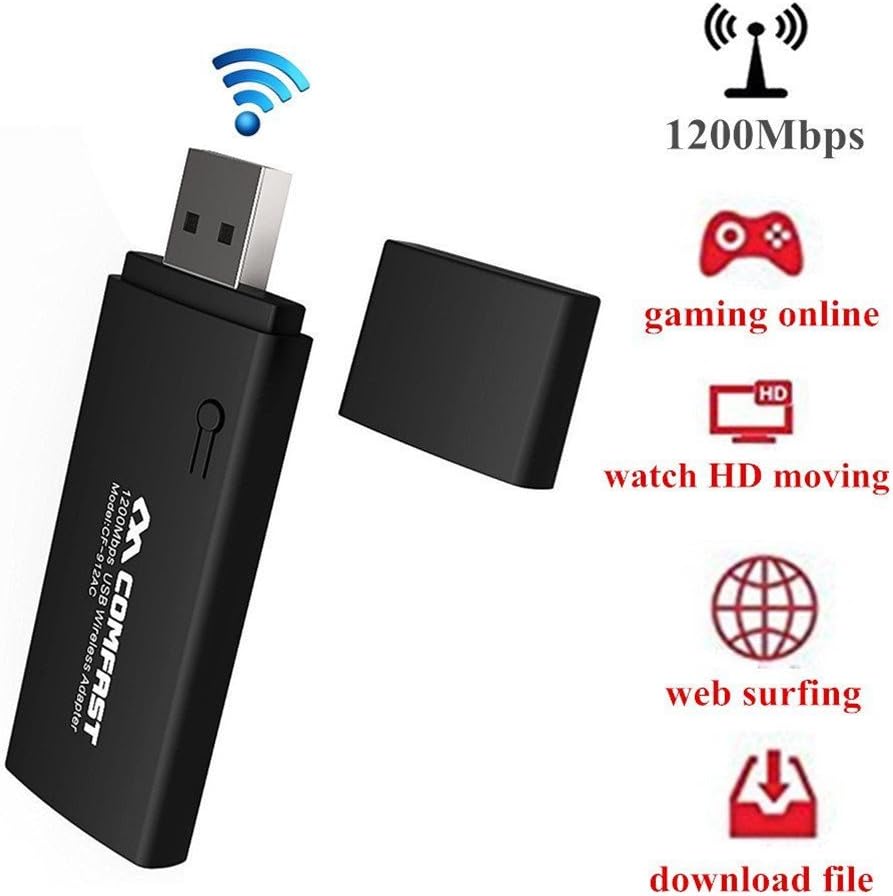
Image: The Comfast CF-912AC USB WiFi adapter highlighting its capabilities for high-speed activities like online gaming, HD video streaming, web browsing, and file prenosi.

Image: The Comfast CF-912AC adapter demonstrating compatibility with a range of devices including PCs, laptops, smart TVs, IPTV boxes, DVB boxes, and smartphones/tablets.

Image: A visual comparison illustrating the faster transmission speed of USB 3.0 (867 Mbps) compared to USB 2.0 (64 Mbps) when using the Comfast CF-912AC adapter.

Image: A chart comparing wireless speeds: 802.11g at 54Mbps, 802.11n at 300Mbps, and 802.11ac (CF912AC) at 1167Mbps, highlighting the superior performance of the 802.11ac protocol.
Navodila za namestitev
1. Namestitev strojne opreme
Insert the Comfast CF-912AC USB WiFi adapter into an available USB port on your computer. For optimal performance, use a USB 3.0 port if available.
- For Windows 7, 8, 8.1, 10: The operating system may attempt to install a generic driver automatically. Proceed to software installation if the device is not recognized or does not function correctly.
- For Windows XP/Vista: After inserting the adapter, if a "New Hardware Wizard" window appears, click "Cancel" to prevent automatic driver installation.
2. Namestitev programske opreme
The driver installation process is similar across Windows XP, Vista, and 7. The following steps use Windows XP as an example:
- Insert the provided driver CD into your computer's CD-ROM drive.
- Navigate to the CD drive in "My Computer" or "This PC" and double-click the setup.exe icon to start the installation wizard.
- The setup process will begin. Click Naprej to proceed through the installation steps.
- Follow the on-screen prompts. The installation typically takes a few seconds.
- Once the installation is complete, click Končaj za izhod iz čarovnika.
After successful installation, your computer should recognize the Comfast CF-912AC adapter, and you will be able to connect to wireless networks.
Navodila za uporabo
Povezovanje z brezžičnim omrežjem
- After installing the drivers, locate the wireless network icon in your system tray (usually in the bottom-right corner of your screen).
- Kliknite na ikono za view razpoložljiva brezžična omrežja.
- Na seznamu izberite želeno omrežje Wi-Fi.
- Click "Connect" and enter the network security key (password) when prompted.
- Once connected, the icon will indicate a successful connection, and you can access the internet.
Uporaba WPS (Wi-Fi Protected Setup)
The WPS button on the adapter allows for a quick and secure connection to a WPS-enabled router without manually entering the password.

Image: Illustration of using the WPS button on the Comfast CF-912AC adapter for a quick and secure wireless network setup with a compatible router.
- Pritisnite gumb WPS na brezžičnem usmerjevalniku.
- Within two minutes, press the WPS button on your Comfast CF-912AC adapter.
- The adapter will automatically establish a secure connection with the router.
Creating a Wi-Fi Hotspot (AP Function)
The Comfast CF-912AC adapter can function as a soft Access Point (AP), allowing your computer to share its internet connection with other wireless devices like smartphones or tablets.

Image: The Comfast CF-912AC adapter being used to create a Wi-Fi hotspot, enabling other mobile devices to connect to the internet through the computer.
To enable this feature, you typically need to access the utility software installed with the adapter drivers. Look for an option like "AP Mode" or "SoftAP" within the utility. Follow the on-screen instructions to configure the hotspot name (SSID) and password.
Vzdrževanje
- Adapter naj bo čist in brez prahu. Za čiščenje uporabljajte mehko, suho krpo.
- Naprave ne izpostavljajte ekstremnim temperaturam, vlagi ali neposredni sončni svetlobi.
- Do not attempt to disassemble or repair the adapter yourself, as this will void the warranty and may cause damage.
- Ko adapterja ne uporabljate, ga shranite na varno mesto, da preprečite fizične poškodbe.
Odpravljanje težav
- Ni internetne povezave:
- Ensure the adapter is properly inserted into a USB port.
- Verify that the drivers are correctly installed. Check Device Manager for any error symbols.
- Confirm that your Wi-Fi network is active and broadcasting.
- Double-check the Wi-Fi password for accuracy.
- Try restarting your computer and router.
- Počasna hitrost povezave:
- Ensure the adapter is plugged into a USB 3.0 port if your computer has one.
- Preverite morebitne motnje zaradi drugih elektronskih naprav (npr. mikrovalovnih pečic, brezžičnih telefonov).
- Update the adapter drivers to the latest version from the Comfast webmesto.
- Za izboljšanje moči signala se premaknite bližje brezžičnemu usmerjevalniku.
- Adapter ni bil zaznan:
- Poskusite druga vrata USB na vašem računalniku.
- Test the adapter on another computer to rule out a device malfunction.
- Reinstall the drivers completely.
Specifikacije
| Znamka | Udobno |
| Model | CF-912AC |
| Strojni vmesnik | USB, USB 2.0 (USB 3.0 compatible) |
| Združljive naprave | Smart TV, Desktop PC, Laptop, Tablet, Smartphone |
| Protokol podatkovne povezave | IEEE 802.11a/b/g/n/ac |
| Hitrost prenosa podatkov | Do 1200 Mbps (2.4 GHz: 300 Mbps, 5.8 GHz: 867 Mbps) |
| Brezžična varnost | 64/128-bit WEP, WPS |
| Operacijski sistemi | Windows XP/Vista/7/8/8.1/10 (32/64-bit) |
| Proizvajalec | Moobom |
| Številka dela | 112509BENQA160 |
| UPC / GTIN | 889250872106 |
| ASIN | B01KX1M436 |
Garancija in podpora
For warranty information and technical support, please refer to the documentation included with your product packaging or visit the official Comfast webmesto. Shranite račun za garancijske zahtevke.


