
Uvod
The UNI-T UT151C is a high-reliability handheld digital multimeter designed for precise electrical measurements. It functions as a multimeter, LCR meter, and temperature tester, capable of measuring DC/AC voltage, DC/AC current, resistance, capacitance, and temperature. This manual provides essential information for the safe and effective operation, setup, and maintenance of your UT151C device.
Varnostne informacije
Opozorilo: To avoid electric shock or personal injury, read all safety information before using this product. Use the product only as specified in this manual, or the protection provided by the product may be impaired.
- Always ensure the test leads are in good condition and properly connected.
- Ne nanašajte več kot nazivna voltage, kot je označeno na števcu, med sponkama ali med katero koli sponko in ozemljitvijo.
- Bodite izjemno previdni pri delu z voltagnad 30 V AC RMS, 42 V vrhom ali 60 V DC. Te vol.tagpredstavljajo nevarnost električnega udara.
- Before measuring current, ensure the circuit is de-energized and the meter is connected in series.
- Pred spreminjanjem funkcij odklopite testne kable iz preskušanega tokokroga.
- Merilnika ne uporabljajte z odprtim ohišjem ali če pokrov baterije ni varno zaprt.
- Baterijo zamenjajte takoj, ko se prikaže indikator nizke napolnjenosti baterije, da zagotovite natančne odčitke.
Konec izdelkaview
Familiarize yourself with the components of your UNI-T UT151C Digital Multimeter.
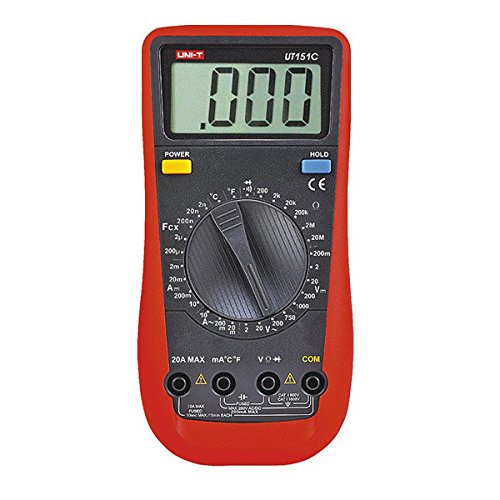
Slika 1: Spredaj view of the UNI-T UT151C Digital Multimeter. This image displays the LCD screen, the central rotary function switch, and the input terminals at the bottom. The 'HOLD' button is visible on the right side of the display.
- LCD zaslon: Prikazuje odčitke meritev, enote in indikatorje funkcij.
- Funkcija vrtljivega stikala: Used to select the desired measurement function (e.g., V~, V-, A~, A-, Ω, F, °C/°F, Diode, Continuity).
- Vhodni priključki: Terminals for connecting test leads. Typically include COM (common), VΩmA (voltage, resistance, small current), and 20A (high current).
- Gumb HOLD: Zamrzne trenutno odčitavanje na zaslonu.
- Gumb za vklop: Vklopi ali izklopi napravo.
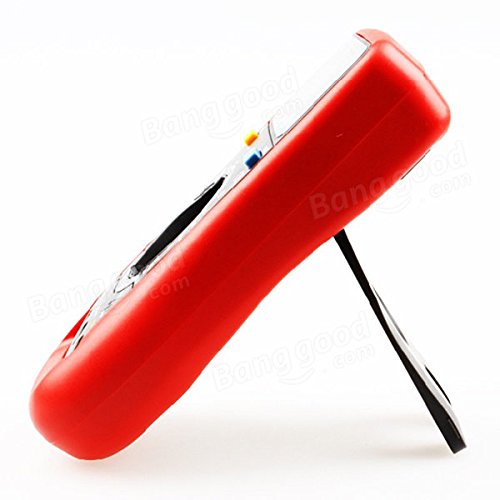
Slika 2: Stran view of the UNI-T UT151C Digital Multimeter. This image highlights the integrated kickstand, allowing the meter to be propped up for easier viewmed uporabo.
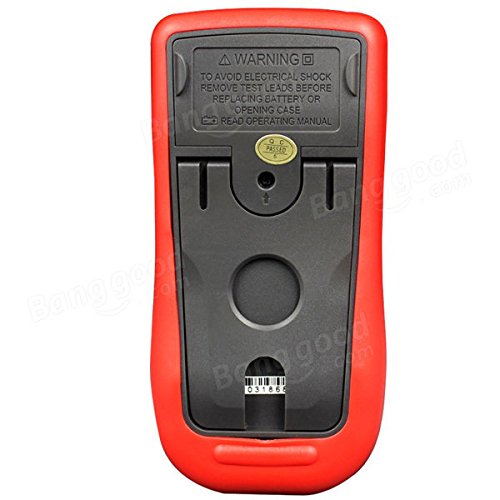
Slika 3: Nazaj view of the UNI-T UT151C Digital Multimeter. This image shows the battery compartment cover and important safety warnings regarding electrical shock and battery replacement.
Nastavitev
1. Namestitev baterije
The UNI-T UT151C requires a 9V (6F22) battery for operation. The battery is not included.
- Prepričajte se, da je multimeter izklopljen, in odklopite vse merilne kable.
- Poiščite predal za baterije na zadnji strani merilnika (glejte sliko 3).
- Odvijte pritrdilni vijak(e) in odstranite pokrov baterije.
- Connect a new 9V battery to the battery clips, observing correct polarity.
- Vstavite baterijo v predal in namestite pokrov, ki ga pritrdite z vijakom(-i).
Opomba: Replace the battery immediately when the low battery indicator appears on the display to maintain measurement accuracy.
2. Priključitev merilnih vodnikov
Črno merilno vez vedno priključite na COM (skupni) priključek. Rdeči merilni kabel priključite na ustrezni vhodni priključek glede na vrsto meritve:
- Za voltage, resistance, capacitance, diode, continuity, and temperature measurements, connect the red lead to the VΩmA jack.
- Za meritve toka do 200 mA priključite rdeči kabel na VΩmA jack.
- Za meritve toka do 20 A priključite rdeči kabel na 20A jack.
Pozor: Incorrect lead connection can damage the meter or the circuit under test.
Navodila za uporabo
Follow these steps for various measurement functions.
1. Vklop/izklop
Pritisnite MOČ button to turn the multimeter on. The meter features an auto power-off function to conserve battery life. To turn it off manually, press the MOČ gumb znova.
2. Merjenje enosmerne napetostitage (V-)
- Priključite črni vodnik na COM and the red lead to VΩmA.
- Set the rotary switch to the desired V- range (e.g., 2V, 20V, 200V, 1000V). If the voltagČe je e neznano, začnite z najvišjim razponom in ga po potrebi zmanjšajte.
- Merilne kable priključite vzporedno na komponento ali vezje, ki ga želite izmeriti.
- Preberite zvtage vrednost na LCD zaslonu.
3. Merjenje AC Voltage (V~)
- Priključite črni vodnik na COM and the red lead to VΩmA.
- Set the rotary switch to the desired V~ range (e.g., 2V, 20V, 200V, 750V).
- Merilne kable priključite vzporedno na vir izmeničnega toka ali komponento.
- Preberite AC voltage vrednost na LCD zaslonu.
4. Measuring DC Current (A-)
- Pozor: Always connect the meter in series with the circuit. Never connect it in parallel across a voltage source when measuring current.
- Odklopite napajanje tokokroga.
- Prekinite tokokrog na mestu, kjer želite izmeriti tok.
- For currents up to 200mA, connect the black lead to COM and the red lead to VΩmA.
- For currents up to 20A, connect the black lead to COM and the red lead to 20A.
- Set the rotary switch to the appropriate A- obseg.
- Connect the test leads to complete the circuit.
- Apply power to the circuit and read the DC current value.
5. Measuring AC Current (A~)
- Follow the same safety precautions and connection steps as for DC Current measurement.
- Set the rotary switch to the appropriate A~ obseg.
- Apply power to the circuit and read the AC current value.
6. Merjenje upornosti (Ω)
- Ensure the circuit or component is completely de-energized before measuring resistance.
- Priključite črni vodnik na COM and the red lead to VΩmA.
- Vrtljivo stikalo nastavite na Ω obseg.
- Priključite merilne kable na komponento.
- Na zaslonu preberite vrednost upora.
7. Measuring Capacitance (F)
- Pred meritvijo se prepričajte, da je kondenzator popolnoma izpraznjen, da preprečite poškodbe merilnika.
- Priključite črni vodnik na COM and the red lead to VΩmA.
- Vrtljivo stikalo nastavite na F (Capacitance) range.
- Merilne kable priključite na priključke kondenzatorja.
- Preberite vrednost kapacitivnosti na zaslonu.
8. Measuring Temperature (°C/°F)
- Connect the temperature probe (if included and compatible) to the COM in VΩmA vtičnice, pri čemer upoštevajte polarnost.
- Vrtljivo stikalo nastavite na °C or °F položaj.
- Konico temperaturne sonde namestite na predmet, katerega temperaturo želite izmeriti, ali blizu njega.
- Odčitajte vrednost temperature na zaslonu.
9. Diodni test
- Prepričajte se, da je dioda odklopljena iz vezja.
- Priključite črni vodnik na COM and the red lead to VΩmA.
- Vrtljivo stikalo nastavite na Dioda simbol.
- Rdeči kabel priključite na anodo, črni pa na katodo diode. Premični toktage drop (e.g., 0.5V to 0.8V for silicon diodes) will be displayed.
- Zamenjajte žice. Na zaslonu bi moral biti napis "OL" (odprta zanka), če je dioda v redu.
10. Preizkus kontinuitete
- Prepričajte se, da je tokokrog ali komponenta brez napetosti.
- Priključite črni vodnik na COM and the red lead to VΩmA.
- Vrtljivo stikalo nastavite na Kontinuiteta symbol (often shared with Diode test).
- Merilne kable priključite na komponento ali vezje.
- If there is continuity (low resistance), the buzzer will sound, and a low resistance value will be displayed. "OL" indicates an open circuit.
11 Funkcija zadrževanja podatkov
Pritisnite PRIDRŽI gumb za zamrznitev trenutnega odčitka na zaslonu. Ponovno ga pritisnite, da sprostite zadržanje in nadaljujete z meritvami v živo.
Vzdrževanje
Pravilno vzdrževanje zagotavlja dolgo življenjsko dobo in natančnost vašega multimetra.
- Čiščenje: Obrišite ohišje z oglasomamp krpo in blag detergent. Ne uporabljajte abrazivov ali topil.
- Zamenjava baterije: Replace the 9V battery when the low battery indicator appears. Refer to the "Battery Installation" section for instructions.
- Zamenjava varovalke: If the current measurement function fails, the fuse may need replacement. This typically requires opening the back case. Refer to the safety warnings on the back of the meter (Figure 3) and consult a qualified technician if unsure. Use only fuses of the specified type and rating.
- Shranjevanje: Če merilnika ne uporabljate dlje časa, odstranite baterijo, da preprečite puščanje. Merilnik shranjujte na hladnem in suhem mestu, stran od neposredne sončne svetlobe in ekstremnih temperatur.
Odpravljanje težav
If you encounter issues with your UNI-T UT151C, refer to the following common problems and solutions:
| Težava | Možen vzrok | rešitev |
|---|---|---|
| Ni prikaza ali pa je prikaz bled | Prazen ali prazen akumulator | Zamenjajte 9V baterijo. |
| Prikazano je "OL" (preobremenitev) | Meritev presega izbrano območje ali pa je tokokrog odprt | Select a higher range or check for an open circuit in the component/leads. |
| Nepravilni odčitki | Incorrect function selected, poor lead connection, or low battery | Verify function selection, ensure leads are securely connected, or replace battery. |
| Merjenje toka ne deluje | Pregorela varovalka | Zamenjajte varovalko (glejte poglavje Vzdrževanje). |
Specifikacije
Technical specifications for the UNI-T UT151C Digital Multimeter.
| Funkcija | Specifikacija |
|---|---|
| Model | UT151C (Internal Model: 365BG1060568) |
| DC Voltage (V) | 200mV/2V/20V/200V/1000V; ±(0.5%+1) |
| AC Voltage (V) | 2V/20V/200V/750V; ±(0.8%+3) |
| enosmerni tok (A) | 2mA/20mA/200mA/20A; ±(0.8%+1) |
| Izmenični tok (A) | 20mA/200mA/20A; ±(1%+3) |
| Odpornost (Ω) | 200Ω/2KΩ/20KΩ/200KΩ/2MΩ/20MΩ; ±(1%+2) |
| Kapacitivnost (F) | 2nF/20nF/200nF/2µF/100µF; ±(4%+3) |
| Temperatura (°C) | -40°C ~ 1000°C; ±(1%+3) |
| Temperatura (°F) | -40°F ~ 1832°F; ±(1%+4) |
| Število prikazov | 1999 |
| Ročni domet | ja |
| Diodni test | ja |
| Samodejni izklop | ja |
| Neprekinjenost Buzzer | ja |
| Indikacija prazne baterije | ja |
| Zadrževanje podatkov | ja |
| Input Impedance for DC Voltage | ≥10MΩ |
| Napajalnik | 9V (6F22) Battery (not included) |
| Velikost LCD-ja | 63 mm x 29 mm |
| Barva izdelka | Rdeča in siva |
| Neto teža izdelka | 300 g |
Garancija in podpora
Informacije o garanciji izdelka in podpori strankam so običajno navedene v dokumentaciji o nakupu ali na uradni strani proizvajalca. webspletno mesto. Za podrobnosti glejte te vire.