
1. Izdelek je končanview
The Ambient Weather WS-3000-X5 is a sophisticated wireless thermo-hygrometer system designed for monitoring temperature and humidity in multiple locations. It includes a main console and five remote sensors, with support for up to eight sensors in total. Key features include data logging, graphical display of historical data, customizable alarms, and a radio-controlled clock.

Figure 1: Ambient Weather WS-3000-X5 Console and Five Remote Sensors. The main console displays readings from multiple remote sensors, providing a comprehensive overview of environmental conditions.
2. Navodila za nastavitev
2.1 Razpakiranje in začetni pregled
Carefully remove all components from the packaging. Verify that all items listed in the 'Included Components' section of the specifications are present and undamaged. The package includes the main console and five thermo-hygrometer sensors.
2.2 Namestitev baterije senzorja
Each remote sensor requires two (2) AA batteries (not included). Open the battery compartment on the back of each sensor and insert the batteries, observing correct polarity (+/-). Close the compartment securely.

Figure 2: A single remote thermo-hygrometer sensor. These sensors transmit temperature and humidity data wirelessly to the main console.
2.3 Console Power-Up
Connect the provided AC adapter to the main console and plug it into a standard electrical outlet. The console will power on and begin its initial setup sequence.
2.4 Sensor Pairing and Channel Assignment
Before placing sensors in their desired locations, ensure they are within close proximity to the console for initial pairing. Each sensor has dip switches to assign a unique channel (1-8). Assign a distinct channel to each of your five sensors. The console will automatically detect and display readings from the paired sensors. Allow a few minutes for the readings to stabilize.
2.5 Time and Date Synchronization
The console features a radio-controlled clock that automatically synchronizes with the atomic clock for accurate time and date display. Ensure the console is placed in a location where it can receive a clear signal. Manual time zone adjustment may be required.
3. Navodila za uporabo
3.1 Console Display Overview
The main console provides a clear, graphical display of current and historical data. It shows indoor temperature and humidity, along with readings from each active remote sensor. Weather forecast icons (e.g., rain, sunny) are also displayed.

Figure 3: The console's multi-channel display, showing indoor and outdoor temperature and humidity readings, along with a weather forecast.
3.2 Data Logging and Graphing
The console can graph up to 72 hours of historical data directly on its screen. For extended data logging and advanced analysis, an optional micro-SD card can be inserted. The included PC software allows for easy data extraction and comprehensive analysis of logged data over years.
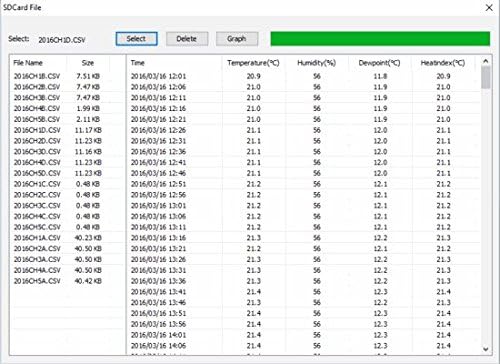
Figure 4: Screenshot of the PC software interface, demonstrating advanced data analysis and extraction capabilities from the micro-SD card.
3.3 Nastavitev alarmov
The WS-3000-X5 allows users to set high and low temperature and humidity alarms for each of the eight possible channels. Refer to the detailed instruction manual for specific steps on configuring these alarms.
3.4 Izbira enote temperature
The console supports display in both Fahrenheit (°F) and Celsius (°C). Use the dedicated button on the console to toggle between these units.
4. Vzdrževanje
4.1 Namestitev senzorja
For optimal accuracy and longevity, place outdoor sensors in a shaded location, protected from direct sunlight and rainfall. This prevents inaccurate readings due to solar radiation and protects the sensor from weather elements.
4.2 Zamenjava baterije
When a sensor's battery level is low, an indicator will appear on the main console. Replace the two (2) AA batteries in the affected sensor promptly to ensure continuous operation and accurate readings.
4.3 Kalibracija
If you suspect a sensor is providing inaccurate readings, it can be calibrated. Place the sensor next to a known accurate thermometer/hygrometer for a period to compare readings. Adjustments can typically be made via the console's settings or PC software. Refer to the full manual for detailed calibration procedures.
5. Odpravljanje težav
5.1 Sensor Not Connecting
- Prepričajte se, da so baterije pravilno nameščene in niso izpraznjene.
- Verify the sensor's channel dip switches match the console's settings.
- Move the sensor closer to the console to rule out range issues.
- Check for strong interference sources (e.g., large metal objects, other wireless devices).
5.2 Netočne meritve
- Allow sufficient time for sensors to acclimate to a new environment (up to 30 minutes).
- Ensure outdoor sensors are not in direct sunlight or exposed to heat sources.
- Izvedite kalibracijo, kot je opisano v poglavju 4.3.
5.3 Console Display Issues
- Ensure the AC adapter is securely connected and providing power.
- Adjust display brightness settings if the screen is too dim or bright.
6. Specifikacije
| Funkcija | Podrobnost |
|---|---|
| Znamka | Ambientalno vreme |
| Številka modela | WS-3000-X5 |
| Dimenzije konzole | 3.25"D x 3.25"W x 4.5"H (base 1.5") |
| Mere senzorja | 4.75 x 1.5 x 0.6 palca |
| Teža predmeta | 1.26 funtov |
| Vir napajanja | Console: Corded Electric; Sensors: 2 x AA batteries (not included) |
| Tehnologija povezljivosti | Brezžično, 915 MHz |
| Natančnost temperature | 1°C do 2°C |
| Ocena zgornje temperature | 140 stopinj Fahrenheita |
| Vrsta zaslona | Grafična |
| Vključene komponente | Console, 5 Thermo-Hygrometer Sensors, User Manual |
7. Uradni videoposnetki izdelkov
WS-3000: Your Personal Forecast Weather Station
Ta videoposnetek ponuja konecview of the Ambient Weather WS-3000 series, highlighting its features as a personal forecast weather station. It demonstrates the console's display and various functionalities.
Display on the console is very easy to read; seems accurate, calibration is easy.
This video showcases the readability of the console's display and discusses the accuracy and ease of calibration for the Ambient Weather WS-3000-X5 system.
8. Garancija in podpora
Specific warranty information for the Ambient Weather WS-3000-X5 is not detailed in the provided product data. For warranty claims, technical support, or further assistance, please refer to the official Ambient Weather website or contact their customer service directly. The included user manual also contains contact information and detailed support resources.