
1. Izdelek je končanview
The Midiplus Studio M is a compact and high-performance USB audio interface designed for studio recording. It features one input and two outputs, supporting high-quality microphone input and 24-bit/192kHz high-precision sampling. The device is powered via PC USB and includes 48V phantom power for condenser microphones. Its small, exquisite design is compatible with both Mac and Windows operating systems, making it a versatile tool for musicians and producers.
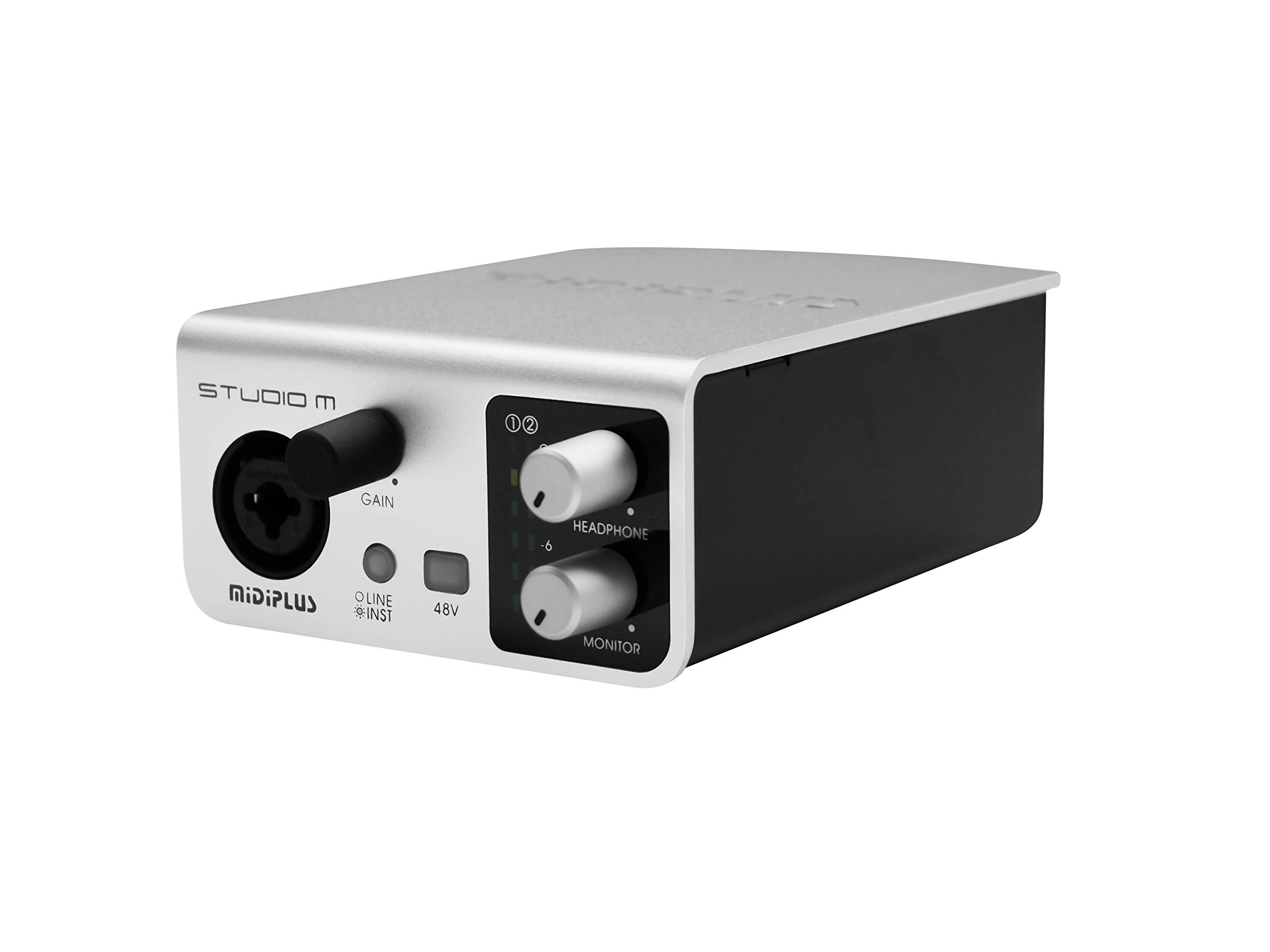
Slika 1: Spredaj in zadaj view of the Midiplus Studio M USB Audio Interface.
2. Navodila za namestitev
2.1 Vsebina paketa
- Midiplus Studio M USB Audio Interface
- USB kabel
- Priročnik za lastnika (ta dokument)
- Informacijska kartica
2.2 Sistemske zahteve
- Operacijski sistem: Windows, macOS
- Compatible Devices: Personal Computer with USB port
2.3 Priključitev naprave
- Connect the Midiplus Studio M to your computer using the provided USB cable. The device is USB-powered.
- Ensure your operating system (Windows or macOS) recognizes the device. Drivers may be required for optimal performance; refer to the Midiplus webspletno mesto za prenos najnovejših gonilnikov.
- Connect your microphone or instrument to the Input (MIC/Line/Hi-z) interface on the front panel.
- Connect your headphones to the headphone interface on the front panel, or your studio monitors to the Output interface (Left/Right) on the rear panel.

Figure 2: Midiplus Studio M connected to a computer, showing input and output cables.
3. Navodila za uporabo
3.1 Kontrole sprednje plošče
- Input Gain Control Knob: Adjusts the input level for the connected microphone or instrument.
- Switch (Mic/Instrument) Button: Toggles between microphone and instrument input modes.
- 48V Phantom Power ON/OFF: Activates or deactivates 48V phantom power for condenser microphones.
- Headphone Volume Control Button: Adjusts the output volume for connected headphones.
- Output Volume Control Button: Adjusts the main output volume for connected studio monitors.

Figure 3: Midiplus Studio M in a studio setup, demonstrating its compact size and integration.
3.2 Priključki na zadnji plošči
- USB vmesnik: USB2.0 port for connection to your computer and power supply.
- Output Interface (Left/Right): Connects to your studio monitors or other output devices.
- Extensible Device Interface: Provides additional connectivity options for other devices.
4. Vzdrževanje
- Napravo vzdržujte čisto tako, da jo obrišete z mehko, suho krpo. Izogibajte se uporabi agresivnih kemikalij ali abrazivnih materialov.
- Prepričajte se, da so vsi kabli varno priključeni, da preprečite izgubo ali poškodbo signala.
- Vmesnik shranjujte na hladnem in suhem mestu, stran od neposredne sončne svetlobe in ekstremnih temperatur.
- Izogibajte se postavljanju težkih predmetov na vrh enote.
5. Odpravljanje težav
5.1 Brez zvočnega izhoda
- Check all cable connections (USB, input, output, headphones).
- Ensure the device is powered on and recognized by your computer.
- Verify that the output volume controls (headphone and main output) are turned up.
- Check your computer's sound settings to ensure the Midiplus Studio M is selected as the output device.
5.2 Input Signal Issues
- Adjust the Input Gain Control Knob.
- Ensure the correct input mode (Mic/Instrument) is selected.
- If using a condenser microphone, verify that 48V Phantom Power is enabled.
- Check the microphone/instrument cable for damage.
5.3 Računalnik ne prepozna naprave
- Poskusite priključiti kabel USB na druga vrata USB na vašem računalniku.
- Znova zaženite računalnik.
- Ensure the latest drivers for the Midiplus Studio M are installed from the official Midiplus webmesto.
- Preizkusite z drugim kablom USB, če je na voljo.
6. Tehnične specifikacije
| Funkcija | Podrobnost |
|---|---|
| Številka modela | Studio M |
| Znamka | Midiplus |
| Tehnologija povezljivosti | USB (USB2.0) |
| Avdio ločljivost | 24-bit/192 kHz |
| Vložki | 1 (MIC/Line/Hi-z) |
| Izhodi | 2 (Left/Right) |
| Fantomska moč | 48V (switchable) |
| Združljivi operacijski sistemi | Windows, macOS |
| Dimenzije izdelka | 5.28 x 3.54 x 1.89 palcev |
| Teža predmeta | 14.1 unč (0.4 kilograma) |
7. Garancija in podpora
For warranty information and technical support, please refer to the official Midiplus webspletnega mesta ali se obrnite na lokalnega prodajalca. Račun shranite kot dokazilo o nakupu za morebitne garancijske zahtevke.