
1. Uvod
This manual provides detailed instructions for the setup, operation, and maintenance of your Enover TS18 7-Day Programmable Digital Timer. This device is designed to automate the control of electrical appliances by setting specific ON/OFF times throughout the week, offering convenience and energy management.
2. Značilnosti izdelka
- Fleksibilno razporejanje: Program up to 10 distinct ON/OFF cycles within a 7-day period. Each program repeats weekly.
- Upravljanje z energijo: Automatically controls lamps, holiday lights, humidifiers, and other electrical devices. Includes a feature to protect devices from overcharge.
- Security Function: Features a random ON/OFF option to vary lighting times, simulating occupancy when away from home.
- Uporabniku prijazen vmesnik: Equipped with a large LCD display for clear visibility and a manual override switch for immediate control adjustments.
- Varnostno kopiranje baterije: An integrated battery retains programmed settings during power outages, eliminating the need for reprogramming.

Image: Enover TS18 Digital Timer highlighting key features for easy home automation.
3. Vsebina paketa
Paket vključuje naslednje elemente:
- 1 x Enover Digital Timer Switch (Model TS18)
- 1 x uporabniški priročnik

Image: Contents of the Enover TS18 Digital Timer package, including the timer and manual.
4. Izdelek je končanview
The Enover TS18 Digital Timer features a clear LCD display and intuitive buttons for easy programming. It plugs directly into a standard electrical outlet.

Slika: spredaj view of the Enover TS18 Digital Timer, displaying the time and control buttons.
Funkcije gumbov:
- TEDEN: Sets the day(s) for programs.
- URA: Adjusts the hour for time and program settings.
- MINUTA: Adjusts the minute for time and program settings.
- RES/RCL: Resets or recalls settings.
- URA: Vstopi v način nastavitve ure ali izstopi iz njega.
- ČASOVNIK: Cycles through program settings (P1 ON, P1 OFF, P2 ON, etc.).
- VKLOP/SAMODEJNO/IZKLOP: Izbere način delovanja (Vedno VKLOPLJENO, Samodejno, Vedno IZKLOPLJENO).
- NAKLJUČEN: Activates or deactivates the random ON/OFF function.
- PONASTAVITI: Small button (requires a pointed object) to clear all settings and reset the device.
Video: A brief demonstration of the Enover Digital Timer's basic functions and display.
5. Nastavitev
5.1 Začetna polnitev
Before first use, plug the timer into an electrical outlet for approximately 5-10 minutes to charge the internal battery. This ensures the display is active and settings can be retained.
5.2 Nastavitev trenutnega časa in dneva
- Pritisnite in držite URA gumb.
- Med držanjem URA, pritisnite TEDEN button repeatedly to set the current day of the week.
- Med držanjem URA, pritisnite URA button repeatedly to set the current hour (AM/PM will display).
- Med držanjem URA, pritisnite MINUTA večkrat zaporedoma pritisnite gumb , da nastavite trenutno minuto.
- Spustite URA , da shranite nastavitve.
6. Navodila za uporabo
6.1 Programiranje ciklov VKLOP/IZKLOP
The timer allows for up to 10 ON/OFF programs. Follow these steps to set a program:
- Pritisnite ČASOVNIK enkrat pritisnite gumb. Na zaslonu se bo prikazalo "1 ON".
- Pritisnite TEDEN to select the day(s) for this program (e.g., MO, TU, WE, TH, FR, SA, SU, MO TU WE TH FR, SA SU, MO TU WE TH FR SA SU, etc.).
- Pritisnite URA za nastavitev želene ure vklopa.
- Pritisnite MINUTA za nastavitev želene minute vklopa.
- Pritisnite ČASOVNIK ponovno pritisnite gumb. Na zaslonu se bo prikazalo "1 IZKLOP".
- Repeat steps 2-4 to set the desired OFF time for Program 1. Ensure the correct day(s) are selected for the OFF time.
- Nadaljujte s pritiskom ČASOVNIK to cycle through and set additional programs (2 ON, 2 OFF, up to 10 ON, 10 OFF).
- Ko nastavite vse želene programe, pritisnite URA gumb za vrnitev na prikaz trenutnega časa.
- Prepričajte se, da je časovnik vklopljen AUTO mode for programs to execute. Press VKLOP/SAMODEJNO/IZKLOP kolesariti do AUTO.
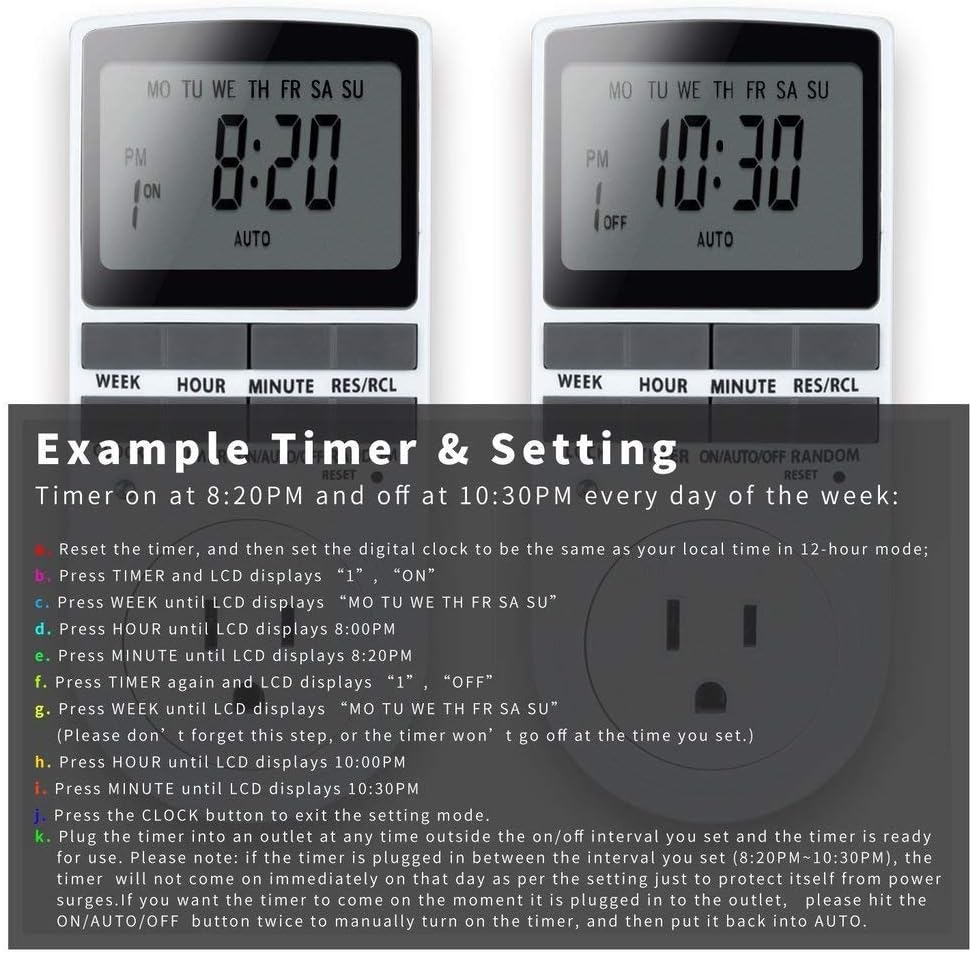
Image: Visual guide for setting an example timer program (ON at 8:20 PM, OFF at 10:30 PM daily).
6.2 Random Function (Anti-theft)
To activate the random ON/OFF feature:
- Pritisnite NAKLJUČNO button. The word "RANDOM" will appear on the display.
- In random mode, the timer will turn ON and OFF at varying times within a set period, typically around the programmed ON/OFF times, to simulate occupancy.
- Za deaktivacijo pritisnite NAKLJUČNO gumb znova.

Image: The anti-theft random feature of the Enover TS18 Digital Timer, designed to deter intruders.
6.3 Ročna preglasitev
To manually switch the timer's output without affecting programmed settings:
- Pritisnite VKLOP/SAMODEJNO/IZKLOP gumb za kroženje med načini: ON (always on), AUTO (follows programs), IZKLOP (always off).
- Select the desired temporary mode. The timer will revert to AUTO mode at the next programmed ON/OFF event.
Video: A detailed demonstration of setting programs and using the manual override function on the Enover Digital Timer.
7. Aplikacije
The Enover TS18 Digital Timer can be used to automate various household devices, enhancing convenience and energy efficiency.
- Coffee Makers: Program your coffee maker to start brewing before you wake up.
- Aquarium Lights/Pumps: Automate the lighting and filtration cycles for your aquarium.
- Indoor Grow Lights: Maintain consistent light schedules for plants.
- Praznični okraski: Set festive lights to turn on and off automatically.
- Fans/Humidifiers: Control environmental devices to operate only when needed.
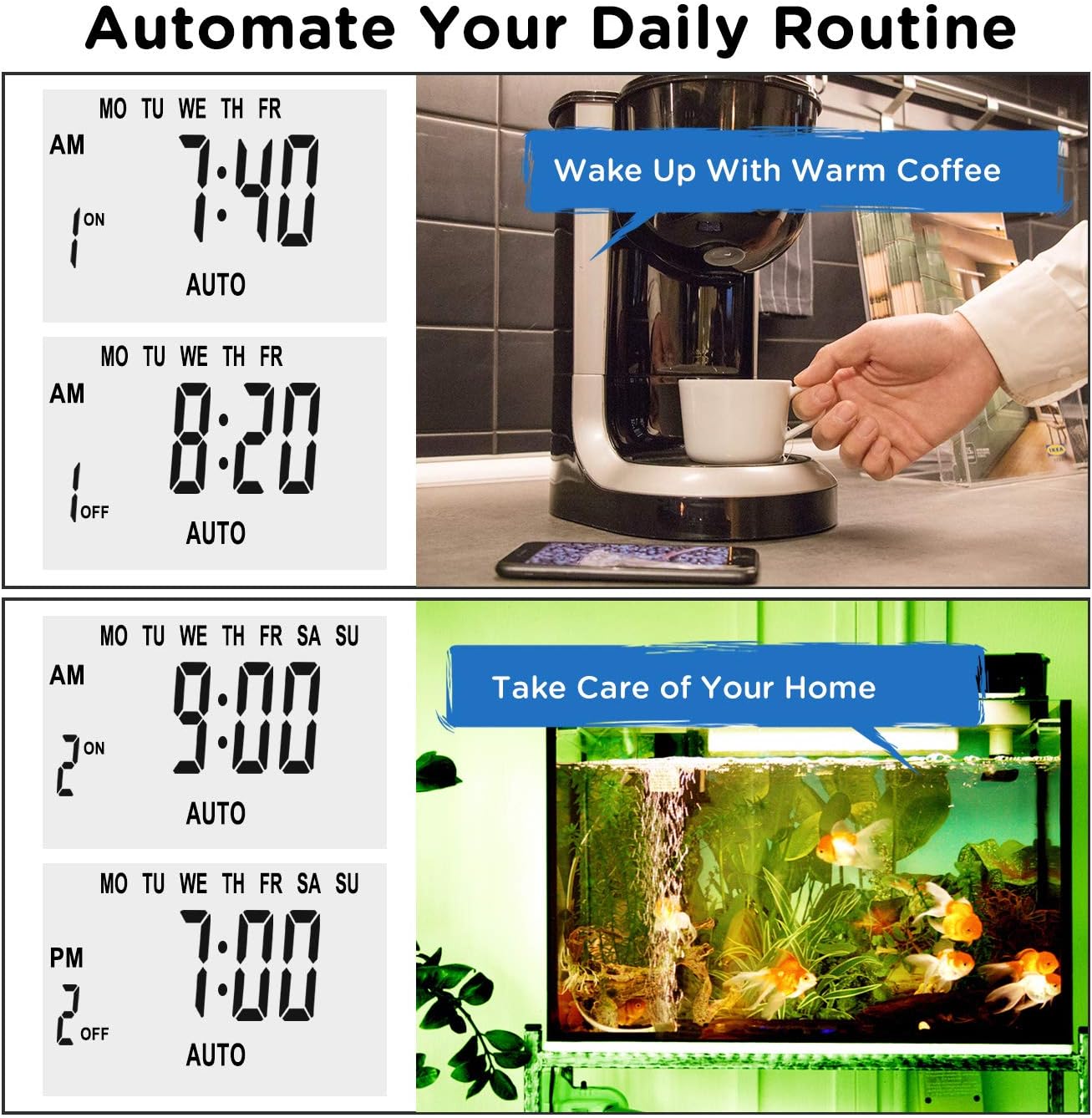
Slika: npramples of automating daily routines with the Enover TS18 Digital Timer, such as a coffee maker and aquarium.
8. Specifikacije
| Številka modela | TS18 |
| Znamka | Enover |
| barva | Bela |
| Material | Plastika |
| Število nastavitev | 10 (programa VKLOP/IZKLOP) |
| voltage | 120 volta |
| Wattage | 1800 vatov |
| Ampzmogljivost shranjevanja | 15 Amps |
| Način namestitve | Vtičnik |
| Vrsta namestitve | Priključni nosilec |
| Oblika vtiča | B - ameriški tip z ozemljitvenim vtičem |
| Posebne lastnosti | 3-wire grounded plug and 3-prong grounded outlet |
| Uporaba | Samo za notranjo uporabo |
| Teža predmeta | 6.4 unč |
| Dimenzije paketa | 5.67 x 3.31 x 2.6 palcev |
| Tip baterije | NiMH |
| Življenjska doba baterije | 100 days (backup) |
9. Odpravljanje težav
- Časovnik se ne vklopi/izklopi, kot je programirano:
- Prepričajte se, da je časovnik vklopljen AUTO način.
- Preverite, ali sta trenutni čas in dan pravilno nastavljena.
- Check that the ON and OFF times for the specific program are correctly entered and assigned to the desired days.
- Confirm the appliance connected to the timer is switched ON.
- Zaslon je prazen ali zatemnjen:
- Plug the timer into an active electrical outlet for 5-10 minutes to charge the internal battery.
- Vse nastavitve so izgubljene po izpadu napajanjatage:
- The internal battery may not be sufficiently charged. Ensure the timer is regularly plugged in to maintain battery charge.
- To clear all settings:
- Use a pointed object (like a pen tip) to press the PONASTAVI button. This will clear all programs and reset the clock. You will need to re-enter all settings.
10. Garancija in podpora
For warranty information or technical support, please refer to the contact details provided on the product packaging or the official Enover webmesto. Shranite račun za garancijske zahtevke.