
Uvod
Hvala za nakupasing the Mitzu Kaiser PAK-8915 Dual Audio System. This system includes an amplified speaker and a passive speaker, designed to deliver powerful and clear sound. This manual provides essential information for the safe and efficient operation of your new audio system. Please read it thoroughly before use and retain it for future reference.
Varnostna navodila
- vir energije: Prepričajte se, da napajalnik ustreza voltage naveden na enoti.
- Prezračevanje: Ne blokirajte prezračevalnih odprtin. Okoli enote naj bo dovolj prostora za pravilen pretok zraka.
- Voda in vlaga: Naprave ne izpostavljajte dežju, vlagi ali tekočinam. Hranite stran od vodnih virov.
- Toplota: Do not place the unit near heat sources such as radiators, heat registers, stoves, or other heat-producing appliances.
- Čiščenje: Unplug the unit before cleaning. Use a dry cloth. Do not use liquid cleaners or aerosol cleaners.
- Servisiranje: Tega izdelka ne poskušajte servisirati sami. Vsa servisna dela prepustite usposobljenemu servisnemu osebju.
- Umestitev: Place the speakers on a stable, level surface. The amplified speaker features a rear knob for stand mounting.
- Kabli: Use only the provided cables and ensure they are not damaged or pinched.
Vsebina paketa
Prosimo, preverite, ali so v vašem paketu vključeni vsi naslednji elementi:
- 1 x Amplified Speaker (with 15-inch woofer)
- 1 x Passive Speaker (with 15-inch woofer)
- 1 x daljinski upravljalnik
- Connection Cables (10 meters in length for speaker connection)
- Napajalni kabel
Konec izdelkaview
Amplified Speaker Rear Panel
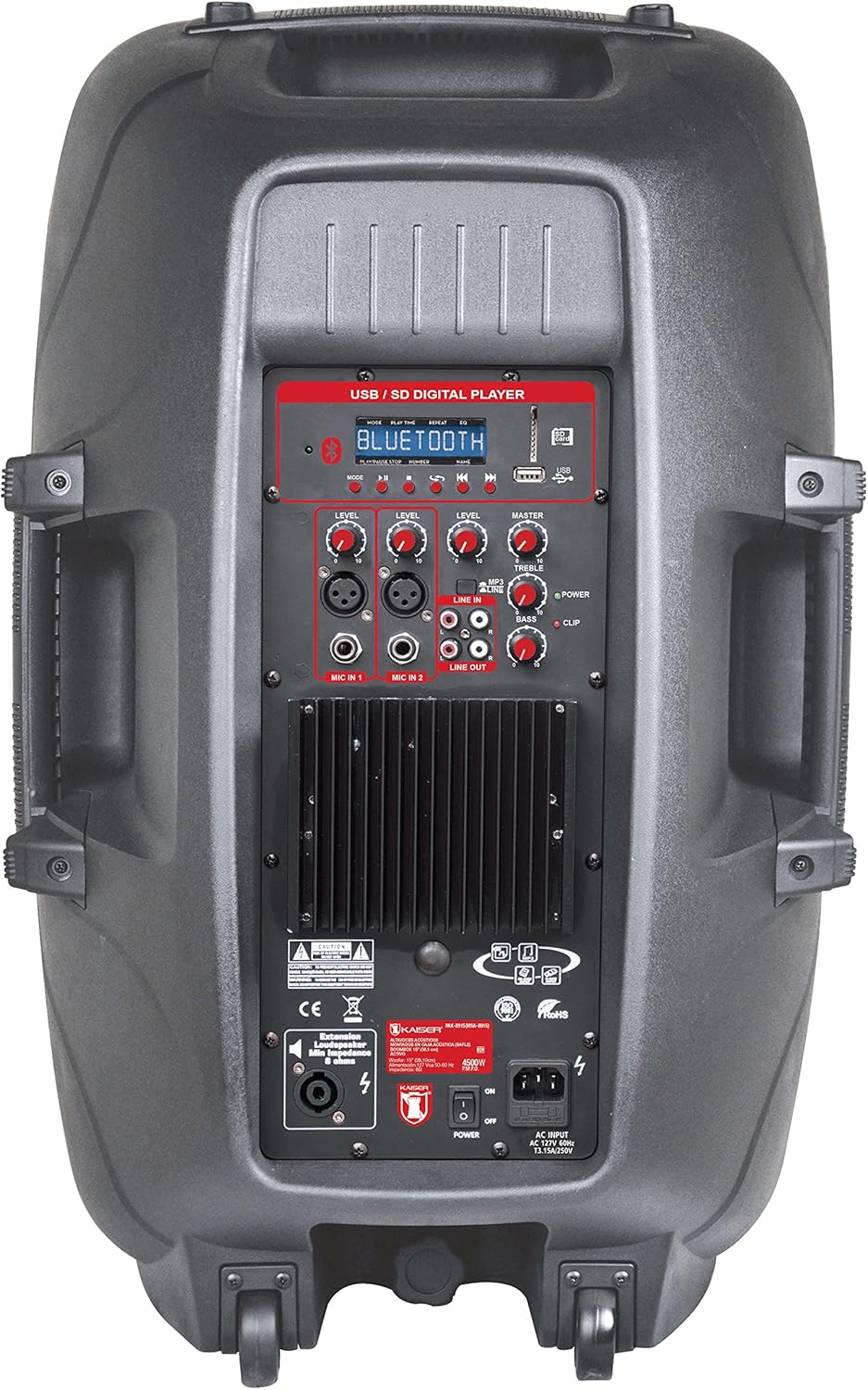
Slika 1: Amplified Speaker Rear Control Panel
The amplified speaker's rear panel houses all primary controls and connection ports:
- USB / SD Digital Player: Ports for USB drives and SD cards, along with a display and playback controls.
- Bluetooth modul: Za brezžično pretakanje zvoka.
- Level Knobs: Adjust input levels for MIC 1, MIC 2, LINE IN, and MASTER volume.
- Kontrole tona: Knobs for TREBLE and BASS adjustment.
- Vhodi za mikrofon: Two inputs (Cannon and 6.3mm) for connecting microphones.
- Vhodna linija (RCA): Stereo RCA inputs for connecting external audio devices.
- Vrstica: RCA output to connect to another amplified speaker or audio system.
- Izhod zvočnika: Speakon connector for connecting the passive speaker.
- Stikalo za vklop: Stikalo za vklop/izklop enote.
- AC vhod: Za priključitev napajalnega kabla.
- Indikator posnetka: Lights up when the audio signal is clipping (distorting).
Passive Speaker Rear Panel

Slika 2: Passive Speaker Rear Panel
The passive speaker features simple input and output connections:
- Vnos: Speakon input for connection from the amppoudarjen zvočnik.
- Izhod: Speakon output for daisy-chaining to another passive speaker (if applicable).
Daljinski upravljalnik
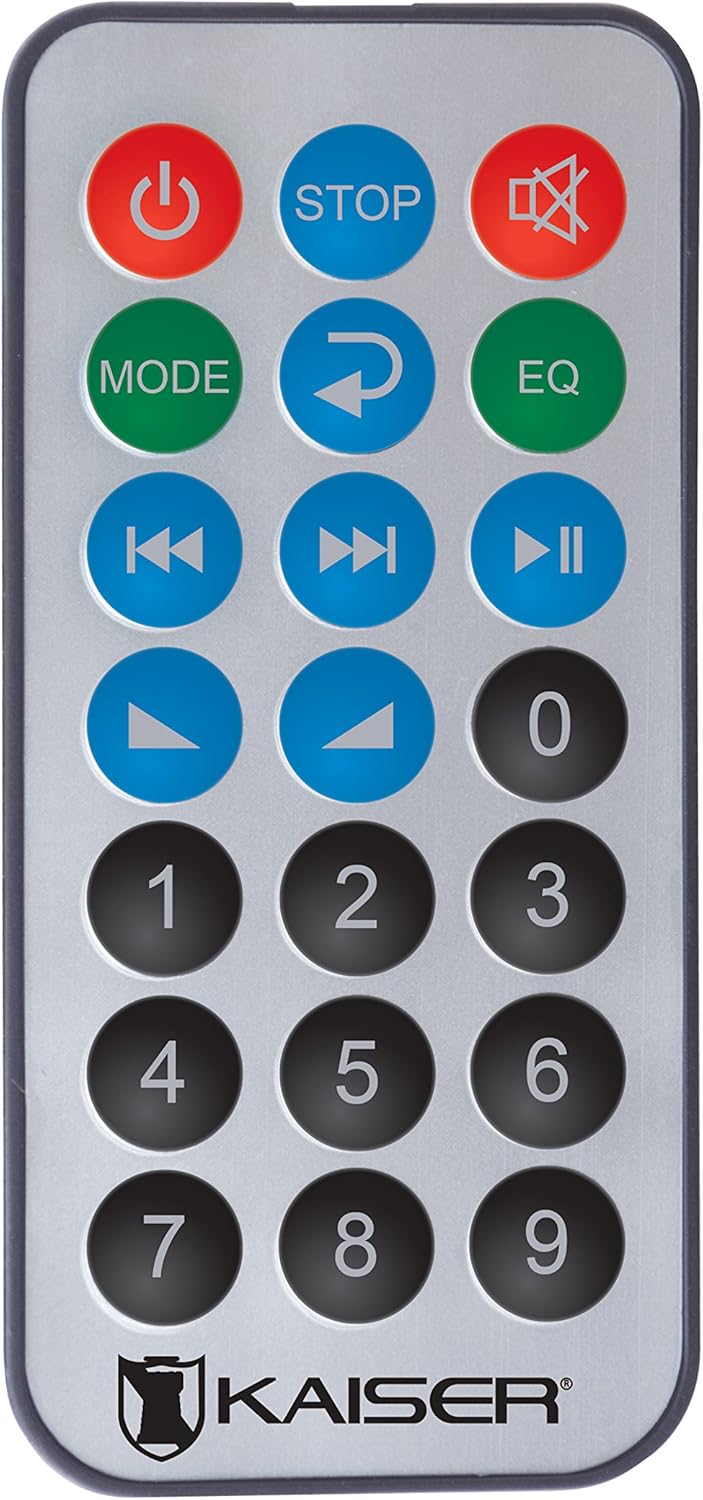
Slika 3: Daljinski upravljalnik
Daljinski upravljalnik omogoča priročen dostop do različnih funkcij:
- Gumb za vklop: Vklopi/izklopi enoto.
- STOP: Ustavi predvajanje.
- Mute: Izklopi/vklopi zvok.
- NAVODILA: Switches between input modes (Bluetooth, USB, SD, FM, RCA).
- Ponovi: Ponavlja trenutno skladbo ali seznam predvajanja.
- EQ: Selects equalizer presets.
- Prejšnja/naslednja skladba: Preskoči na prejšnjo ali naslednjo skladbo.
- Predvajanje/pavza: Zažene ali zaustavi predvajanje.
- Povečanje/zmanjšanje glasnosti: Prilagodi glavno glasnost.
- Numerična tipkovnica: For direct track selection or FM station tuning.
Nastavitev
- Umestitev: Postavite amplified and passive speakers in your desired location. The amplified speaker has handles and wheels for transport. Both speakers can be mounted on a stand using the rear knob on the amppoudarjen zvočnik.
- Connect Passive Speaker: Use the provided speaker cable to connect the "Speaker Output" on the amplified speaker's rear panel to the "Input" on the passive speaker's rear panel. Ensure a secure connection.
- Napajalni priključek: Connect the power cable to the AC input on the amplified speaker and then plug it into a suitable power outlet.
- Začetni vklop: Ensure all volume knobs are set to minimum before turning on the power switch.
Navodila za uporabo
Vklop/izklop
Flip the "POWER" switch on the rear panel of the amplified speaker to turn the system on or off. You can also use the power button on the remote control.
Selecting Input Mode
Press the "MODE" button on the control panel or remote control to cycle through available input sources: Bluetooth, USB, SD, FM Radio, and RCA Line In.
Povezava Bluetooth
- Switch the speaker system to Bluetooth mode using the "MODE" button. The display will show "Bluetooth" or a similar indicator.
- Na mobilni napravi (pametnem telefonu, tabličnem računalniku itd.) omogočite Bluetooth in poiščite razpoložljive naprave.
- Select "Kaiser PAK-8915" or a similar name from the list of devices.
- Once paired, you will hear a confirmation sound, and your device will show a connected status. You can now stream audio wirelessly from up to 30 meters away.
Predvajanje USB/SD
- Vstavite USB-ključek ali SD-kartico z zvočno datoteko files into the respective port on the amplified speaker's rear panel.
- The system should automatically switch to USB or SD mode and begin playback. If not, press the "MODE" button to select the correct source.
- Use the playback controls (Play/Pause, Previous/Next, Stop) on the speaker panel or remote control to manage your music.
RCA Line In Connection
Connect an external audio device (e.g., DVD player, TV, computer) to the "LINE IN" RCA ports on the amplified speaker using an RCA cable. Select "LINE IN" mode using the "MODE" button.
Uporaba mikrofona
Plug your microphone(s) into the "MIC IN 1" (Cannon) or "MIC IN 2" (6.3mm) ports. Adjust the individual "MIC LEVEL" knobs to control the microphone volume. Ensure the MASTER volume is also adjusted appropriately.
FM radio
Switch to FM Radio mode using the "MODE" button. The system will automatically scan and store available stations. Use the Previous/Next track buttons to navigate between stations or the numeric keypad on the remote for direct tuning.
Volume and Tone Adjustment
Use the "MASTER" volume knob to control the overall output volume. Adjust the "BASS" and "TREBLE" knobs to fine-tune the audio's low and high frequencies. Individual input levels (MIC 1, MIC 2, LINE IN) can also be adjusted.
Vzdrževanje
- Čiščenje: Pred čiščenjem izključite napajanje. Za brisanje zunanjih površin uporabite mehko, suho krpo. Ne uporabljajte abrazivnih čistil, voskov ali topil.
- Shranjevanje: If not in use for an extended period, store the speakers in a cool, dry place, away from direct sunlight and extreme temperatures.
- Prezračevanje: Regularly check that the ventilation grilles are free from dust and debris to prevent overheating.
Odpravljanje težav
| Težava | Možen vzrok | rešitev |
|---|---|---|
| Brez moči | Power cable not connected; Power switch off; Power outlet faulty. | Ensure power cable is securely connected. Turn the power switch ON. Test the power outlet with another device. |
| Ni zvoka | Volume too low; Incorrect input mode selected; Audio source not playing; Passive speaker not connected. | Increase MASTER volume. Select the correct input mode. Ensure the audio source is playing. Verify the passive speaker is correctly connected to the amppoudarjen zvočnik. |
| Bluetooth se ne povezuje | Speaker not in Bluetooth mode; Device too far; Device already connected to another speaker. | Ensure the speaker is in Bluetooth mode. Move your device closer to the speaker (within 30m). Disconnect from other Bluetooth devices. |
| USB/SD se ne predvaja | Nepravilno file format; USB/SD card corrupted; Speaker not in USB/SD mode. | Zagotovite zvok files are in a compatible format. Try another USB/SD card. Select USB/SD mode. |
| Popačenje zvoka | Volume too high (clipping); Input level too high. | Reduce MASTER volume. Adjust individual input levels (MIC, LINE IN) to prevent the CLIP indicator from lighting up. |
Specifikacije
| Znamka | Mitzu |
| Model | PAK-8915 |
| Amplified Speaker Power | 3500 W PMPO |
| Passive Speaker Power | 3000 W PMPO |
| Velikost nizkotonca | 15 palcev (38.1 cm) |
| Impedanca | 8 Ω |
| Tehnologija povezljivosti | Bluetooth, RCA, USB |
| Brezžična tehnologija | Bluetooth |
| Bluetooth obseg | Do 30 metre |
| Način avdio izhoda | Stereo |
| Frekvenčni odziv | 4 KHz |
| Nadzorna metoda | Gumbi, daljinski upravljalnik |
| Vir napajanja | Električni kabel |
| Teža predmeta | 34 kilogramov |
| Priporočene uporabe | Smartphones, Tablets, Computers, DVD Players, TVs, Surround Sound Systems, Microphones |
Garancija in podpora
Specific warranty information for the Mitzu Kaiser PAK-8915 is not provided in this manual. Please refer to the warranty card included with your purchase or contact your retailer for details regarding warranty coverage and terms.
For technical support or service inquiries, please contact the Mitzu customer service department or your authorized dealer. Keep your purchase receipt as proof of purchase.