
1. Uvod
The Datavideo HRS-30 is a versatile portable recorder and integrated 10.1-inch monitor designed for professional field recording and playback applications. This device supports both HD and SD video equipment, accepting signals via HD/SD-SDI inputs. It is compatible with various video formats including 1080i, 720p, 576i, and 480i.
The HRS-30 offers flexible recording formats, including MPEG-II Long-GOP or intra-frame (i-frame) with 4:2:2 color sampling. Recorded files are stored in the MXF/OP1A format, ensuring compatibility with a wide range of Non-Linear Editing (NLE) systems and playout solutions. Storage is facilitated by a removable caddy, compatible with standard 2.5-inch HDD and SSD drives.
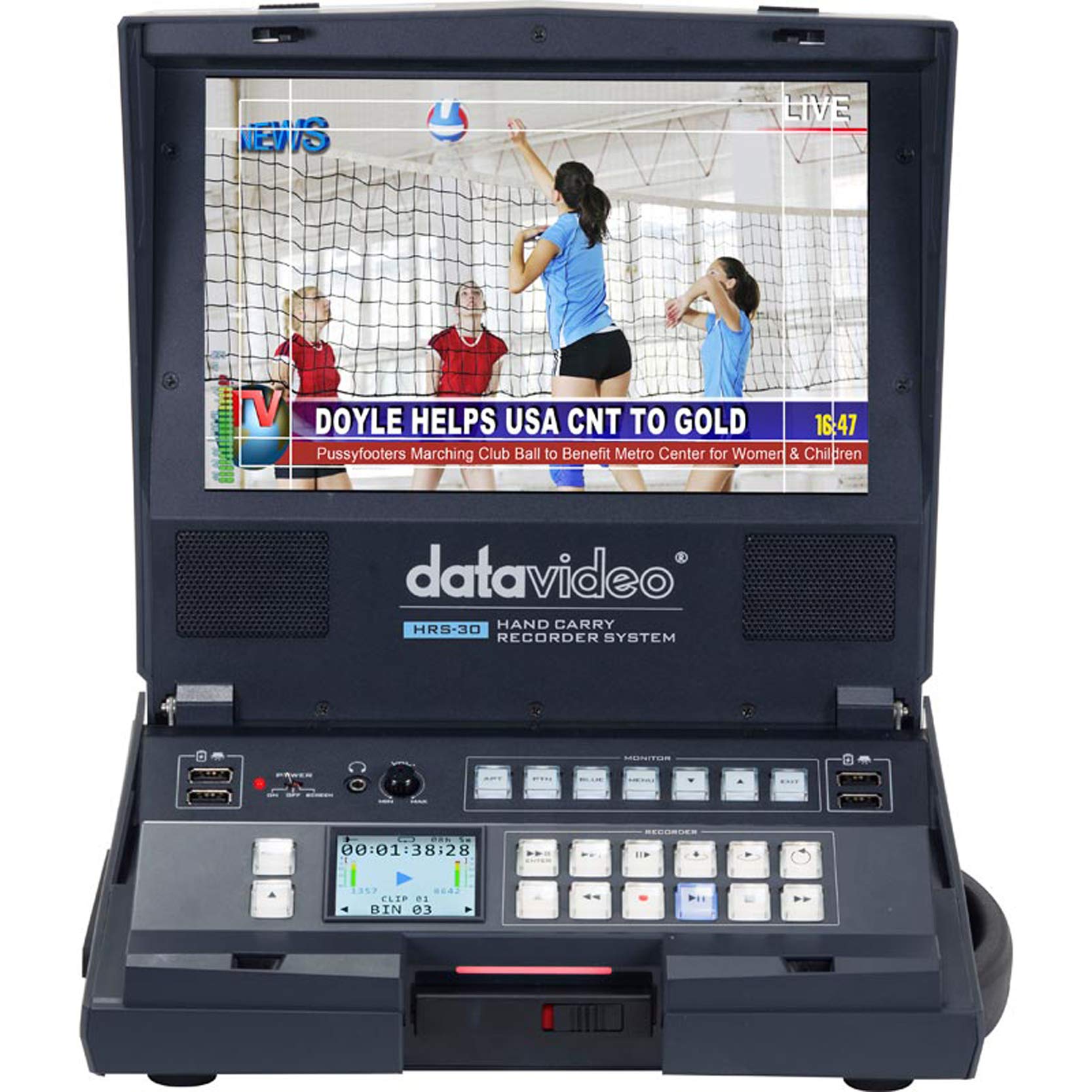
Slika 1.1: Spredaj view of the Datavideo HRS-30 Portable Recorder Monitor, showing the integrated screen and control interface.
2. Varnostne informacije
Please read and understand all safety instructions before operating the HRS-30. Failure to follow these instructions may result in electric shock, fire, or damage to the unit.
- vir energije: Use only the specified power adapter and ensure the voltage ustreza zahtevam enote.
- Prezračevanje: Ne blokirajte prezračevalnih odprtin. Zagotovite zadosten pretok zraka okoli enote, da preprečite pregrevanje.
- Voda in vlaga: Naprave ne izpostavljajte dežju, vlagi in je ne potapljajte v vodo.
- Servisiranje: Tega izdelka ne poskušajte servisirati sami. Vsa servisna dela prepustite usposobljenemu servisnemu osebju.
- Umestitev: Napravo postavite na stabilno, ravno površino. Izogibajte se neposredni sončni svetlobi ali bližini virov toplote.
3. Vsebina paketa
Verify that all items are present in the package. If any items are missing or damaged, contact your dealer immediately.
- Datavideo HRS-30 Portable Recorder Monitor Unit
- Napajalni adapter
- Removable Caddy for 2.5" HDD/SSD
- Uporabniški priročnik (ta dokument)
- Additional accessories as specified by your retailer
4. Nastavitev
Follow these steps to set up your HRS-30 unit for operation.
4.1 Installing Storage Media
- Ensure the HRS-30 is powered off.
- Locate the removable caddy slot on the unit.
- Insert a compatible 2.5-inch HDD or SSD into the removable caddy.
- Slide the caddy with the installed drive into the HRS-30's caddy slot until it clicks securely into place.
4.2 Priključitev napajanja
- Connect the power adapter to the DC IN 12V port on the rear of the HRS-30.
- Priključite napajalnik v ustrezno električno vtičnico.
- Press the POWER switch on the rear panel to turn on the unit.
4.3 Video in avdio povezave
The HRS-30 supports various input and output connections. Refer to the rear panel diagram for port locations.
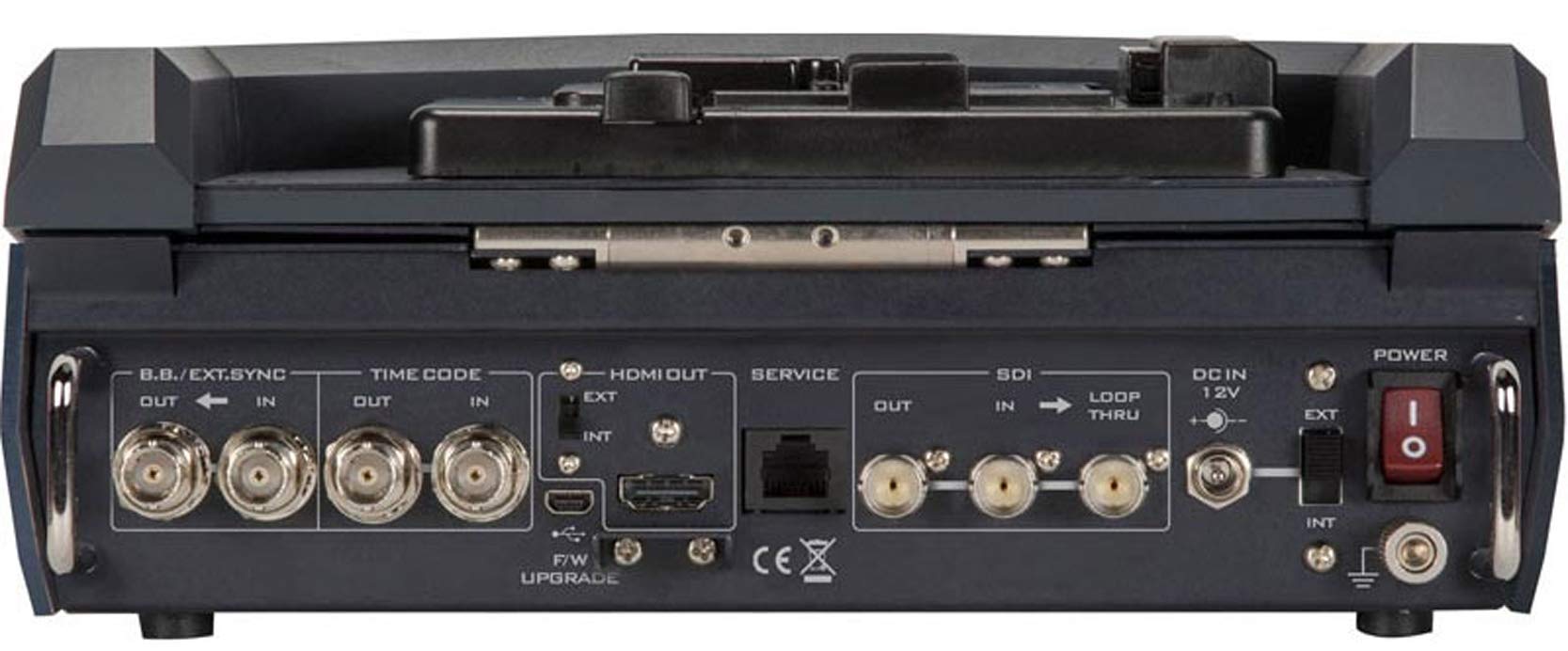
Figure 4.1: Rear panel connections of the Datavideo HRS-30, including SDI, HDMI, Timecode, and Power inputs/outputs.
- SDI vhod: Connect your HD/SD-SDI video source to the SDI IN port. The unit also features an SDI LOOP THRU for connecting to another device.
- HDMI izhod: Connect an external monitor or display to the HDMI OUT port for video monitoring.
- Časovna koda: Use the TIME CODE IN/OUT ports for external timecode synchronization.
- BB/EXT.SYNC: Connect Black Burst or external sync signals to the BB/EXT.SYNC IN/OUT ports.
- Servisna vrata: Za nadgradnje in vzdrževanje vdelane programske opreme.
5. Navodila za uporabo
This section details the basic operation of the HRS-30 for recording and playback.
5.1 Vklop in začetni zaslon
- Ensure all necessary connections are made and the storage caddy is installed.
- Stikalo POWER na zadnji plošči preklopite v položaj »ON«.
- The integrated 10.1-inch monitor will display the boot-up sequence, followed by the live video input or the last recorded clip.
5.2 Snemanje videa
The HRS-30 records video from HD/SD-SDI sources in various formats.
- Izberite vnos: Use the control panel buttons to select the desired SDI input source.
- Vhod monitorja: Verify the incoming video signal on the integrated monitor.
- Začetek snemanja: Pritisnite REC button on the control panel to begin recording. The recording indicator will illuminate.
- Ustavi snemanje: Pritisnite STOP button to end the recording. The recording indicator will turn off.
The HRS-30 supports recording in MPEG-II Long-GOP or intra-frame (i-frame) with 4:2:2 color sampling, producing MXF/OP1A files.
5.3 Predvajanje
Za ponovnoview posneta vsebina:
- Access Playback Mode: Use the navigation buttons to enter playback mode.
- Select Clip: Browse through your recorded clips using the navigation controls.
- Začni predvajanje: Pritisnite IGRAJ button to start playback of the selected clip.
- Nadzor predvajanja: Uporabite PREMOR, FFW (Hitro previjanje naprej) in REW (Rewind) buttons to control playback.
5.4 Navigacija po meniju
The HRS-30 features an on-screen menu system for configuring settings such as video format, recording quality, audio settings, and system preferences. Use the MENU button and directional arrows to navigate, and the ENTER button to confirm selections.
6. Vzdrževanje
Proper maintenance ensures the longevity and optimal performance of your HRS-30.
- Čiščenje: Use a soft, dry cloth to clean the exterior of the unit. For the screen, use a specialized screen cleaning solution and a microfiber cloth. Do not use abrasive cleaners or solvents.
- Shranjevanje: When not in use, store the HRS-30 in a cool, dry place, away from direct sunlight and extreme temperatures.
- Posodobitve vdelane programske opreme: Občasno preverite Datavideo website for firmware updates to ensure your unit has the latest features and bug fixes. Follow the instructions provided with the firmware update carefully.
7. Odpravljanje težav
This section addresses common issues you might encounter with the HRS-30.
| Težava | Možen vzrok | rešitev |
|---|---|---|
| Enota se ne vklopi | No power, faulty adapter, power switch off | Check power cable connection, verify power outlet, ensure power switch is ON. |
| No video on screen | Incorrect input selected, no signal from source, faulty cable | Select correct input, check video source, replace SDI/HDMI cable. |
| Ni mogoče snemati | No storage media, full storage, media error | Ensure caddy with drive is installed, check available storage space, format or replace drive if necessary. |
| Playback issues | Pokvarjen file, incompatible format | Try playing another clip. Ensure recorded files niso poškodovani. |
8. Specifikacije
Detailed technical specifications for the Datavideo HRS-30.
- Model: HRS-30
- Vidna diagonala zaslona: 10 palcev / 26 cm
- Dimenzije izdelka: 10.83 x 10.24 x 3.94 palcev (27.5 x 26 x 10 cm)
- Teža artikla: 7.92 funtov (3.6 kg)
- Video vhodi: HD/SD-SDI
- Video izhodi: HDMI, SDI Loop Thru
- Podprti video formati: 1080i, 720p, 576i, 480i
- Formati snemanja: MPEG-II Long-GOP, Intra-frame (i-frame) with 4:2:2 color sampling
- File Oblika: MXF/OP1A
- Mediji za shranjevanje: Removable caddy for 2.5" HDD & SSD drives
- Proizvajalec: Datavideo
- Prvič na voljo: 23. marec 2016
9. Garancija in podpora
For warranty information and technical support, please refer to the official Datavideo website or contact your authorized Datavideo dealer. Keep your purchase receipt as proof of purchase for warranty claims.