
Coby CBC-52-WHT
Coby Retro LCD Alarm Clock
Model: CBC-52-WHT
Uvod
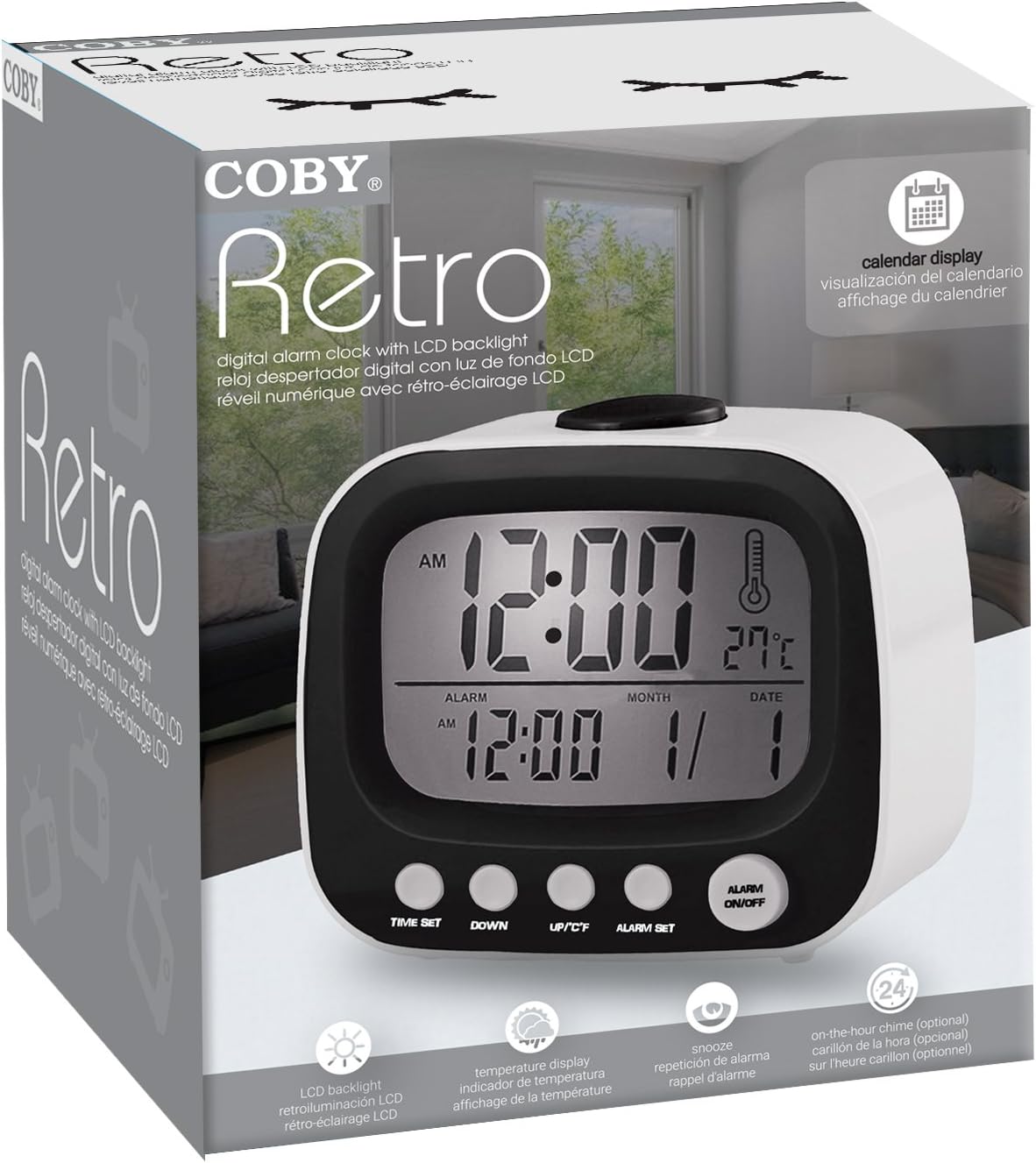
Thank you for choosing the Coby Retro LCD Alarm Clock, model CBC-52-WHT. This user manual provides essential information for setting up, operating, and maintaining your new alarm clock. Designed for clear and precise visibility, this clock features a sleek 3.5" LCD screen that displays time, date, and indoor temperature.
Ključne značilnosti:
- Perpetual Calendar Display: Always know the current date.
- On-The-Hour Chime: Optional audible chime for every hour.
- LCD Time and Temperature Display: Clear digital readout of time and indoor temperature.
- Alarm & 10 Minute Snooze Function: Reliable alarm with a convenient snooze option.
- Napajanje na baterije: Portable design, requires 2 AAA batteries (not included).
Vsebina paketa
Prosimo, da paket natančno preverite, ali so vsi predmeti prisotni in v dobrem stanju.
- 1 x Coby Retro LCD Alarm Clock (CBC-52-WHT)
- 1 x Uporabniški priročnik (ta dokument)
Opomba: Za delovanje sta potrebni 2 bateriji AAA, ki nista priloženi paketu.
Konec izdelkaview in Kontrole

Slika 1: Spredaj view of the Coby Retro LCD Alarm Clock, highlighting the digital display and control buttons.
Elementi prikaza:
- Prikaz časa: Shows current time (AM/PM indicator).
- Prikaz časa alarma: Shows the set alarm time.
- Prikaz meseca/datuma: Prikazuje trenutni mesec in dan.
- Prikaz temperature: Shows indoor temperature in Celsius or Fahrenheit.
- Ikona alarma: Indicates when the alarm is active.
- Chime Icon: Indicates when the hourlZvonec y je aktiven.
Control Buttons (Front Panel):
- ČAS NASTAVLJEN: Used to enter time/date setting mode.
- DOL: Decreases values during setting, or navigates options.
- UP/°C/°F: Increases values during setting, navigates options, or switches temperature unit.
- NASTAVLJEN ALARM: Uporablja se za vstop v način nastavitve alarma.
- ALARM VKLOP/IZKLOP: Vklopi ali izklopi funkcijo alarma.
Zgornji gumb:
- SNOOZE/LUČ: Activates snooze during an alarm, or temporarily illuminates the display backlight.
Nastavitev
1. Namestitev baterije
- Poiščite pokrovček predalčka za baterije na zadnji strani budilke.
- Potisnite pokrov navzdol, da ga odprete.
- Insert two (2) new AAA batteries, ensuring the correct polarity (+ and -) as indicated inside the compartment.
- Replace the battery compartment cover by sliding it back into place until it clicks.
Note: The clock will power on automatically once batteries are inserted. The display may show default values or "12:00 AM".
Navodila za uporabo
1. Nastavitev ure in datuma
- Pritisnite in držite ČAS NAST približno 3 sekunde, dokler ne začnejo utripati številke za uro.
- Uporabite UP/°C/°F or DOL gumbe za nastavitev ure. Bodite pozorni na indikator AM/PM.
- Pritisnite ČAS NAST again to move to the minute setting. Use UP/°C/°F or DOL za prilagoditev minut.
- Pritisnite ČAS NAST again to move to the year setting. Adjust with UP/°C/°F or DOL.
- Pritisnite ČAS NAST again to move to the month setting. Adjust with UP/°C/°F or DOL.
- Pritisnite ČAS NAST again to move to the date setting. Adjust with UP/°C/°F or DOL.
- Pritisnite ČAS NAST one last time to exit the setting mode. The display will stop flashing.
2. Nastavitev alarma
- Pritisnite in držite ALARM NASTAVLJEN button for approximately 3 seconds until the alarm hour digits begin to flash.
- Uporabite UP/°C/°F or DOL buttons to adjust the alarm hour. Observe the AM/PM indicator for the alarm.
- Pritisnite ALARM NASTAVLJEN again to move to the alarm minute setting. Use UP/°C/°F or DOL za nastavitev minut alarma.
- Pritisnite ALARM NASTAVLJEN one last time to exit the alarm setting mode. The alarm time will stop flashing.
3. Vklop/izklop alarma
- Za vklop alarma ON: Pritisnite VKLOP / IZKLOP ALARMA button once. An alarm icon (bell symbol) will appear on the display, indicating the alarm is active.
- Za vklop alarma IZKLOP: Pritisnite VKLOP / IZKLOP ALARMA button again. The alarm icon will disappear from the display.
4. Funkcija dremeža
- Ko se oglasi alarm, pritisnite veliko SNOOZE / LUČ gumb na vrhu ure. Alarm se bo začasno ustavil in ponovno zazvonil čez približno 10 minut.
- To cancel the snooze and turn off the alarm completely, press any other button on the front panel (e.g., VKLOP / IZKLOP ALARMA).
5. Osvetlitev zaslona
Slika 2: The Coby Retro LCD Alarm Clock with its backlight activated, providing visibility in low-light conditions.
- To temporarily illuminate the display, press the large SNOOZE / LUČ button on top of the clock. The backlight will stay on for a few seconds.
6. Changing Temperature Unit (°C/°F)
- V običajnem načinu prikaza časa pritisnite UP/°C/°F button once to toggle between Celsius (°C) and Fahrenheit (°F) temperature readings.
7. On-The-Hour Chime
This model features an optional on-the-hour chime. The method to activate/deactivate this feature is typically integrated with the time setting or a dedicated button. If a chime icon is visible on the display, it indicates the chime is active. Consult the quick start guide if provided, or experiment with pressing the UP/°C/°F or DOL buttons in normal mode to see if a chime icon appears/disappears.
Vzdrževanje
Čiščenje:
- Površino ure obrišite z mehko, suho krpo.
- Ne uporabljajte abrazivnih čistil, voskov ali topil, saj lahko poškodujejo premaz.
- Avoid exposing the clock to excessive moisture or submerging it in water.
Zamenjava baterije:
- When the display becomes dim or the clock functions erratically, it's time to replace the batteries.
- Follow the "Battery Installation" steps in the Setup section to replace the two AAA batteries.
- Always use new batteries of the same type.
- Stare baterije zavrzite odgovorno v skladu z lokalnimi predpisi.
Odpravljanje težav
| Težava | Možen vzrok | rešitev |
|---|---|---|
| Zaslon je prazen ali temen. | Baterije so prazne ali vstavljene nepravilno. | Baterije zamenjajte z novimi in pri tem pazite na pravilno polarnost. |
| Alarm se ne oglasi. | Alarm function is not activated, or alarm time is incorrect. | Ensure the alarm icon is visible on the display. Re-check alarm time setting. |
| Ura/datum ni pravilen. | Time/Date was not set correctly or batteries were removed. | Follow the "Setting the Time and Date" instructions to reset. |
| Odčitek temperature se zdi netočen. | Clock is placed near a heat source or vent. | Premaknite uro na mesto s stabilno temperaturo okolice. |
Specifikacije
| Znamka: | Coby |
| Številka modela: | CBC-52-WHT |
| barva: | Bela |
| Vrsta zaslona: | Digitalni LCD |
| vir energije: | 2 x AAA baterije (niso vključene) |
| Dimenzije izdelka: | 20.32 x 7.62 x 10.16 cm (8 x 3 x 4 palca) |
| Teža artikla: | 249.47 g (0.55 lbs) |
| Posebne lastnosti: | Alarm, Calendar Display, Snooze, Temperature Display, On-The-Hour Chime |
| Proizvajalec: | Summit Electronics, US |
Garancija in podpora
Coby products are designed for reliability and performance. For information regarding warranty coverage, technical support, or service inquiries, please refer to the warranty card included with your purchase or visit the official Coby webspletnega mesta. Prosimo, shranite dokazilo o nakupu za uveljavljanje garancije.
For further assistance, you may contact Coby customer support through their official channels. Always provide your product model number (CBC-52-WHT) when seeking support.
Ask a question about this manual
Ask about setup, troubleshooting, compatibility, parts, safety, or missing instructions. Manuals+ will review the question and use this page’s manual context to help answer it.