
1. Uvod
Hvala za nakupasing the COBY DTV-700 Digital to Analog TV Converter. This device allows you to receive digital broadcast television signals and convert them for display on older analog televisions. It also functions as a multimedia player, supporting various audio, video, and image formats via its USB port, and offers recording capabilities. Please read this manual thoroughly before operating the device to ensure proper use and to maximize your viewizkušnje.
2. Vsebina paketa
Označite polje za naslednje elemente:
- COBY DTV-700 Digital to Analog TV Converter
- Daljinski upravljalnik
- AC/DC napajalnik
- AV kabel (RCA)
- Uporabniški priročnik (ta dokument)
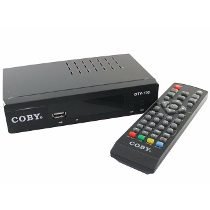
Image 2.1: The COBY DTV-700 Digital to Analog TV Converter. This image shows the compact design of the converter unit, typically black with various ports and indicators.
3. Varnostne informacije
Za zagotovitev varnega delovanja in preprečevanje poškodb upoštevajte naslednje varnostne ukrepe:
- Naprave ne izpostavljajte dežju, vlagi ali ekstremnim temperaturam.
- Ne odpirajte casing; vsa servisna dela prepustite usposobljenemu osebju.
- Poskrbite za ustrezno prezračevanje okoli enote, da preprečite pregrevanje.
- Uporabljajte samo priloženi napajalnik.
- Napravo hranite stran od neposredne sončne svetlobe, virov toplote in močnih magnetnih polj.
- Baterije in elektronske odpadke odvrzite odgovorno v skladu z lokalnimi predpisi.
4. Izdelek je končanview
4.1 Sprednja plošča
The front panel typically includes:
- Indikator moči: Sveti, ko je enota vklopljena.
- Gumbi za kanal gor/dol: For changing channels.
- Gumb menija: Dostop do glavnega menija.
- Vrata USB: For connecting USB storage devices for media playback and recording.
4.2 Zadnja plošča
Zadnja plošča ima vse potrebne priključne priključke:
- MRAVLJE V: Connects to your antenna for receiving digital signals.
- HDMI IZHOD: Connects to an HDMI-compatible TV for high-definition output.
- AV OUT (RCA): Connects to older analog TVs using composite video (yellow) and stereo audio (red/white) cables.
- KOAKSIALNI IZHOD: Digital audio output (if available).
- DC IN: Connects to the provided AC/DC power adapter.
5. Nastavitev
5.1 Priključitev pretvornika
- Priključitev antene: Connect your digital antenna to the MRAVLJICA V port on the rear of the DTV-700.
- Povežite se s televizorjem:
- For Analog TVs: Use the supplied AV cable. Connect the yellow plug to the video input of your TV, and the red/white plugs to the corresponding audio inputs. Connect the other end to the AV IZHOD ports on the DTV-700.
- For Digital/HDTVs: Use an HDMI cable (not included). Connect one end to the HDMI IZHOD port on the DTV-700 and the other end to an available HDMI input on your TV.
- Priključite napajanje: Plug the AC/DC power adapter into the DC IN port on the DTV-700, then plug the adapter into a wall outlet.
5.2 Začetna nastavitev in iskanje kanalov
- Turn on your TV and select the correct input source (e.g., AV1, HDMI1) that corresponds to your connection.
- Power on the DTV-700 using the remote control or the power button on the front panel.
- The first time you power on, an initial setup wizard may appear. Follow the on-screen prompts to select your language and country.
- Initiate an automatic channel scan. This will search for all available digital channels in your area. This process may take several minutes. Do not interrupt the scan.
- Once the scan is complete, the converter will tune to the first available channel.
6. Navodila za uporabo
6.1 Funkcije daljinskega upravljalnika
The remote control provides full functionality for your DTV-700. Ensure two AAA batteries are inserted correctly (batteries not included).
- MOČ: Vklopi ali izklopi enoto.
- CH +/-: Preklaplja kanale navzgor ali navzdol.
- GLASNOST +/-: Prilagodi glasnost.
- MENI: Dostop do glavnega menija.
- IZHOD: Zapusti trenutni meni ali funkcijo.
- INFO: Prikaže informacije o trenutnem kanalu.
- OK / Navigation Buttons: Confirms selections and navigates menus.
- REC: Starts recording the current program.
- PREDVAJANJE/PAVZA, USTAVITEV, PREVIJANJE NAPREJ, PREVIJANJE NAZAJ: Nadzor predvajanja medijev.
- USB: Preklopi v način predvajanja medijev USB.
6.2 Navigacija po kanalih
Uporabite CH +/- buttons on the remote or front panel to browse channels. You can also directly enter a channel number using the numeric keypad on the remote.
6.3 Glavni meni
Pritisnite MENI button to access settings for Program, Picture, Sound, Time, Option, and System. Use the navigation buttons to select options and OK za potrditev.
7. Predvajanje medijev
The DTV-700 supports media playback from a USB storage device (e.g., USB flash drive, external hard drive). Insert your USB device into the USB port on the front panel.
7.1 Podprti formati
- Glasba: MP3, WMA
- fotografija: JPG, BMP, PNG
- Video: MKV, AVI, DIVX, XVID, MOV, VOB, FLV, DAT, MPEG, MP4, TS
7.2 Predvajanje medijev
- V vrata USB vstavite pomnilniško napravo USB.
- Pritisnite USB button on the remote control or navigate to the 'Multimedia' section in the main menu.
- Select the desired media type (Music, Photo, Video) and browse your files.
- Z navigacijskimi gumbi izberite file in pritisnite OK igrati.
8. Funkcije snemanja
The DTV-700 allows you to record live TV programs to a connected USB storage device.
8.1 Takojšnje snemanje
Med gledanjem programa pritisnite REC button on the remote control to start recording. Press STOP da končate snemanje.
8.2 Scheduled Recording (PVR)
Access the PVR (Personal Video Recorder) or Schedule menu via the main menu to set up timed recordings. You will need to specify the channel, start time, end time, and date for the recording.
9. Odpravljanje težav
| Težava | Možen vzrok/rešitev |
|---|---|
| Ni slike ali zvoka |
|
| Poor picture quality / No channels |
|
| Daljinski upravljalnik ne deluje |
|
| USB medij se ne predvaja |
|
10. Specifikacije
- Model: DTV-700
- Znamka: Coby
- Vnos: Digital TV Antenna (ATSC/DVB-T/T2 compatible, depending on region)
- Izhod: HDMI, AV (RCA Composite Video/Audio)
- Vrata USB: Yes (for media playback and PVR)
- Podprti medijski formati:
- Music: MP3, WMA
- Fotografije: JPG, BMP, PNG
- Video: MKV, AVI, DIVX, XVID, MOV, VOB, FLV, DAT, MPEG, MP4, TS
- moč: AC/DC Adapter (Input: 100-240V ~ 50/60Hz, Output: typically 5V-12V DC)
- Dimenzije: Approximately 20 x 15.6 x 6.2 cm (Package dimensions)
- Teža: Approximately 490 g (Package weight)
- Baterije za daljinski upravljalnik: 2 x AAA (niso vključeni)
11. Vzdrževanje
To ensure the longevity and optimal performance of your DTV-700 converter:
- Čiščenje: Za čiščenje zunanjosti enote uporabite mehko, suho krpo. Ne uporabljajte tekočih čistil ali abrazivnih kemikalij.
- Prezračevanje: Prepričajte se, da prezračevalne odprtine niso blokirane, da preprečite pregrevanje.
- Shranjevanje: Če enoto shranjujete dalj časa, jo izključite iz električnega omrežja in jo shranite na hladnem in suhem mestu.
12. Garancija in podpora
For warranty information and technical support, please refer to the warranty card included with your product or visit the official Coby webspletnega mesta. Račun shranite kot dokazilo o nakupu za morebitne garancijske zahtevke.
Coby is committed to providing quality products and customer satisfaction. If you encounter any issues not covered in this manual, please contact Coby customer service for assistance.