
Konec izdelkaview
The Airmaster CF71760 is a robust 24-inch industrial circulating fan designed for floor mounting. It features a powerful motor and durable construction suitable for various industrial and commercial applications. This fan provides efficient air circulation with three speed settings.
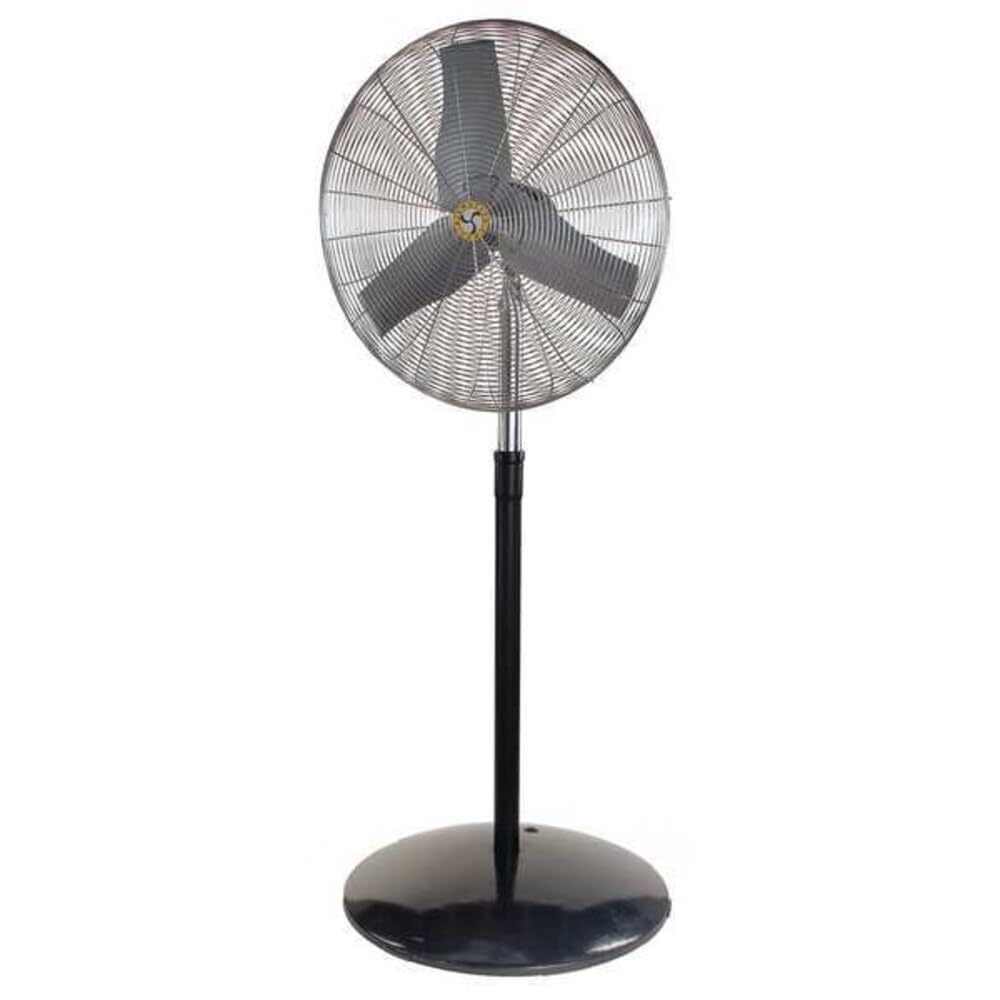
Image: The Airmaster CF71760 24-inch Industrial Floor Fan, shown assembled with its floor stand. This fan is designed for powerful air circulation in industrial settings.
Pomembna varnostna navodila
Read all instructions carefully before using this fan. Failure to follow these instructions may result in electric shock, fire, or serious personal injury.
- Pred čiščenjem, servisiranjem ali premikanjem ventilator vedno izključite iz električne vtičnice.
- Ne uporabljajte ventilatorjev s poškodovanim kablom ali vtičem. Zavrzite ventilator ali ga vrnite pooblaščenemu serviserju na pregled in/ali popravilo.
- Kabla ne napeljite pod preprogo. Kabla ne prekrivajte s preprogami, tekači ali podobnimi prevlekami. Kabel napeljite stran od prometnih površin in tako, da se obnj ne boste spotaknili.
- Ne vstavljajte prstov ali tujih predmetov v prezračevalne ali izpušne odprtine, saj lahko to povzroči električni udar ali požar ali poškoduje ventilator.
- Ne uporabljajte na prostem. Ta ventilator je namenjen samo za uporabo v zaprtih prostorih.
- To disconnect fan, turn controls to OFF, then remove plug from outlet.
- Ta ventilator uporabljajte samo tako, kot je opisano v tem priročniku. Vsaka druga uporaba, ki je ne priporoča proizvajalec, lahko povzroči požar, električni udar ali poškodbe oseb.
- Avoid using extension cords if possible. If an extension cord must be used, use the shortest possible cord and ensure it is rated for the fan's power requirements.
Vsebina paketa
Pred sestavljanjem preverite, ali so vse komponente prisotne.
- Sklop glave ventilatorja
- Pedestal Stand (Base and Pole)
- Pritrdilni material (vijaki, podložke, matice)
- Uporabniški priročnik
Postavitev in montaža
Follow these steps to assemble your Airmaster CF71760 fan.
- Razpakirajte komponente: Previdno odstranite vse dele iz embalaže. Embalažo shranite za kasnejše shranjevanje ali transport.
- Assemble Pedestal Base: Attach the pole to the base of the pedestal stand using the provided hardware. Ensure all connections are secure.
- Mount Fan Head: Secure the fan head assembly to the top of the pedestal pole. Align the mounting holes and fasten with the appropriate bolts, washers, and nuts. Do not overtighten.
- Položaj ventilatorja: Place the assembled fan on a stable, level surface. Ensure there is adequate clearance around the fan for proper airflow and to prevent obstruction.
Navodila za uporabo
This section details how to operate your Airmaster CF71760 fan.
- Napajalni priključek: Plug the fan's power cord into a standard 115V AC electrical outlet. Ensure the outlet is properly grounded.
- Izbira hitrosti: The fan features a button control for speed adjustment. Press the button to cycle through the available speed settings (Low, Medium, High) and Off.
- Prilagoditev smeri pretoka zraka: The fan head can be tilted vertically to direct airflow. Loosen the adjustment knob on the side of the fan head, tilt to the desired angle, and then tighten the knob securely.
- Nihanje: The fan is equipped with an oscillation feature for wider air distribution. Locate the oscillation control (typically a knob or switch on the motor housing) and activate it as desired.
- Izklop: To turn off the fan, cycle through the speed settings until the fan stops, or press the OFF button if available. Unplug the fan from the outlet when not in use for extended periods.
Vzdrževanje
Redno vzdrževanje zagotavlja optimalno delovanje in podaljšuje življenjsko dobo vašega ventilatorja.
- Čiščenje: Pred čiščenjem vedno izključite ventilator iz električnega omrežja. Uporabite mehko,amp cloth to wipe the exterior surfaces. Do not use abrasive cleaners or solvents. For blade cleaning, carefully remove the front grille (if designed for removal) and wipe the blades. Ensure all parts are dry before reassembling and operating.
- Mazanje motorja: Motor ventilatorja je trajno namazan in ne potrebuje dodatnega olja.
- Shranjevanje: When not in use, store the fan in a cool, dry place. It is recommended to cover the fan to protect it from dust.
Odpravljanje težav
| Težava | Možen vzrok | rešitev |
|---|---|---|
| Ventilator se ne vklopi. | No power to the unit; Fan not plugged in; Circuit breaker tripped. | Ensure fan is securely plugged into a live outlet. Check circuit breaker/fuse. |
| Zmanjšan pretok zraka. | Fan blades or grille are dirty; Obstruction near fan. | Clean fan blades and grilles. Remove any obstructions. |
| Ventilator oddaja nenavaden hrup. | Loose parts; Fan not on a level surface; Debris in fan. | Check for loose screws or components. Place fan on a stable, level surface. Unplug and inspect for debris. |
| Fan oscillates intermittently or not at all. | Oscillation mechanism obstructed or damaged. | Ensure no obstructions are preventing oscillation. If issue persists, contact customer support. |
Specifikacije
- Model: CF71760
- Znamka: Zračni mojster
- Tip ventilatorja: Industrial Circulating Floor Fan
- Premer rezila: 24 palcev
- Število hitrosti: 3
- vir energije: Električni na kabel
- voltage: 115 volta
- Pogostost: 60 Hz
- Wattage: 260 W
- Material rezila: Plastika
- Vrsta pritrditve: Floor Mount, Pedestal
- Posebne lastnosti: Nihajna
- Assembled Dimensions (Height x Width): 88 1/2 inches x 27 inches
- Teža artikla: 81 funta
- Certifikati: cULus
Garancija in podpora
Airmaster products are manufactured to high-quality standards. For warranty information or technical support, please contact Airmaster customer service.
Airmaster Customer Service: Please refer to the official Airmaster webZa trenutne kontaktne podatke glejte spletno mesto ali dokumentacijo o nakupu.
Obiščete lahko tudi Airmaster Store on Amazon za več informacij o izdelku.